1. ആമുഖം
Thank you for choosing the Daakro ZK-302T Bluetooth 5.3 Amplifier Board. This compact 2.0 channel audio amplifier is designed for DIY wireless speaker projects, offering 30W+30W output, precise treble and bass control, and versatile input options including Bluetooth 5.3, USB, and AUX. This manual will guide you through the installation, operation, and maintenance of your amplifier board to ensure optimal performance and longevity.
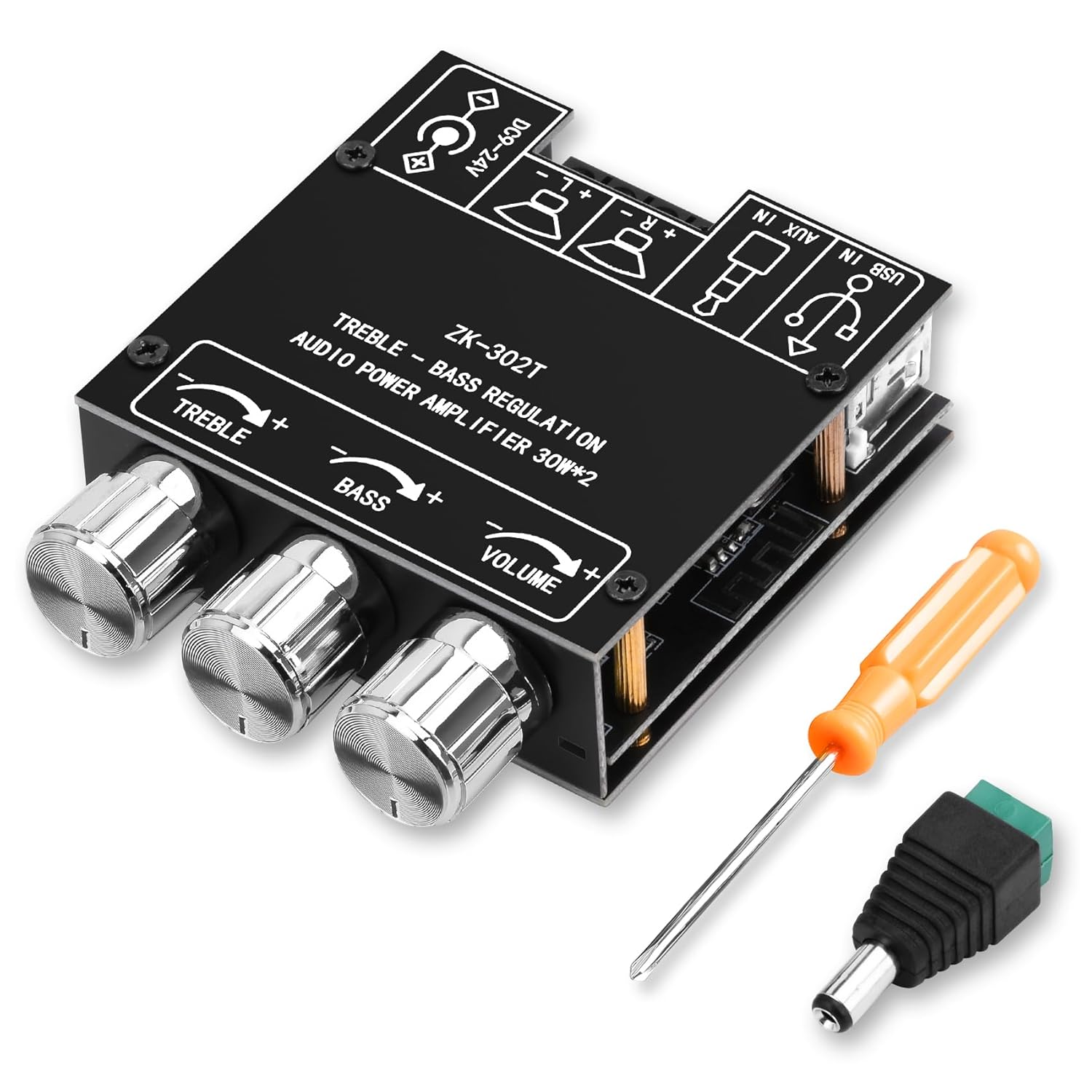
ചിത്രം 1: ഡാക്രോ ZK-302T ബ്ലൂടൂത്ത് 5.3 Amplifier Board. This image shows the compact amplifier board with its three control knobs for treble, bass, and volume, along with the various input and output terminals.
2 സുരക്ഷാ വിവരങ്ങൾ
ഈ ഉൽപ്പന്നം ഉപയോഗിക്കുന്നതിന് മുമ്പ് എല്ലാ സുരക്ഷാ നിർദ്ദേശങ്ങളും വായിച്ച് മനസ്സിലാക്കുക. ഈ നിർദ്ദേശങ്ങൾ പാലിക്കുന്നതിൽ പരാജയപ്പെടുന്നത് വൈദ്യുതാഘാതം, തീപിടുത്തം അല്ലെങ്കിൽ മറ്റ് അപകടങ്ങൾക്ക് കാരണമായേക്കാം.
- വൈദ്യുതി വിതരണം വോളിയം ഉറപ്പാക്കുകtage is within the specified range of DC 9-24V.
- തുറന്നുകാട്ടരുത് amplifier board to moisture, water, or extreme temperatures.
- ഔട്ട്പുട്ട് ടെർമിനലുകളിൽ ഷോർട്ട് സർക്യൂട്ട് ഒഴിവാക്കുക.
- ഏതെങ്കിലും കണക്ഷനുകൾ നടത്തുന്നതിനോ വിച്ഛേദിക്കുന്നതിനോ മുമ്പ് വൈദ്യുതി വിച്ഛേദിക്കുക.
- കുട്ടികൾക്ക് ലഭ്യമാകാതെ സൂക്ഷിക്കുക.
- Do not attempt to disassemble or modify the board. Refer all servicing to qualified personnel.
- അമിതമായി ചൂടാക്കുന്നത് തടയാൻ ശരിയായ വായുസഞ്ചാരം ഉറപ്പാക്കുക.
- ഈ ഉൽപ്പന്നം ഇൻഡോർ ഉപയോഗത്തിനായി മാത്രം രൂപകൽപ്പന ചെയ്തിട്ടുള്ളതാണ്.
3. സജ്ജീകരണവും കണക്ഷനുകളും
Follow these steps to correctly set up your Daakro ZK-302T ampലൈഫ് ബോർഡ്.
3.1 പാക്കേജ് ഉള്ളടക്കം
നിങ്ങളുടെ പാക്കേജിൽ എല്ലാ ഇനങ്ങളും ഉണ്ടെന്ന് ഉറപ്പാക്കുക:
- ഡാക്രോ ZK-302T ബ്ലൂടൂത്ത് Ampലൈഫ് ബോർഡ്
- Power adapter cable (if included)
- സ്ക്രൂഡ്രൈവർ
- Mounting hardware (standoffs, screws)
- Heat sink (if not pre-installed)

ചിത്രം 2: What's in the Box. This image displays the amplifier board along with included accessories such as a screwdriver, power adapter cable, and mounting hardware.
3.2 ഘടകം തിരിച്ചറിയൽ
Familiarize yourself with the various ports and controls on the ampലൈഫ് ബോർഡ്.

ചിത്രം 3: Component Identification. This diagram highlights key components including the power input, USB input, AUX input, left and right channel outputs, and the treble, bass, and volume control knobs.
- Power Input (DC 9-24V): Connect your DC power supply here.
- യുഎസ്ബി ഇൻപുട്ട്: For audio input from a USB source.
- AUX Input (3.5mm Jack): For wired audio input from devices like phones or PCs.
- Left Channel Output (L+ L-): Connect to your left speaker.
- Right Channel Output (R+ R-): Connect to your right speaker.
- ട്രെബിൾ നിയന്ത്രണം: Rotate to adjust high-frequency audio.
- ബാസ് നിയന്ത്രണം: Rotate to adjust low-frequency audio.
- വോളിയം നിയന്ത്രണം: Rotate to adjust overall audio output level.
3.3 സ്പീക്കറുകൾ ബന്ധിപ്പിക്കുന്നു
- ഉറപ്പാക്കുക amplifier board is powered off.
- Connect your speakers (4-8Ω, 20-200W) to the corresponding Left (L+ L-) and Right (R+ R-) channel output terminals. Ensure correct polarity (+ to + and - to -).
- Tighten the terminal screws to secure the speaker wires.
3.4 പവർ കണക്ഷൻ
- Connect a DC power supply (9-24V) to the power input terminal.
- Ensure the power supply provides sufficient current for your speakers. Refer to the "Power Output Comparison Table" in Section 4.3 for optimal power matching.
4. പ്രവർത്തന നിർദ്ദേശങ്ങൾ
4.1 Powering On and Input Selection
- Once speakers and power are connected, turn on the power supply. The amplifier board will automatically enter Bluetooth pairing mode.
- The board supports three audio input modes: Bluetooth, USB, and AUX. The board will automatically switch to the last active input or prioritize a newly connected input.

ചിത്രം 4: Multiple Audio Input Modes. This image illustrates the three input options: Bluetooth, 3.5mm AUX, and USB, and shows compatible devices like mobile phones, tablets, and computers.
4.2 ബ്ലൂടൂത്ത് ജോടിയാക്കൽ
- ഉറപ്പാക്കുക amplifier board is powered on and in Bluetooth mode.
- On your mobile device (phone, tablet, etc.), enable Bluetooth and search for available devices.
- Select "ZK-302T" from the list of devices to pair. No password is required.
- Once paired, you will hear a confirmation tone, and the Bluetooth indicator light (if present) will stabilize.
- The Bluetooth connection range is approximately 16.4 feet (5 meters).

ചിത്രം 5: Bluetooth Connection. This image shows a smartphone connected via Bluetooth to the ZK-302T amplifier board, indicating a wireless range of up to 16.4 feet (5 meters).
4.3 ഓഡിയോ ക്രമീകരിക്കൽ
- വോളിയം നിയന്ത്രണം: Rotate the VOLUME knob to increase or decrease the overall sound level.
- ട്രെബിൾ നിയന്ത്രണം: Rotate the TREBLE knob to adjust the high-frequency response. Turn clockwise for more treble, counter-clockwise for less.
- ബാസ് നിയന്ത്രണം: Rotate the BASS knob to adjust the low-frequency response. Turn clockwise for more bass, counter-clockwise for less.
4.4 Power Output Considerations
Optimal audio output requires a suitable power supply and speaker impedance. The table below illustrates the approximate output power based on input voltage and speaker impedance.

ചിത്രം 6: Power Output Comparison Table. This table details the R&L channel output power at 1KHz for various input voltages (12V, 15V, 19V, 24V) and speaker impedances (4Ω, 8Ω).
Important Note: There must be enough voltage and current input to achieve the rated power output. Higher voltage and current generally result in higher power. For the same conditions, a smaller speaker impedance will yield greater power.
5. പരിപാലനം
- വൃത്തിയാക്കൽ: വൃത്തിയാക്കാൻ മൃദുവായതും ഉണങ്ങിയതുമായ തുണി ഉപയോഗിക്കുക amplifier board. Do not use liquid cleaners or solvents.
- സംഭരണം: നേരിട്ടുള്ള സൂര്യപ്രകാശത്തിൽ നിന്നും കടുത്ത താപനിലയിൽ നിന്നും മാറി തണുത്തതും വരണ്ടതുമായ സ്ഥലത്ത് ഉപകരണം സൂക്ഷിക്കുക.
- വെൻ്റിലേഷൻ: Ensure the board has adequate airflow to prevent overheating, especially during prolonged use at high volumes.
- കണക്ഷനുകൾ: Periodically check all connections for tightness and ensure no wires are frayed or exposed.
6. പ്രശ്നപരിഹാരം
If you encounter issues with your Daakro ZK-302T amplifier board, refer to the following common problems and solutions.
| പ്രശ്നം | സാധ്യമായ കാരണം | പരിഹാരം |
|---|---|---|
| ശബ്ദ ഔട്ട്പുട്ട് ഇല്ല |
|
|
| വികലമായ ശബ്ദം |
|
|
| ബ്ലൂടൂത്ത് കണക്ഷൻ പ്രശ്നങ്ങൾ |
|
|
| അമിത ചൂടാക്കൽ |
|
|
7 സ്പെസിഫിക്കേഷനുകൾ
| ഫീച്ചർ | വിശദാംശങ്ങൾ |
|---|---|
| മോഡൽ നമ്പർ | ZK-302T |
| ഔട്ട്പുട്ട് പവർ | 30W + 30W (2.0 Channel) |
| Ampലൈഫയർ ചിപ്പ് | Dual TPA3110D2 HiFi Chip |
| ബ്ലൂടൂത്ത് പതിപ്പ് | 5.3 |
| ഇൻപുട്ട് വോളിയംtage | ഡിസി ക്സനുമ്ക്സ-ക്സനുമ്ക്സവ് |
| ഓഡിയോ ഇൻപുട്ടുകൾ | Bluetooth, USB, AUX (3.5mm) |
| സ്പീക്കർ ഇംപെഡൻസ് | 4-8Ω |
| Recommended Speaker Power | 20-200W |
| ഉൽപ്പന്ന അളവുകൾ (L x W x H) | 4.33 x 2.76 x 1.97 ഇഞ്ച് |
| ഭാരം | 3.53 ഔൺസ് |
| സംരക്ഷണ സംവിധാനങ്ങൾ | ഓവർ-വോളിയംtagഇ, അണ്ടർ-വോളിയംtage, Over-temperature, Short-circuit, Reverse connection |
8. വാറൻ്റിയും പിന്തുണയും
The Daakro ZK-302T Bluetooth 5.3 Amplifier Board comes with a 30 ദിവസത്തെ റിട്ടേൺ/റീപ്ലേസ്മെന്റ് പോളിസി from the date of purchase. This warranty covers manufacturing defects and issues arising from normal use. It does not cover damage caused by misuse, accidents, unauthorized modifications, or improper installation.
For technical support, warranty claims, or any questions regarding your product, please contact Daakro customer service through the platform where you purchased the product. Please have your purchase details and model number (ZK-302T) ready.


