1. ആമുഖം
Thank you for choosing the ROCAM Digital Alarm Clock. This manual provides detailed instructions to help you set up and operate your new alarm clock. Designed for clarity and ease of use, this clock features a large display, dual alarms, adjustable brightness, and convenient charging ports.

Image 1.1: The ROCAM Digital Alarm Clock with its power adapter, showcasing its sleek design and large digital display.
2. ഉൽപ്പന്ന സവിശേഷതകൾ
- വലിയ, വ്യക്തമായ ഡിസ്പ്ലേ: 7.5-inch display with bold, easy-to-read numbers, visible from any angle.
- ഉപയോക്തൃ-സൗഹൃദ ഡിസൈൻ: Simple controls and large buttons for effortless setup and operation.
- ഇരട്ട അലാറങ്ങൾ: Set two independent alarms with options for everyday, weekday, or weekend modes.
- ക്രമീകരിക്കാവുന്ന തെളിച്ചം: Display brightness can be adjusted from 0% to 100% to suit your preference.
- സോഫ്റ്റ് നൈറ്റ് ലൈറ്റ്: Integrated night light with three adjustable levels to create a comfortable ambiance.
- ബാറ്ററി ബാക്കപ്പ്: വൈദ്യുതി വിതരണ സമയത്ത് സമയവും അലാറം ക്രമീകരണങ്ങളും നിലനിർത്തുന്നു.tages (3 AAA ബാറ്ററികൾ ആവശ്യമാണ്, ഉൾപ്പെടുത്തിയിട്ടില്ല).
- USB & Type-C Charging Ports: ക്ലോക്കിൽ നിന്ന് നേരിട്ട് നിങ്ങളുടെ ഉപകരണങ്ങൾ സൗകര്യപ്രദമായി ചാർജ് ചെയ്യുക.
- ഉച്ചത്തിലുള്ള അലാറം: Five adjustable volume levels, from soft to 110 dB, suitable for all sleepers.

Image 2.1: The alarm clock's 7.5-inch display, highlighting its large and clear digital numbers for easy readability.
3. പാക്കേജ് ഉള്ളടക്കം
- ROCAM Digital Alarm Clock Unit
- പവർ അഡാപ്റ്റർ
- ഉപയോക്തൃ മാനുവൽ
4. നിയന്ത്രണങ്ങളും പ്രദർശനവും
Familiarize yourself with the buttons and display elements of your alarm clock:

Image 4.1: A detailed diagram illustrating the location and function of each button on the top panel of the alarm clock.
മുകളിലെ പാനൽ ബട്ടണുകൾ:
- സമയം: നിലവിലെ സമയം സജ്ജീകരിക്കാൻ അമർത്തുക.
- DIM: ഡിസ്പ്ലേ തെളിച്ചം ക്രമീകരിക്കുക.
- AL1 / AL2: അലാറം 1 അല്ലെങ്കിൽ അലാറം 2 സജ്ജമാക്കാൻ അമർത്തുക.
- + / -: Adjust values (time, volume, brightness).
- വോൾ: അലാറം വോളിയം ക്രമീകരിക്കുക.
- 12/24H DST: Switch between 12-hour and 24-hour format; activate/deactivate Daylight Saving Time.
- SNOOZE OK / 💡: Snooze active alarm; confirm settings; long press to activate/deactivate night light.
ഡിസ്പ്ലേ സൂചകങ്ങൾ:
- AM/PM: 12-മണിക്കൂർ സമയ ഫോർമാറ്റ് സൂചിപ്പിക്കുന്നു.
- DST: പകൽ വെളിച്ച സംരക്ഷണ സമയം സജീവമാണെന്ന് സൂചിപ്പിക്കുന്നു.
- MON/TUE/WED/THU/FRI/SAT/SUN: ആഴ്ചയിലെ നിലവിലെ ദിവസം.
- 🔔1 / 🔔2: Indicates Alarm 1 or Alarm 2 is active.
5. സജ്ജീകരണം
5.1 പവർ കണക്ഷൻ
- നൽകിയിരിക്കുന്ന പവർ അഡാപ്റ്റർ അലാറം ക്ലോക്കിന്റെ പിൻഭാഗത്തുള്ള DC IN പോർട്ടുമായി ബന്ധിപ്പിക്കുക.
- Plug the power adapter into a standard electrical outlet. The display will light up.
5.2 ബാറ്ററി ബാക്കപ്പ് ഇൻസ്റ്റാളേഷൻ
The battery backup feature ensures your time and alarm settings are retained during a power outage. It does not power the display.
- ക്ലോക്കിന്റെ അടിയിൽ ബാറ്ററി കമ്പാർട്ട്മെന്റ് കണ്ടെത്തുക.
- ബാറ്ററി കമ്പാർട്ട്മെൻ്റ് കവർ തുറക്കുക.
- Insert 3 AAA batteries (not included), ensuring correct polarity (+/-).
- ബാറ്ററി കമ്പാർട്ട്മെൻ്റ് കവർ സുരക്ഷിതമായി അടയ്ക്കുക.

Image 5.1: The back of the alarm clock, illustrating the USB and Type-C charging ports, and the battery backup compartment for AAA batteries.
5.3 നിലവിലെ സമയം ക്രമീകരിക്കുന്നു
- അമർത്തിപ്പിടിക്കുക സമയം മണിക്കൂർ അക്കങ്ങൾ മിന്നുന്നത് വരെ ബട്ടൺ അമർത്തുക.
- ഉപയോഗിക്കുക + or - മണിക്കൂർ ക്രമീകരിക്കാൻ ബട്ടണുകൾ. അമർത്തുക സമയം സ്ഥിരീകരിക്കാൻ.
- മിനിറ്റ് അക്കങ്ങൾ മിന്നിമറയും. ഉപയോഗിക്കുക + or - മിനിറ്റ് ക്രമീകരിക്കാൻ ബട്ടണുകൾ. അമർത്തുക സമയം സ്ഥിരീകരിക്കാൻ.
- ആഴ്ചയിലെ ദിവസം മിന്നിമറയും. ഉപയോഗിക്കുക + or - buttons to select the correct day. Press സമയം സമയ ക്രമീകരണ മോഡ് സ്ഥിരീകരിച്ച് പുറത്തുകടക്കാൻ.
5.4 12/24 മണിക്കൂർ ഫോർമാറ്റ്
12 മണിക്കൂർ സമയത്തിനും 24 മണിക്കൂർ സമയത്തിനും ഇടയിൽ ഡിസ്പ്ലേ മാറ്റാൻ:
- അമർത്തുക 12/24H DST button once. The display will toggle between 12-hour (with AM/PM indicator) and 24-hour format.
5.5 പകൽ വെളിച്ച ലാഭിക്കൽ സമയം (DST)
പകൽ വെളിച്ച ലാഭിക്കൽ സമയം സജീവമാക്കുന്നതിനോ നിർജ്ജീവമാക്കുന്നതിനോ:
- അമർത്തിപ്പിടിക്കുക 12/24H DST button. The time will adjust by one hour forward or backward, and the 'DST' indicator will appear or disappear on the display.
6. പ്രവർത്തന നിർദ്ദേശങ്ങൾ
6.1 അലാറങ്ങൾ സജ്ജമാക്കൽ (AL1 / AL2)
The clock features two independent alarms, AL1 and AL2.
- അമർത്തിപ്പിടിക്കുക AL1 (അല്ലെങ്കിൽ AL2) button until the alarm hour digits flash.
- ഉപയോഗിക്കുക + or - അലാറം സമയം ക്രമീകരിക്കാൻ ബട്ടണുകൾ. അമർത്തുക AL1 (അല്ലെങ്കിൽ AL2) സ്ഥിരീകരിക്കാൻ.
- മിനിറ്റ് അക്കങ്ങൾ മിന്നിമറയും. ഉപയോഗിക്കുക + or - buttons to adjust the alarm minutes. Press AL1 (അല്ലെങ്കിൽ AL2) സ്ഥിരീകരിക്കാൻ.
- The alarm volume will flash. Use the + or - buttons to set the desired alarm volume (5 levels). Press AL1 (അല്ലെങ്കിൽ AL2) സ്ഥിരീകരിക്കാൻ.
- The alarm mode will flash (e.g., MON-SUN, MON-FRI, SAT-SUN). Use the + or - buttons to select the desired alarm frequency. Press AL1 (അല്ലെങ്കിൽ AL2) to confirm and exit alarm setting mode.

Image 6.1: The alarm clock displaying two separate alarm times, illustrating the dual alarm functionality and customization options for different days.
6.2 Turning Alarms On/Off
To quickly enable or disable an alarm:
- അമർത്തുക AL1 (അല്ലെങ്കിൽ AL2) button once. The corresponding alarm icon (🔔1 or 🔔2) will appear on the display when the alarm is active, and disappear when it is off.
6.3 സ്നൂസ് ഫംഗ്ഷൻ
അലാറം മുഴങ്ങുമ്പോൾ:
- അമർത്തുക SNOOZE OK / 💡 button to activate snooze. The alarm will pause for 9 minutes and then sound again.
- To turn off the alarm completely, press any other button (e.g., AL1, AL2, TIME, DIM, +, -, VOL, 12/24H DST).
6.4 ഡിസ്പ്ലേ ബ്രൈറ്റ്നസ് അഡ്ജസ്റ്റ്മെന്റ്
To adjust the main display brightness:
- അമർത്തുക DIM button repeatedly to cycle through different brightness levels (0% to 100%).
6.5 നൈറ്റ് ലൈറ്റ് ഫംഗ്ഷൻ
To activate or adjust the integrated night light:
- ദീർഘനേരം അമർത്തുക SNOOZE OK / 💡 രാത്രി ലൈറ്റ് ഓണാക്കാനോ ഓഫാക്കാനോ ഉള്ള ബട്ടൺ.
- നൈറ്റ് ലൈറ്റ് ഓണായിരിക്കുമ്പോൾ, ഷോർട്ട് അമർത്തുക SNOOZE OK / 💡 button to cycle through its three brightness levels.
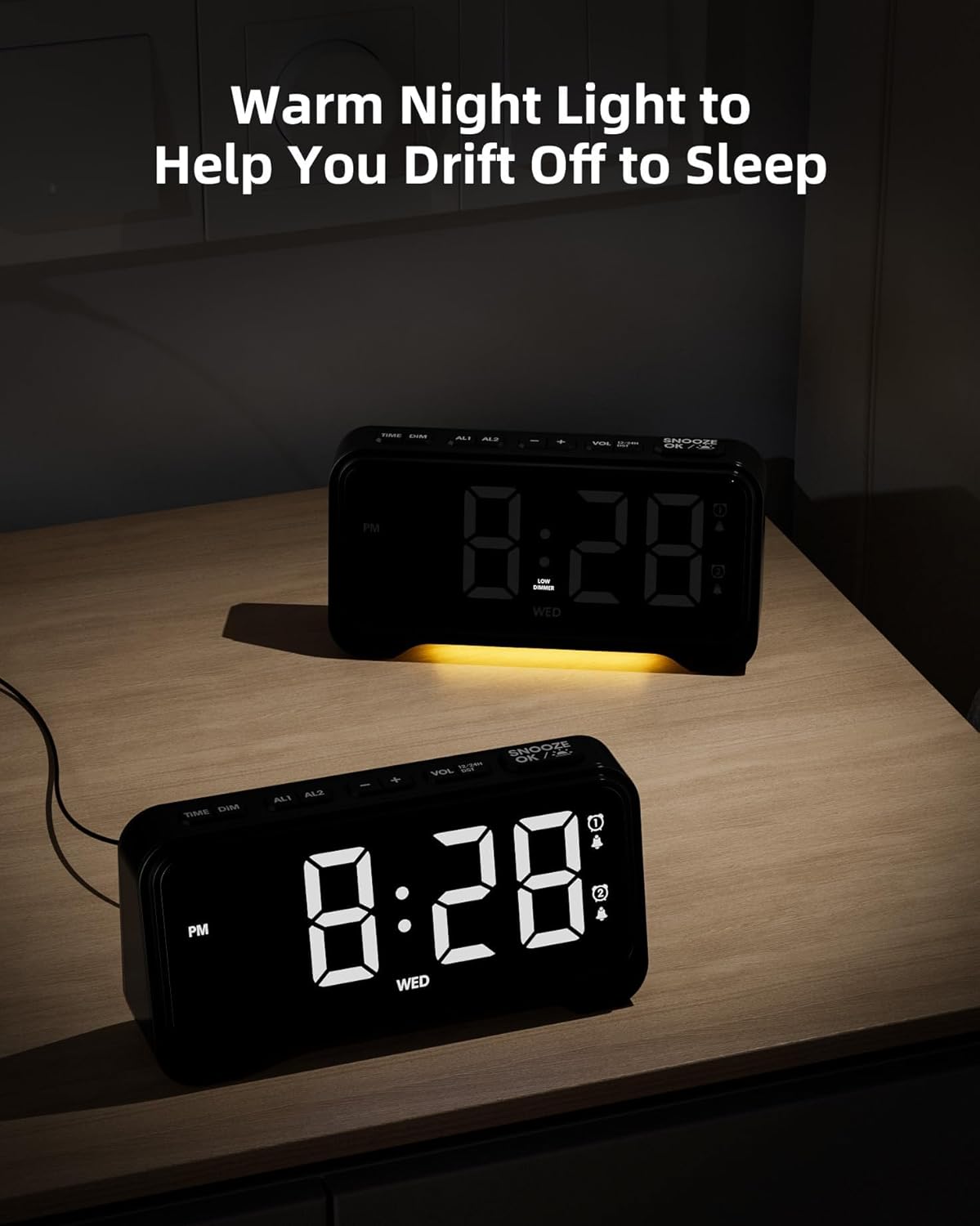
Image 6.2: The alarm clock with its warm night light feature activated, providing a soft glow suitable for a bedroom environment.
6.6 USB & Type-C Charging Ports
The clock is equipped with a USB-A port and a Type-C port on the back for charging external devices.
- Connect your device's charging cable to the appropriate port on the back of the alarm clock.
- Ensure the alarm clock is powered via its adapter for charging functionality.
7. പരിപാലനം
7.1 വൃത്തിയാക്കൽ
- വൃത്തിയാക്കുന്നതിന് മുമ്പ് പവർ ഔട്ട്ലെറ്റിൽ നിന്ന് അലാറം ക്ലോക്ക് ഊരിമാറ്റുക.
- Use a soft, dry cloth to wipe the display and exterior surfaces.
- അബ്രാസീവ് ക്ലീനറുകൾ, മെഴുക് അല്ലെങ്കിൽ ലായകങ്ങൾ എന്നിവ ഉപയോഗിക്കരുത്, കാരണം അവ ഫിനിഷിന് കേടുവരുത്തും.
7.2 ബാറ്ററി മാറ്റിസ്ഥാപിക്കൽ
- If the battery backup function is not working, replace the 3 AAA batteries in the compartment on the bottom of the clock.
- പുതിയ ബാറ്ററികൾ ഇടുമ്പോൾ ശരിയായ ധ്രുവീകരണം ഉറപ്പാക്കുക.
8. പ്രശ്നപരിഹാരം
If you encounter any issues with your ROCAM Digital Alarm Clock, please refer to the following common solutions:
| പ്രശ്നം | സാധ്യമായ കാരണം | പരിഹാരം |
|---|---|---|
| ഡിസ്പ്ലേ ശൂന്യമാണ്. | വൈദ്യുതി കണക്ഷനില്ല. | Ensure the power adapter is securely plugged into the clock and a working electrical outlet. |
| അലാറം മുഴങ്ങുന്നില്ല. | അലാറം സജീവമാക്കിയിട്ടില്ല അല്ലെങ്കിൽ തെറ്റായി സജ്ജീകരിച്ചിട്ടില്ല. | Check if the alarm icon (🔔1 or 🔔2) is displayed. Re-set the alarm time and mode (everyday, weekday, weekend). Ensure alarm volume is not set to minimum. |
| പവർ OU ന് ശേഷം സമയം/ക്രമീകരണങ്ങൾ പുനഃസജ്ജമാക്കുന്നുtage. | ബാറ്ററി ബാക്കപ്പ് ഇൻസ്റ്റാൾ ചെയ്തിട്ടില്ല അല്ലെങ്കിൽ ബാറ്ററികൾ തീർന്നിരിക്കുന്നു. | Install 3 fresh AAA batteries in the battery compartment. |
| USB/Type-C charging not working. | Clock not powered by adapter; faulty cable. | Ensure the clock is connected to main power. Try a different charging cable. |
9 സ്പെസിഫിക്കേഷനുകൾ
| ഫീച്ചർ | വിശദാംശങ്ങൾ |
|---|---|
| ബ്രാൻഡ് | ROCAM |
| മോഡൽ | ഡിജിറ്റൽ അലാറം ക്ലോക്ക് |
| നിറം | കറുപ്പ് |
| ഉൽപ്പന്ന അളവുകൾ | 16.9 x 3.81 x 8.6 സെ.മീ |
| ഇനത്തിൻ്റെ ഭാരം | 200 ഗ്രാം |
| മെറ്റീരിയൽ | പ്ലാസ്റ്റിക് |
| ഡിസ്പ്ലേ തരം | ഡിജിറ്റൽ |
| പ്രത്യേക സവിശേഷതകൾ | Adjustable Brightness, Adjustable Volume, Charging Port, Daylight Saving, Night Mode |
| ബാറ്ററി ബാക്കപ്പ് | 3 x AAA ബാറ്ററികൾ (ഉൾപ്പെടുത്തിയിട്ടില്ല) |
10. വാറൻ്റിയും പിന്തുണയും
ROCAM products are designed for reliability and performance. This product comes with a standard manufacturer's warranty. For specific warranty details, please refer to the warranty card included with your purchase or contact ROCAM customer support.
If you require further assistance or have questions not covered in this manual, please contact our customer support team:
- ഇമെയിൽ: [ഉപഭോക്തൃ പിന്തുണ ഇമെയിൽ ഇവിടെ ചേർക്കുക]
- ഫോൺ: [ഉപഭോക്തൃ പിന്തുണാ ഫോൺ നമ്പർ ഇവിടെ ചേർക്കുക]
- Webസൈറ്റ്: Visit the ROCAM Store on Amazon


