1. ആമുഖം
This manual provides comprehensive instructions for the Richmat HJH55 Wireless Remote Control, designed for use with compatible adjustable bed bases. It covers essential information regarding product setup, operation, maintenance, and troubleshooting to ensure optimal performance and user experience. This specific model is referred to as 'Remote 1'.
The Richmat HJH55 remote is compatible with various adjustable bed brands, including MLILY, MATTRESS FIRM, CLASSIC BRANDS, and INNOVA. Always verify compatibility with your specific control box device before attempting to pair.
2 സുരക്ഷാ വിവരങ്ങൾ
- Keep the remote control away from water or excessive moisture.
- റിമോട്ട് കൺട്രോൾ താഴെയിടുകയോ ശക്തമായ ആഘാതങ്ങൾക്ക് വിധേയമാക്കുകയോ ചെയ്യുന്നത് ഒഴിവാക്കുക.
- റിമോട്ട് കൺട്രോൾ സ്വയം ഡിസ്അസംബ്ലിംഗ് ചെയ്യാനോ നന്നാക്കാനോ ശ്രമിക്കരുത്. യോഗ്യതയുള്ള സേവന ഉദ്യോഗസ്ഥരെ ബന്ധപ്പെടുക.
- ശരിയായ പോളാരിറ്റിയോടെ ബാറ്ററികൾ ചേർത്തിട്ടുണ്ടെന്ന് ഉറപ്പാക്കുക.
- ചോർച്ച തടയാൻ റിമോട്ട് കൺട്രോൾ ദീർഘനേരം ഉപയോഗിക്കുന്നില്ലെങ്കിൽ ബാറ്ററികൾ നീക്കം ചെയ്യുക.
3. സജ്ജീകരണം
3.1 ബാറ്ററി ഇൻസ്റ്റാളേഷൻ
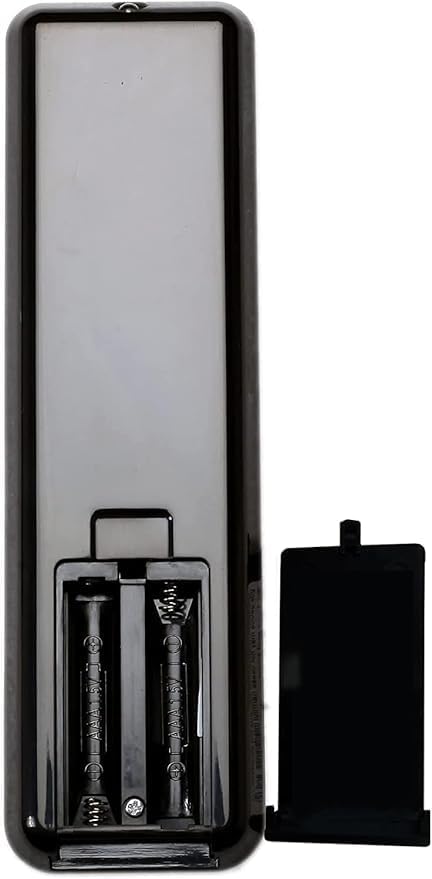
The Richmat HJH55 remote control requires two (2) AAA batteries (not included). To install or replace batteries:
- റിമോട്ട് കൺട്രോളിൻ്റെ പിൻഭാഗത്ത് ബാറ്ററി കമ്പാർട്ട്മെൻ്റ് കവർ കണ്ടെത്തുക.
- കമ്പാർട്ട്മെന്റ് തുറക്കാൻ കവർ താഴേക്ക് സ്ലൈഡ് ചെയ്യുക.
- കമ്പാർട്ടുമെന്റിനുള്ളിലെ അടയാളപ്പെടുത്തലുകളുമായി പോസിറ്റീവ് (+), നെഗറ്റീവ് (-) ടെർമിനലുകൾ ശരിയായി വിന്യസിക്കുന്നുണ്ടെന്ന് ഉറപ്പാക്കാൻ രണ്ട് AAA ബാറ്ററികൾ ഇടുക.
- കവർ സുരക്ഷിതമായി ക്ലിക്കുചെയ്യുന്നത് വരെ അതിൻ്റെ സ്ഥാനത്തേക്ക് തിരികെ സ്ലൈഡ് ചെയ്യുക.
3.2 Remote and Control Box Compatibility
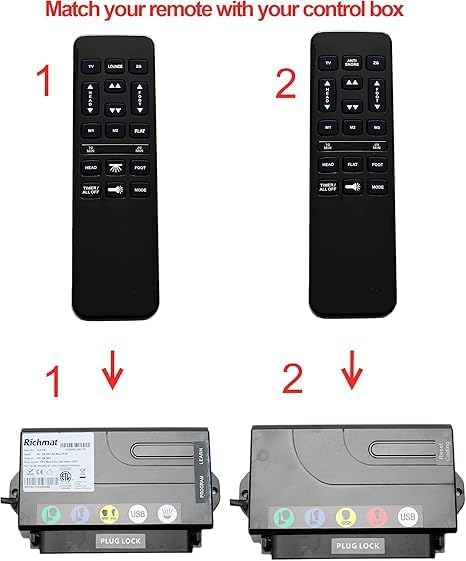
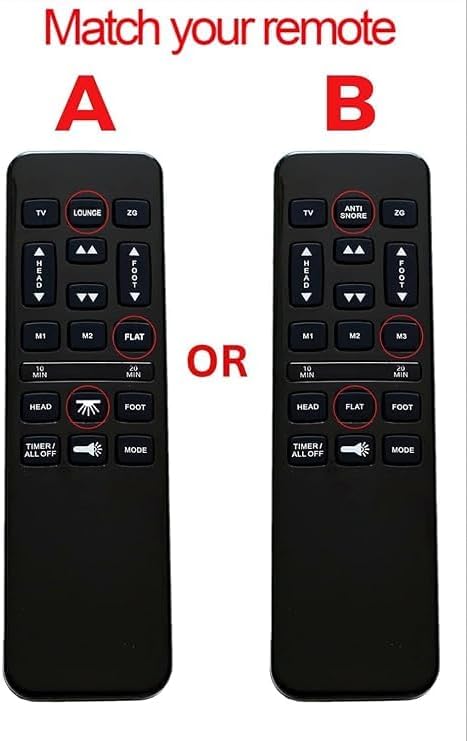
It is crucial to ensure that your remote control is compatible with your bed base's control box. Different Richmat remotes (e.g., Remote 1, Remote 2) are designed to work with specific control box models. Please check your existing remote and control box for matching model numbers or visual identification.
3.3 Pairing Instructions
The remote control does not come pre-paired with your bed base and requires manual pairing. Follow these steps to pair your Richmat HJH55 remote with its control box:
- വൈദ്യുതി ഉറപ്പാക്കുക: Make sure your bed base's power adapter is securely plugged into a wall outlet and the control box.
- Locate Cable Lock: Identify the cable lock mechanism on your power adapter's cable.
- കേബിളുകൾ ബന്ധിപ്പിക്കുക: Connect the power adapter cable to the control box cable, ensuring a secure connection.
- Press Learn Button: On the side of your bed base's control box, locate and press the small 'Learn' or 'Program' button.
- Simultaneous Remote Press: While holding the 'Learn' button on the control box, simultaneously press and hold the തല ഉയർത്തുക (മുകളിലേക്കുള്ള അമ്പടയാളം) കൂടാതെ കാൽ അപ്പ് (up arrow) buttons on your Richmat HJH55 remote control.
- സ്ഥിരീകരണം: Continue holding the buttons until you hear a beep from the control box. This indicates successful pairing.
4. പ്രവർത്തന നിർദ്ദേശങ്ങൾ
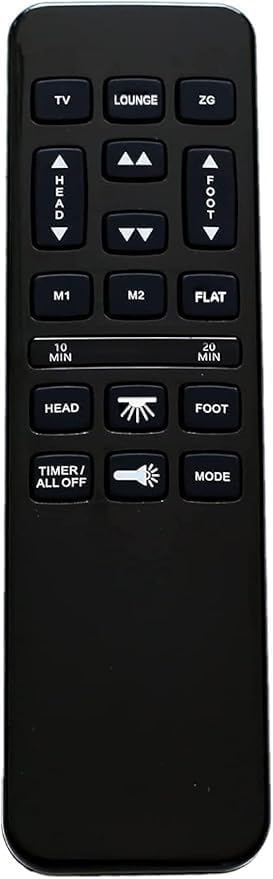
Familiarize yourself with the buttons on your Richmat HJH55 remote control to operate your adjustable bed base effectively.
4.1 ബട്ടൺ പ്രവർത്തനങ്ങൾ
- ടിവി: Adjusts the bed to a preset TV viewസ്ഥാനം.
- LOUNGE: Adjusts the bed to a preset lounge position.
- ZG (Zero Gravity): Adjusts the bed to a preset Zero Gravity position, which elevates the head and feet to promote circulation and relieve pressure.
- HEAD (Up/Down Arrows): കിടക്കയുടെ തലഭാഗം മുകളിലേക്കോ താഴേക്കോ ക്രമീകരിക്കുന്നു.
- FOOT (Up/Down Arrows): കിടക്കയുടെ പാദഭാഗം മുകളിലേക്കോ താഴേക്കോ ക്രമീകരിക്കുന്നു.
- M1 / M2: Programmable memory buttons to save and recall your favorite bed positions.
- ഫ്ലാറ്റ്: കിടക്ക പൂർണ്ണമായും പരന്ന സ്ഥാനത്തേക്ക് തിരികെ കൊണ്ടുവരുന്നു.
- 10 MIN / 20 MIN: Activates a massage timer for 10 or 20 minutes.
- HEAD (Massage Icon): Activates or adjusts the head massage function.
- FOOT (Massage Icon): Activates or adjusts the foot massage function.
- TIMER / ALL OFF: Turns off all active functions (e.g., massage, light) or sets a timer for specific functions.
- Light Bulb Icon: ബെഡ്ഡിന് താഴെയുള്ള ലൈറ്റ് ഓണാക്കുകയോ ഓഫാക്കുകയോ ചെയ്യുന്നു.
- വഴികൾ: Cycles through different massage modes or light settings.
5. പരിപാലനം
- വൃത്തിയാക്കൽ: മൃദുവായതും ഉണങ്ങിയതുമായ തുണി ഉപയോഗിച്ച് റിമോട്ട് കൺട്രോൾ തുടയ്ക്കുക. ലിക്വിഡ് ക്ലീനറുകളോ ഉരച്ചിലുകളുള്ള വസ്തുക്കളോ ഉപയോഗിക്കരുത്.
- ബാറ്ററി മാറ്റിസ്ഥാപിക്കൽ: Replace batteries when the remote's response becomes sluggish or stops working. Always use new AAA batteries.
- സംഭരണം: നേരിട്ടുള്ള സൂര്യപ്രകാശത്തിൽ നിന്നും കടുത്ത താപനിലയിൽ നിന്നും മാറി, വരണ്ട സ്ഥലത്ത് റിമോട്ട് സൂക്ഷിക്കുക.
6. പ്രശ്നപരിഹാരം
- റിമോട്ട് പ്രതികരിക്കുന്നില്ല:
- ബാറ്ററികൾ ശരിയായി ഇൻസ്റ്റാൾ ചെയ്തിട്ടുണ്ടോ എന്നും ആവശ്യത്തിന് ചാർജ് ഉണ്ടോ എന്നും പരിശോധിക്കുക. ആവശ്യമെങ്കിൽ മാറ്റിസ്ഥാപിക്കുക.
- റിമോട്ടിനും ബെഡ് ബേസിന്റെ റിസീവറിനും ഇടയിൽ തടസ്സങ്ങളൊന്നുമില്ലെന്ന് ഉറപ്പാക്കുക.
- Verify that the bed base is properly plugged into a power outlet.
- റിമോട്ട് ജോടിയാക്കുന്നില്ല:
- Review the 'Pairing Instructions' in Section 3.3 carefully and repeat the steps.
- Confirm that your remote control model (Remote 1) is compatible with your bed base's control box. In some cases, newer remotes may not be compatible with older control boxes, even if they appear identical. This may require purchasing a remote and control box combo.
- Ensure the 'Learn' or 'Program' button on the control box is functioning correctly.
- ഇടയ്ക്കിടെയുള്ള പ്രവർത്തനം:
- Weak batteries can cause intermittent operation. Replace them.
- കിടക്കയുടെ അടിത്തറയുടെ ഫലപ്രദമായ പരിധിക്കുള്ളിലാണ് റിമോട്ട് എന്ന് ഉറപ്പാക്കുക.
7 സ്പെസിഫിക്കേഷനുകൾ
| മോഡൽ നമ്പർ | HJH55 |
| ബ്രാൻഡ് | Richmat (Generic Manufacturer) |
| പവർ ഉറവിടം | 2 x AAA ബാറ്ററികൾ (ഉൾപ്പെടുത്തിയിട്ടില്ല) |
| നിറം | കറുപ്പ് |
| പ്രത്യേക ഫീച്ചർ | ബാക്ക്ലിറ്റ് ബട്ടണുകൾ |
| പിന്തുണയ്ക്കുന്ന ഉപകരണങ്ങളുടെ പരമാവധി എണ്ണം | 1 (per remote) |
8. വാറൻ്റിയും പിന്തുണയും
For specific warranty information, please refer to the documentation provided with your adjustable bed base or contact the original seller or manufacturer of the Richmat HJH55 remote control. Keep your purchase receipt for warranty claims.
If you encounter issues not covered in this manual or require further assistance, please contact the customer support of your bed base manufacturer or the seller of this remote control.


