സുരക്ഷാ വിവരങ്ങൾ
Always read and understand this manual completely before operating the treadmill. Ensure all safety precautions are followed to prevent injury or damage. Keep children and pets away from the treadmill during operation. The maximum weight capacity for this treadmill is 300 lbs.
The included safety key is crucial for operation. Attach it to your clothing before starting the treadmill. If the safety key is detached, the treadmill will automatically stop, preventing falls or accidents.
പാക്കേജ് ഉള്ളടക്കം
താഴെ ലിസ്റ്റ് ചെയ്തിരിക്കുന്ന എല്ലാ ഇനങ്ങളും നിങ്ങളുടെ പാക്കേജിൽ ഉൾപ്പെടുത്തിയിട്ടുണ്ടെന്ന് ഉറപ്പാക്കുക:
- ഉപയോക്തൃ മാനുവൽ
- സുരക്ഷാ കീ
- പവർ കോർഡ്
- റിമോട്ട് കൺട്രോൾ
- ടൂൾ കിറ്റ്
- ലൂബ്രിക്കറ്റിംഗ് ഓയിൽ

Image: All components included in the HiFast Walking Pad Treadmill package.
സജ്ജീകരണ ഗൈഡ്
അൺബോക്സിംഗും പ്രാരംഭ പ്ലേസ്മെന്റും
Carefully remove the treadmill from its packaging. The treadmill arrives in a compact, flat configuration, making it easy to slide under furniture or store in small spaces. Place the treadmill on a flat, stable surface.

Image: The HiFast Walking Pad Treadmill in its compact, folded state, ready for storage or use.
Raising the Handlebar
To raise the handlebar, locate the adjustment pins on each side of the vertical supports. Pull the pins outwards, then lift the handlebar to your desired height. Release the pins to lock the handlebar securely in place. The handlebar can be adjusted from 41.34 inches to 47.24 inches to accommodate users of different heights.
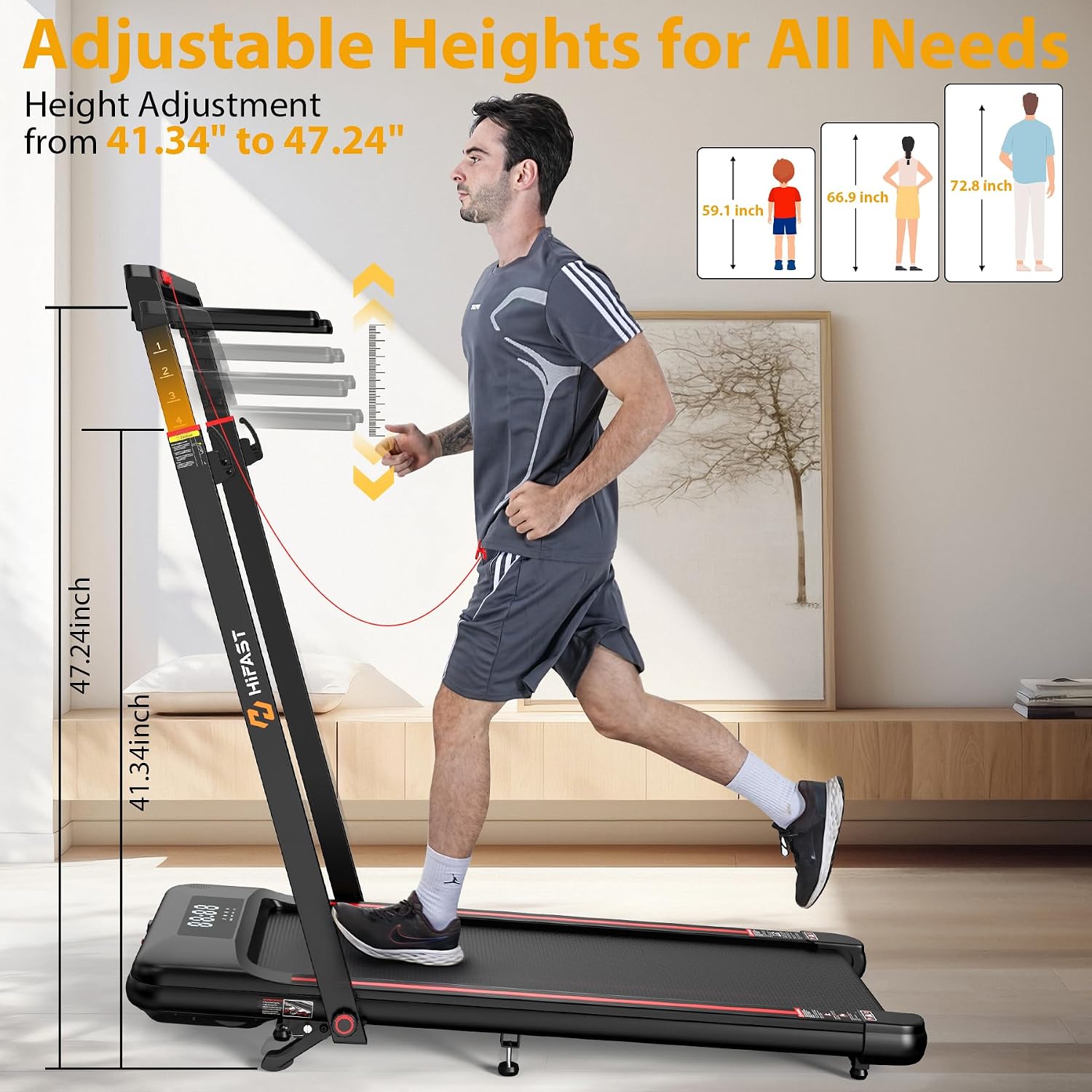
Image: A user adjusting the height of the treadmill's handlebar for comfortable use.
Video: Official product video demonstrating the setup and features of the HiFast Walking Pad Treadmill, including handlebar adjustment.
Attaching the Removable Workstation
The treadmill comes with a detachable workstation. Align the workstation with the designated slots on the handlebar supports and slide it into place until it clicks securely. The workstation features a cup holder and a tablet slot for convenience while exercising.

Image: The removable workstation attached to the treadmill, highlighting its features.

Image: Detail of the tablet mount on the workstation.

Image: Detail of the cup holder on the workstation.
പ്രവർത്തന നിർദ്ദേശങ്ങൾ
പവർ ചെയ്യലും ഓഫും
Connect the power cord to a suitable electrical outlet and to the treadmill's power port. Locate the main power switch, usually near the power cord connection, and flip it to the 'ON' position. To turn off, flip the switch to 'OFF' and unplug the unit.
Understanding Display and Controls
The LED display tracks essential metrics including time, distance, speed, and calories burned. Control the treadmill using the remote control, buttons on the handlebar, or compatible fitness apps.

Image: The three control methods for the treadmill: App, Remote Control, and Console.
വേഗതയും മോഡ് തിരഞ്ഞെടുക്കലും
The treadmill offers four distinct modes: Walking (0.6-2 MPH), Working (2-4 MPH), Climbing (4-8.6 MPH), and Running (0.6-8.6 MPH). Select your desired mode and adjust speed using the control options.

Image: Visual representation of the treadmill's four modes and their speed ranges.
ചരിവ് ക്രമീകരിക്കുന്നു
The treadmill features an 8% incline option to enhance your workout intensity. No tools are required to quickly switch between flat and incline running modes. This helps burn more calories and target different muscle groups.

Image: Comparison of 8% incline versus 0% incline on the treadmill.

Image: Detail of the manual incline adjustment.
Using the Safety Key
For your safety, always attach the red safety key to the designated slot on the console and clip the other end to your clothing. If you accidentally step off or fall, the safety key will detach, immediately stopping the treadmill to prevent injury.

Image: The safety key in place on the treadmill console.
ബ്ലൂടൂത്ത് സ്പീക്കർ
Enhance your workout experience by connecting your smartphone to the built-in Bluetooth speaker. The device name is 'EsangAudio'. Pair your device and enjoy your favorite music or podcasts while you exercise.
മെയിൻ്റനൻസ്
ലൂബ്രിക്കേഷൻ
Regular lubrication of the running belt is essential for optimal performance and longevity. Use the provided lubricating oil as instructed in the user manual. Frequency of lubrication depends on usage, typically every few months.
ബെൽറ്റ് അഡ്ജസ്റ്റ്മെൻ്റ്
The 2025 upgraded running belt features exclusive anti-slip technology designed to prevent shifting during workouts. If the belt appears to be off-center or slipping, refer to the user manual for instructions on how to adjust it properly.
ട്രബിൾഷൂട്ടിംഗ്
If you encounter any issues with your treadmill, please refer to the following basic troubleshooting steps:
- ശക്തിയില്ല: Ensure the power cord is securely plugged into both the treadmill and the wall outlet. Check if the main power switch is in the 'ON' position.
- ട്രെഡ്മിൽ ആരംഭിക്കുന്നില്ല: Verify that the safety key is correctly placed on the console. The treadmill will not start without the safety key engaged.
- അസാധാരണമായ ശബ്ദങ്ങൾ: Check for any loose parts or debris under the running belt. Ensure the belt is properly lubricated.
- ബെൽറ്റ് തെന്നിമാറൽ: The running belt may need adjustment or lubrication. Refer to the maintenance section for guidance.
ഇവിടെ പട്ടികപ്പെടുത്തിയിട്ടില്ലാത്ത സ്ഥിരമായ പ്രശ്നങ്ങൾക്കോ പ്രശ്നങ്ങൾക്കോ, ദയവായി ഉപഭോക്തൃ പിന്തുണയുമായി ബന്ധപ്പെടുക.
സ്പെസിഫിക്കേഷനുകൾ
| ഫീച്ചർ | സ്പെസിഫിക്കേഷൻ |
|---|---|
| ബ്രാൻഡ് | HiFast |
| മോഡലിൻ്റെ പേര് | S8HF-WM07 |
| മോട്ടോർ കുതിരശക്തി | 3.0 എച്ച്പി (പീക്ക്) |
| വേഗത പരിധി | 0.6 - 8.6 മൈൽ / മണിക്കൂർ |
| പരമാവധി ചരിവ് | 8% |
| ഭാരം ശേഷി | 300 പൗണ്ട് |
| ഉൽപ്പന്ന അളവുകൾ | 59.2"D x 24.84"W x 4.88"H |
| ഇനത്തിൻ്റെ ഭാരം | 71.43 പൗണ്ട് |
| മെറ്റീരിയൽ | അക്രിലോണിട്രൈൽ ബ്യൂട്ടാഡീൻ സ്റ്റൈറൈൻ (എബിഎസ്) |
| ഡിസ്പ്ലേ തരം | എൽഇഡി |
| പ്രത്യേക സവിശേഷതകൾ | Adjustable Height, Shock Absorbent, Manual Incline, Foldable |
വാറൻ്റി വിവരങ്ങൾ
The HiFast Walking Pad Treadmill comes with a 1-Year Manufacturer Warranty. Please retain your proof of purchase for warranty claims.
ഉപഭോക്തൃ പിന്തുണ
For any inquiries, technical assistance, or warranty claims, please contact HiFast customer support. We are committed to providing excellent service and offer 24-hour support to address your needs.
Visit the official HiFast Store for more information and products: HiFast Store on Amazon


