ആമുഖം
This manual provides instructions for the assembly, operation, and maintenance of your FLEXISPOT MT137 32-inch Height Adjustable Standing Desk Converter. This product is designed to transform your existing desk into an ergonomic sit-to-stand workstation, promoting a healthier work routine.
സുരക്ഷാ വിവരങ്ങൾ
- അസംബ്ലി നിർദ്ദേശങ്ങൾ എപ്പോഴും ശ്രദ്ധാപൂർവ്വം പാലിക്കുക.
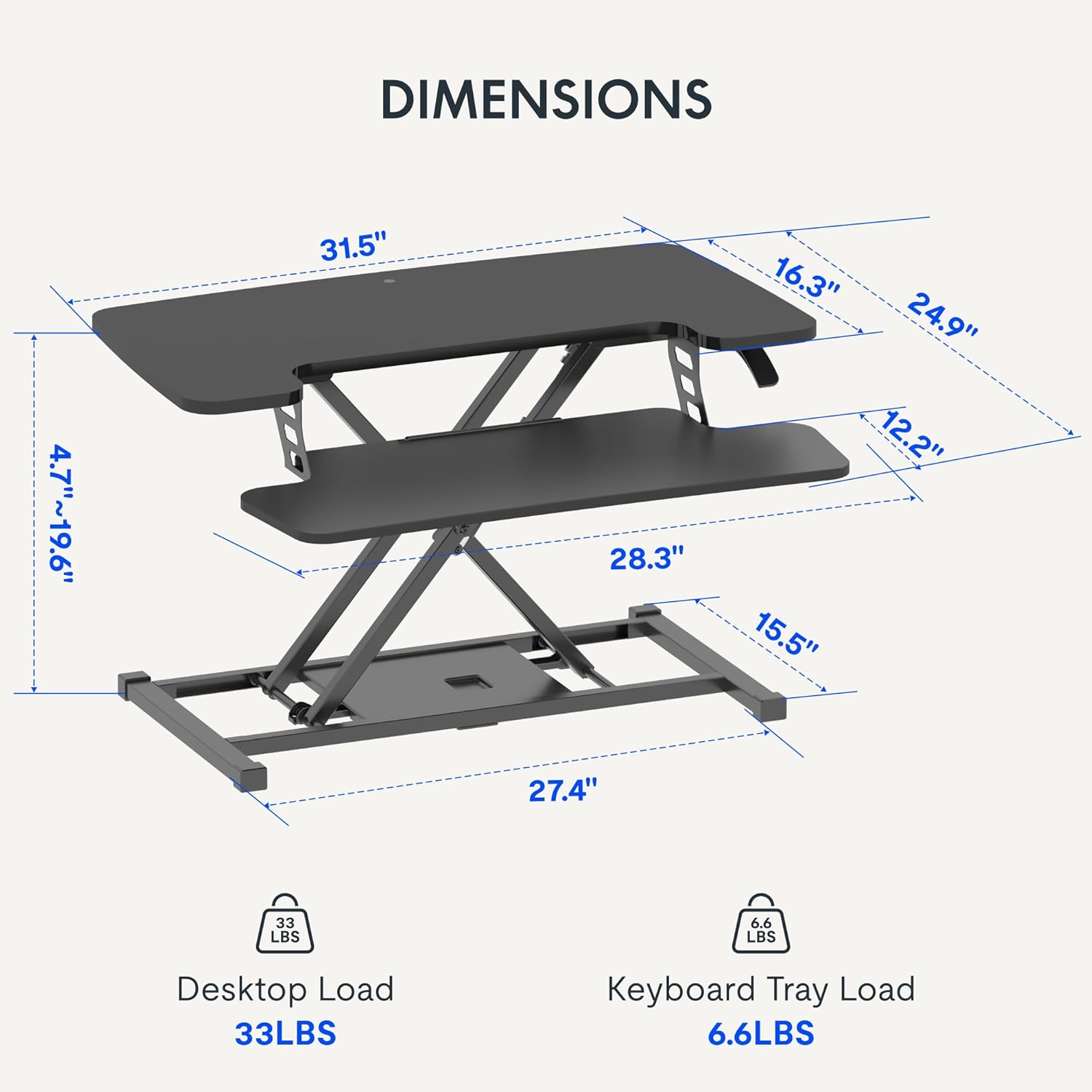
- Do not exceed the weight limit of 33 lbs (15 kg) on the upper desktop.
- Do not exceed the weight limit of 6.6 lbs (3 kg) on the keyboard tray.
- Ensure the desk converter is placed on a stable, flat surface.
- ഉയരം ക്രമീകരിക്കുമ്പോൾ കൈകളും വിരലുകളും ചലിക്കുന്ന ഭാഗങ്ങളിൽ നിന്ന് അകറ്റി നിർത്തുക.
പാക്കേജ് ഉള്ളടക്കം
- Pre-assembled Desk Converter Unit
- കീബോർഡ് ട്രേ
- Mounting Screws for Keyboard Tray
- നിർദ്ദേശ മാനുവൽ (ഈ പ്രമാണം)
സജ്ജീകരണവും അസംബ്ലിയും
- അൺപാക്ക് ചെയ്യുന്നു: പാക്കേജിംഗിൽ നിന്ന് എല്ലാ ഘടകങ്ങളും ശ്രദ്ധാപൂർവ്വം നീക്കം ചെയ്യുക.
- Keyboard Tray Attachment: Position the keyboard tray beneath the main desktop. Align the pre-drilled holes on the keyboard tray with the mounting points on the converter's frame. Secure the keyboard tray using the provided screws.
- പ്ലേസ്മെൻ്റ്: Place the assembled desk converter on a stable, flat desk surface.

The desk converter is largely pre-assembled, requiring only the attachment of the keyboard tray for immediate use.
പ്രവർത്തന നിർദ്ദേശങ്ങൾ
- ഉയരം ക്രമീകരിക്കുന്നു: To adjust the height, locate the adjustment lever on the side of the upper desktop.
- Raising the Desk: Squeeze the lever and gently lift the desktop to your desired standing height. Release the lever to lock it in place. The gas spring mechanism assists in smooth elevation.
- Lowering the Desk: Squeeze the lever and apply gentle downward pressure to lower the desktop to your desired sitting height. Release the lever to lock it in place.
- ഭാരം ശേഷി: The upper desktop supports up to 33 pounds (15 kg). The keyboard tray supports up to 6.6 pounds (3 kg). Do not exceed these limits.


ഫീച്ചറുകൾ
- എർഗണോമിക് ഡിസൈൻ: Seamlessly transition between sitting and standing positions to promote a healthy work posture. The streamlined edges are designed to reduce wrist discomfort.
- Spacious Two-Tier Workstation: The upper desktop provides ample space for monitors or laptops, while the lower keyboard tray accommodates your keyboard and mouse. A U-shaped cutout on the upper deck allows for laptop placement directly on the tray, optimizing space.
- Sturdy X-Frame Construction: Built with a robust X-frame, ensuring stability and smooth, effortless height adjustments.
- Versatile Height Range: Offers a height adjustment range from 4.7 inches (12 cm) to 19.6 inches (50 cm), accommodating various user heights and work preferences.


മെയിൻ്റനൻസ്
- വൃത്തിയാക്കൽ: മൃദുവായ, ഡി ഉപയോഗിച്ച് ഉപരിതലങ്ങൾ തുടയ്ക്കുകamp തുണി. ഉരച്ചിലുകൾ ഉള്ള ക്ലീനറുകൾ ഒഴിവാക്കുക.
- പരിശോധന: എല്ലാ സ്ക്രൂകളും കണക്ഷനുകളും സുരക്ഷിതമാണെന്ന് ഉറപ്പാക്കാൻ ഇടയ്ക്കിടെ പരിശോധിക്കുക.
ട്രബിൾഷൂട്ടിംഗ്
- ഉയരം ക്രമീകരിക്കുന്നതിലെ ബുദ്ധിമുട്ട്: Ensure no objects are obstructing the lifting mechanism. Verify that the weight on the desk does not exceed the specified limits.
- വിറയൽ: Confirm the desk converter is placed on a flat, stable surface. Check all assembly screws for tightness.
സ്പെസിഫിക്കേഷനുകൾ
| ബ്രാൻഡ് | ഫ്ലെക്സിസ്പോട്ട് |
| മോഡലിൻ്റെ പേര് | MT137 |
| ഉൽപ്പന്ന അളവുകൾ | 24"D x 32"W x 19.7"H (61cm D x 81cm W x 50cm H) |
| നിറം | കറുപ്പ് |
| അടിസ്ഥാന മെറ്റീരിയൽ | ലോഹം |
| മികച്ച മെറ്റീരിയൽ തരം | മരം |
| ഇനത്തിൻ്റെ ഭാരം | 24 പൗണ്ട് (10.9 കി.ഗ്രാം) |
| Maximum Upper Desktop Load | 33 പൗണ്ട് (15 കി.ഗ്രാം) |
| Maximum Keyboard Tray Load | 6.6 പൗണ്ട് (3 കി.ഗ്രാം) |
| ഉയരം ക്രമീകരിക്കൽ ശ്രേണി | 4.7 ഇഞ്ച് (12 സെ.മീ) മുതൽ 19.6 ഇഞ്ച് (50 സെ.മീ) വരെ |
| അസംബ്ലി ആവശ്യമാണ് | അതെ (കുറഞ്ഞത്) |
| അസംബ്ലിക്ക് ശുപാർശ ചെയ്യുന്ന ഉപകരണങ്ങൾ | സ്ക്രൂഡ്രൈവർ |
| യു.പി.സി | 810072862501 |
വാറൻ്റിയും പിന്തുണയും
വാറന്റി തരം: This product comes with a Full Warranty.
For further assistance, warranty claims, or technical support, please contact FLEXISPOT customer service. Refer to the official FLEXISPOT webനിലവിലെ കോൺടാക്റ്റ് വിശദാംശങ്ങൾക്കായി സൈറ്റ്.


