1. ഉൽപ്പന്നം കഴിഞ്ഞുview
This document provides instructions for the Saillong Treadmill Remote Control Replacement, designed exclusively for the Walking Pad Q1 treadmill. This remote allows for convenient control of your Walking Pad Q1, including starting, stopping, and adjusting speed.
Important: This remote control is ONLY compatible with the Walking Pad Q1 treadmill. It will NOT function with other treadmill brands or models.
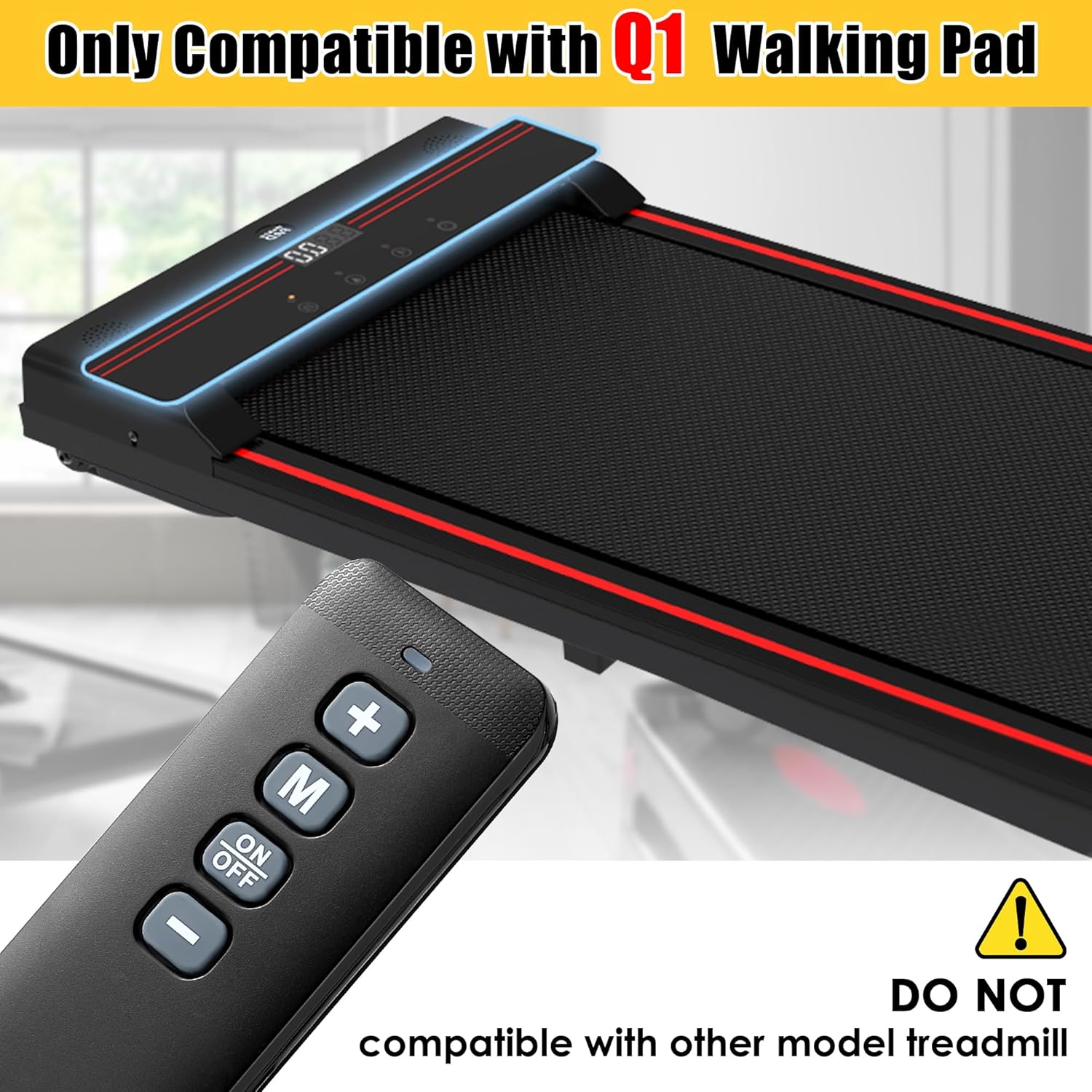
Image: Saillong remote control positioned next to a Walking Pad Q1 treadmill, emphasizing its specific compatibility.
2. ബോക്സിൽ എന്താണുള്ളത്?
- 1x Saillong Treadmill Remote Control Replacement
- 2x AAA ബാറ്ററികൾ
3. സജ്ജീകരണം: ബാറ്ററി ഇൻസ്റ്റാളേഷൻ
The remote control requires two AAA batteries (included) for operation. Follow these steps to install them:
- റിമോട്ട് കൺട്രോളിൻ്റെ പിൻഭാഗത്ത് ബാറ്ററി കമ്പാർട്ട്മെൻ്റ് കവർ കണ്ടെത്തുക.
- കമ്പാർട്ട്മെന്റ് തുറക്കാൻ കവർ പതുക്കെ താഴേക്ക് സ്ലൈഡ് ചെയ്യുക.
- രണ്ട് AAA ബാറ്ററികൾ ഇടുക, പോസിറ്റീവ് (+) ഉം നെഗറ്റീവ് (-) ടെർമിനലുകളും കമ്പാർട്ടുമെന്റിനുള്ളിലെ അടയാളപ്പെടുത്തലുകളുമായി ശരിയായി വിന്യസിക്കുന്നുണ്ടെന്ന് ഉറപ്പാക്കുക.
- സുരക്ഷിതമായി ക്ലിക്ക് ചെയ്യുന്നതുവരെ ബാറ്ററി കമ്പാർട്ട്മെന്റ് കവർ തിരികെ സ്ഥലത്തേക്ക് സ്ലൈഡ് ചെയ്യുക.

Image: The Saillong remote control with its battery cover removed, illustrating the correct placement for two AAA batteries.
Video: Battery Installation and Button Overview
Video Description: This video demonstrates how to install the AAA batteries into the Saillong remote control and shows the function of each button, including power, mode, and speed adjustments.
4. പ്രവർത്തന നിർദ്ദേശങ്ങൾ
The remote control provides simple and direct control over your Walking Pad Q1 treadmill. No pairing or downloads are required; simply turn on your treadmill to use the remote.
ബട്ടൺ പ്രവർത്തനങ്ങൾ:
- ഓൺ/ഓഫ് ബട്ടൺ: Press to power the treadmill on or off.
- '+' ബട്ടൺ: Increases the treadmill's speed. Also used to increase time, calories, or distance in certain modes.
- '-' ബട്ടൺ: Decreases the treadmill's speed. Also used to decrease time, calories, or distance in certain modes.
- 'M' (മോഡ്) ബട്ടൺ: Cycles through different display modes or settings on the treadmill.
- ബ്ലൂ ഇൻഡിക്കേറ്റർ ലൈറ്റ്: Illuminates when the remote is actively transmitting a signal.

Image: A hand holding the Saillong remote control, with clear labels indicating the function of each button.
Image: A close-up of the Saillong remote control, highlighting the blue indicator light when active.
നിയന്ത്രണ പരിധി:
The remote offers precise control from a distance of up to 33 feet (approximately 10 meters) with 360-degree infrared sensing, allowing for flexible operation.

Image: Graphic illustrating the Saillong remote control's 360-degree, 33-foot control range and rapid 0.2-second response time.
Video: Remote Control in Action
Video Description: This video illustrates the Saillong remote control in use with a Walking Pad Q1 treadmill, demonstrating how to power on the treadmill, adjust speed, and power off using the remote.
5. ഉൽപ്പന്ന സവിശേഷതകൾ
- മെറ്റീരിയൽ: ഈടുനിൽക്കുന്ന ABS മെറ്റീരിയൽ കൊണ്ടാണ് നിർമ്മിച്ചിരിക്കുന്നത്.
- ഭാരം കുറഞ്ഞ ഡിസൈൻ: Weighs approximately 0.12 pounds (0.06 kg) for comfortable handling.
- Long-Lasting Buttons: Buttons are designed to withstand over 100,000 presses.

Image: The Saillong remote control accompanied by icons highlighting its ABS material, lightweight nature, and durable buttons.
6 സ്പെസിഫിക്കേഷനുകൾ
| ഇനത്തിൻ്റെ പാക്കേജ് അളവുകൾ (L x W x H) | 5 x 3.94 x 0.63 ഇഞ്ച് |
| പാക്കേജ് ഭാരം | 0.06 കിലോഗ്രാം |
| ഇനത്തിന്റെ അളവുകൾ (L x W x H) | 4.72 x 0.78 x 1.57 ഇഞ്ച് |
| ഇനത്തിൻ്റെ ഭാരം | 0.12 പൗണ്ട് |
| ബ്രാൻഡ് നാമം | സെയ്ലോംഗ് |
| മോഡലിൻ്റെ പേര് | Treadmill Remote Control Replacement |
| നിറം | കറുപ്പ് |
| മെറ്റീരിയൽ | എബിഎസ് |
| ഇനങ്ങളുടെ എണ്ണം | 1 |
| അനുയോജ്യമായ ഉപകരണങ്ങൾ | Walking Pad Q1 |
7. പ്രശ്നപരിഹാരം
- റിമോട്ട് പ്രതികരിക്കുന്നില്ല:
- Ensure the batteries are correctly installed with the proper polarity (+/-).
- പഴയ ബാറ്ററികൾ പുതിയ AAA ബാറ്ററികൾ ഉപയോഗിച്ച് മാറ്റിസ്ഥാപിക്കുക.
- Verify that the remote is pointed towards the treadmill's receiver and there are no obstructions.
- Check the battery contacts inside the remote. If they appear loose or corroded, gently adjust them to ensure proper connection with the batteries.
- Treadmill Not Responding to Remote:
- Confirm that your treadmill is a Walking Pad Q1 model. This remote is not compatible with other models.
- Ensure the treadmill is powered on and in a ready state.
8. വാറൻ്റിയും പിന്തുണയും
Information regarding product warranty and specific support contacts is not provided in the available product data. Please refer to the retailer or manufacturer's website for details on warranty coverage and customer support options.


