1. ആമുഖം
This manual provides essential information for setting up, operating, and maintaining your Acer CB242Y G monitor. Please read this manual thoroughly before using the product to ensure proper functionality and safety.
The Acer CB242Y G is a 23.8-inch Full HD (1920 x 1080) IPS monitor designed for a clear and vibrant viewing experience. It features a frameless design, a high refresh rate of up to 120Hz via HDMI/DisplayPort, and 75Hz via VGA, with a rapid 1ms Visual Response Boost (VRB) or 4ms Gray-to-Gray (GTG) response time. The monitor also includes Adaptive Sync technology for smooth visuals and an adjustable stand for ergonomic comfort.
2 സുരക്ഷാ വിവരങ്ങൾ
മോണിറ്ററിന് കേടുപാടുകൾ സംഭവിക്കാതിരിക്കാനും വ്യക്തിഗത സുരക്ഷ ഉറപ്പാക്കാനും ഇനിപ്പറയുന്ന സുരക്ഷാ മുൻകരുതലുകൾ പാലിക്കുക:
- മോണിറ്റർ സുസ്ഥിരവും നിരപ്പും ഉള്ള പ്രതലത്തിൽ സ്ഥാപിക്കുക.
- വെന്റിലേഷൻ തുറക്കൽ തടയരുത്.
- Use only the power adapter and cables provided by Acer.
- മോണിറ്റർ വെള്ളം, ഈർപ്പം, തീവ്രമായ താപനില എന്നിവയിൽ നിന്ന് അകറ്റി നിർത്തുക.
- മോണിറ്റർ സ്വയം സർവീസ് ചെയ്യാൻ ശ്രമിക്കരുത്. എല്ലാ സർവീസിംഗും യോഗ്യതയുള്ള ഉദ്യോഗസ്ഥർക്ക് റഫർ ചെയ്യുക.
- വൃത്തിയാക്കുന്നതിന് മുമ്പ് ഔട്ട്ലെറ്റിൽ നിന്ന് പവർ കേബിൾ വിച്ഛേദിക്കുക.
3. പാക്കേജ് ഉള്ളടക്കം
നിങ്ങളുടെ പാക്കേജിൽ എല്ലാ ഇനങ്ങളും ഉണ്ടെന്ന് ഉറപ്പാക്കുക:
- Acer CB242Y G Monitor
- മോണിറ്റർ സ്റ്റാൻഡ് (ബേസും കഴുത്തും)
- പവർ കേബിൾ
- HDMI കേബിൾ
- ഉപയോക്തൃ മാനുവൽ (ഈ പ്രമാണം)
4. സജ്ജീകരണം
4.1 മോണിറ്റർ സ്റ്റാൻഡ് കൂട്ടിച്ചേർക്കൽ
- മോണിറ്ററിന്റെയും സ്റ്റാൻഡിന്റെയും ഘടകങ്ങൾ പാക്കേജിംഗിൽ നിന്ന് ശ്രദ്ധാപൂർവ്വം നീക്കം ചെയ്യുക.
- Attach the stand neck to the monitor panel. Ensure it clicks securely into place or is fastened with screws if applicable (refer to specific model instructions for screw details).
- Attach the stand base to the stand neck. Tighten the thumb screw or screws at the bottom of the base to secure it.
- കൂട്ടിച്ചേർത്ത മോണിറ്റർ ഒരു സ്ഥിരതയുള്ളതും പരന്നതുമായ പ്രതലത്തിൽ സ്ഥാപിക്കുക.
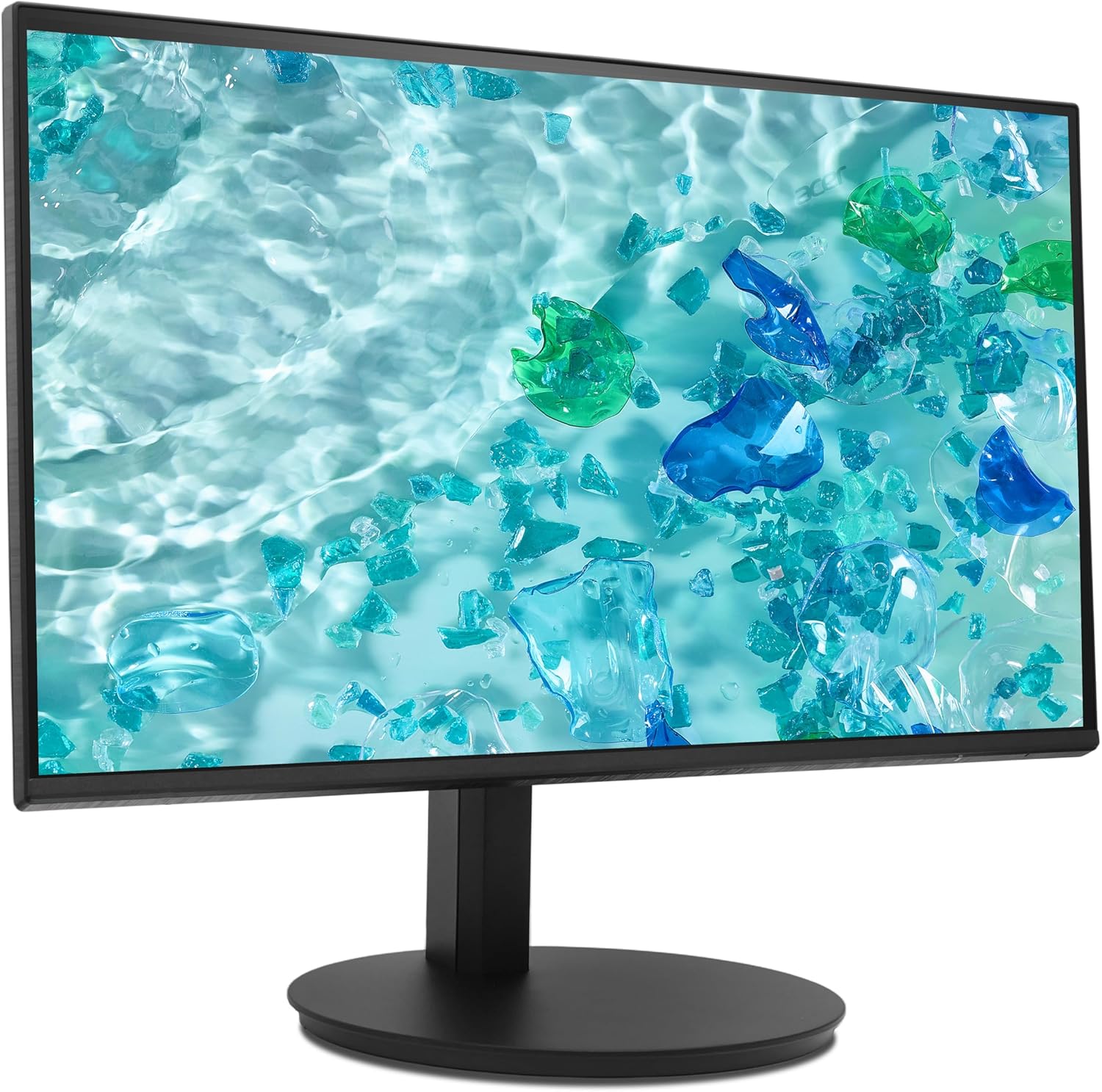
Figure 1: Assembled Acer CB242Y G Monitor. This image shows the monitor from an angled front perspective, highlighting its frameless design and the sturdy stand.
4.2 ബന്ധിപ്പിക്കുന്ന കേബിളുകൾ
മോണിറ്ററിലേക്കും നിങ്ങളുടെ കമ്പ്യൂട്ടറിലേക്കും ആവശ്യമായ കേബിളുകൾ ബന്ധിപ്പിക്കുക:
- പവർ കേബിൾ: പവർ കേബിളിന്റെ ഒരറ്റം മോണിറ്ററിന്റെ പവർ ഇൻപുട്ടിലേക്കും മറ്റേ അറ്റം ഒരു പവർ ഔട്ട്ലെറ്റിലേക്കും ബന്ധിപ്പിക്കുക.
- വീഡിയോ കേബിൾ:
- എച്ച്ഡിഎംഐ: Connect the provided HDMI cable from your computer's HDMI output to the monitor's HDMI input.
- വി.ജി.എ: If using VGA, connect a VGA cable from your computer's VGA output to the monitor's VGA input.
- ഡിസ്പ്ലേ പോർട്ട് (ഡിപി): If using DisplayPort, connect a DisplayPort cable from your computer's DP output to the monitor's DP input. (Note: DP cable not included, but supported by monitor).

ചിത്രം 2: പിൻഭാഗം view of the monitor. This image displays the back of the monitor, clearly showing the various input ports including HDMI and VGA, and the power input.
4.3 VESA Wall Mounting
The monitor supports VESA 100 x 100 mm mounting. To mount the monitor on a wall or an alternative stand:
- Remove the stand neck from the monitor panel.
- Attach the VESA-compatible wall mount or arm to the four screw holes on the back of the monitor.
- Ensure the mounting screws are of appropriate length and type to avoid damaging internal components.
5. പ്രവർത്തന നിർദ്ദേശങ്ങൾ
5.1 പവർ ഓൺ/ഓഫ്
മോണിറ്റർ ഓണാക്കാനോ ഓഫാക്കാനോ അതിൽ സ്ഥിതിചെയ്യുന്ന പവർ ബട്ടൺ അമർത്തുക. മോണിറ്റർ ഓണായിരിക്കുമ്പോൾ പവർ ഇൻഡിക്കേറ്റർ ലൈറ്റ് പ്രകാശിക്കും.
5.2 ഓൺ-സ്ക്രീൻ ഡിസ്പ്ലേ (OSD) മെനു
വിവിധ മോണിറ്റർ ക്രമീകരണങ്ങൾ ക്രമീകരിക്കാൻ OSD മെനു നിങ്ങളെ അനുവദിക്കുന്നു. മെനു നാവിഗേറ്റ് ചെയ്യാൻ നിയന്ത്രണ ബട്ടണുകൾ (സാധാരണയായി മോണിറ്ററിന്റെ പിൻഭാഗത്തോ താഴെ വലതുവശത്തോ സ്ഥിതിചെയ്യുന്നു) ഉപയോഗിക്കുക.
- OSD മെനു സജീവമാക്കാൻ ഒരു നിയന്ത്രണ ബട്ടൺ അമർത്തുക.
- Use the navigation buttons (up/down/left/right) to move through menu options.
- Press the select button to enter a sub-menu or confirm a selection.
- Press the exit button to go back or close the OSD menu.
5.3 ഡിസ്പ്ലേ സെറ്റിംഗ്സ് ക്രമീകരിക്കൽ
OSD മെനു വഴി നിങ്ങൾക്ക് ക്രമീകരിക്കാൻ കഴിയുന്ന പ്രധാന ക്രമീകരണങ്ങളിൽ ഇവ ഉൾപ്പെടുന്നു:
- തെളിച്ചം/തീവ്രത: പ്രകാശ, ഇരുണ്ട പ്രദേശങ്ങൾ തമ്മിലുള്ള മൊത്തത്തിലുള്ള പ്രകാശവും വ്യത്യാസവും ക്രമീകരിക്കുക.
- വർണ്ണ ക്രമീകരണങ്ങൾ: വർണ്ണ താപനില, ഗാമ, വ്യക്തിഗത RGB ലെവലുകൾ എന്നിവ പരിഷ്കരിക്കുക.
- ഇൻപുട്ട് ഉറവിടം: Manually select between HDMI, VGA, or DisplayPort inputs.
- പുതുക്കൽ നിരക്ക്: The monitor automatically detects the optimal refresh rate. Ensure your graphics card settings are configured correctly to utilize the maximum 120Hz (HDMI/DP) or 75Hz (VGA).
- അഡാപ്റ്റീവ് സമന്വയം: Enable or disable Adaptive Sync to synchronize the monitor's refresh rate with your graphics card's frame rate, reducing screen tearing and stuttering. This feature is a VESA open standard.
- ബ്ലൂ ലൈറ്റ് ഫിൽട്ടർ: Activate this feature to reduce blue light emissions, which can help reduce eye strain during prolonged use.
5.4 എർഗണോമിക് ക്രമീകരണങ്ങൾ
മോണിറ്റർ സ്റ്റാൻഡ് വിവിധ എർഗണോമിക് ക്രമീകരണങ്ങൾ അനുവദിക്കുന്നു:
- ഉയരം ക്രമീകരിക്കൽ: Raise or lower the monitor to achieve an optimal viewing ഉയരം.
- ടിൽറ്റ്: Adjust the screen's vertical angle (forward/backward) for comfortable viewing.
- സ്വിവൽ: മോണിറ്റർ അതിന്റെ അടിഭാഗത്ത് തിരശ്ചീനമായി തിരിക്കുക.
- പിവറ്റ്: ലാൻഡ്സ്കേപ്പ്, പോർട്രെയ്റ്റ് ഓറിയന്റേഷൻ എന്നിവയ്ക്കിടയിൽ മാറാൻ സ്ക്രീൻ 90 ഡിഗ്രി തിരിക്കുക.

ചിത്രം 3: വശം view of the monitor. This image illustrates the monitor's profile, demonstrating its slim design and the range of motion for height and tilt adjustments.
6. പരിപാലനം
നിങ്ങളുടെ മോണിറ്ററിന്റെ ദീർഘായുസ്സും ഒപ്റ്റിമൽ പ്രകടനവും ഉറപ്പാക്കാൻ, ഈ പരിപാലന മാർഗ്ഗനിർദ്ദേശങ്ങൾ പാലിക്കുക:
- സ്ക്രീൻ വൃത്തിയാക്കൽ: മൃദുവായ, ലിന്റ് രഹിത തുണി ഉപയോഗിച്ച് സ്ക്രീൻ സൌമ്യമായി തുടയ്ക്കുക. കഠിനമായ പാടുകൾക്ക്, dampen the cloth slightly with water or a non-abrasive screen cleaner. Do not spray cleaner directly onto the screen.
- സി വൃത്തിയാക്കൽasing: മോണിറ്റർ തുടയ്ക്കാൻ മൃദുവായതും ഉണങ്ങിയതുമായ തുണി ഉപയോഗിക്കുക casing. വീര്യം കൂടിയ ഡിറ്റർജന്റുകൾ അല്ലെങ്കിൽ ഉരച്ചിലുകൾ ഉള്ള ക്ലീനറുകൾ ഉപയോഗിക്കുന്നത് ഒഴിവാക്കുക.
- വെൻ്റിലേഷൻ: Ensure the ventilation openings on the monitor are not obstructed to prevent overheating.
- പവർ ഓഫ്: മോണിറ്റർ വൃത്തിയാക്കുന്നതിന് മുമ്പ് അല്ലെങ്കിൽ അത് ദീർഘനേരം ഉപയോഗിക്കാതിരുന്നാൽ, എല്ലായ്പ്പോഴും അത് ഓഫ് ചെയ്ത് പവർ ഔട്ട്ലെറ്റിൽ നിന്ന് അൺപ്ലഗ് ചെയ്യുക.
7. പ്രശ്നപരിഹാരം
നിങ്ങളുടെ മോണിറ്ററിൽ പ്രശ്നങ്ങൾ നേരിടുകയാണെങ്കിൽ, ഇനിപ്പറയുന്ന പൊതുവായ പ്രശ്നങ്ങളും പരിഹാരങ്ങളും പരിശോധിക്കുക:
| പ്രശ്നം | സാധ്യമായ പരിഹാരം |
|---|---|
| സ്ക്രീനിൽ ചിത്രമൊന്നുമില്ല |
|
| ചിത്രം മങ്ങിയതോ വളച്ചൊടിച്ചതോ ആണ് |
|
| സ്ക്രീൻ കീറുകയോ ഇടറുകയോ ചെയ്യുന്നു |
|
| കമ്പ്യൂട്ടർ മോണിറ്റർ കണ്ടെത്തിയില്ല. |
|
8 സ്പെസിഫിക്കേഷനുകൾ
| മോഡലിൻ്റെ പേര് | CB242Y G |
| സ്ക്രീൻ വലിപ്പം | 23.8 ഇഞ്ച് (60 സെ.മീ) |
| പാനൽ തരം | IPS with LED backlight |
| റെസലൂഷൻ | 1920 x 1080 (പൂർണ്ണ HD) |
| വീക്ഷണാനുപാതം | 16:9 |
| പുതുക്കിയ നിരക്ക് | 120 Hz (HDMI/DP), 75 Hz (VGA) |
| പ്രതികരണ സമയം | 1 ms (VRB), 4 ms (GTG) |
| കോൺട്രാസ്റ്റ് റേഷ്യോ | 2000:1 |
| ഉപരിതല ചികിത്സ | മാറ്റ് |
| കണക്റ്റിവിറ്റി | HDMI 1.4, VGA, DisplayPort |
| പ്രത്യേക സവിശേഷതകൾ | Adaptive Sync, Blue Light Filter, Height Adjustment, Pivot, Swivel, Tilt |
| VESA മൗണ്ട് അനുയോജ്യത | 100 x 100 മി.മീ |
| വൈദ്യുതി ഉപഭോഗം (SDR) | 9.0 W |
| എനർജി എഫിഷ്യൻസി ക്ലാസ് (SDR) | B |

Figure 4: Energy label for the Acer CB242Y G monitor, showing its energy efficiency class B and power consumption of 9 kWh/1000h.
വിശദമായ ഉൽപ്പന്ന വിവരങ്ങൾക്ക്, കാണുക EPREL product database.
9. വാറൻ്റിയും പിന്തുണയും
Acer provides comprehensive support for its products. For the Acer CB242Y G monitor, the following support terms apply:
- കുറഞ്ഞ ഗ്യാരണ്ടീഡ് ഉൽപ്പന്ന പിന്തുണ: 7 വർഷം
- Minimum Availability of Spare Parts: 7 വർഷം
- സോഫ്റ്റ്വെയർ, ഫേംവെയർ അപ്ഡേറ്റുകൾ: കുറഞ്ഞത് 8 വർഷം
For technical assistance, warranty claims, or further inquiries, please visit the official Acer support website or contact your local Acer service center. Contact information can typically be found on the Acer webസൈറ്റിലോ നിങ്ങളുടെ ഉൽപ്പന്നത്തിന്റെ പാക്കേജിംഗിലോ.


