ആമുഖം
This manual provides detailed instructions for the safe and effective use of the NJTY T3 Digital Multimeter. Please read this manual thoroughly before operation and retain it for future reference. The NJTY T3 is a rechargeable, auto-ranging digital multimeter designed for accurate measurements of AC/DC voltage, resistance, and features Non-Contact Voltage (NCV) detection and live wire testing.

Image: The NJTY T3 Digital Multimeter, showing its main unit, red and black test probes, and a USB-C charging cable connected.
സുരക്ഷാ വിവരങ്ങൾ
Always adhere to safety precautions when using any electrical testing equipment. Failure to do so may result in injury or damage to the device.
- ഓരോ ഫംഗ്ഷനും വ്യക്തമാക്കിയിട്ടുള്ള പരമാവധി ഇൻപുട്ട് മൂല്യങ്ങൾ കവിയരുത്.
- Ensure test leads are in good condition and properly connected before making measurements.
- വോള്യവുമായി പ്രവർത്തിക്കുമ്പോൾ ജാഗ്രത പാലിക്കുകtag30V AC RMS, 42V പീക്ക്, അല്ലെങ്കിൽ 60V DC എന്നിവയ്ക്ക് മുകളിലാണ്, കാരണം ഇവ ഷോക്ക് അപകടമുണ്ടാക്കുന്നു.
- മൾട്ടിമീറ്റർ കേടായതായി തോന്നിയാലോ കേസ് തുറന്നിരിക്കുകയാണെങ്കിലോ അത് പ്രവർത്തിപ്പിക്കരുത്.
- Always disconnect power to the circuit under test before measuring resistance or continuity.
- Use the Non-Contact Voltage (NCV) function as an initial check, but always verify with direct contact measurements when safety is critical.
പാക്കേജ് ഉള്ളടക്കം
പാക്കേജിൽ എല്ലാ ഇനങ്ങളും ഉണ്ടെന്ന് ഉറപ്പാക്കുക:
- NJTY T3 Multimeter (1 unit)
- Test Leads (1 pair, red and black)
- ടൈപ്പ്-സി ചാർജിംഗ് കേബിൾ (1 യൂണിറ്റ്)
- ഇൻസ്ട്രക്ഷൻ മാനുവൽ (1 യൂണിറ്റ്)
സജ്ജമാക്കുക
1. പ്രാരംഭ ചാർജിംഗ്
The NJTY T3 Multimeter features a built-in rechargeable Lithium Ion battery. Before first use, or if the low battery indicator is displayed, charge the device using the provided Type-C charging cable.
- ചാർജിംഗ് കേബിളിന്റെ ടൈപ്പ്-സി അറ്റം മൾട്ടിമീറ്ററിന്റെ ചാർജിംഗ് പോർട്ടുമായി ബന്ധിപ്പിക്കുക.
- ചാർജിംഗ് കേബിളിന്റെ USB-A അറ്റം ഒരു സാധാരണ USB പവർ അഡാപ്റ്ററുമായി (ഉൾപ്പെടുത്തിയിട്ടില്ല) അല്ലെങ്കിൽ ഒരു കമ്പ്യൂട്ടറിന്റെ USB പോർട്ടുമായി ബന്ധിപ്പിക്കുക.
- The charging indicator on the multimeter will illuminate during charging and turn off when fully charged.

Image: The NJTY T3 Multimeter being charged via its Type-C port, connected to a laptop.
2. ടെസ്റ്റ് ലീഡുകൾ ബന്ധിപ്പിക്കുന്നു
Insert the red test lead into the "VΩ" input jack and the black test lead into the "COM" input jack. Ensure they are securely seated.
പ്രവർത്തന നിർദ്ദേശങ്ങൾ
The NJTY T3 Multimeter features an auto-ranging function, simplifying operation by automatically detecting the measurement type and range.
1. പവർ ഓൺ/ഓഫ്
Press and hold the power button to turn the multimeter on or off. The device will automatically shut off after approximately 15 minutes of inactivity to conserve battery life.
2. Automatic Measurement (Auto-Ranging)
In auto-ranging mode, the multimeter will automatically identify and measure AC voltagഇ, ഡിസി വോളിയംtage, or resistance when the test leads are applied to a circuit. The display will show the measurement type (AC, DC, Ω) and the value.
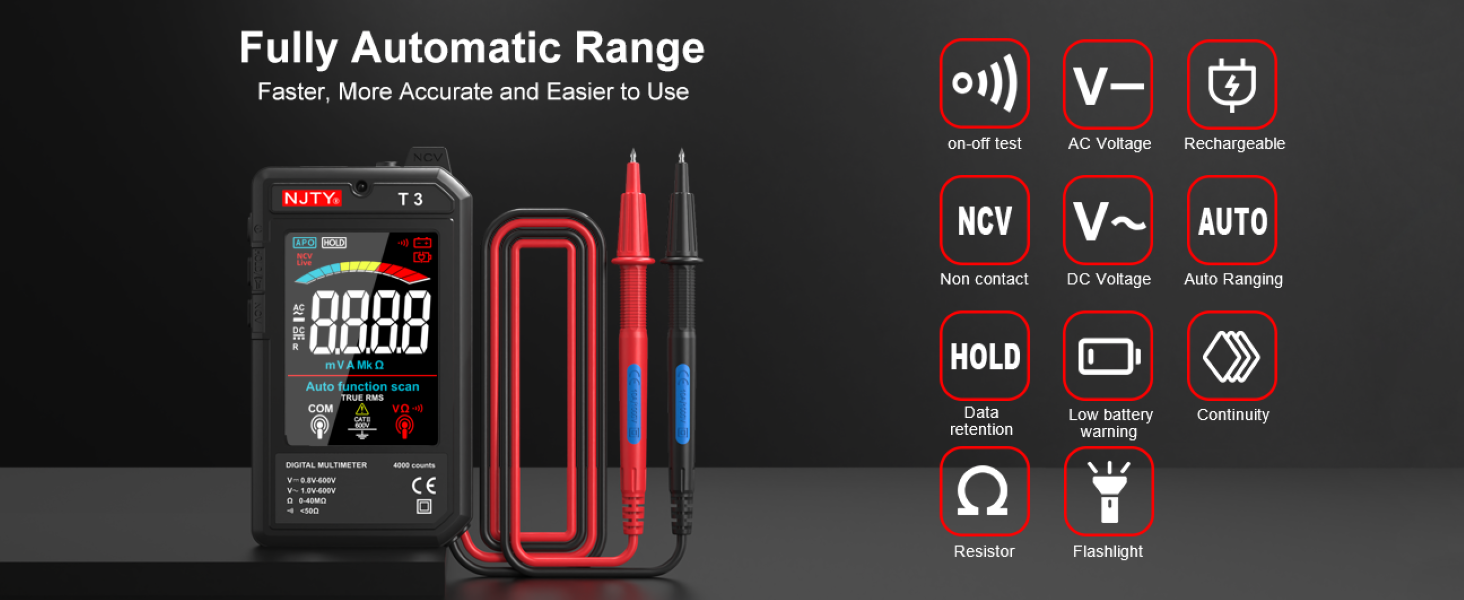
Image: The NJTY T3 Multimeter screen showing "Auto function scan" and icons representing AC/DC voltage, resistance, continuity, NCV, and flashlight functions.
3. എസി/ഡിസി വോളിയംtagഇ അളവ്
- Ensure the multimeter is powered on.
- Connect the test leads to the circuit points where voltage needs to be measured. The multimeter will automatically detect AC or DC voltage.
- വാല്യം വായിക്കുകtage മൂല്യം സ്ക്രീനിൽ പ്രദർശിപ്പിച്ചിരിക്കുന്നു.
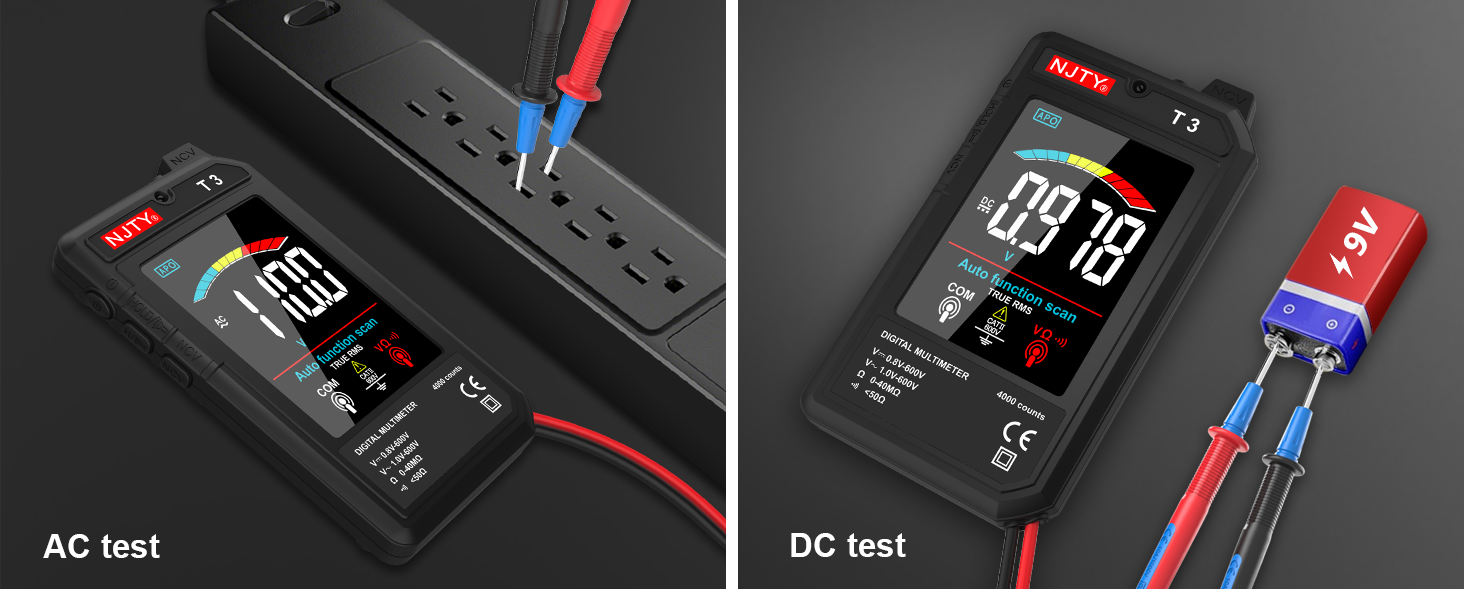
Image: Two separate images showing the NJTY T3 Multimeter measuring AC voltage from a power strip and DC voltagഒരു 9V ബാറ്ററിയിൽ നിന്ന്.
4. പ്രതിരോധം അളക്കൽ
- പ്രധാനപ്പെട്ടത്: പ്രതിരോധം അളക്കുന്നതിന് മുമ്പ് സർക്യൂട്ട് ഡീ-എനർജൈസ് ചെയ്തിട്ടുണ്ടെന്ന് ഉറപ്പാക്കുക.
- Connect the test leads across the component or circuit section where resistance is to be measured.
- The multimeter will display the resistance value in Ohms (Ω), Kilo-Ohms (KΩ), or Mega-Ohms (MΩ).

Image: Two separate images showing the NJTY T3 Multimeter measuring resistance of a resistor and performing a continuity test on a wire.
5. നോൺ-കോൺടാക്റ്റ് വോളിയംtagഇ (NCV) കണ്ടെത്തൽ
The NCV function allows for safe detection of live wires without direct contact.
- Press the NCV button (if available, or ensure NCV mode is active).
- Bring the NCV sensor at the top of the multimeter close to the wire or outlet.
- The multimeter will emit an audible beep and the display will indicate the presence of AC voltage, with increasing intensity as it gets closer to the source.

Image: The NJTY T3 Multimeter detecting non-contact voltage near an electrical wall outlet, with the screen showing "EF" and a signal strength indicator.
6. Live Wire Testing
ഒരു എസി സർക്യൂട്ടിലെ ലൈവ് വയറുകളെ തിരിച്ചറിയാൻ ഈ ഫംഗ്ഷൻ സഹായിക്കുന്നു.
- Insert the red test probe into the socket or touch it to the wire you want to test.
- If the multimeter emits an alarm sound and the screen changes to indicate "LIVE", it signifies a live wire.

Image: The NJTY T3 Multimeter's red probe inserted into an electrical outlet for live wire testing, with the screen displaying "LIVE".
7. തുടർ പരിശോധന
- പ്രധാനപ്പെട്ടത്: ഒരു കണ്ടിന്യുറ്റി ടെസ്റ്റ് നടത്തുന്നതിന് മുമ്പ് സർക്യൂട്ട് ഡീ-എനർജൈസ് ചെയ്തിട്ടുണ്ടെന്ന് ഉറപ്പാക്കുക.
- Connect the test leads across the component or wire to be tested.
- If continuity exists (resistance is low, typically below 50Ω), the multimeter will emit an audible beep.
8 ഡാറ്റ ഹോൾഡ്
Press the "HOLD" button to freeze the current reading on the display. Press it again to release the hold function.
9. ഫ്ലാഷ്ലൈറ്റും ബാക്ക്ലൈറ്റും
The multimeter includes a built-in flashlight for illuminating the test area and a backlight for the display, enhancing visibility in low-light conditions. Refer to the device buttons for activation (typically a short press of the power button or a dedicated light button).
Image: The NJTY T3 Multimeter with its integrated flashlight active, illuminating a dark electrical panel.
മെയിൻ്റനൻസ്
1. വൃത്തിയാക്കൽ
Wipe the multimeter's case with a damp cloth and mild detergent. Do not use abrasives or solvents. Ensure the device is off and disconnected from any power source before cleaning.
2. ബാറ്ററി പരിചരണം
The built-in Lithium Ion battery should be charged regularly, especially if the device is not used for extended periods. The automatic shut-off feature helps prolong battery life. A low battery indicator will appear on the display when charging is required.
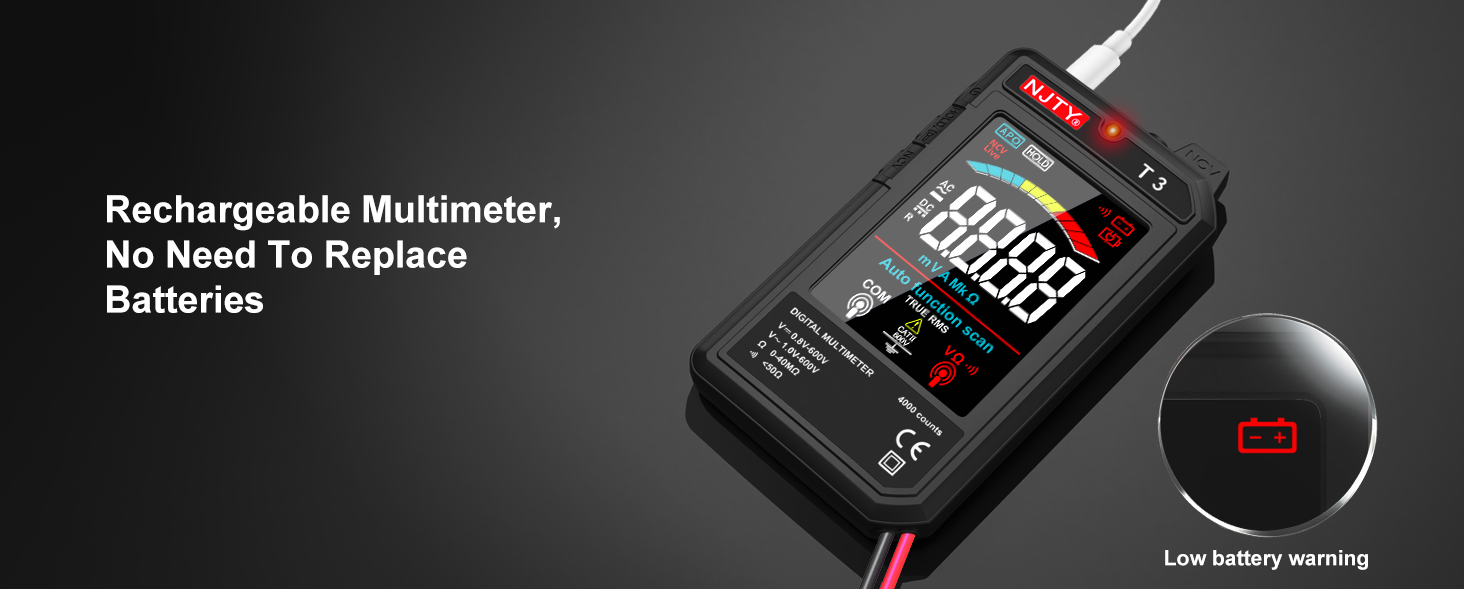
Image: The NJTY T3 Multimeter screen showing a low battery warning icon, indicating the need for recharging.
3. സംഭരണം
Store the multimeter in a cool, dry place, away from direct sunlight and extreme temperatures. Disconnect test leads when storing.
ട്രബിൾഷൂട്ടിംഗ്
| പ്രശ്നം | സാധ്യമായ കാരണം | പരിഹാരം |
|---|---|---|
| ഒരു ഡിസ്പ്ലേയും ഉപകരണവും ഓണാകില്ല. | ബാറ്ററി കുറവാണ് അല്ലെങ്കിൽ ഉപകരണം ഓഫാണ്. | Charge the battery using the Type-C cable. Press and hold the power button to turn on. |
| കൃത്യമല്ലാത്ത വായനകൾ. | Poor test lead connection, incorrect measurement technique, or exceeding input limits. | Ensure test leads are firmly connected. Review operating instructions for correct measurement procedures. Do not exceed specified input ranges. |
| Multimeter automatically shuts off. | Automatic power-off feature activated due to inactivity. | This is normal behavior to conserve battery. Press the power button to turn it back on. |
| NCV detection not working or inconsistent. | Distance to voltage source too far, or interference. | Bring the NCV sensor closer to the suspected live wire. Ensure no other strong electromagnetic fields are present. |
സ്പെസിഫിക്കേഷനുകൾ
| ഫീച്ചർ | വിശദാംശങ്ങൾ |
|---|---|
| പ്രദർശിപ്പിക്കുക | 4000 Counts, 3.19-inch Color LCD |
| ഡിസി വോളിയംtagഇ റേഞ്ച് | 0.8V - 600V (Accuracy: ±(0.8%+5)) |
| എസി വോളിയംtagഇ റേഞ്ച് | 1V - 600V (Accuracy: ±(1.0%+5)) |
| പ്രതിരോധ ശ്രേണി | 0 - 40MΩ (Accuracy: ±(1.0%+10)) |
| Minimum Resolution (DCV/ACV) | 0.001V |
| Minimum Resolution (Resistance) | 1Ω |
| പവർ ഉറവിടം | റീചാർജ് ചെയ്യാവുന്ന ലിഥിയം അയൺ ബാറ്ററി (ഉൾപ്പെടുത്തിയിരിക്കുന്നു) |
| ചാർജിംഗ് പോർട്ട് | ടൈപ്പ്-സി |
| ഓട്ടോമാറ്റിക് ഷട്ട്-ഓഫ് | ഏകദേശം 15 മിനിറ്റ് നിഷ്ക്രിയത്വം |
| ഫ്ലാഷ്ലൈറ്റ് | Yes (1 minute auto shut-off) |
| ബാക്ക്ലൈറ്റ് | അതെ |
| ബസർ | Yes (for continuity, internal resistance less than 50Ω) |
| NCV കണ്ടെത്തൽ | അതെ |
| യഥാർത്ഥ RMS | Yes (45Hz-2KHz) |
| കുറഞ്ഞ ബാറ്ററി സൂചകം | അതെ |
| ലൈവ് വയർ ഐഡന്റിഫിക്കേഷൻ | അതെ |
| ഉൽപ്പന്ന അളവുകൾ | 5.51 x 1.18 x 0.79 ഇഞ്ച് |
| ഇനത്തിൻ്റെ ഭാരം | 150 ഗ്രാം (5.29 ഔൺസ്) |
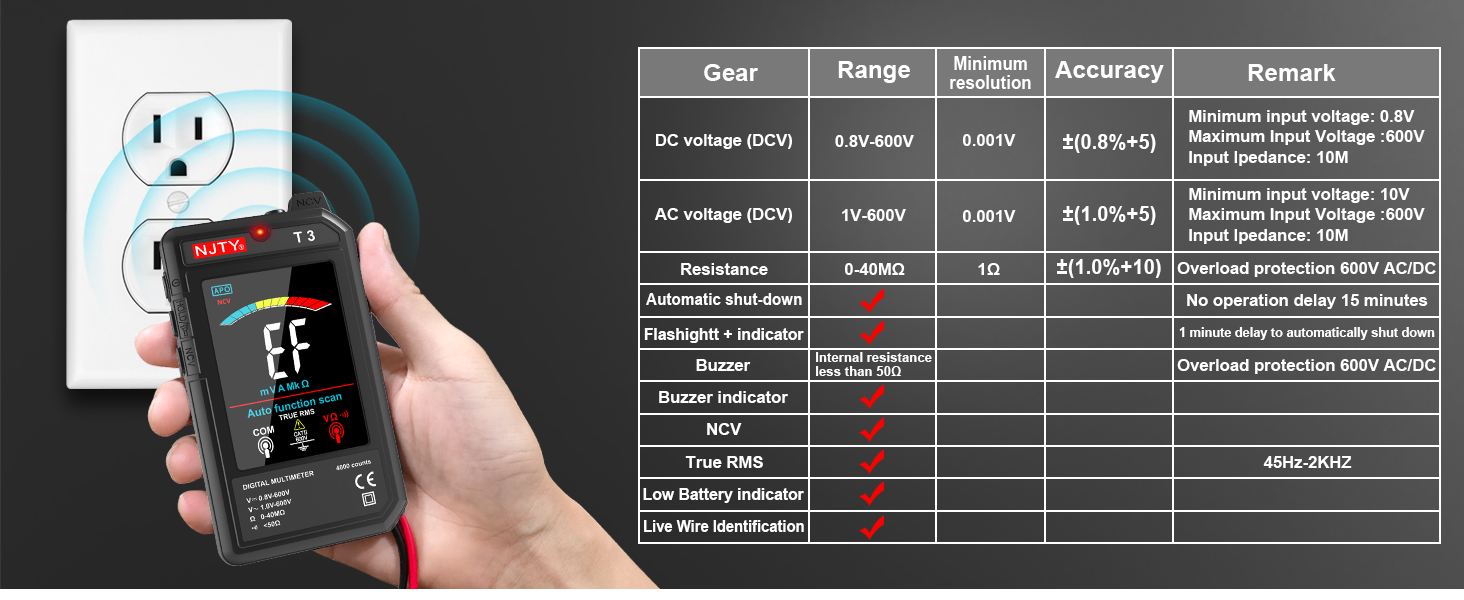
Image: The NJTY T3 Multimeter demonstrating NCV detection alongside a table detailing its technical specifications.
വാറൻ്റിയും പിന്തുണയും
വാറൻ്റി വിവരങ്ങൾ
For specific warranty terms and conditions, please refer to the warranty card included with your product or contact the seller directly. Warranty coverage typically addresses manufacturing defects under normal use.
ഉപഭോക്തൃ പിന്തുണ
If you encounter any issues or have questions regarding the NJTY T3 Multimeter, please contact your retailer or the manufacturer's customer support channel. Refer to the "after-sales channel" information provided in your product packaging for contact details.


