1. ആമുഖം
This manual provides essential information for the safe and effective use of your PICO 4 Ultra Enterprise A9210 All-in-One 6DoF VR Headset. Please read this manual thoroughly before using the device and retain it for future reference.
2 സുരക്ഷാ വിവരങ്ങൾ
- Clear Your Space: Ensure you have a clear, unobstructed area for use to prevent injury or damage to property.
- ഇടവേളകൾ എടുക്കുക: Prolonged use may cause eye strain, fatigue, or motion sickness. Take regular breaks.
- മേൽനോട്ടം: Not recommended for children without adult supervision.
- ആരോഗ്യ പരിഗണനകൾ: If you experience discomfort, dizziness, or nausea, discontinue use immediately. Consult a doctor if symptoms persist.
- പരിസ്ഥിതി വ്യവസ്ഥകൾ: തീവ്രമായ ഊഷ്മാവ്, ഈർപ്പം, നേരിട്ടുള്ള സൂര്യപ്രകാശം എന്നിവയിൽ ഉപകരണം തുറന്നുകാട്ടരുത്.
3. പാക്കേജ് ഉള്ളടക്കം
നിങ്ങളുടെ പാക്കേജിൽ എല്ലാ ഇനങ്ങളും ഉണ്ടെന്ന് ഉറപ്പാക്കുക:
- PICO 4 Ultra Enterprise A9210 VR Headset
- 6DoF Controllers (x2)
- കണ്ണട സ്പേസർ
- യുഎസ്ബി ടൈപ്പ്-സി കേബിൾ (ചാർജ് ചെയ്യുന്നതിനും ഡാറ്റ കൈമാറ്റത്തിനും)
- പവർ അഡാപ്റ്റർ
4. ഉൽപ്പന്നം കഴിഞ്ഞുview
4.1 ഹെഡ്സെറ്റ് ഘടകങ്ങൾ

ചിത്രം: ഫ്രണ്ട് view of the PICO 4 Ultra Enterprise A9210 VR Headset, showing the integrated cameras and sensors.
- Front Cameras & Sensors: Used for inside-out tracking and environmental mapping.
- ലെൻസുകൾ: High-resolution displays with pancake lenses for a wide field of view.
- ഹെഡ് സ്ട്രാപ്പ്: Adjustable strap for secure and comfortable fit.
- IPD Adjustment Wheel: Located on the bottom of the headset for seamless interpupillary distance adjustment.
- യുഎസ്ബി ടൈപ്പ്-സി പോർട്ട്: ചാർജിംഗിനും ഡാറ്റ കൈമാറ്റത്തിനും.
- പവർ ബട്ടൺ: ഹെഡ്സെറ്റ് ഓൺ അല്ലെങ്കിൽ ഓഫ് ചെയ്യാൻ.
- വോളിയം ബട്ടണുകൾ: To adjust audio output.
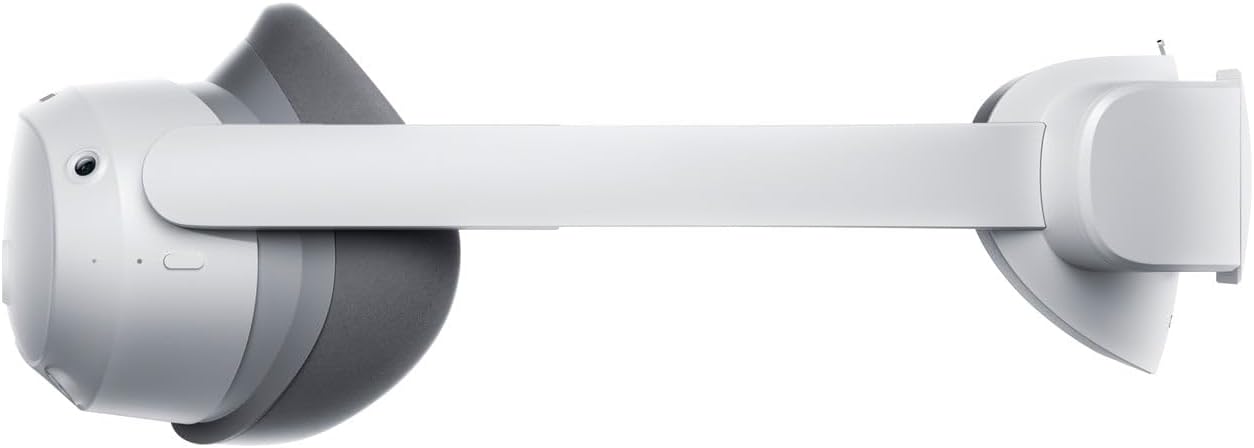
ചിത്രം: വശം view of the PICO 4 Ultra Enterprise A9210 VR Headset, illustrating the head strap and overall profile.
4.2 Controller Components
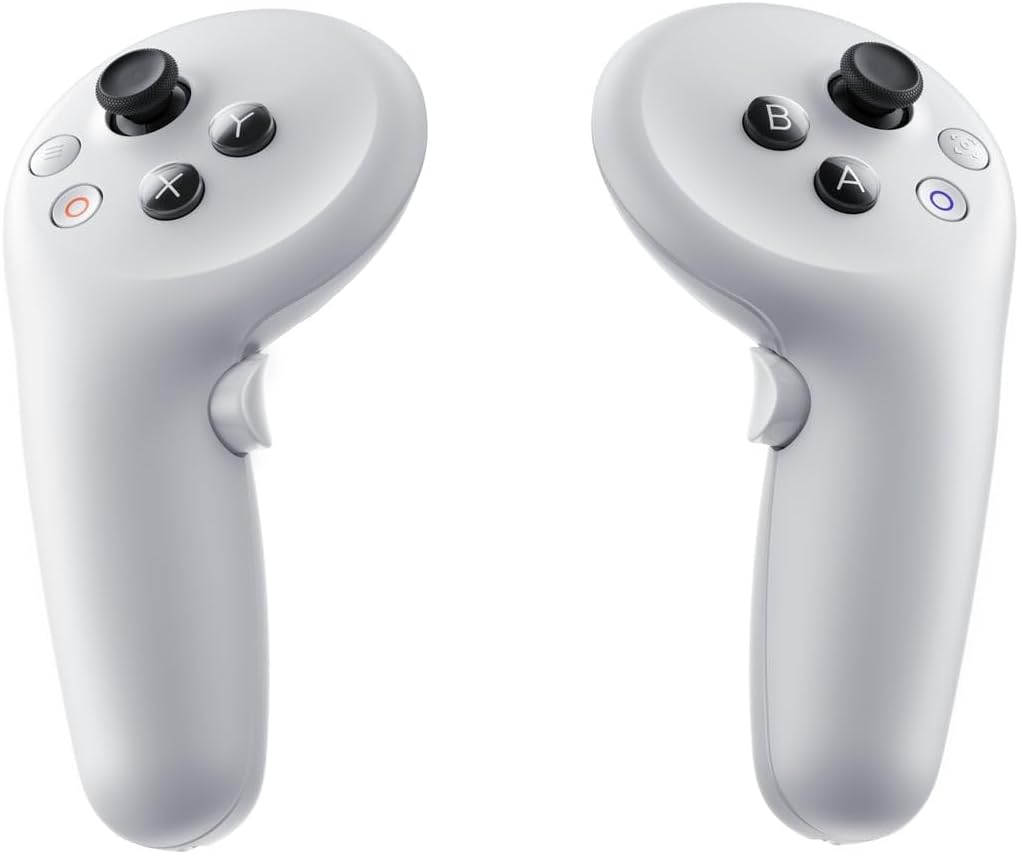
ചിത്രം: Two PICO 4 Ultra Enterprise A9210 VR controllers, showing buttons and joysticks.
- അനലോഗ് സ്റ്റിക്ക്: For movement and navigation.
- ആക്ഷൻ ബട്ടണുകൾ (A/B/X/Y): For in-app interactions.
- ട്രിഗർ ബട്ടൺ: For selection and interaction.
- Grip Button: For grabbing or holding objects in VR.
- സിസ്റ്റം ബട്ടൺ: For accessing system menus.
5. സജ്ജീകരണം
5.1 Charging the Headset and Controllers
- Connect the USB Type-C cable to the headset's charging port and the other end to the power adapter.
- Plug the power adapter into a wall outlet. The indicator light on the headset will show charging status.
- The controllers typically use AA batteries. Open the battery compartment and insert fresh batteries if needed.
5.2 ഹെഡ്സെറ്റ് ധരിക്കൽ

ചിത്രം: മുകളിൽ view of the PICO 4 Ultra Enterprise A9210 VR Headset, showing the adjustable head strap.
- Loosen the head strap to its widest setting.
- Place the headset on your head, ensuring the display is centered over your eyes.
- Tighten the head strap until the headset feels secure and comfortable, without being too tight.
- Adjust the IPD (Interpupillary Distance) using the wheel on the bottom of the headset until the image appears clear and comfortable. The optimal range is 58-72mm.
- If you wear glasses, insert the included glasses spacer before wearing the headset to ensure proper fit and prevent lens scratching.
5.3 പ്രാരംഭ സോഫ്റ്റ്വെയർ സജ്ജീകരണം
- പവർ ബട്ടൺ അമർത്തിപ്പിടിച്ചുകൊണ്ട് ഹെഡ്സെറ്റ് ഓൺ ചെയ്യുക.
- Follow the on-screen instructions to select your language, connect to a Wi-Fi network (supports Wi-Fi 7), and set up your user account.
- The controllers should automatically pair. If not, follow the on-screen prompts for manual pairing.
- Define your play space as instructed by the headset. This involves drawing a boundary in your physical environment.
6. പ്രവർത്തന നിർദ്ദേശങ്ങൾ
6.1 പവർ ഓൺ/ഓഫ്
- പവർ ഓൺ: Press and hold the Power button on the headset until the PICO logo appears.
- പവർ ഓഫ്: Press and hold the Power button until a power-off menu appears, then select 'Power Off'.
- സ്ലീപ്പ് മോഡ്: Briefly press the Power button to put the headset into sleep mode. Press again to wake it up.
6.2 Navigation and Interaction
- ഉപയോഗിക്കുക അനലോഗ് സ്റ്റിക്ക് on the controller to move around in virtual environments.
- Point the controller at menu items or objects and use the ട്രിഗർ ബട്ടൺ അവരെ തിരഞ്ഞെടുക്കാൻ.
- ദി Action Buttons (A/B/X/Y) perform various functions depending on the application.
- അമർത്തുക സിസ്റ്റം ബട്ടൺ to access the main menu or return to the home screen.
6.3 വൈഫൈ കണക്ഷൻ
To connect to a Wi-Fi network or change networks:
- From the home screen, access the Quick Settings menu (usually by pressing the System button or a specific gesture).
- Wi-Fi ഐക്കൺ തിരഞ്ഞെടുക്കുക.
- ലിസ്റ്റിൽ നിന്ന് നിങ്ങൾക്ക് ആവശ്യമുള്ള നെറ്റ്വർക്ക് തിരഞ്ഞെടുത്ത് ആവശ്യപ്പെടുകയാണെങ്കിൽ പാസ്വേഡ് നൽകുക.
7. പരിപാലനം
7.1 ലെൻസുകൾ വൃത്തിയാക്കൽ
- Use a dry microfiber cloth specifically designed for optical lenses.
- Gently wipe the lenses in a circular motion from the center outwards.
- Do not use liquid cleaners, alcohol, or abrasive materials, as these can damage the lenses.
7.2 Cleaning the Headset and Controllers
- Use a soft, dry cloth to wipe the exterior surfaces of the headset and controllers.
- കഠിനമായ അഴുക്കിന്, ചെറുതായി dampen the cloth with water. Avoid getting moisture into any openings.
- കഠിനമായ രാസവസ്തുക്കളോ ലായകങ്ങളോ ഉപയോഗിക്കരുത്.
7.3 സംഭരണം
- Store the headset in a cool, dry place away from direct sunlight.
- Protect the lenses from scratches by keeping the headset in its original packaging or a protective case when not in use.
- Remove batteries from controllers if storing for extended periods.
8. പ്രശ്നപരിഹാരം
8.1 ഹെഡ്സെറ്റ് ഓണാക്കുന്നില്ല
- Ensure the headset is fully charged. Connect it to the power adapter and wait for a few minutes before attempting to power on again.
- വ്യത്യസ്തമായ ഒരു USB Type-C കേബിളും പവർ അഡാപ്റ്ററും പരീക്ഷിച്ചുനോക്കൂ.
- Perform a hard reset by holding the Power button for 10-15 seconds.
8.2 കൺട്രോളറുകൾ പ്രതികരിക്കുന്നില്ല
- Check the batteries in the controllers and replace them if necessary.
- Ensure the controllers are within the headset's tracking range.
- Try re-pairing the controllers through the headset's settings menu.
8.3 മങ്ങിയ ചിത്രം
- Adjust the IPD (Interpupillary Distance) using the wheel on the bottom of the headset.
- Ensure the headset is properly positioned on your head and the straps are adjusted correctly.
- Clean the lenses with a microfiber cloth.
- If you wear glasses, ensure the glasses spacer is correctly installed.
8.4 വൈഫൈ കണക്ഷൻ പ്രശ്നങ്ങൾ
- Verify that your Wi-Fi router is working correctly and other devices can connect.
- നിങ്ങൾ ശരിയായ വൈഫൈ പാസ്വേഡ് നൽകിയിട്ടുണ്ടെന്ന് ഉറപ്പാക്കുക.
- Restart your Wi-Fi router and the PICO headset.
- സിഗ്നൽ ശക്തി മെച്ചപ്പെടുത്താൻ നിങ്ങളുടെ വൈഫൈ റൂട്ടറിന് അടുത്തേക്ക് നീങ്ങുക.
9 സ്പെസിഫിക്കേഷനുകൾ
| പ്രോസസ്സർ | ക്വാൽകോം സ്നാപ്ഡ്രാഗൺ XR2 Gen 2 |
| മെമ്മറി | 12GB LPDDR5 |
| ആന്തരിക സംഭരണം | 256 ജിബി യുഎഫ്എസ് 3.1 |
| റെസലൂഷൻ | 4320 x 2160 (1200ppi) |
| ഫീൽഡ് View (FOV) | 105 ഡിഗ്രി |
| പുതുക്കിയ നിരക്ക് | 90Hz |
| ട്രാക്കിംഗ് രീതി | Inside-out (6DoF), Environmental tracking cameras x4, iToF depth sensor camera x1 |
| IPD അഡ്ജസ്റ്റ്മെൻ്റ് | 58-72mm (Seamless) |
| ഓഡിയോ | Stereo speakers, Spatial audio compatible microphones x4 |
| കൺട്രോളറുകൾ | 6DoF Controllers (x2) |
| ബാഹ്യ കണക്റ്റിവിറ്റി | വൈ-ഫൈ 7, ബ്ലൂടൂത്ത് 5.3 |
| കണക്ഷൻ പോർട്ട് | യുഎസ്ബി ടൈപ്പ്-സി |
| Headset Dimensions (W x H x D) | 165 x 84 x 62 മിമി |
| മോഡൽ നമ്പർ | A9210 |
| JAN കോഡ് | 6970214574083 |
| ഉൾപ്പെടുത്തിയ ഘടകങ്ങൾ | Glasses spacer |
10. വാറൻ്റിയും പിന്തുണയും
For warranty information and technical support, please refer to the official PICO website or contact your regional PICO customer service. Keep your proof of purchase for warranty claims.
This device includes a commercial use license and business support via PICO Business Suite for enterprise applications.


