ആമുഖം
ട്രെയിൻ കംഫർട്ട് ലിങ്ക് II XL850 സ്മാർട്ട് തെർമോസ്റ്റാറ്റ് നിങ്ങളുടെ വീടിന്റെ ഹീറ്റിംഗ്, വെന്റിലേഷൻ, എയർ കണ്ടീഷനിംഗ് (HVAC) സിസ്റ്റത്തിന് വിപുലമായ നിയന്ത്രണം നൽകുന്നു. ട്രാനിന്റെ കംഫർട്ട് ലിങ്ക് കമ്മ്യൂണിക്കേറ്റിംഗ്, വേരിയബിൾ സ്പീഡ് സിസ്റ്റങ്ങളുമായി സംയോജിപ്പിക്കുന്നതിനായാണ് ഈ ഉപകരണം രൂപകൽപ്പന ചെയ്തിരിക്കുന്നത്, ഇത് കൃത്യമായ താപനില മാനേജ്മെന്റും ഊർജ്ജ കാര്യക്ഷമതയും വാഗ്ദാനം ചെയ്യുന്നു. അവബോധജന്യമായ പ്രവർത്തനത്തിനായി 4.3 ഇഞ്ച് കളർ ടച്ച്സ്ക്രീനും റിമോട്ട് ആക്സസിനും സ്മാർട്ട് ഹോം ഇന്റഗ്രേഷനുമായി ബിൽറ്റ്-ഇൻ വൈ-ഫൈ, ഇസഡ്-വേവ് കണക്റ്റിവിറ്റിയും ഇതിൽ ഉൾപ്പെടുന്നു.
നിങ്ങളുടെ ട്രാൻ കംഫർട്ട് ലിങ്ക് II XL850 സ്മാർട്ട് തെർമോസ്റ്റാറ്റിന്റെ ഇൻസ്റ്റാളേഷൻ, പ്രവർത്തനം, പരിപാലനം എന്നിവയ്ക്കുള്ള നിർദ്ദേശങ്ങൾ ഈ മാനുവൽ നൽകുന്നു.

ചിത്രം: ഇൻഡോർ താപനില, പുറത്തെ താപനില, ഇൻഡോർ ഈർപ്പം എന്നിവ കാണിക്കുന്ന ട്രാൻ കംഫർട്ട് ലിങ്ക് II XL850 തെർമോസ്റ്റാറ്റ് ഡിസ്പ്ലേ. സിസ്റ്റം കൂളിംഗ് മോഡിലാണെന്നും ഒരു ഷെഡ്യൂൾ പാലിക്കുന്നുണ്ടെന്നും ഇത് സൂചിപ്പിക്കുന്നു.
സജ്ജീകരണവും ഇൻസ്റ്റാളേഷനും
പാക്കേജ് ഉള്ളടക്കം
നിങ്ങളുടെ പാക്കേജിൽ ഇനിപ്പറയുന്ന ഇനങ്ങൾ അടങ്ങിയിട്ടുണ്ടെന്ന് പരിശോധിക്കുക:
- ട്രാൻ കംഫർട്ട് ലിങ്ക് II XL850 തെർമോസ്റ്റാറ്റ്
- ബാക്ക് പ്ലേറ്റ്
- ആങ്കർമാർ
- USB കേബിൾ
- ഉപയോക്തൃ മാനുവൽ (ഈ പ്രമാണം)

ചിത്രം: ട്രെയിൻ കംഫർട്ട് ലിങ്ക് II XL850 തെർമോസ്റ്റാറ്റ്, അതിന്റെ പിൻ പ്ലേറ്റ്, ഒരു യുഎസ്ബി കേബിൾ, ഉൽപ്പന്ന പാക്കേജിംഗിനൊപ്പം മൗണ്ടിംഗ് ആങ്കറുകൾ.
ഫിസിക്കൽ ഇൻസ്റ്റലേഷൻ
ട്രാൻ കംഫർട്ട് ലിങ്ക് II XL850 ഇൻസ്റ്റാൾ ചെയ്യുന്നതിൽ ബാക്ക് പ്ലേറ്റ് ഒരു ഭിത്തിയിൽ ഘടിപ്പിച്ച് നിങ്ങളുടെ HVAC സിസ്റ്റത്തിന് ആവശ്യമായ വയറിംഗ് ബന്ധിപ്പിക്കുന്നതാണ് ഉൾപ്പെടുന്നത്. ശരിയായ വയറിംഗും സിസ്റ്റം അനുയോജ്യതയും ഉറപ്പാക്കാൻ യോഗ്യതയുള്ള ഒരു HVAC ടെക്നീഷ്യൻ ഫിസിക്കൽ ഇൻസ്റ്റാളേഷൻ നടത്താൻ ശുപാർശ ചെയ്യുന്നു. നിർദ്ദിഷ്ട കണക്ഷനുകൾക്കായി നിങ്ങളുടെ യൂണിറ്റിനൊപ്പം നൽകിയിരിക്കുന്ന വിശദമായ വയറിംഗ് ഡയഗ്രമുകൾ കാണുക.

ചിത്രം: ഒരു വശം view ചുമരിൽ ഘടിപ്പിച്ചിരിക്കുന്ന ട്രാൻ കംഫർട്ട് ലിങ്ക് II XL850 തെർമോസ്റ്റാറ്റിന്റെ, അതിന്റെ സ്ലിം പ്രോ കാണിക്കുന്നുfile.
പ്രാരംഭ കോൺഫിഗറേഷനും കണക്റ്റിവിറ്റിയും
ഭൗതിക ഇൻസ്റ്റാളേഷന് ശേഷം, തെർമോസ്റ്റാറ്റ് പവർ ഓൺ ചെയ്യുക. ഇനിപ്പറയുന്നവ ഉൾപ്പെടെയുള്ള പ്രാരംഭ സജ്ജീകരണ പ്രക്രിയയിലൂടെ ടച്ച്സ്ക്രീൻ നിങ്ങളെ നയിക്കും:
- തീയതിയും സമയവും ക്രമീകരണം: നിലവിലെ തീയതിയും സമയവും കോൺഫിഗർ ചെയ്യുക.
- HVAC സിസ്റ്റം തരം: നിങ്ങളുടെ നിർദ്ദിഷ്ട തപീകരണ, തണുപ്പിക്കൽ സംവിധാന കോൺഫിഗറേഷൻ തിരഞ്ഞെടുക്കുക.
- Wi-Fi കണക്ഷൻ: നിങ്ങളുടെ വീട്ടിലെ വൈഫൈ നെറ്റ്വർക്കിലേക്ക് തെർമോസ്റ്റാറ്റ് കണക്റ്റുചെയ്യുക. റിമോട്ട് ആക്സസിനായി വൈഫൈ, ഇതർനെറ്റ് കണക്റ്റിവിറ്റി എന്നിവ XL850 പിന്തുണയ്ക്കുന്നു.
- ഇസഡ്-വേവ് ഇന്റഗ്രേഷൻ: ബിൽറ്റ്-ഇൻ ഇസഡ്-വേവ് ബ്രിഡ്ജ് മറ്റ് ഇസഡ്-വേവ് അനുയോജ്യമായ സ്മാർട്ട് ഹോം ഉപകരണങ്ങളുമായി സംയോജിപ്പിക്കാൻ അനുവദിക്കുന്നു. നിങ്ങളുടെ ഇസഡ്-വേവ് നെറ്റ്വർക്കിലേക്ക് തെർമോസ്റ്റാറ്റ് ചേർക്കുന്നതിനോ മറ്റ് ഇസഡ്-വേവ് ഉപകരണങ്ങൾ തെർമോസ്റ്റാറ്റുമായി ജോടിയാക്കുന്നതിനോ ഓൺ-സ്ക്രീൻ നിർദ്ദേശങ്ങൾ പാലിക്കുക. ഉപകരണം ഇസഡ്-വേവ് സർട്ടിഫൈഡ് ആണ് (ഐഡി: ZC08-14090003).
പ്രവർത്തന നിർദ്ദേശങ്ങൾ
ടച്ച്സ്ക്രീൻ ഇന്റർഫേസ്
ട്രെയിൻ കംഫർട്ട് ലിങ്ക് II XL850-ൽ 4.3 ഇഞ്ച് കളർ ടച്ച്സ്ക്രീൻ ഉണ്ട്. മെനുകളിലൂടെ നാവിഗേറ്റ് ചെയ്ത് സ്ക്രീനിലെ അനുബന്ധ ഐക്കണുകളിലോ മൂല്യങ്ങളിലോ സ്പർശിച്ചുകൊണ്ട് ക്രമീകരണങ്ങൾ ക്രമീകരിക്കുക.
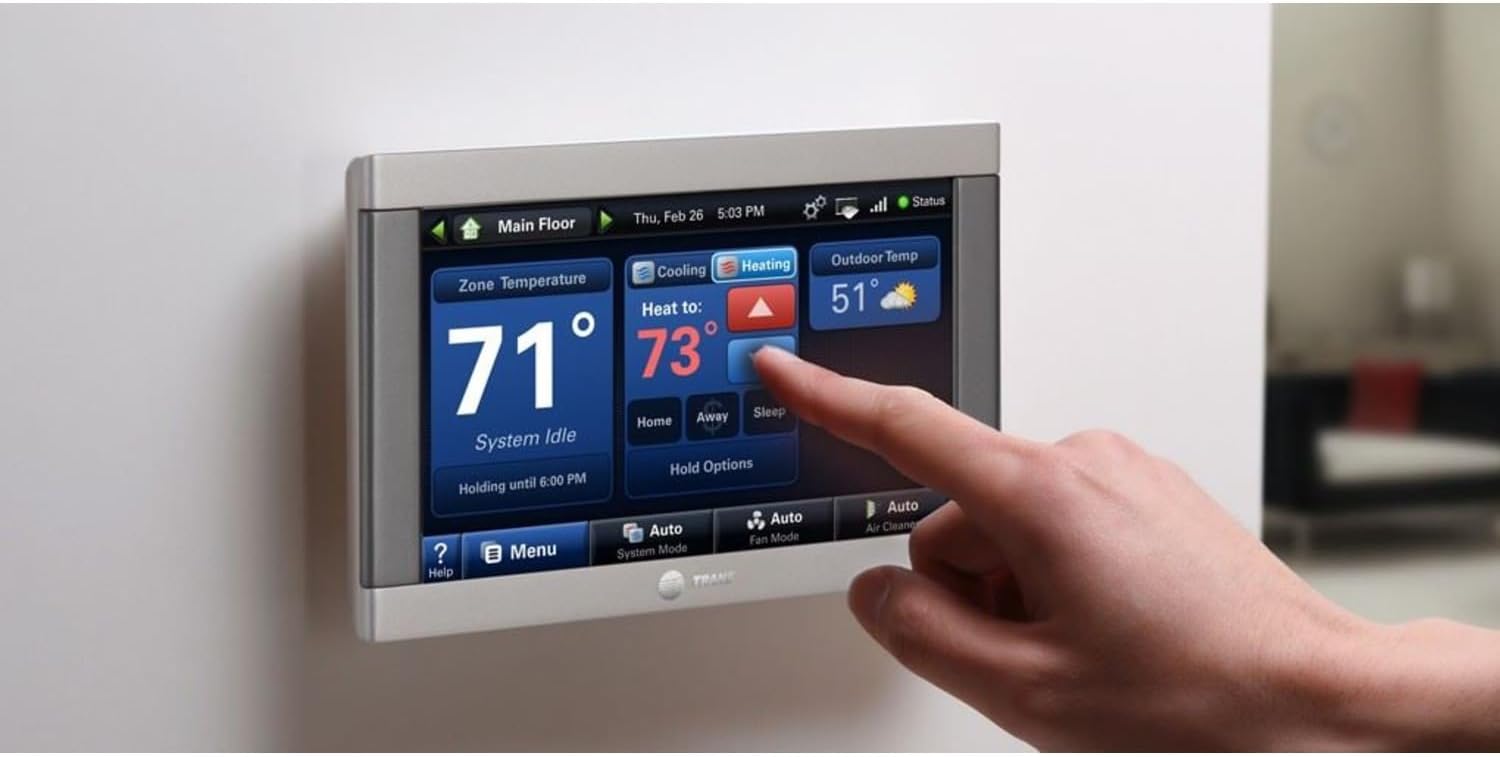
ചിത്രം: ട്രാൻ കംഫർട്ട് ലിങ്ക് II XL850 തെർമോസ്റ്റാറ്റിന്റെ സ്ക്രീനിൽ സ്പർശിക്കുന്ന ഒരു കൈ, ഹീറ്റിംഗ് സെറ്റ്പോയിന്റ് ക്രമീകരിക്കുന്നു.
അടിസ്ഥാന താപനില നിയന്ത്രണം
പ്രധാന സ്ക്രീനിൽ നിന്ന്, നിങ്ങൾക്ക് കഴിയും view നിലവിലെ ഇൻഡോർ താപനില, പുറത്തെ താപനില, ഇൻഡോർ ഈർപ്പം. ആവശ്യമുള്ള താപനില ക്രമീകരിക്കാൻ:
- താപനില പ്രദർശന ഏരിയയിൽ സ്പർശിക്കുക.
- സെറ്റ് പോയിന്റ് കൂട്ടാനോ കുറയ്ക്കാനോ മുകളിലേക്കും താഴേക്കുമുള്ള അമ്പടയാളങ്ങൾ ഉപയോഗിക്കുക.
- ലഭ്യമെങ്കിൽ, ആവശ്യമുള്ള ഓപ്പറേറ്റിംഗ് മോഡ് (ഹീറ്റ്, കൂൾ, ഓട്ടോ, ഓഫ്) തിരഞ്ഞെടുക്കുക.

ചിത്രം: ട്രാൻ കംഫർട്ട് ലിങ്ക് II XL850 തെർമോസ്റ്റാറ്റ് ഡിസ്പ്ലേ, നിലവിലെ ഇൻഡോർ താപനിലയും മുകളിലേക്കും താഴേക്കുമുള്ള അമ്പടയാളങ്ങൾ ഉപയോഗിച്ച് കൂളിംഗ് സെറ്റ്പോയിന്റ് ക്രമീകരിക്കാനുള്ള ഓപ്ഷനുകളും കാണിക്കുന്നു.
പ്രോഗ്രാം ചെയ്യാവുന്ന ഷെഡ്യൂളിംഗ്
XL850 7 ദിവസത്തെ പ്രോഗ്രാമബിൾ ഷെഡ്യൂളിംഗ് അനുവദിക്കുന്നു, ഇത് നിങ്ങളുടെ പ്രതിവാര ദിനചര്യയുമായി പൊരുത്തപ്പെടുന്നതിന് ഏഴ് വ്യത്യസ്ത ഷെഡ്യൂളുകൾ വരെ ഇഷ്ടാനുസൃതമാക്കാൻ നിങ്ങളെ പ്രാപ്തമാക്കുന്നു. ഊർജ്ജ ഉപയോഗം ഒപ്റ്റിമൈസ് ചെയ്യാനും സുഖസൗകര്യങ്ങൾ നിലനിർത്താനും ഈ സവിശേഷത സഹായിക്കുന്നു.
- പ്രധാന സ്ക്രീൻ അല്ലെങ്കിൽ 'മെനു' ഓപ്ഷൻ വഴി ഷെഡ്യൂളിംഗ് മെനു ആക്സസ് ചെയ്യുക.
- ദിവസത്തിലെ വ്യത്യസ്ത സമയങ്ങൾക്കായി (ഉദാ: ഉണരുക, വീട്ടിലിരിക്കുക, ഉറങ്ങുക, ഉണരുക) ഷെഡ്യൂളുകൾ സൃഷ്ടിക്കുക അല്ലെങ്കിൽ പരിഷ്കരിക്കുക.
- ഓരോ കാലയളവിനും ആവശ്യമുള്ള താപനിലകൾ സജ്ജമാക്കുക.
- വ്യക്തിഗത ദിവസങ്ങളിലേക്കോ ദിവസങ്ങളുടെ ഗ്രൂപ്പുകളിലേക്കോ ഷെഡ്യൂളുകൾ പ്രയോഗിക്കുക.
റിമോട്ട് ആക്സസും സ്മാർട്ട് ഫീച്ചറുകളും
വൈഫൈ അല്ലെങ്കിൽ ഇതർനെറ്റ് കണക്റ്റിവിറ്റി ഉപയോഗിച്ച്, സ്മാർട്ട്ഫോൺ, ടാബ്ലെറ്റ് അല്ലെങ്കിൽ കമ്പ്യൂട്ടർ ഉപയോഗിച്ച് നിങ്ങളുടെ തെർമോസ്റ്റാറ്റ് വിദൂരമായി നിയന്ത്രിക്കാൻ കഴിയും. അനുയോജ്യമായ ട്രാൻ അല്ലെങ്കിൽ നെക്സിയ ആപ്പ് ഡൗൺലോഡ് ചെയ്യുക:
- എവിടെനിന്നും താപനിലയും ഈർപ്പവും ക്രമീകരണങ്ങൾ ക്രമീകരിക്കുക.
- സിസ്റ്റത്തിന്റെ അവസ്ഥയും പ്രകടനവും നിരീക്ഷിക്കുക.
- അറ്റകുറ്റപ്പണി ആവശ്യങ്ങൾക്കായി സ്മാർട്ട് അലേർട്ടുകൾ സ്വീകരിക്കുക.
- അലക്സ, ഗൂഗിൾ അസിസ്റ്റന്റ് പോലുള്ള വോയ്സ് കൺട്രോൾ പ്ലാറ്റ്ഫോമുകളുമായി സംയോജിപ്പിക്കുക (അനുയോജ്യമായ സ്മാർട്ട് ഹോം ഹബ് ആവശ്യമാണ്).
തെർമോസ്റ്റാറ്റ് ഇന്റർഫേസിൽ നിന്നോ കണക്റ്റുചെയ്ത ആപ്പിൽ നിന്നോ ലൈറ്റിംഗ്, സുരക്ഷ, മറ്റ് സ്മാർട്ട് ഉപകരണങ്ങൾ എന്നിവയുടെ സമഗ്രമായ നിയന്ത്രണം അനുവദിച്ചുകൊണ്ട് ബിൽറ്റ്-ഇൻ ഇസഡ്-വേവ് ബ്രിഡ്ജ് ഹോം ഓട്ടോമേഷൻ മെച്ചപ്പെടുത്തുന്നു.
മെയിൻ്റനൻസ്
സ്മാർട്ട് മെയിന്റനൻസ് അലേർട്ടുകൾ
ട്രെയിൻ കംഫർട്ട് ലിങ്ക് II XL850, തെർമോസ്റ്റാറ്റ് സ്ക്രീനിൽ നേരിട്ട് മൊബൈൽ ആപ്പ് വഴി സ്മാർട്ട് മെയിന്റനൻസ് അലേർട്ടുകൾ നൽകുന്നു. ഈ അലേർട്ടുകളിൽ ഇവയ്ക്കുള്ള ഓർമ്മപ്പെടുത്തലുകൾ ഉൾപ്പെടുന്നു:
- നിങ്ങളുടെ HVAC സിസ്റ്റത്തിനായുള്ള മാറ്റങ്ങൾ ഫിൽട്ടർ ചെയ്യുക.
- പൊതുവായ സിസ്റ്റം പരിപാലനം.
- ഹ്യുമിഡിഫയർ സർവീസിംഗ് (ബാധകമെങ്കിൽ).
ഈ അലേർട്ടുകൾ പാലിക്കുന്നത് ഒപ്റ്റിമൽ സിസ്റ്റം പ്രകടനവും ദീർഘായുസ്സും ഉറപ്പാക്കാൻ സഹായിക്കുന്നു.
തെർമോസ്റ്റാറ്റ് വൃത്തിയാക്കൽ
ടച്ച്സ്ക്രീനും തെർമോസ്റ്റാറ്റിന്റെ പുറംഭാഗവും വൃത്തിയാക്കാൻ:
- ആകസ്മികമായ മാറ്റങ്ങൾ തടയുന്നതിന് തെർമോസ്റ്റാറ്റിന്റെ ഡിസ്പ്ലേ ഓഫ് ചെയ്യുക അല്ലെങ്കിൽ 'ഓഫ്' മോഡിലേക്ക് സജ്ജമാക്കുക.
- ഒരു സോഫ്റ്റ് ഉപയോഗിക്കുക, ഡിamp സ്ക്രീൻ സൌമ്യമായി തുടയ്ക്കാൻ തുണി (വെള്ളം മാത്രം) ഉപയോഗിക്കുക, സി.asing.
- അബ്രാസീവ് ക്ലീനറുകൾ, ലായകങ്ങൾ, അല്ലെങ്കിൽ കെമിക്കൽ സ്പ്രേകൾ എന്നിവ ഉപയോഗിക്കുന്നത് ഒഴിവാക്കുക, കാരണം ഇവ സ്ക്രീനിനോ ഫിനിഷിനോ കേടുവരുത്തും.
ട്രബിൾഷൂട്ടിംഗ്
പൊതുവായ പ്രശ്നങ്ങളും പരിഹാരങ്ങളും
| ഇഷ്യൂ | സാധ്യമായ കാരണം | പരിഹാരം |
|---|---|---|
| തെർമോസ്റ്റാറ്റ് ഓണാക്കുന്നില്ല | യൂണിറ്റിലേക്ക് വൈദ്യുതിയില്ല; വയറിംഗ് പ്രശ്നം. | സർക്യൂട്ട് ബ്രേക്കർ പരിശോധിക്കുക. വയറിംഗ് കണക്ഷനുകൾ പരിശോധിക്കുക (ഉറപ്പില്ലെങ്കിൽ ഒരു HVAC ടെക്നീഷ്യനെ സമീപിക്കുക). |
| Wi-Fi-യിലേക്ക് കണക്റ്റുചെയ്യാൻ കഴിയില്ല | തെറ്റായ വൈഫൈ പാസ്വേഡ്; റൂട്ടർ പ്രശ്നങ്ങൾ; പരിധിക്ക് പുറത്താണ്. | വൈഫൈ പാസ്വേഡ് വീണ്ടും നൽകുക. നിങ്ങളുടെ റൂട്ടർ റീസ്റ്റാർട്ട് ചെയ്യുക. തെർമോസ്റ്റാറ്റ് വൈഫൈ പരിധിക്കുള്ളിലാണെന്ന് ഉറപ്പാക്കുക. |
| താപനില മാറുന്നില്ല | സിസ്റ്റം മോഡ് തെറ്റാണ്; ഷെഡ്യൂൾ അസാധുവാക്കൽ; HVAC സിസ്റ്റം തകരാറ്. | തെർമോസ്റ്റാറ്റ് മോഡ് (ഹീറ്റ്/കൂൾ/ഓട്ടോ) പരിശോധിച്ചുറപ്പിക്കുക. സജീവ ഹോൾഡുകൾ അല്ലെങ്കിൽ ഷെഡ്യൂൾ ഓവർറൈഡുകൾ പരിശോധിക്കുക. പ്രശ്നം നിലനിൽക്കുകയാണെങ്കിൽ, ഒരു HVAC ടെക്നീഷ്യനെ ബന്ധപ്പെടുക. |
| Z-Wave ഉപകരണം ജോടിയാക്കുന്നില്ല | ഉപകരണം വളരെ അകലെയാണ്; ഉപകരണം ഇതിനകം ജോടിയാക്കി; തടസ്സം. | ഉപകരണം തെർമോസ്റ്റാറ്റിന് അടുത്താണെന്ന് ഉറപ്പാക്കുക. ബാധകമെങ്കിൽ, ഉപകരണത്തെ അതിന്റെ മുൻ നെറ്റ്വർക്കിൽ നിന്ന് ഒഴിവാക്കുക. ജോടിയാക്കൽ നിർദ്ദേശങ്ങൾക്ക് Z-Wave ഉപകരണ മാനുവൽ കാണുക. |
ട്രെയിൻ ഡയഗ്നോസ്റ്റിക്സ്
XL850-ൽ ബിൽറ്റ്-ഇൻ ട്രാൻ ഡയഗ്നോസ്റ്റിക്സ് ഉൾപ്പെടുന്നു. നിങ്ങൾ ഓപ്റ്റ്-ഇൻ ചെയ്യുകയാണെങ്കിൽ, നിങ്ങളുടെ HVAC ഡീലർക്ക് തത്സമയ സിസ്റ്റം പ്രകടനം നിരീക്ഷിക്കാനും സാധ്യതയുള്ള പ്രശ്നങ്ങൾക്കുള്ള അലേർട്ടുകൾ സ്വീകരിക്കാനും കഴിയും. ഇത് റിമോട്ട് ട്രബിൾഷൂട്ടിംഗിനും മുൻകരുതൽ അറ്റകുറ്റപ്പണികൾക്കും അനുവദിക്കുന്നു, ഇത് നിങ്ങളുടെ സിസ്റ്റം സുഗമമായി പ്രവർത്തിക്കാൻ സഹായിക്കുന്നു.
സങ്കീർണ്ണമായ പ്രശ്നങ്ങൾക്കോ സിസ്റ്റം തകരാറുകൾക്കോ, ഒരു സർട്ടിഫൈഡ് ട്രെയിൻ HVAC പ്രൊഫഷണലിനെ ബന്ധപ്പെടാൻ ശുപാർശ ചെയ്യുന്നു.
സ്പെസിഫിക്കേഷനുകൾ
| ഫീച്ചർ | വിശദാംശങ്ങൾ |
|---|---|
| മോഡലിൻ്റെ പേര് | XL-850 |
| ഡിസ്പ്ലേ തരം | 4.3" കളർ LCD ടച്ച്സ്ക്രീൻ |
| കണക്റ്റിവിറ്റി ടെക്നോളജി | വൈ-ഫൈ, ഇസഡ്-വേവ് (ബിൽറ്റ്-ഇൻ ബ്രിഡ്ജ്) |
| കണക്റ്റിവിറ്റി പ്രോട്ടോക്കോൾ | വൈ-ഫൈ, ഇസഡ്-വേവ് |
| ഇസഡ്-വേവ് സർട്ടിഫിക്കേഷൻ ഐഡി | ZC08-14090003 |
| പ്രോഗ്രാമബിലിറ്റി | 7-ദിവസത്തെ പ്രോഗ്രാം ചെയ്യാവുന്ന ഷെഡ്യൂളിംഗ് |
| നിയന്ത്രണ രീതി | സ്പർശിക്കുക |
| വാല്യംtage | 24 വോൾട്ട് (എസി) |
| മെറ്റീരിയൽ | പ്ലാസ്റ്റിക് |
| ആകൃതി | ദീർഘചതുരം |
| ഇനത്തിൻ്റെ ഭാരം | 1 പൗണ്ട് |
| പാക്കേജ് അളവുകൾ | 10 x 5.75 x 3.1 ഇഞ്ച് |
| ഉൾപ്പെടുത്തിയ ഘടകങ്ങൾ | ആങ്കറുകൾ, ബാക്ക് പ്ലേറ്റ്, മാനുവൽ, യുഎസ്ബി കേബിൾ |
| നിർമ്മാതാവ് | ട്രെയിൻ |

ചിത്രം: ഒരു മുൻഭാഗം view 5 3/8 ഇഞ്ച് വീതിയും 3 3/8 ഇഞ്ച് ഉയരവുമുള്ള അളവുകൾ സൂചിപ്പിച്ചിരിക്കുന്ന ട്രാൻ കംഫർട്ട് ലിങ്ക് II XL850 തെർമോസ്റ്റാറ്റിന്റെ.

ചിത്രം: കംഫർട്ട് ലിങ്ക് II XL850 ഉൾപ്പെടെയുള്ള വിവിധ ട്രെയിൻ തെർമോസ്റ്റാറ്റുകളുടെ സവിശേഷതകൾ വിശദീകരിക്കുന്ന ഒരു താരതമ്യ ചാർട്ട്, അതിന്റെ 4.3" കളർ ടച്ച്സ്ക്രീൻ, ബിൽറ്റ്-ഇൻ ബ്രിഡ്ജ്, വൈ-ഫൈ/ഇഥർനെറ്റ് കണക്റ്റിവിറ്റി എന്നിവ എടുത്തുകാണിക്കുന്നു.
വാറൻ്റിയും പിന്തുണയും
വാറൻ്റി വിവരങ്ങൾ
ട്രെയിൻ കംഫർട്ട് ലിങ്ക് II XL850 സ്മാർട്ട് തെർമോസ്റ്റാറ്റിനായുള്ള പ്രത്യേക വാറന്റി വിശദാംശങ്ങൾ സാധാരണയായി വാങ്ങുന്ന സമയത്ത് നൽകും അല്ലെങ്കിൽ ഔദ്യോഗിക ട്രാൻ വെയർഹൗസിൽ കാണാം. webട്രേൻ ഉൽപ്പന്നങ്ങൾ പ്രവർത്തനക്ഷമമായ ഭാഗങ്ങൾക്ക് പരിമിതമായ വാറന്റി നൽകുന്നത് സാധാരണമാണ്, പലപ്പോഴും ഉൽപ്പന്ന രജിസ്ട്രേഷൻ ആവശ്യമാണ്.
നിങ്ങളുടെ ഉൽപ്പന്നം വാങ്ങിയതിന്റെ തെളിവ് സൂക്ഷിക്കുക, കൃത്യമായ നിബന്ധനകൾക്കും വ്യവസ്ഥകൾക്കും നിങ്ങളുടെ ഉൽപ്പന്നത്തോടൊപ്പം ഉൾപ്പെടുത്തിയിരിക്കുന്ന വാറന്റി ഡോക്യുമെന്റേഷൻ പരിശോധിക്കുക.
ഉപഭോക്തൃ പിന്തുണ
സാങ്കേതിക സഹായം, ട്രബിൾഷൂട്ടിംഗ്, അല്ലെങ്കിൽ വാറന്റി ക്ലെയിമുകൾ എന്നിവയ്ക്കായി, ദയവായി ട്രാൻ ഉപഭോക്തൃ പിന്തുണയെയോ നിങ്ങളുടെ അംഗീകൃത ട്രാൻ ഡീലറെയോ ബന്ധപ്പെടുക. ഔദ്യോഗിക ട്രാൻ എന്ന വെബ്സൈറ്റിൽ നിങ്ങൾക്ക് ബന്ധപ്പെടാനുള്ള വിവരങ്ങൾ കണ്ടെത്താൻ കഴിയും. webസൈറ്റ് അല്ലെങ്കിൽ നിങ്ങളുടെ ഉൽപ്പന്ന ഡോക്യുമെന്റേഷനിൽ.
- ഓൺലൈൻ ഉറവിടങ്ങൾ: ഔദ്യോഗിക ട്രെയിൻ സന്ദർശിക്കുക webപതിവുചോദ്യങ്ങൾ, പിന്തുണാ ലേഖനങ്ങൾ, അധിക ഉൽപ്പന്ന വിവരങ്ങൾ എന്നിവയ്ക്കുള്ള സൈറ്റ്.
- അംഗീകൃത ഡീലർമാർ: നിങ്ങളുടെ പ്രാദേശിക ട്രെയിൻ ഡീലർക്ക് വിദഗ്ദ്ധ ഇൻസ്റ്റാളേഷൻ, അറ്റകുറ്റപ്പണി, നന്നാക്കൽ സേവനങ്ങൾ നൽകാൻ കഴിയും.


