1. ഉൽപ്പന്നം കഴിഞ്ഞുview
The Fockety MP3 MP4 Player is a versatile portable media device designed for music, video, and more. It features a super thin design, a 1.8-inch color screen, and Bluetooth 5.0 connectivity for stable audio streaming. This player supports expandable memory up to 128GB, allowing you to store a vast library of media.
പ്രധാന സവിശേഷതകൾ:
- ബ്ലൂടൂത്ത് 5.0: For stable connection with Bluetooth earphones or speakers. (Note: Cannot pair with computers or phones.)
- മൾട്ടി-ഫങ്ഷണൽ: Supports MP3 music playback, voice recording, e-books (TXT format), photo viewing (JPG, JPEG, BMP/GIF), and videos (AMV format).
- വികസിപ്പിക്കാവുന്ന മെമ്മറി: Supports up to 128GB Micro SD card (not included).
- ബിൽറ്റ്-ഇൻ സ്പീക്കർ: Provides a powerful sound experience.
- എഫ്എം റേഡിയോ: നിങ്ങളുടെ പ്രിയപ്പെട്ട റേഡിയോ സ്റ്റേഷനുകൾ ആസ്വദിക്കൂ.
- നീണ്ട ബാറ്ററി ലൈഫ്: Up to 10 hours of music playback on a 1-2 hour charge.

ചിത്രം 1.1: മുൻഭാഗം view of the Fockety MP3 MP4 Player, showing the screen and control buttons.
2. സജ്ജീകരണം
2.1 പാക്കേജ് ഉള്ളടക്കം
ആരംഭിക്കുന്നതിന് മുമ്പ്, പാക്കേജിൽ എല്ലാ ഇനങ്ങളും ഉണ്ടെന്ന് ഉറപ്പാക്കുക:
- 1 x Fockety MP3 MP4 Player
- 1 x Data Cable (USB 2.0)
- 1 x ഇയർഫോണുകൾ
- 1 x ഇൻസ്ട്രക്ഷൻ മാനുവൽ (ഈ ഡോക്യുമെന്റ്)
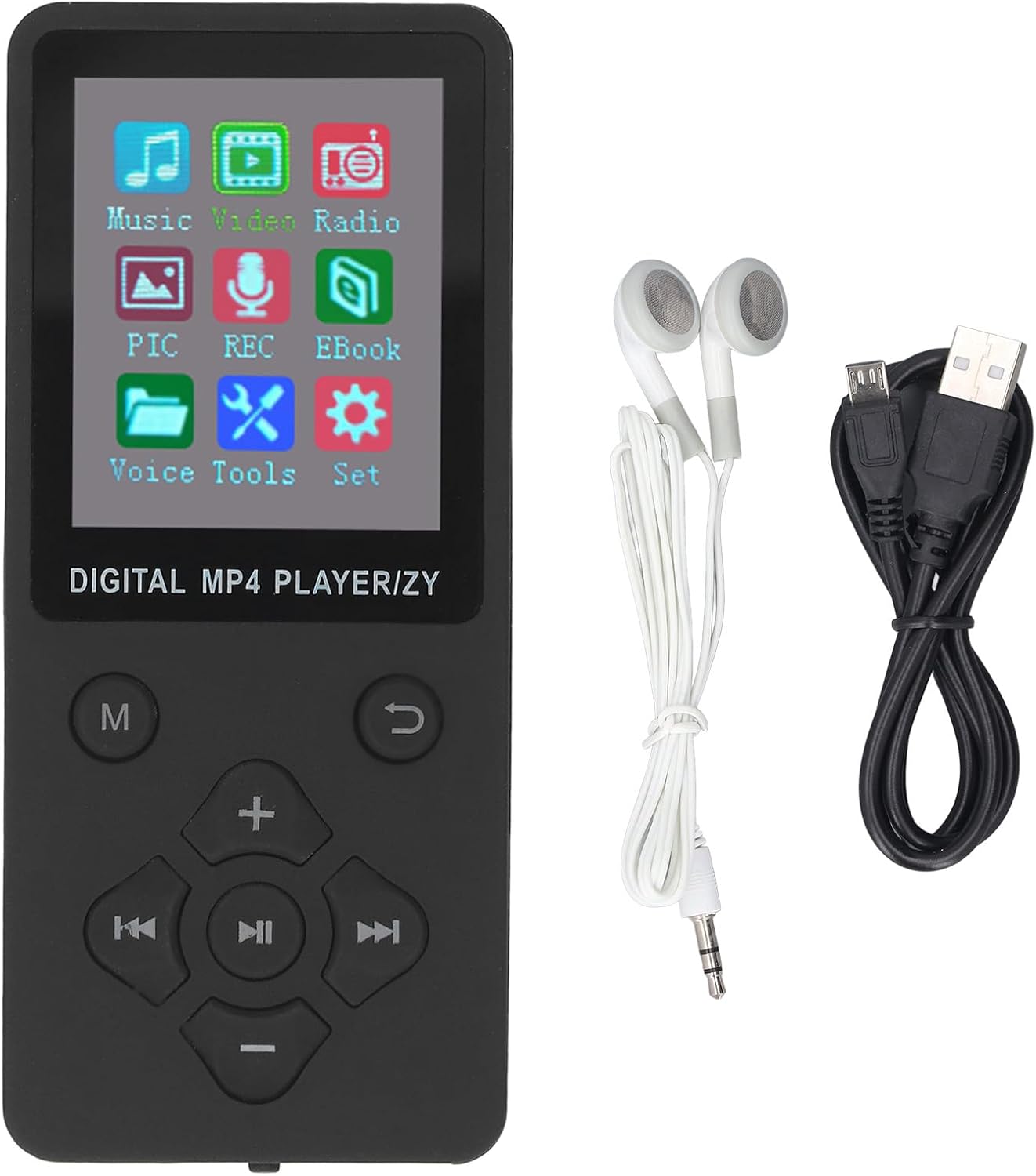
Image 2.1: The MP3 MP4 Player shown with its data cable and earphones.
2.2 ഉപകരണം ചാർജ് ചെയ്യുന്നു
Before first use, fully charge the player. Connect the provided USB data cable to the player's USB port and the other end to a USB power adapter (not included) or a computer's USB port. A full charge typically takes 1 to 2 hours.
2.3 ഒരു മൈക്രോ എസ്ഡി കാർഡ് ചേർക്കുന്നു
The player supports a Micro SD card (also known as TF card) up to 128GB for expanded storage. Locate the Micro SD card slot on the side or bottom of the device. Gently insert the card with the gold contacts facing down until it clicks into place.

ചിത്രം 2.2: മുന്നിലും പിന്നിലും view of the player, highlighting the TF-CARD slot on the rear.
2.4 ഒരു കമ്പ്യൂട്ടറിലേക്ക് ബന്ധിപ്പിക്കുന്നു
സംഗീതം, വീഡിയോകൾ അല്ലെങ്കിൽ മറ്റുള്ളവ കൈമാറാൻ files, connect the player to your computer using the provided USB data cable. The player will appear as a removable disk drive. You can then drag and drop files directly into the player's internal storage or the inserted Micro SD card.
3. പ്രവർത്തന നിർദ്ദേശങ്ങൾ
3.1 പവർ ഓൺ/ഓഫ്
Locate the ON/OFF switch on the side or bottom of the device. Slide the switch to the "ON" position to power on the player. To power off, slide the switch to the "OFF" position.

Image 3.1: Close-up of the player's bottom, showing the ON/OFF switch and ports.
3.2 നാവിഗേഷനും നിയന്ത്രണങ്ങളും
The player features a set of physical buttons for navigation:
- എം (മെനു): Access the main menu or return to the previous menu.
- Up/Volume (+): Navigate up in menus or increase volume during playback.
- Down/Volume (-): Navigate down in menus or decrease volume during playback.
- Left/Previous: Navigate left, go to the previous track/item.
- Right/Next: Navigate right, go to the next track/item.
- Play/Pause/Confirm: Start/pause playback, confirm selection in menus.
- മടക്കം: മുമ്പത്തെ സ്ക്രീനിലേക്കോ മെനുവിലേക്കോ മടങ്ങുക.

Image 3.2: The player's main menu interface.
3.3 മ്യൂസിക് പ്ലേബാക്ക്
- From the main menu, select "Music".
- Browse your music library by artist, album, genre, or all songs.
- Select a song and press the Play/Pause/Confirm button to begin playback.
- Use the Up/Down buttons to adjust volume. Use Left/Right buttons for previous/next track.
Supported music formats include MP3, WMA, OGG, APE, FLAC, and WAV.
3.4 ബ്ലൂടൂത്ത് കണക്ഷൻ
- Ensure your Bluetooth earphones or speaker are in pairing mode.
- On the player, navigate to the "Settings" menu and select "Bluetooth".
- Turn Bluetooth "On" and select "Search Device".
- ജോടിയാക്കാൻ ലിസ്റ്റിൽ നിന്ന് നിങ്ങളുടെ ഉപകരണം തിരഞ്ഞെടുക്കുക.
Once paired, audio will stream to your Bluetooth device. This player cannot pair with computers or mobile phones.
3.5 വീഡിയോ പ്ലേബാക്ക്
The player supports AMV video format. Videos must be converted to AMV format before transfer for proper playback.
- From the main menu, select "Video".
- Browse and select your desired video file.
- Press Play/Pause/Confirm to start playback.

Image 3.3: The player displaying video content.
3.6 മറ്റ് പ്രവർത്തനങ്ങൾ
- എഫ്എം റേഡിയോ: Select "Radio" from the main menu. Use navigation buttons to scan for stations.
- വോയ്സ് റെക്കോർഡർ: Select "REC" (Record) from the main menu to start and manage voice recordings.
- ഇ-ബുക്ക്: Select "Ebook" to read TXT format files.
- ഫോട്ടോ Viewer: Select "PIC" (Picture) to view JPG, JPEG, BMP, or GIF images.
4. പരിപാലനം
- വൃത്തിയാക്കൽ: ഉപകരണം വൃത്തിയാക്കാൻ മൃദുവായതും ഉണങ്ങിയതുമായ തുണി ഉപയോഗിക്കുക. ദ്രാവക ക്ലീനറുകളോ ഉരച്ചിലുകളുള്ള വസ്തുക്കളോ ഒഴിവാക്കുക.
- സംഭരണം: നേരിട്ടുള്ള സൂര്യപ്രകാശവും കടുത്ത താപനിലയും ഏൽക്കാത്ത തണുത്തതും വരണ്ടതുമായ സ്ഥലത്ത് പ്ലെയർ സൂക്ഷിക്കുക.
- ബാറ്ററി കെയർ: ബാറ്ററി ലൈഫ് വർദ്ധിപ്പിക്കാൻ, ബാറ്ററി ഇടയ്ക്കിടെ പൂർണ്ണമായും ഡിസ്ചാർജ് ചെയ്യുന്നത് ഒഴിവാക്കുക. ദീർഘനേരം ഉപയോഗത്തിലില്ലെങ്കിൽ പോലും ഉപകരണം പതിവായി ചാർജ് ചെയ്യുക.
- വാട്ടർ എക്സ്പോഷർ: ഈ ഉപകരണം വാട്ടർപ്രൂഫ് അല്ല. വെള്ളത്തിലോ ഉയർന്ന ആർദ്രതയിലോ സമ്പർക്കം ഒഴിവാക്കുക.
5. പ്രശ്നപരിഹാരം
If you encounter issues with your Fockety MP3 MP4 Player, please refer to the following common solutions:
- ഉപകരണം പവർ ഓൺ ചെയ്യുന്നില്ല: Ensure the battery is charged. Connect the player to a power source and try again. Check the ON/OFF switch is in the "ON" position.
- Cannot hear audio: Check the volume level. Ensure earphones are properly plugged in or Bluetooth device is connected and its volume is up. If using Bluetooth, ensure it's paired correctly.
- Fileകളിക്കുന്നില്ല: എന്ന് പരിശോധിക്കുക file format is supported (e.g., MP3 for music, AMV for video, TXT for e-books). Corrupted files may not play.
- ബ്ലൂടൂത്ത് ജോടിയാക്കൽ പ്രശ്നങ്ങൾ: Ensure the player's Bluetooth is enabled and your external Bluetooth device is in pairing mode and within range. Remember, the player cannot pair with computers or phones.
- സ്ക്രീൻ പ്രതികരിക്കുന്നില്ല അല്ലെങ്കിൽ നിശ്ചലമാണ്: Try powering off the device and then powering it back on. If the issue persists, allow the battery to fully discharge and then recharge it.
6 സ്പെസിഫിക്കേഷനുകൾ
| ഫീച്ചർ | സ്പെസിഫിക്കേഷൻ |
|---|---|
| മോഡലിൻ്റെ പേര് | Fockety8smuh0ixfe-11 |
| സ്ക്രീൻ വലിപ്പം | 1.8 ഇഞ്ച് |
| കണക്റ്റിവിറ്റി ടെക്നോളജി | Bluetooth 5.0, USB 2.0 |
| മെമ്മറി സ്റ്റോറേജ് കപ്പാസിറ്റി | Supports up to 128 GB (Micro SD card not included) |
| പിന്തുണയ്ക്കുന്ന സംഗീത ഫോർമാറ്റുകൾ | MP3, WMA, OGG, APE, FLAC, WAV |
| പിന്തുണയ്ക്കുന്ന വീഡിയോ ഫോർമാറ്റുകൾ | AMV (Converted Video) |
| പിന്തുണയ്ക്കുന്ന ചിത്ര ഫോർമാറ്റുകൾ | JPG, JPEG, BMP, GIF |
| Supported E-book Format | ടെക്സ്റ്റ് |
| പ്രത്യേക സവിശേഷതകൾ | Video Playback, E-Book, Voice Recorder, FM Radio, Built-in Speaker |
| ബാറ്ററി തരം | 180mAh ലിഥിയം അയോൺ ബാറ്ററി |
| ചാർജിംഗ് സമയം | 1 മുതൽ 2 മണിക്കൂർ വരെ |
| സംഗീത പ്ലേബാക്ക് സമയം | 10 മണിക്കൂർ വരെ |
| ഇനത്തിൻ്റെ ഭാരം | 2.68 ഔൺസ് |
| പാക്കേജ് അളവുകൾ | 6.69 x 3.15 x 0.79 ഇഞ്ച് |
| ഉൾപ്പെടുത്തിയ ഘടകങ്ങൾ | Data Cable, Earphone |
7. വാറൻ്റിയും പിന്തുണയും
For warranty information and customer support, please refer to the documentation provided at the time of purchase or contact the seller directly. Specific warranty terms may vary by region and retailer.


