BOBLOV KJ23Pro & W1 Body Camera User Manual
Models: KJ23Pro, W1
1. ഉൽപ്പന്നം കഴിഞ്ഞുview
This manual provides detailed instructions for the operation and maintenance of your BOBLOV KJ23Pro and W1 Body Cameras. These devices are designed for reliable video and audio recording in various professional and personal settings.

ചിത്രം 1.1: The BOBLOV KJ23Pro (left) and W1 (right) body cameras, along with a 64GB microSD card and USB adapter.
ദി BOBLOV KJ23Pro is a robust 2K body camera featuring 38MP photo clarity, 256GB storage, night vision with five IR lights, and a 4000mAh battery providing up to 15 hours of continuous recording. It is IP66 waterproof, suitable for law enforcement, security, and outdoor work.
ദി BOBLOV W1 is a compact HD 1080P body worn camera with a 550mAh battery offering up to 100 minutes of recording. It supports loop recording and time stamping, and comes with two clips for versatile wearability, ideal for traveling, delivery, and lecture recording.
2 പ്രധാന സവിശേഷതകൾ
KJ23Pro Body Camera:
- മെച്ചപ്പെടുത്തിയ ദൃശ്യങ്ങൾ: 2K video and 38MP photo resolution for clear and detailed capture.
- വിപുലീകരിച്ച ബാറ്ററി ലൈഫ്: 4000mAh battery supports up to 15 hours of continuous 1080P recording.
- വിപുലമായ രാത്രി കാഴ്ച: Equipped with five high-intensity IR lights for superior visibility in low-light conditions.
- മോടിയുള്ള ഡിസൈൻ: IP66 waterproof rating for reliable performance in various environments.

ചിത്രം 2.1: The KJ23Pro camera demonstrating 2K clarity, shown worn by a police officer.
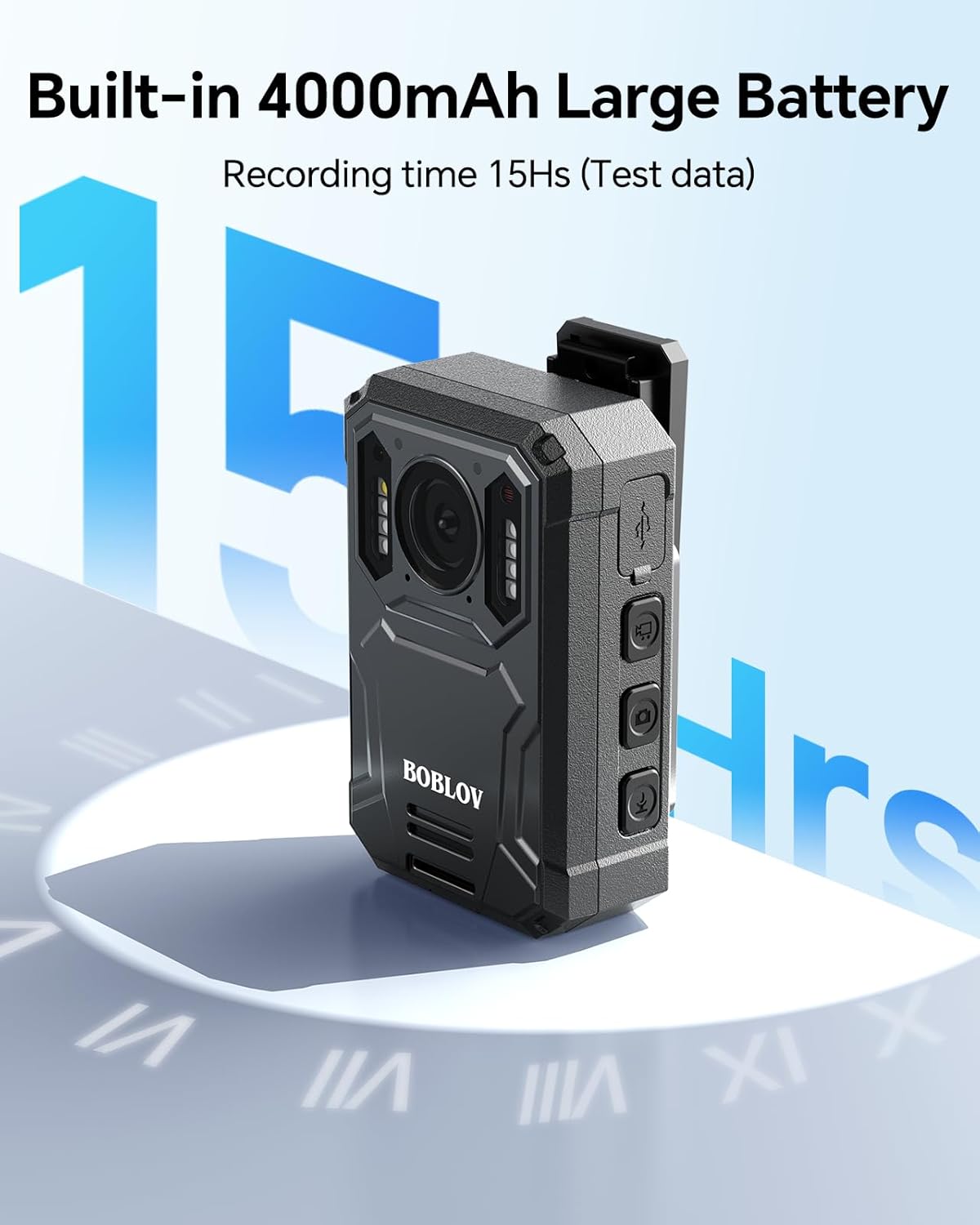
ചിത്രം 2.2: The KJ23Pro highlighting its 4000mAh battery, capable of 15 hours of recording.

ചിത്രം 2.3: The KJ23Pro camera showcasing its night vision capability in a low-light urban setting.

ചിത്രം 2.4: Illustration of the KJ23Pro's loop recording feature, showing various video segment lengths.
W1 Body Camera:
- ഒതുക്കമുള്ളതും പോർട്ടബിൾ: Ergonomic design for easy carrying and discreet use.
- Reliable Recording: HD 1080P video quality with a Sony 307 sensor for crisp footage.
- വഴക്കമുള്ള ശക്തി: 550mAh battery provides up to 100 minutes of recording, supports continuous use while charging.
- ബഹുമുഖ ഉപയോഗം: Includes two clips for various wearing options, suitable for diverse applications.

ചിത്രം 2.5: The W1 camera demonstrating true 1080P clarity compared to blurry footage.

ചിത്രം 2.6: The W1 camera's compact size, shown being placed into a pocket.

ചിത്രം 2.7: The W1 camera highlighting its 90-minute recording time and charging capabilities.

ചിത്രം 2.8: The W1 camera being worn by a delivery person, illustrating its wearable design.
3. സജ്ജീകരണ ഗൈഡ്
3.1 പ്രാരംഭ ചാർജിംഗ്
Before first use, fully charge your BOBLOV body camera. Connect the camera to a power source using the provided USB cable. The charging indicator light will typically show red during charging and turn off or change color when fully charged.
- KJ23Pro: Charging time may vary, but ensure it is fully charged for optimal 15-hour recording performance.
- W1: Charging typically takes 2 hours for up to 100 minutes of recording. The W1 can record while charging.
3.2 Memory Card Installation (KJ23Pro)
The KJ23Pro comes with 256GB internal storage. No external memory card installation is required.
3.3 Mounting and Wearing
Both cameras come with clips for secure attachment.
- KJ23Pro: Utilize the included clip to attach the camera securely to clothing, a belt, or a bag strap. Ensure the lens has a clear view.
- W1: The W1 includes two clips for versatile wearing options. Attach it to a shirt pocket, collar, or other suitable location.
4. പ്രവർത്തന നിർദ്ദേശങ്ങൾ
4.1 പവർ ഓൺ/ഓഫ്
- പവർ ഓണാക്കാൻ: Press and hold the Power button for a few seconds until the indicator light illuminates.
- പവർ ഓഫ് ചെയ്യാൻ: Press and hold the Power button again until the indicator light turns off.
4.2 വീഡിയോ റെക്കോർഡിംഗ്
To start video recording, locate the dedicated video recording button (refer to your camera's specific button layout).
- റെക്കോർഡിംഗ് ആരംഭിക്കുക: Press the Video button once. The indicator light will typically flash to indicate recording is in progress.
- റെക്കോർഡിംഗ് നിർത്തുക: Press the Video button again to stop recording. The indicator light will return to standby mode.
- ലൂപ്പ് റെക്കോർഡിംഗ്: Both cameras support loop recording. When the storage is full, the oldest files will be overwritten automatically. The KJ23Pro supports configurable video fragment lengths (e.g., 5min, 10min, 15min, 30min).
4.3 ഫോട്ടോ എടുക്കൽ
To take still photos, locate the dedicated photo capture button.
- ഫോട്ടോ എടുക്കുക: Press the Photo button once. The camera will capture a still image.
4.4 Night Vision Activation (KJ23Pro)
The KJ23Pro features automatic or manual night vision activation.
- സ്വയമേവ: The camera may automatically switch to night vision in low-light conditions.
- മാനുവൽ: Refer to the camera's on-screen menu or dedicated button for manual IR light activation.
4.5 File Transfer and Playback
റെക്കോർഡ് ചെയ്ത ആക്സസ് ചെയ്യാൻ files, connect the camera to a computer using the provided USB cable. The camera will appear as a removable disk drive.
- File പ്രവേശനം: Navigate to the DCIM folder to find your video and photo files.
- പ്ലേബാക്ക്: Use a standard media player on your computer to view ദി files.
5. പരിപാലനം
5.1 വൃത്തിയാക്കൽ
- ക്യാമറ ബോഡി വൃത്തിയാക്കാൻ മൃദുവായതും ഉണങ്ങിയതുമായ തുണി ഉപയോഗിക്കുക.
- ലെൻസിന്, പോറലുകൾ ഒഴിവാക്കാൻ ഒരു പ്രത്യേക ലെൻസ് ക്ലീനിംഗ് തുണിയും ലായനിയും ഉപയോഗിക്കുക.
- കഠിനമായ രാസവസ്തുക്കളോ ഉരച്ചിലുകൾ ഉപയോഗിക്കരുത്.
5.2 സംഭരണം
- നേരിട്ടുള്ള സൂര്യപ്രകാശവും ഉയർന്ന താപനിലയും ഏൽക്കാത്ത തണുത്തതും വരണ്ടതുമായ സ്ഥലത്ത് ക്യാമറ സൂക്ഷിക്കുക.
- ദീർഘനേരം സൂക്ഷിക്കുകയാണെങ്കിൽ, ബാറ്ററിയുടെ ആയുസ്സ് വർദ്ധിപ്പിക്കുന്നതിന് ബാറ്ററി ഭാഗികമായി (ഏകദേശം 50%) ചാർജ്ജ് ചെയ്തിട്ടുണ്ടെന്ന് ഉറപ്പാക്കുക.
5.3 ഫേംവെയർ അപ്ഡേറ്റുകൾ
Periodically check the official BOBLOV website for any available firmware updates. Firmware updates can improve performance, add features, or fix bugs. Follow the instructions provided with the firmware update carefully.
6. പ്രശ്നപരിഹാരം
| പ്രശ്നം | സാധ്യമായ കാരണം | പരിഹാരം |
|---|---|---|
| ക്യാമറ പവർ ഓൺ ചെയ്യുന്നില്ല. | ബാറ്ററി തീർന്നു. | ക്യാമറ പൂർണ്ണമായും ചാർജ് ചെയ്യുക. |
| റെക്കോർഡിംഗ് അപ്രതീക്ഷിതമായി നിലയ്ക്കുന്നു. | Low battery; Storage full (for W1 if not using loop recording); Overheating. | Charge the battery; Ensure loop recording is enabled or transfer files; Allow camera to cool down. |
| മോശം വീഡിയോ/ഫോട്ടോ നിലവാരം. | ലെൻസ് വൃത്തികേടാണ്; വെളിച്ചക്കുറവ്; തെറ്റായ ക്രമീകരണങ്ങൾ. | Clean the lens; Ensure adequate lighting or activate night vision (KJ23Pro); Check resolution settings. |
| കമ്പ്യൂട്ടർ ക്യാമറ തിരിച്ചറിഞ്ഞില്ല. | Faulty USB cable; Driver issue; Camera not in mass storage mode. | Try a different USB cable; Restart computer; Check camera settings for USB mode. |
7 സ്പെസിഫിക്കേഷനുകൾ
BOBLOV KJ23Pro Body Camera:
- വീഡിയോ മിഴിവ്: 2K വരെ
- ഫോട്ടോ മിഴിവ്: 38MP വരെ
- ആന്തരിക സംഭരണം: 256 ജിബി
- ബാറ്ററി ശേഷി: 4000mAh
- തുടർച്ചയായ റെക്കോർഡിംഗ് സമയം: Up to 15 hours (at 1080P)
- രാത്രി കാഴ്ച: Yes, with five IR lights
- വാട്ടർപ്രൂഫ് റേറ്റിംഗ്: IP66
BOBLOV W1 Body Camera:
- വീഡിയോ മിഴിവ്: എച്ച്ഡി 1080 പി
- സെൻസർ: Sony 307 Sensor
- ബാറ്ററി ശേഷി: 550mAh
- റെക്കോർഡിംഗ് സമയം: 100 മിനിറ്റ് വരെ
- ചിപ്സെറ്റ്: Novatek Chipset
- ഫീച്ചറുകൾ: Loop Recording, Time Stamp, Wearable with 2 Clips
8. വാറൻ്റിയും പിന്തുണയും
For warranty information and technical support, please refer to the official BOBLOV webസൈറ്റിൽ ബന്ധപ്പെടുകയോ അവരുടെ ഉപഭോക്തൃ സേവനവുമായി നേരിട്ട് ബന്ധപ്പെടുകയോ ചെയ്യുക. വാറന്റി ക്ലെയിമുകൾക്കുള്ള വാങ്ങലിന്റെ തെളിവായി നിങ്ങളുടെ വാങ്ങൽ രസീത് സൂക്ഷിക്കുക.
Official BOBLOV Store: Visit the BOBLOV Store on Amazon


