1. ആമുഖം
This manual provides detailed instructions for the safe and effective use of the SEQURE HT140 2-IN-1 Portable Hot Tweezers Soldering Iron Kit. The HT140 is designed for precision soldering and desoldering tasks, particularly for Surface Mount Devices (SMD). Please read this manual thoroughly before operating the device.
2 സുരക്ഷാ വിവരങ്ങൾ
- സോൾഡറിംഗ് ചെയ്യുമ്പോൾ എല്ലായ്പ്പോഴും ഉചിതമായ നേത്ര സംരക്ഷണം ധരിക്കുക.
- സോൾഡർ പുക ശ്വസിക്കുന്നത് ഒഴിവാക്കാൻ നിങ്ങളുടെ ജോലിസ്ഥലത്ത് മതിയായ വായുസഞ്ചാരം ഉറപ്പാക്കുക.
- The soldering tips reach high temperatures. Avoid direct contact with skin to prevent burns.
- Place the device on the provided stand when not in use to prevent accidental contact or damage.
- Do not use the device near flammable materials or liquids.
- Disconnect power when changing tips or performing maintenance.
- കുട്ടികൾക്ക് ലഭ്യമാകാതെ സൂക്ഷിക്കുക.
3. പാക്കേജ് ഉള്ളടക്കം
താഴെ ലിസ്റ്റ് ചെയ്തിരിക്കുന്ന എല്ലാ ഇനങ്ങളും നിങ്ങളുടെ പാക്കേജിൽ ഉൾപ്പെടുത്തിയിട്ടുണ്ടെന്ന് ഉറപ്പാക്കുക:
- HT140 Host (Main Unit) x 1
- Hot Tweezers Desoldering Tip (IS type) x 2
- HT Station (Stand with cleaning sponge) x 1
- Accessory Package (Hex keys, spare screws) x 1
- സംഭരണ ബാഗ് x 1
- 1.5m PD 240W Silicone Wire (USB-C to USB-C) x 1
- PD 65W Fast Charging Adapter (US + EU plug) x 1

4. ഉൽപ്പന്നം കഴിഞ്ഞുview
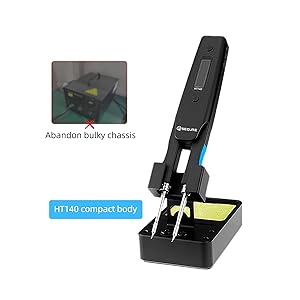
The SEQURE HT140 is an innovative 2-in-1 tool that functions as both a soldering iron and hot tweezers. It features rapid heating, precise temperature control, and a compact design suitable for various electronic repair and SMD work.
4.1 പ്രധാന സവിശേഷതകൾ
- 2-ഇൻ-1 പ്രവർത്തനം: Operates as a single-sided soldering iron or double-sided hot tweezers.
- വേഗത്തിലുള്ള ചൂടാക്കൽ: Melts solder in approximately 2 seconds.
- വിശാലമായ താപനില പരിധി: 50°C മുതൽ 500°C വരെ (122°F മുതൽ 932°F വരെ) ക്രമീകരിക്കാവുന്നതാണ്.
- മുൻകൂട്ടി നിശ്ചയിച്ച താപനില: Three customizable temperature settings for efficiency.
- സ്മാർട്ട് കൺട്രോൾ സിസ്റ്റം: Features temperature calibration, compensation, auto sleep, and auto standby.
- OLED ഡിസ്പ്ലേ: High-definition display for clear temperature and status indication.
- ഡ്യുവൽ പവർ ഇൻപുട്ട്: Supports Type-C (PD3.1/3.0/2.0, QC3.0/2.0) and DC5525 (5V-28V, max 140W).
- ഒതുക്കമുള്ളതും പോർട്ടബിൾ: വിവിധ പരിതസ്ഥിതികളിൽ എളുപ്പത്തിൽ ഗതാഗതത്തിനും ഉപയോഗത്തിനും വേണ്ടി രൂപകൽപ്പന ചെയ്തിരിക്കുന്നു.

4.2 2-in-1 Functionality
The HT140 can be configured for two primary modes of operation:
- Soldering Iron Mode: Utilizes single-sided heating for precise soldering of individual components.
- Hot Tweezers Mode: Employs double-sided heating for efficient desoldering and removal of SMD components.

5. സജ്ജീകരണം
5.1 Installing Soldering Tips
- Ensure the HT140 is powered off and cool.
- Loosen the small set screws on the tip holders using the provided hex key.
- Carefully insert the desired C120 hot tweezers cartridge tips into the holders. Ensure they are fully seated.
- Tighten the set screws to secure the tips. Do not overtighten.
5.2 ബന്ധിപ്പിക്കുന്ന പവർ
The HT140 supports both Type-C (USB-C) and DC5525 power inputs.
- Using Type-C: Connect the provided 1.5m PD 240W Silicone Wire to the Type-C port on the HT140 and to a compatible PD (Power Delivery) charger (e.g., the included 65W adapter).
- Using DC5525: Connect a compatible DC power adapter (5V-28V) to the DC5525 port.
Note: For optimal performance and rapid heating, use a power source capable of delivering at least 65W, ideally up to 140W.
6. ഓപ്പറേഷൻ
6.1 പവർ ഓൺ/ഓഫ്
Connect the device to a power source. The OLED display will illuminate. To power off, disconnect the power source.
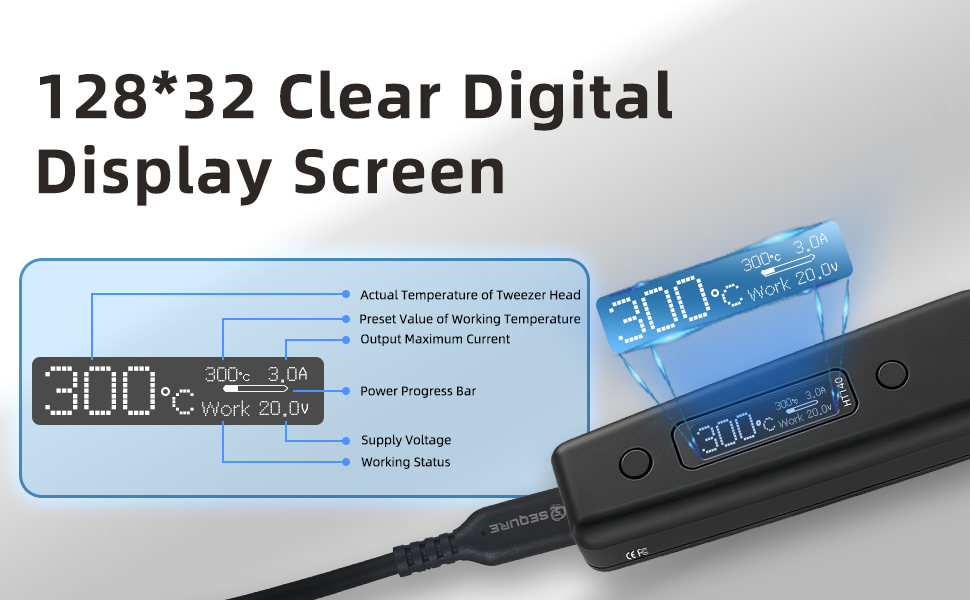
6.2 OLED ഡിസ്പ്ലേ
The OLED display provides real-time information about the device's status:
- Actual Temperature of Tweezer Head
- Preset Value of Working Temperature
- ഔട്ട്പുട്ട് പരമാവധി കറന്റ്
- പവർ പ്രോഗ്രസ് ബാർ
- സപ്ലൈ വോളിയംtage
- പ്രവർത്തന നില
6.3 താപനില ക്രമീകരണം
The temperature can be adjusted from 50°C to 500°C. Use the control buttons on the device to increase or decrease the target temperature. The display will show the current and target temperatures.

6.4 Preset Temperatures (TurboSet Mode)
The HT140 supports three groups of default heating temperatures for quick access:
- SetTemp 1: 280°C (Adjustable)
- SetTemp 2: 320°C (Adjustable)
- SetTemp 3: 380°C (Adjustable)
Refer to the device's menu for instructions on how to select and customize these preset temperatures.
6.5 Auto Sleep & Standby
To conserve energy and reduce tip wear, the HT140 features adjustable auto sleep and standby modes:
- Adjustable Sleep Time: Configurable from 5s to 360s of inactivity.
- Adjustable Sleep Temperature: Set between 50°C and 500°C.
- യാന്ത്രിക സ്റ്റാൻഡ്ബൈ: Enters standby mode after a default of 5 minutes following sleep mode (adjustable).

6.6 Power Input Compatibility
The HT140 is compatible with a wide range of power sources, supporting 5V-28V DC input with a maximum power of 140W. This includes PD chargers, power adapters, and 3S-6S LiPo batteries.

6.7 ഫേംവെയർ നവീകരണം
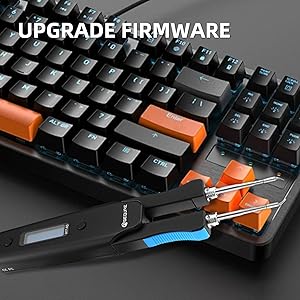
The HT140 supports firmware upgrades to enhance functionality and performance. Connect the device to a computer via the USB-C port and follow the instructions provided on the SEQURE official website for the upgrade process.
7. പരിപാലനം
7.1 ടിപ്പ് ക്ലീനിംഗ്
Regularly clean the soldering tips to ensure optimal performance and longevity. Use the included cleaning sponge (dampened, not wet) or brass wool to wipe off excess solder and oxidation.
7.2 Tip Tinning
After cleaning and before storage, always tin the tips with a thin layer of fresh solder. This prevents oxidation and prolongs tip life.
7.3 സംഭരണം
When not in use, store the HT140 in its provided storage bag to protect it from dust and physical damage.
8. പ്രശ്നപരിഹാരം
- ഉപകരണം ഓണാക്കുന്നില്ല: Ensure the power cable is securely connected and the power source is functioning correctly and providing sufficient wattage.
- Tips not heating: Check if the tips are correctly installed and the set screws are tightened. Verify the power input.
- കൃത്യമല്ലാത്ത താപനില വായന: Perform a temperature calibration as described in the device's menu settings.
- Poor solder wetting: Clean and re-tin the tips. Ensure the correct temperature is set for the solder type being used.
9 സ്പെസിഫിക്കേഷനുകൾ
| ഫീച്ചർ | സ്പെസിഫിക്കേഷൻ |
|---|---|
| മോഡൽ | HT140 |
| പവർ ഇൻപുട്ട് | Type-C (PD3.1/3.0/2.0, QC3.0/2.0), DC5525 |
| വാല്യംtagഇ റേഞ്ച് | 5 വി -28 വി ഡിസി |
| പരമാവധി പവർ | 140W |
| താപനില പരിധി | 50°C - 500°C (122°F - 932°F) |
| Heating Time (30°C to 300°C) | As fast as 2 seconds (with 140W input) |
| പ്രദർശിപ്പിക്കുക | HD OLED |
| അനുയോജ്യമായ നുറുങ്ങുകൾ | C120 Hot Tweezers Cartridge Tips |
| യാന്ത്രിക ഉറക്കം | Adjustable (5s-360s) |
| ഓട്ടോ സ്റ്റാൻഡ്ബൈ | Adjustable (default 5 minutes after sleep) |
| മെറ്റീരിയൽ | മെറ്റൽ, പ്ലാസ്റ്റിക് |
| ഇനത്തിൻ്റെ ദൈർഘ്യം | 6.3 ഇഞ്ച് |
| ഇനത്തിൻ്റെ ഭാരം | 1.76 ഔൺസ് |

10. വാറൻ്റിയും പിന്തുണയും
For warranty information and technical support, please refer to the official SEQURE webസൈറ്റിൽ ബന്ധപ്പെടുക അല്ലെങ്കിൽ നിങ്ങളുടെ റീട്ടെയിലറെ ബന്ധപ്പെടുക. വാങ്ങിയതിന്റെ തെളിവായി നിങ്ങളുടെ വാങ്ങൽ രസീത് സൂക്ഷിക്കുക.


