1. ആമുഖം
The Tapo C530WS is a high-resolution 3K (5MP) outdoor security camera designed for comprehensive surveillance. It features pan and tilt capabilities, allowing for a wide field of view, and is equipped with Starlight night vision for clear imaging in low-light conditions. The camera supports advanced AI detection for distinguishing between people, vehicles, and pets, reducing false alarms. Its IP66 weatherproofing ensures reliable operation in various outdoor environments, and it offers both wireless (Wi-Fi) and wired (Ethernet) connectivity options. Two-way audio communication is also supported.
2. പാക്കേജ് ഉള്ളടക്കം
നിങ്ങളുടെ പാക്കേജിൽ എല്ലാ ഘടകങ്ങളും ഉണ്ടെന്ന് ഉറപ്പാക്കുക:
- Tapo C530WS Camera Unit
- പവർ അഡാപ്റ്റർ
- മ Template ണ്ടിംഗ് ടെംപ്ലേറ്റ്
- മൗണ്ടിംഗ് സ്ക്രൂകളും ആങ്കറുകളും
- വാട്ടർപ്രൂഫ് സീൽ
- ദ്രുത ആരംഭ ഗൈഡ്
3. സജ്ജീകരണം
3.1. Download the Tapo App
Before installation, download the Tapo app from the App Store or Google Play Store. The app will guide you through the setup process.
3.2. ക്യാമറ ഓൺ ചെയ്യുക
Connect the camera to a power outlet using the provided power adapter. Wait for the status LED to blink red and green, indicating it's ready for setup.
3.3. Initial Configuration via Tapo App
Open the Tapo app, log in or create a TP-Link ID. Tap the '+' icon to add your camera and follow the on-screen instructions to connect it to your Wi-Fi network or via an Ethernet cable.

Image: The Tapo app interface guiding a user through the camera setup process, displaying various options and controls.
3.4. ക്യാമറ ഘടിപ്പിക്കുന്നു
The Tapo C530WS can be mounted on a wall or ceiling. Use the provided mounting template to mark drill holes. Secure the mounting bracket, then attach the camera. Ensure the power cable is properly routed and protected, especially for outdoor installations.

Image: A diagram illustrating different ways to mount the Tapo C530WS camera, including wall and ceiling installations, highlighting its versatility.
4. ക്യാമറ പ്രവർത്തിപ്പിക്കുക
4.1. തത്സമയം View ഒപ്പം പ്ലേബാക്ക്
Access the live feed and recorded footage through the Tapo app. You can pan and tilt the camera remotely to adjust the viewing ആംഗിൾ.

Image: A side-by-side comparison demonstrating the superior clarity and detail of 3K 5MP resolution captured by the Tapo C530WS camera compared to standard 1080p.
4.2. പാൻ, ടിൽറ്റ് നിയന്ത്രണം
The camera offers 360° horizontal and 130° vertical rotation. Use the controls in the Tapo app to adjust the camera's orientation and cover a wide area.

Image: The Tapo C530WS camera is shown mounted on the exterior of a house, with arrows indicating its extensive 360-degree horizontal and 130-degree vertical pan and tilt range, providing broad surveillance coverage.
4.3. നൈറ്റ് വിഷൻ
The Tapo C530WS features Starlight night vision, providing full-color video even in extremely low-light conditions. It also has traditional infrared night vision for complete darkness.

Image: A split image comparing the performance of Starlight Night Vision (left, showing color) and standard Night Vision (right, showing monochrome) from the Tapo C530WS camera in a low-light outdoor setting.
4.4. AI Detection and Smart Tracking
Configure detection zones and sensitivity for motion, person, vehicle, and pet detection. The camera can automatically track detected subjects within its field of view.

Image: A smartphone screen displaying notifications from the Tapo app, indicating various AI detection events such as person detection, vehicle detection, and pet detection, with corresponding visual highlights.

ചിത്രം: ഒരു ആകാശ ചിത്രം view showing the Tapo C530WS camera actively tracking a person riding a skateboard alongside a swimming pool, demonstrating its smart tracking capability.
4.5. Two-Way Audio and Alarm
Use the built-in microphone and speaker for two-way communication. You can also activate sound and light alarms to deter intruders.

Image: A person communicating with a delivery driver at their doorstep using the two-way audio function of the Tapo C530WS camera, illustrating remote interaction.

Image: The Tapo C530WS camera is shown with its integrated light and sound alarm activated, illuminating a dark area where a figure is attempting to break into a car, demonstrating its deterrent capabilities.
4.6. സ്റ്റോറേജ് ഓപ്ഷനുകൾ
The camera supports local storage via a microSD card (up to 512GB) and offers optional cloud storage services for recorded footage.
4.7. സ്വകാര്യത മോഡ്
Activate Privacy Mode through the Tapo app to physically block the camera lens, ensuring privacy when needed.
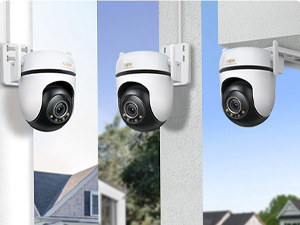
Image: A smartphone displaying the Tapo app interface with Privacy Mode enabled, showing the camera's lens physically rotated to obscure the view, ensuring user privacy.
4.8. സ്മാർട്ട് ഹോം ഇന്റഗ്രേഷൻ
The Tapo C530WS is compatible with smart home platforms like Amazon Alexa and Google Home, allowing for voice control and integration into smart routines.

Image: A person interacting with a smart display, which is showing the live feed from a Tapo C530WS camera, demonstrating integration with voice assistants like Alexa.
5. പരിപാലനം
The Tapo C530WS is designed for outdoor use with an IP66 weatherproof rating, making it resistant to dust and water. Regular maintenance is minimal:
- ലെൻസ് വൃത്തിയാക്കൽ: ക്യാമറ ലെൻസ് ഇടയ്ക്കിടെ മൃദുവായ, ഡി-ടച്ച് ഉപയോഗിച്ച് തുടയ്ക്കുക.amp വ്യക്തമായ ചിത്ര നിലവാരം ഉറപ്പാക്കാൻ തുണി ഉപയോഗിക്കുക. അബ്രസിവ് ക്ലീനറുകൾ ഒഴിവാക്കുക.
- ഫേംവെയർ അപ്ഡേറ്റുകൾ: Keep the camera's firmware updated through the Tapo app to ensure optimal performance and security.
- പവർ കണക്ഷൻ: Ensure the power connection remains secure and free from damage.

Image: The Tapo C530WS camera is depicted enduring rain and dust, visually representing its IP66 rating for weather and dust resistance, suitable for outdoor environments.
6. പ്രശ്നപരിഹാരം
If you encounter issues with your Tapo C530WS camera, try the following steps:
- ക്യാമറ ഓഫ്ലൈൻ: Check the power connection and ensure your Wi-Fi network is functioning correctly. Restart the camera and your router.
- മോശം ചിത്രത്തിന്റെ ഗുണനിലവാരം: ക്യാമറ ലെൻസ് വൃത്തിയാക്കുക. ക്യാമറയുടെ ലെൻസ് ഫീൽഡിൽ തടസ്സങ്ങളൊന്നുമില്ലെന്ന് ഉറപ്പാക്കുക. view. Check your network speed.
- മോഷൻ ഡിറ്റക്ഷൻ പ്രവർത്തിക്കുന്നില്ല: Verify that motion detection is enabled in the Tapo app and that detection zones are correctly configured. Adjust sensitivity settings.
- Wi-Fi-ലേക്ക് കണക്റ്റുചെയ്യാൻ കഴിയില്ല: Ensure the camera is within range of your Wi-Fi router. Double-check your Wi-Fi password. Try resetting the camera to factory defaults and re-configuring.
- ആപ്പ് പ്രശ്നങ്ങൾ: Ensure your Tapo app is updated to the latest version. Try clearing the app's cache or reinstalling it.
For more detailed troubleshooting, refer to the support section within the Tapo app or visit the official Tapo support webസൈറ്റ്.
7 സ്പെസിഫിക്കേഷനുകൾ
| ഫീച്ചർ | വിശദാംശങ്ങൾ |
|---|---|
| ബ്രാൻഡ് | തപോ |
| മോഡൽ നമ്പർ | C530WS തൊപ്പി |
| ഉൽപ്പന്ന അളവുകൾ (LxWxH) | 12.4 x 12.3 x 9 സെ.മീ |
| ഉൽപ്പന്ന ഭാരം | 740 ഗ്രാം |
| നിറം | വെള്ള |
| ഫോം ഫാക്ടർ | താഴികക്കുടം |
| വീഡിയോ ക്യാപ്ചർ റെസല്യൂഷൻ | 3K 5MP |
| കണക്റ്റിവിറ്റി ടെക്നോളജി | വയർലെസ് (വൈ-ഫൈ) |
| വയർലെസ് കമ്മ്യൂണിക്കേഷൻ ടെക്നോളജി | വൈഫൈ |
| കണക്ഷൻ പ്രോട്ടോക്കോൾ | വൈഫൈ |
| ഫീച്ചറുകൾ | Night Vision, Pan/Tilt, AI Detection (Person, Vehicle, Pet), Two-Way Audio, Starlight Sensor, IP66 Weatherproof |
| ഇൻഡോർ/ഔട്ട്ഡോർ ഉപയോഗം | ഔട്ട്ഡോർ |
| ശുപാർശ ചെയ്യുന്ന ഉപയോഗം | ഔട്ട്ഡോർ സെക്യൂരിറ്റി |
| അനുയോജ്യമായ ഉപകരണങ്ങൾ | സ്മാർട്ട്ഫോൺ |
| മൗണ്ടിംഗ് തരം | സീലിംഗ് മൗണ്ട് |
| ഉൾപ്പെടുത്തിയ ഘടകങ്ങൾ | Tapo C530WS Camera Unit |
8. വാറൻ്റിയും പിന്തുണയും
8.1. വാറൻ്റി വിവരങ്ങൾ
വിശദമായ വാറന്റി വിവരങ്ങൾക്ക്, ദയവായി നിർമ്മാതാവിന്റെ ഔദ്യോഗിക വെബ്സൈറ്റ് കാണുക. webനിങ്ങളുടെ ഉൽപ്പന്നത്തിന്റെ വെബ്സൈറ്റിലോ വാറന്റി കാർഡിലോ ഉൾപ്പെടുത്തിയിട്ടില്ല. വാറന്റി നിബന്ധനകളും വ്യവസ്ഥകളും പ്രദേശത്തിനനുസരിച്ച് വ്യത്യാസപ്പെടാം.
8.2. ഉപഭോക്തൃ പിന്തുണ
If you require technical assistance or have questions about your Tapo C530WS camera, please contact Tapo customer service. You can find contact details and additional support resources on the official Tapo support webസൈറ്റ്:
- Tapo Official Webസൈറ്റ്: www.tapo.com
- പിന്തുണാ പേജ്: ഔദ്യോഗിക പേജിലെ പിന്തുണ വിഭാഗം കാണുക. website for FAQs, firmware downloads, and contact options.


