1. ആമുഖം
This manual provides essential information for the safe and efficient operation of your VIZIO 50-inch 4K UHD LED Smart TV, model V4K50C-08. Please read this manual thoroughly before using your television and retain it for future reference.
The VIZIO V4K50C-08 Smart TV delivers vivid 4K picture quality with Dolby Vision HDR, enhancing detail, contrast, and color. It features WiFi 6 for faster streaming and gaming, and built-in VIZIO Home for instant access to applications, free channels, and on-demand titles.

ചിത്രം 1.1: മുൻഭാഗം view of the VIZIO 50-inch 4K UHD LED Smart TV.
2 സുരക്ഷാ വിവരങ്ങൾ
Always follow basic safety precautions when using this television to reduce the risk of fire, electric shock, and injury to persons. Keep this manual handy for reference.
- ഈ ഉപകരണം മഴയിലോ ഈർപ്പത്തിലോ തുറന്നുകാട്ടരുത്.
- വെന്റിലേഷൻ തുറസ്സുകളൊന്നും തടയരുത്. നിർമ്മാതാവിന്റെ നിർദ്ദേശങ്ങൾക്കനുസൃതമായി ഇൻസ്റ്റാൾ ചെയ്യുക.
- റേഡിയറുകൾ, ഹീറ്റ് രജിസ്റ്ററുകൾ, സ്റ്റൗകൾ, അല്ലെങ്കിൽ മറ്റ് ഉപകരണങ്ങൾ (ഉൾപ്പെടെ) പോലെയുള്ള താപ സ്രോതസ്സുകൾക്ക് സമീപം ഇൻസ്റ്റാൾ ചെയ്യരുത്. ampലൈഫയറുകൾ) ചൂട് ഉത്പാദിപ്പിക്കുന്നത്.
- പ്രത്യേകിച്ച് പ്ലഗുകൾ, കൺവീനിയൻസ് റെസെപ്റ്റക്കിളുകൾ, ഉപകരണത്തിൽ നിന്ന് പുറത്തുകടക്കുന്ന ഇടം എന്നിവയിൽ നടക്കുകയോ നുള്ളുകയോ ചെയ്യുന്നതിൽ നിന്ന് പവർ കോർഡ് സംരക്ഷിക്കുക.
- നിർമ്മാതാവ് വ്യക്തമാക്കിയ അറ്റാച്ച്മെൻ്റുകൾ/ആക്സസറികൾ മാത്രം ഉപയോഗിക്കുക.
- എല്ലാ സേവനങ്ങളും യോഗ്യതയുള്ള സേവന ഉദ്യോഗസ്ഥർക്ക് റഫർ ചെയ്യുക.
3. ബോക്സിൽ എന്താണുള്ളത്?
Your VIZIO 50-inch 4K UHD LED Smart TV package includes the following items:
- VIZIO 50-inch 4K UHD LED Smart TV
- വോയ്സ് വിദൂര
- 2 AAA ബാറ്ററികൾ (റിമോട്ടിന്)
- പവർ കേബിൾ
- ടിവി സ്റ്റാൻഡ് (2 കഷണങ്ങൾ)

Image 3.1: Included components and TV dimensions.
4. സജ്ജീകരണം
4.1 സ്റ്റാൻഡ് അറ്റാച്ചുചെയ്യുന്നു
- Carefully place the TV face-down on a soft, clean surface to prevent damage.
- ഓരോ സ്റ്റാൻഡ് പീസും ടിവിയുടെ അടിയിലുള്ള അനുബന്ധ സ്ലോട്ടുകളുമായി വിന്യസിക്കുക.
- നൽകിയിരിക്കുന്ന സ്ക്രൂകൾ ഉപയോഗിച്ച് ഓരോ സ്റ്റാൻഡ് പീസും ഉറപ്പിക്കുക. അവ ദൃഢമായി മുറുക്കിയിട്ടുണ്ടെന്ന് ഉറപ്പാക്കുക.
4.2 പെരിഫറലുകൾ ബന്ധിപ്പിക്കുന്നു
Connect your external devices to the appropriate ports on the back or side of your VIZIO TV.
- എച്ച്ഡിഎംഐ: For high-definition video and audio devices (e.g., Blu-ray players, gaming consoles). Your TV features multiple HDMI ports, including HDMI 1 (eARC) for enhanced audio return channel functionality.
- USB: USB സംഭരണ ഉപകരണങ്ങൾ ബന്ധിപ്പിക്കുന്നതിന്.
- ആൻ്റിന: വായുവിലൂടെ പ്രവർത്തിക്കുന്ന ആന്റിന ബന്ധിപ്പിക്കുന്നതിന്.
- Audio Out Optical (S/PDIF): ഒരു സൗണ്ട്ബാറിലേക്കോ ഓഡിയോ റിസീവറിലേക്കോ ബന്ധിപ്പിക്കുന്നതിന്.
- ഇഥർനെറ്റ്: വയർഡ് നെറ്റ്വർക്ക് കണക്ഷന് വേണ്ടി.
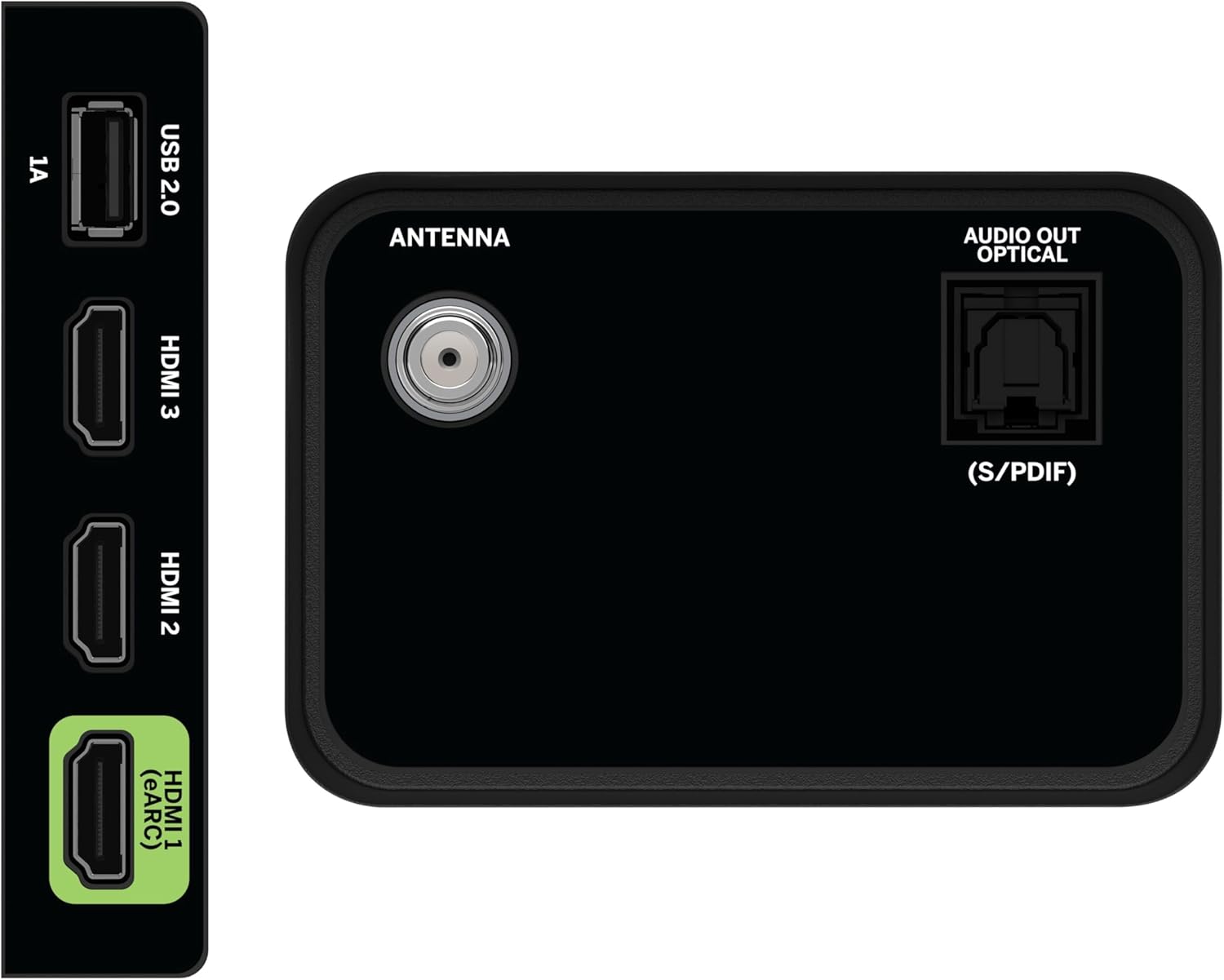
Image 4.1: Rear and side input/output ports.
4.3 പ്രാരംഭ പവർ ഓൺ & നെറ്റ്വർക്ക് കണക്ഷൻ
- Plug the power cable into the TV and then into a power outlet.
- റിമോട്ടിലോ ടിവിയിലോ പവർ ബട്ടൺ അമർത്തുക.
- Follow the on-screen prompts to select your language, country, and connect to your Wi-Fi network (WiFi 6 supported for faster performance).
4.4 VIZIO Account Setup
A VIZIO Account is required for Smart TV functionality and product updates. Follow the on-screen instructions to create or log in to your VIZIO Account. This allows access to VIZIO Home, app subscriptions, and free channels.

Image 4.2: VIZIO Account setup via mobile device.
5. നിങ്ങളുടെ ടിവി പ്രവർത്തിപ്പിക്കുന്നു
5.1 റിമോട്ട് കൺട്രോൾ ഓവർview
The included Voice Remote provides intuitive control over your TV. It features dedicated buttons for popular streaming apps and voice assistance integration.
- ഇൻപുട്ട്: Switch between connected devices.
- ശക്തി: ടിവി ഓൺ/ഓഫ് ചെയ്യുക.
- നാവിഗേഷൻ പാഡ്: Use the directional buttons and OK button to navigate menus.
- വീട്: Access the VIZIO Home screen.
- സൗജന്യമായി കാണുക+: Direct access to VIZIO's free streaming service.
- വോയ്സ് ബട്ടൺ: വോയ്സ് കമാൻഡുകൾ സജീവമാക്കുക.
- വോളിയം/ചാനൽ: ശബ്ദം ക്രമീകരിക്കുക, ചാനലുകൾ മാറ്റുക.
- ആപ്പ് കുറുക്കുവഴികൾ: Quick access to pre-installed streaming applications.

Image 5.1: VIZIO Voice Remote and mobile app functionality.
5.2 Navigating VIZIO Home
The VIZIO Home screen is your central hub for all entertainment. It provides quick access to:
- ആപ്പുകളും ഇൻപുട്ടുകളും: Browse and launch your favorite streaming apps (Netflix, Prime Video, Hulu, Disney+, etc.) and switch between connected inputs.
- തത്സമയ ടിവി: Access hundreds of free channels and thousands of free On Demand titles with the built-in WatchFree+ app.
- Trending Now: Discover popular movies and shows.

Image 5.2: The VIZIO Home screen, your destination for easy streaming.
5.3 ചിത്ര ക്രമീകരണങ്ങൾ
Your VIZIO TV features Dolby Vision HDR, HDR10+, HDR10, and HLG for a true-to-life picture with a wider range of color and detail. Adjust picture modes (e.g., Calibrated, Vivid, Game) in the settings menu to optimize your viewഅനുഭവം.

Image 5.3: Breathtaking details for a crystal-clear 4K picture with Dolby Vision.
5.4 ഓഡിയോ ക്രമീകരണങ്ങൾ
Experience immersive sound with DTS Virtual:X setting. You can also connect Bluetooth headphones for private listening.

Image 5.4: Pair your wireless Bluetooth headphones for uninterrupted audio.
5.5 സ്മാർട്ട് സവിശേഷതകൾ
The VIZIO Smart TV supports Apple AirPlay and Google Cast Built-in, allowing you to stream content directly from your compatible devices. WiFi 6 ensures better streaming and gaming performance in a congested smart home environment.
5.6 ഗെയിമിംഗ് സവിശേഷതകൾ
For gamers, the TV offers Dolby Vision HDR Gaming for enhanced in-game color. When a console or PC is detected, Auto Low Latency Mode is automatically enabled to reduce input lag.

Image 5.5: Venture into game realism with Dolby Vision HDR.
6. പരിപാലനം
6.1 നിങ്ങളുടെ ടിവി വൃത്തിയാക്കൽ
- വൃത്തിയാക്കുന്നതിന് മുമ്പ് എപ്പോഴും ടിവി അൺപ്ലഗ് ചെയ്യുക.
- സ്ക്രീനും കാബിനറ്റും മൃദുവായതും ലിന്റ് രഹിതവുമായ ഒരു തുണി ഉപയോഗിച്ച് സൌമ്യമായി തുടയ്ക്കുക.
- Do not use liquid or aerosol cleaners directly on the TV.
6.2 സോഫ്റ്റ്വെയർ അപ്ഡേറ്റുകൾ
Your VIZIO TV will automatically receive software updates when connected to the internet. Ensure your TV is connected to a network for optimal performance and access to the latest features.
7. പ്രശ്നപരിഹാരം
If you encounter issues with your VIZIO TV, try the following common solutions:
- ശക്തിയില്ല: പവർ കേബിൾ ടിവിയിലേക്കും ഔട്ട്ലെറ്റിലേക്കും സുരക്ഷിതമായി ബന്ധിപ്പിച്ചിട്ടുണ്ടെന്ന് ഉറപ്പാക്കുക. മറ്റൊരു ഔട്ട്ലെറ്റ് പരീക്ഷിക്കുക.
- ചിത്രം/ശബ്ദം ഇല്ല: എല്ലാ കേബിൾ കണക്ഷനുകളും (HDMI, ഓഡിയോ) പരിശോധിക്കുക. ശരിയായ ഇൻപുട്ട് ഉറവിടം തിരഞ്ഞെടുത്തിട്ടുണ്ടെന്ന് ഉറപ്പാക്കുക.
- റിമോട്ട് പ്രവർത്തിക്കുന്നില്ല: ബാറ്ററികൾ മാറ്റിസ്ഥാപിക്കുക. റിമോട്ടിനും ടിവിക്കും ഇടയിൽ തടസ്സങ്ങളൊന്നുമില്ലെന്ന് ഉറപ്പാക്കുക.
- നെറ്റ്വർക്ക് കണക്ഷൻ പ്രശ്നങ്ങൾ: Restart your router and modem. Reconnect the TV to the Wi-Fi network via the settings menu.
- മോശം ചിത്ര നിലവാരം: Check the source content resolution. Adjust picture settings in the TV menu.
For further assistance, refer to the VIZIO support webസൈറ്റ് അല്ലെങ്കിൽ ഉപഭോക്തൃ സേവനവുമായി ബന്ധപ്പെടുക.
8 സ്പെസിഫിക്കേഷനുകൾ
| ഫീച്ചർ | സ്പെസിഫിക്കേഷൻ |
|---|---|
| ബ്രാൻഡ് | VIZIO |
| മോഡൽ നമ്പർ | വി4കെ50സി-08 |
| സ്ക്രീൻ വലിപ്പം | 50 ഇഞ്ച് |
| ഡിസ്പ്ലേ ടെക്നോളജി | എൽഇഡി |
| റെസലൂഷൻ | 4K UHD |
| HDR പിന്തുണ | Dolby Vision HDR, HDR10+, HDR10, HLG |
| പുതുക്കിയ നിരക്ക് | HDMI VRR |
| കണക്റ്റിവിറ്റി ടെക്നോളജി | Bluetooth, HDMI, Wi-Fi (WiFi 6) |
| പ്രത്യേക സവിശേഷതകൾ | Apple AirPlay, Bluetooth Headphone compatibility, Built-in apps with VIZIO Home, Closed Captioning, Google Chromecast, Sleep Timer, Voice Assistance Integration, Voice Remote |
| ഉൽപ്പന്ന അളവുകൾ | 9.68"D x 43.69"W x 27.57"H |
| ഇനത്തിൻ്റെ ഭാരം | 28.4 പൗണ്ട് |
| വീക്ഷണാനുപാതം | 16:9 |
9. വാറൻ്റിയും പിന്തുണയും
For warranty information and customer support, please visit the official VIZIO website or refer to the warranty card included with your product. VIZIO provides award-winning customer support to assist with any questions or issues you may have.


