ആമുഖം
Thank you for choosing the FLEXISPOT EC5 Plus Electric Sit-Stand Desk Frame. This manual provides essential information for the safe and efficient assembly, operation, and maintenance of your new desk frame. Designed with ergonomics in mind, this dual-motor frame offers smooth and quiet height adjustment, allowing you to effortlessly switch between sitting and standing positions for a healthier work environment.
പ്രധാനപ്പെട്ട സുരക്ഷാ നിർദ്ദേശങ്ങൾ
അസംബ്ലി ചെയ്യുന്നതിനും ഉപയോഗിക്കുന്നതിനും മുമ്പ് ദയവായി എല്ലാ നിർദ്ദേശങ്ങളും ശ്രദ്ധാപൂർവ്വം വായിക്കുക. ഈ നിർദ്ദേശങ്ങൾ പാലിക്കുന്നതിൽ പരാജയപ്പെടുന്നത് ഉൽപ്പന്നത്തിന് പരിക്കോ കേടുപാടുകളോ ഉണ്ടാക്കാം.
- Ensure all components are present and undamaged before assembly. Do not use if any parts are missing or damaged.
- Keep children and pets away from the desk during operation to prevent injury from moving parts.
- Do not place hands or other body parts near the lifting columns or crossbar during height adjustment to avoid pinching.
- മേശ മറിഞ്ഞു വീഴാതിരിക്കാൻ ഒരു നിരപ്പായ പ്രതലത്തിൽ സ്ഥാപിച്ചിട്ടുണ്ടെന്ന് ഉറപ്പാക്കുക.
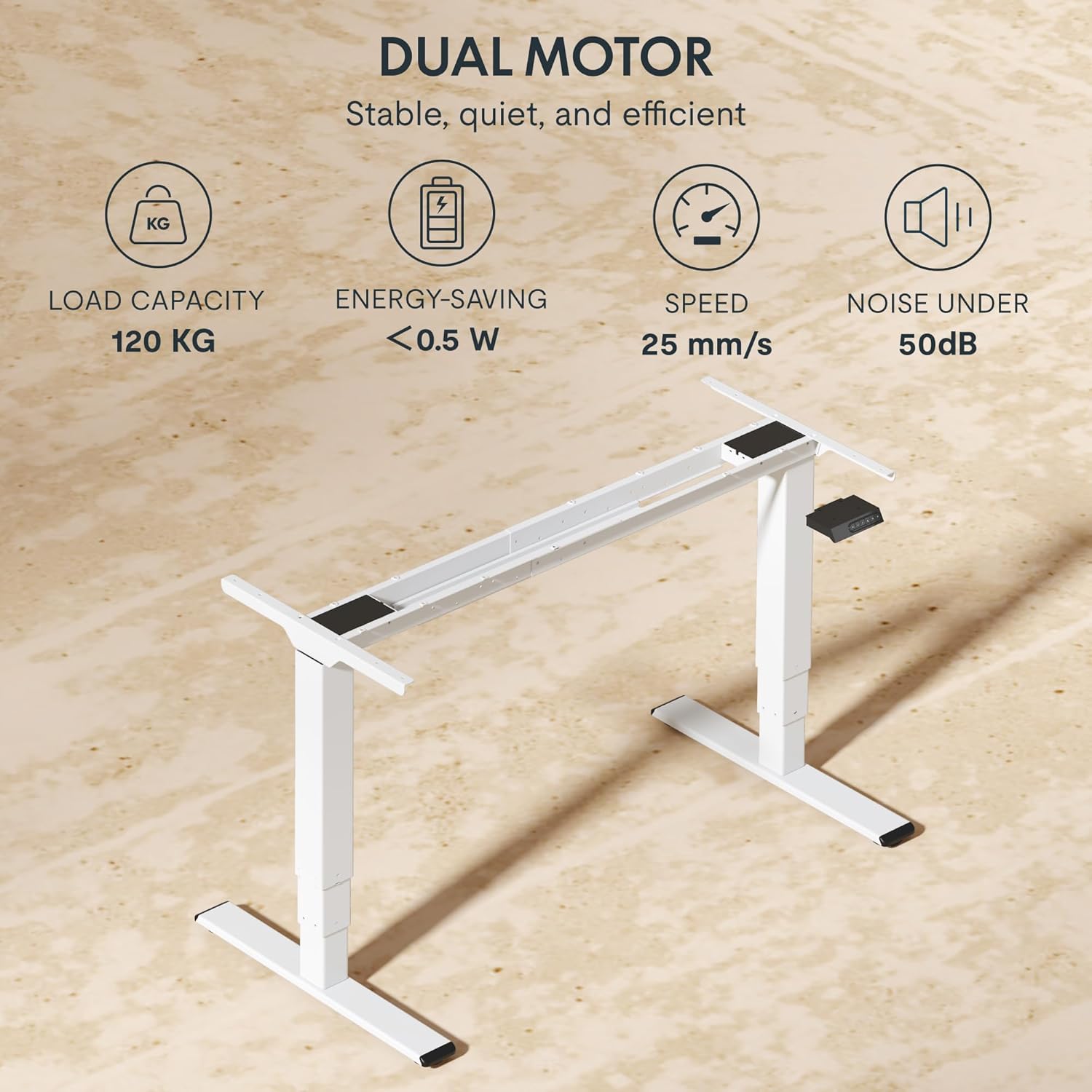
- മേശയിൽ ഓവർലോഡ് കയറ്റരുത്. പരമാവധി ലോഡ് കപ്പാസിറ്റി 120 കിലോഗ്രാം (265 പൗണ്ട്) ആണ്.
- നൽകിയിരിക്കുന്ന പവർ അഡാപ്റ്ററും കേബിളുകളും മാത്രം ഉപയോഗിക്കുക.
- വൃത്തിയാക്കുന്നതിനോ പരിപാലിക്കുന്നതിനോ മുമ്പായി വൈദ്യുതി വിച്ഛേദിക്കുക.
- The anti-collision system is designed to prevent damage, but always exercise caution during operation.
പാക്കേജ് ഉള്ളടക്കം
നിങ്ങളുടെ പാക്കേജിൽ ഇനിപ്പറയുന്ന എല്ലാ ഘടകങ്ങളും ഉൾപ്പെടുത്തിയിട്ടുണ്ടെന്ന് ഉറപ്പാക്കുക:
- ഡെസ്ക് കാലുകൾ (2)
- ക്രോസ്ബാർ (1)
- സൈഡ് ബ്രാക്കറ്റുകൾ (2)
- നിയന്ത്രണ ബോക്സ് (1)
- Handset/Control Panel (1)
- പവർ അഡാപ്റ്റർ (1)
- പവർ കേബിൾ (1)
- കേബിൾ മാനേജ്മെന്റ് ട്രേ (1)
- Hardware Kit (screws, tools, etc.)
- ഉപയോക്തൃ മാനുവൽ (ഈ പ്രമാണം)

സജ്ജീകരണ ഗൈഡ്
അസംബ്ലി നിർദ്ദേശങ്ങൾ
Assembly typically requires two people. Follow the steps below for a successful setup. Refer to the detailed diagrams in the included printed manual for visual guidance.
- ഘടകങ്ങൾ അൺപാക്ക് ചെയ്യുക: പാക്കേജിംഗിൽ നിന്ന് എല്ലാ ഭാഗങ്ങളും ശ്രദ്ധാപൂർവ്വം നീക്കം ചെയ്ത് പോറലുകൾ ഉണ്ടാകാതിരിക്കാൻ വൃത്തിയുള്ളതും മൃദുവായതുമായ ഒരു പ്രതലത്തിൽ വയ്ക്കുക.
- Attach Side Brackets to Legs: Secure the side brackets to the top of each lifting column (leg) using the provided screws.
- Assemble Crossbar: Connect the two halves of the crossbar, ensuring the motor cables are properly routed.
- Connect Legs to Crossbar: Attach the assembled legs to the crossbar. Ensure all connections are secure.
- Install Control Box: Mount the control box to the designated area on the crossbar using the provided screws.
- Connect Motors and Handset: Plug the motor cables from each leg into the control box. Connect the handset/control panel cable to the control box.
- പവർ അഡാപ്റ്റർ അറ്റാച്ചുചെയ്യുക: Connect the power adapter to the control box and then to the power cable.
- മൗണ്ട് ടാബ്ലെറ്റ്: Carefully place your chosen tabletop (not included) onto the assembled frame. Ensure it is centered and aligned. Secure the tabletop to the frame using appropriate screws (ensure screw length is suitable for your tabletop thickness to avoid piercing through). The frame is compatible with tabletops from 120 to 180 cm in length and 60 to 80 cm in width.
- കേബിൾ മാനേജുമെന്റ്: Use the included cable management tray and ties to organize all cables neatly.
- പ്രാരംഭ പവർ-അപ്പ്: Plug the power cable into a wall outlet. The desk should be ready for initial calibration or operation.

പ്രവർത്തന നിർദ്ദേശങ്ങൾ
നിയന്ത്രണ പാനൽ ഓവർview
The EC5 Plus features an intuitive control panel with an LED display and memory functions.
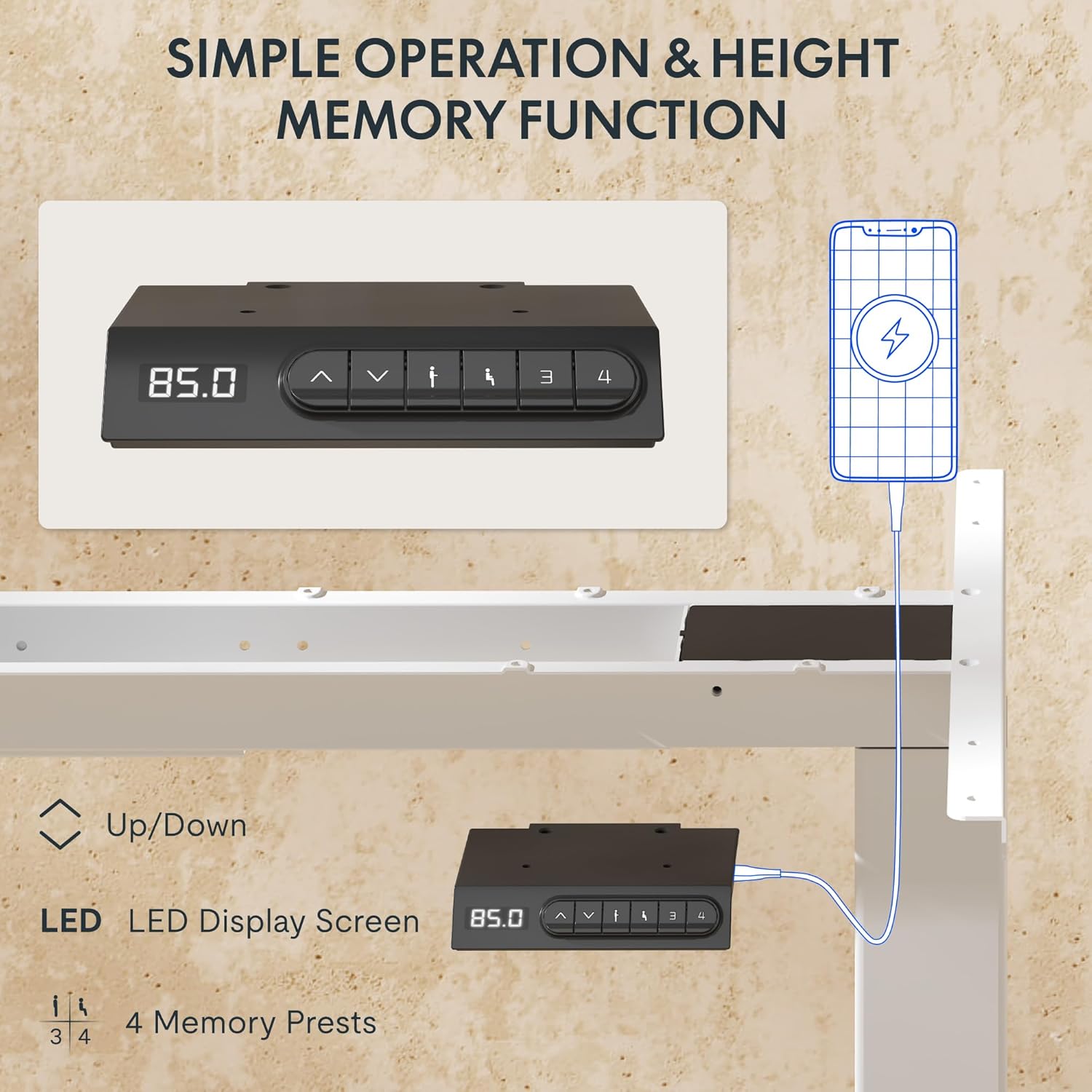
- LED ഡിസ്പ്ലേ: Shows the current height of the desk in centimeters.
- മുകളിലേക്കും താഴേക്കും ഉള്ള അമ്പടയാളങ്ങൾ (▲ / ▼): Press and hold to manually adjust the desk height.
- മെമ്മറി പ്രീസെറ്റുകൾ (1, 2, 3, 4): ഇഷ്ടപ്പെട്ട ഉയര ക്രമീകരണങ്ങൾ സംഭരിക്കുകയും തിരിച്ചുവിളിക്കുകയും ചെയ്യുക.
- USB-A & USB-C പോർട്ടുകൾ: Integrated charging ports for your devices.
ഉയരം ക്രമീകരിക്കൽ
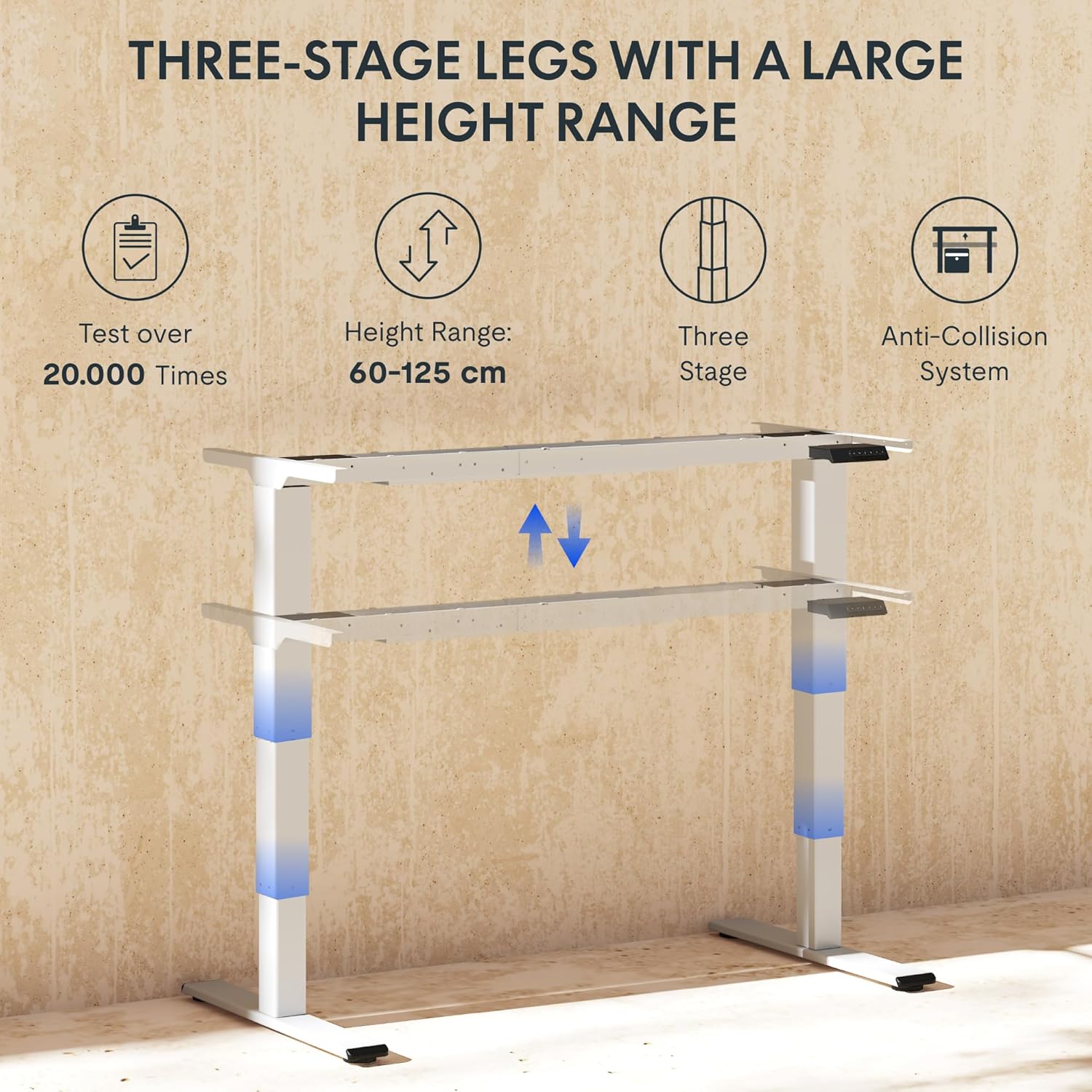
To adjust the desk height, press and hold the ▲ (മുകളിലേക്ക്) അല്ലെങ്കിൽ ▼ (Down) arrow button until the desk reaches your desired height. The LED display will show the current height in real-time. The desk frame supports a height range of 60 cm to 125 cm.
മെമ്മറി പ്രീസെറ്റുകൾ
The desk allows you to save up to four preferred height settings for quick recall:
- മുകളിലേക്കും താഴേക്കുമുള്ള അമ്പടയാളങ്ങൾ ഉപയോഗിച്ച് നിങ്ങൾക്ക് ആവശ്യമുള്ള ഉയരത്തിലേക്ക് ഡെസ്ക് ക്രമീകരിക്കുക.
- Press the "M" or "SET" button (if available, otherwise proceed to step 3).
- Press one of the numbered memory preset buttons (1, 2, 3, or 4) within 3 seconds. The LED display will show "S-" followed by the number, indicating the height has been saved.
- To recall a saved height, simply press the corresponding numbered memory preset button. The desk will automatically move to the saved position.
ആന്റി-കൊളിഷൻ സിസ്റ്റം
The EC5 Plus is equipped with an intelligent anti-collision system. If the desk encounters an obstacle during height adjustment, it will automatically stop and reverse slightly to prevent damage or injury. This system has adjustable sensitivity levels. Refer to the detailed manual for instructions on adjusting sensitivity.
USB ചാർജിംഗ് പോർട്ടുകൾ
The control panel includes integrated USB-A and USB-C charging ports. Simply connect your smartphone, tablet, or other compatible devices to these ports for convenient charging directly from your desk.
മെയിൻ്റനൻസ്
Regular maintenance ensures the longevity and optimal performance of your FLEXISPOT EC5 Plus desk frame.
- വൃത്തിയാക്കൽ: Wipe the desk frame with a soft, damp cloth. Avoid using abrasive cleaners or solvents that may damage the finish. Ensure the desk is unplugged before cleaning.
- പരിശോധന: എല്ലാ സ്ക്രൂകളും കണക്ഷനുകളും ഇറുകിയതാണെന്ന് ഉറപ്പാക്കാൻ ഇടയ്ക്കിടെ പരിശോധിക്കുക. ആവശ്യമെങ്കിൽ വീണ്ടും മുറുക്കുക.
- കേബിൾ മാനേജുമെന്റ്: Ensure cables are not pinched or tangled, which could affect desk operation or cause damage.
- ലൂബ്രിക്കേഷൻ: The lifting columns are designed to be maintenance-free and do not require lubrication.
ട്രബിൾഷൂട്ടിംഗ്
If you encounter any issues with your desk frame, refer to the table below for common problems and solutions.
| പ്രശ്നം | സാധ്യമായ കാരണം | പരിഹാരം |
|---|---|---|
| ഡെസ്ക് അനങ്ങുന്നില്ല. | Power cable disconnected; control box not connected; motor cables loose. | Check all power and motor connections. Ensure the power outlet is functional. |
| മേശ അസമമായി നീങ്ങുന്നു അല്ലെങ്കിൽ അസാധാരണമായ ശബ്ദം ഉണ്ടാക്കുന്നു. | Overload; loose connections; obstruction. | Reduce weight on the desk. Check all screws and connections. Ensure no obstructions are present. Perform a reset (refer to manual for specific reset procedure). |
| Anti-collision system triggers too often or not at all. | സെൻസിറ്റിവിറ്റി ക്രമീകരണം തെറ്റാണ്. | Adjust the anti-collision sensitivity via the control panel (refer to manual for specific steps). |
| LED ഡിസ്പ്ലേ ഒരു പിശക് കോഡ് കാണിക്കുന്നു. | നിർദ്ദിഷ്ട തകരാറ്. | പിശക് കോഡുകളുടെയും അവയുടെ അനുബന്ധ പരിഹാരങ്ങളുടെയും പട്ടികയ്ക്കായി പൂർണ്ണ ഉപയോക്തൃ മാനുവൽ പരിശോധിക്കുക. പ്രശ്നം നിലനിൽക്കുകയാണെങ്കിൽ, ഉപഭോക്തൃ പിന്തുണയുമായി ബന്ധപ്പെടുക. |
സ്പെസിഫിക്കേഷനുകൾ
Detailed technical specifications for the FLEXISPOT EC5 Plus Desk Frame:
| ഫീച്ചർ | വിശദാംശങ്ങൾ |
|---|---|
| ബ്രാൻഡ് | ഫ്ലെക്സിസ്പോട്ട് |
| മോഡൽ നമ്പർ | EC5W-PL-IE |
| നിറം | വെള്ള |
| ഉൽപ്പന്ന അളവുകൾ (L x W x H) | 80 x 180 x 125 cm (frame dimensions, adaptable to tabletop) |
| ഇനത്തിൻ്റെ ഭാരം | 22.6 കിലോഗ്രാം |
| ലോഡ് കപ്പാസിറ്റി | 120 കി.ഗ്രാം (265 പൗണ്ട്) |
| മോട്ടോർ തരം | ഡ്യുവൽ മോട്ടോർ സിസ്റ്റം |
| ഉയരം ക്രമീകരിക്കൽ ശ്രേണി | 60 സെ.മീ - 125 സെ.മീ (23.6 ഇഞ്ച് - 49.2 ഇഞ്ച്) |
| ലിഫ്റ്റ് വേഗത | 25 മിമി/സെ |
| ശബ്ദ നില | 50 dB-യിൽ താഴെ |
| ലെഗ് എസ്tages | മൂന്ന്-എസ്tage telescopic legs |
| നിയന്ത്രണ പാനൽ | LED display, 4 memory presets, Up/Down buttons |
| ചാർജിംഗ് പോർട്ടുകൾ | Integrated USB-A and USB-C ports |
| പ്രത്യേക സവിശേഷതകൾ | Ergonomic design, Anti-Collision System, Energy-saving (<0.5W standby) |
| Compatible Tabletop Sizes | Length: 120-180 cm; Width: 60-80 cm |
| അടിസ്ഥാന മെറ്റീരിയൽ | ലോഹം |
വാറൻ്റിയും പിന്തുണയും
FLEXISPOT stands behind the quality of its products. Your EC5 Plus Desk Frame comes with the following warranty:
- ഫ്രെയിം വാറൻ്റി: 5 വർഷം
- മോട്ടോർ വാറന്റി: 3 വർഷം
This warranty covers defects in materials and workmanship under normal use. For warranty claims or technical assistance, please contact FLEXISPOT customer support. Lifetime free technical support is provided.
For the most up-to-date contact information, please visit the official FLEXISPOT webസൈറ്റ് അല്ലെങ്കിൽ നിങ്ങളുടെ വാങ്ങൽ ഡോക്യുമെന്റേഷൻ പരിശോധിക്കുക.
Webസൈറ്റ്: www.flexispot.com


