1. ആമുഖം
The Devo G4 Smart Lock provides advanced security and convenient access for your home. This keyless entry deadbolt features multiple unlocking methods, Bluetooth app control, and intelligent automation functions. This manual will guide you through the installation, setup, and operation of your new smart lock.

This image displays the complete Devo G4 Smart Lock system, including the sleek black exterior keypad with touchscreen, the interior deadbolt mechanism, and a smartphone screen showing the lock's control application.
2. ഉൽപ്പന്ന സവിശേഷതകൾ
- ആപ്പ് നിയന്ത്രണം: Connect via Bluetooth to the Tuya Smart app for remote locking/unlocking, user management, event history, and low battery reminders.
- ഒന്നിലധികം അൺലോക്കിംഗ് രീതികൾ: Offers four ways to unlock: smartphone app, password keypad, physical key, and IC card. Two physical keys and two IC cards are included.
- മെച്ചപ്പെടുത്തിയ സുരക്ഷ: Features include wrong input restriction, temporary PIN code generation for guests, and anti-peeping password protection. Operates without constant network reliance, enhancing security against online attacks.
- Long Battery Life & Durability: Powered by 4 AA batteries (not included) for approximately 8 months of use. Equipped with a Type-C emergency charging port. IP54 waterproof design withstands temperatures from 5°F to 122°F (-15°C to 50°C). BHMA Grade 3 certified for security and durability.
- Automatic & One-Touch Locking: Customizable auto-lock time (5-900 seconds) and one-touch locking for convenience and security.
- എളുപ്പമുള്ള ഇൻസ്റ്റാളേഷൻ: Designed for straightforward installation without specialized tools, compatible with most American standard doors.

This graphic illustrates the four convenient methods to unlock the Devo G4 Smart Lock: using the smartphone app, entering a code on the keypad, tapping an IC card, or using a traditional physical key.
3. പാക്കേജ് ഉള്ളടക്കം
ഇൻസ്റ്റാളേഷൻ ആരംഭിക്കുന്നതിന് മുമ്പ് എല്ലാ ഘടകങ്ങളും നിലവിലുണ്ടെന്ന് ദയവായി പരിശോധിക്കുക.
- ഡെവോ ജി4 സ്മാർട്ട് ഡോർ ലോക്ക് (1 യൂണിറ്റ്)
- ഐസി കാർഡുകൾ (2 യൂണിറ്റുകൾ)
- ഇൻസ്റ്റലേഷൻ ആക്സസറികൾ (സ്ക്രൂകൾ, പ്ലേറ്റുകൾ മുതലായവ)
- മെക്കാനിക്കൽ കീകൾ (2 യൂണിറ്റുകൾ)
- ഉപയോക്തൃ മാനുവൽ (ഈ പ്രമാണം)
4. ഇൻസ്റ്റാളേഷൻ ഗൈഡ്
4.1 പ്രീ-ഇൻസ്റ്റലേഷൻ പരിശോധന
Before installation, ensure your door meets the following specifications for compatibility:
- വാതിൽ കനം: 1-3/8" to 2-1/8" (35-55mm)
- ഡോർ ഹോൾ വ്യാസം: 1-1/2" അല്ലെങ്കിൽ 2-1/8" (38 അല്ലെങ്കിൽ 54 മിമി)
- ബാക്ക്സെറ്റ്: 2-3/8" അല്ലെങ്കിൽ 2-3/4" (60 അല്ലെങ്കിൽ 70 മിമി)
- Compatible with chiselled and single-cylinder door types. Not compatible with unchiselled or mortise/integrated locks.
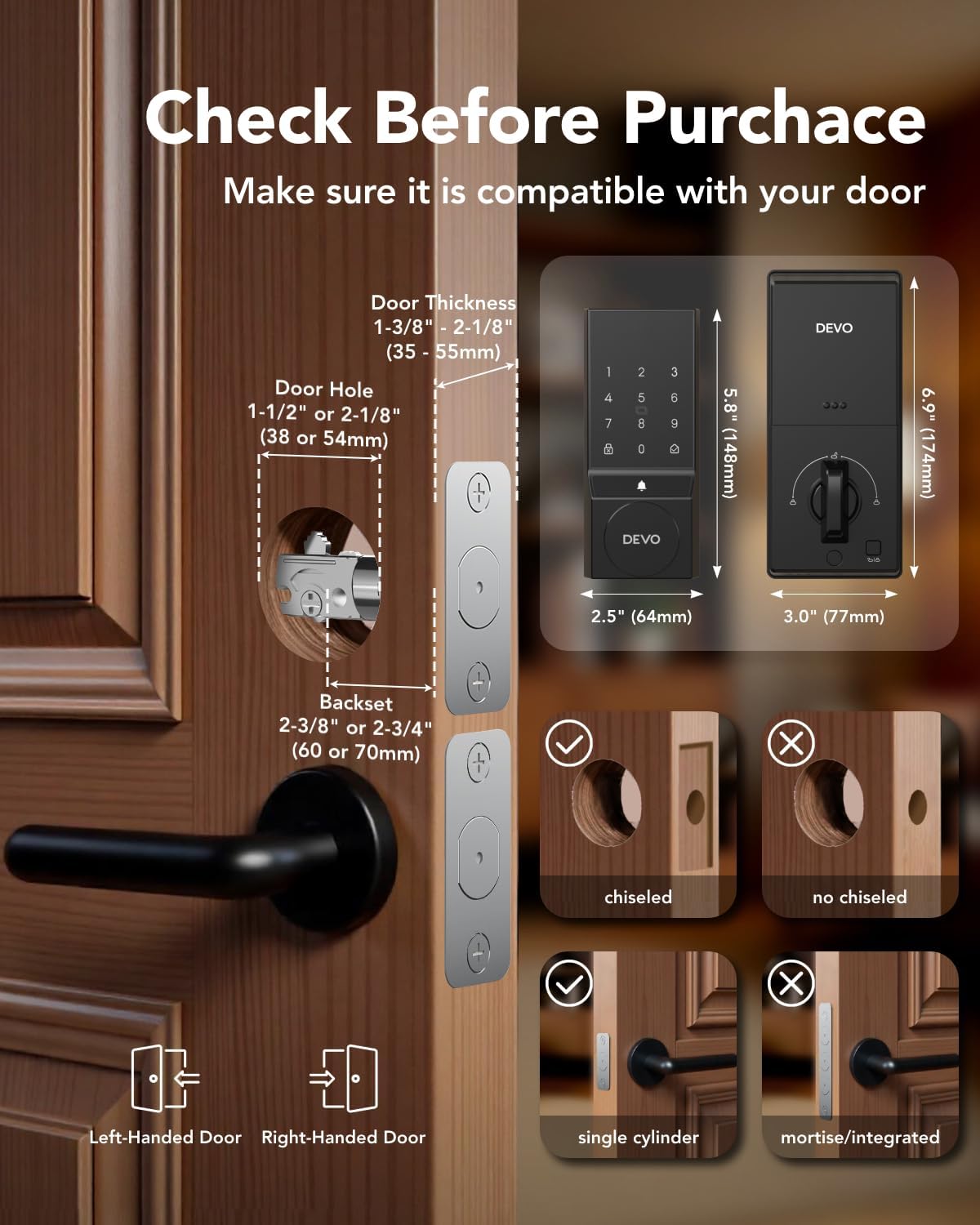
This diagram provides essential measurements and door type compatibility checks for installing the Devo G4 Smart Lock, detailing requirements for door thickness, bore hole diameter, backset, and confirming suitability for chiselled and single-cylinder doors.
4.2 പൊതുവായ ഇൻസ്റ്റലേഷൻ ഘട്ടങ്ങൾ
The Devo G4 Smart Lock is designed for easy installation. While specific steps are detailed in the included printed user manual, the general process involves:
- നിലവിലുള്ള ഡെഡ്ബോൾട്ട് നീക്കം ചെയ്യുക.
- വാതിലിന്റെ അരികിൽ പുതിയ ഡെഡ്ബോൾട്ട് ലാച്ച് സ്ഥാപിക്കുക.
- എക്സ്റ്റീരിയർ കീപാഡ് അസംബ്ലി മൌണ്ട് ചെയ്യുക.
- Install the interior assembly, ensuring proper cable connection.
- നൽകിയിരിക്കുന്ന സ്ക്രൂകൾ ഉപയോഗിച്ച് എല്ലാ ഘടകങ്ങളും സുരക്ഷിതമാക്കുക.
- ഇന്റീരിയർ യൂണിറ്റിലേക്ക് 4 AA ബാറ്ററികൾ (ഉൾപ്പെടുത്തിയിട്ടില്ല) ചേർക്കുക.
Refer to the detailed graphical instructions in your physical user manual for precise steps and diagrams.
5. സജ്ജീകരണവും കോൺഫിഗറേഷനും
5.1 App Setup (Tuya Smart App)
- ഡൗൺലോഡ് ചെയ്യുക തുയ സ്മാർട്ട് നിങ്ങളുടെ സ്മാർട്ട്ഫോണിന്റെ ആപ്പ് സ്റ്റോറിൽ നിന്നുള്ള ആപ്പ്.
- ഒരു അക്കൗണ്ട് സൃഷ്ടിക്കുക അല്ലെങ്കിൽ ലോഗിൻ ചെയ്യുക.
- നിങ്ങളുടെ സ്മാർട്ട്ഫോണിൽ ബ്ലൂടൂത്ത് പ്രവർത്തനക്ഷമമാക്കുക.
- In the app, select 'Add Device' and follow the on-screen instructions to connect to your Devo G4 Smart Lock via Bluetooth.
5.2 User Management and Passcodes
The app allows you to manage various users and access methods.
- ഉപയോക്താക്കളെ ചേർക്കുന്നു: Navigate to 'Member Management' in the app to add family members, roommates, or other authorized individuals.
- Setting Passcodes: Create permanent or temporary passcodes for different users. The anti-peeping password feature allows you to enter random digits before or after your actual code to prevent others from guessing it.
- താൽക്കാലിക പാസ്വേഡുകൾ: Generate time-limited or single-use passcodes for guests or service providers directly from the app.
5.3 IC Card Setup
To program the included IC cards:
- Access the 'Accessories Management' section in the Tuya Smart app.
- Follow the prompts to add a new IC card.
- Present the IC card to the lock's sensor when instructed by the app.
6. പ്രവർത്തന നിർദ്ദേശങ്ങൾ
6.1 അൺലോക്ക് രീതികൾ
- ആപ്പ് അൺലോക്ക്: Open the Tuya Smart app, select your lock, and tap the unlock icon.
- പാസ്കോഡ് അൺലോക്ക്: Enter your programmed passcode on the touchscreen keypad, followed by the '#' key.
- ഐസി കാർഡ് അൺലോക്ക്: Tap a programmed IC card against the designated sensor area on the lock's exterior unit.
- ഫിസിക്കൽ കീ അൺലോക്ക്: Insert the mechanical key into the hidden keyhole and turn to unlock. This serves as a backup method.

A woman is shown operating the Devo G4 Smart Lock keypad, emphasizing its versatility for various applications such as side doors, garage doors, rental properties, and home offices.
6.2 Auto-Lock and One-Touch Lock
- യാന്ത്രിക ലോക്ക്: Customize the auto-lock delay (5-900 seconds) via the app. The lock will automatically engage after the door closes and the set time elapses.
- വൺ-ടച്ച് ലോക്ക്: Simply press and hold the '#' key on the keypad to instantly lock the door from the outside.

This image demonstrates the automatic locking feature of the Devo G4 Smart Lock, showing a door that can be set to auto-lock after a customizable delay, such as 5 seconds, 30 seconds, 1 minute, or 10 minutes.
6.3 Adjustable Volume Doorbell
The Devo G4 Smart Lock includes an integrated doorbell function. You can customize the chime volume through the Tuya Smart app to suit your preferences.
7. പരിപാലനം
- വൃത്തിയാക്കൽ: Wipe the touchscreen and lock body with a soft, dry cloth. Avoid abrasive cleaners or solvents.
- ബാറ്ററി മാറ്റിസ്ഥാപിക്കൽ: The app will provide a low battery warning. Replace all 4 AA batteries promptly when indicated. Use high-quality alkaline batteries for optimal performance.
- അടിയന്തര പവർ: If batteries completely drain, use the Type-C emergency charging port with a power bank to temporarily power the lock and gain access.

This image highlights the long-lasting battery life of the Devo G4 Smart Lock, showing the battery compartment designed for 4 AA batteries (not included) which provide approximately 8 months of operation.
8. പ്രശ്നപരിഹാരം
- ലോക്ക് പ്രതികരിക്കുന്നില്ല: Check battery levels. If low, replace batteries or use the emergency Type-C charging port.
- ആപ്പ് കണക്റ്റിവിറ്റി പ്രശ്നങ്ങൾ: Ensure Bluetooth is enabled on your phone and the lock is within range. Restart the app and try reconnecting.
- പാസ്കോഡ് പ്രവർത്തിക്കുന്നില്ല: Verify the correct passcode is being entered. Ensure the anti-peeping feature is not causing confusion.
- IC card not recognized: Ensure the IC card is properly programmed and presented to the correct sensor area.
- ഓട്ടോ-ലോക്ക് പ്രവർത്തിക്കുന്നില്ല: Check the auto-lock settings in the app to ensure it is enabled and the delay time is set correctly.
For further assistance, refer to the comprehensive troubleshooting section in the physical user manual or contact customer support.
9 സ്പെസിഫിക്കേഷനുകൾ
| ഫീച്ചർ | വിശദാംശങ്ങൾ |
|---|---|
| ബ്രാൻഡ് | ദേവോ |
| മോഡലിൻ്റെ പേര് | G4 |
| ലോക്ക് തരം | ഡെഡ്ബോൾട്ട് |
| മെറ്റീരിയൽ | അലുമിനിയം |
| ഫിനിഷ് തരം | പൊടി പൂശി |
| ഇനത്തിന്റെ അളവുകൾ (L x W x H) | 9.5 x 7.3 x 3.8 ഇഞ്ച് |
| ഇനത്തിൻ്റെ ഭാരം | 2.44 പൗണ്ട് |
| പ്രത്യേക സവിശേഷതകൾ | Auto-Lock, One-Touch Lock, Passcode Unlock, Touchscreen, Weather Resistant |
| ശുപാർശ ചെയ്യുന്ന ഉപയോഗങ്ങൾ | മുൻവാതിൽ |
| നിയന്ത്രണ രീതി | ആപ്പ്, ടച്ച് |
| കണക്റ്റിവിറ്റി പ്രോട്ടോക്കോൾ | ബ്ലൂടൂത്ത് |
| ബാറ്ററികൾ ആവശ്യമാണ് | അതെ (4 AA ബാറ്ററികൾ, ഉൾപ്പെടുത്തിയിട്ടില്ല) |
| IP റേറ്റിംഗ് | IP54 (ജലപ്രൂഫ്) |
| പ്രവർത്തന താപനില | 5°F മുതൽ 122°F വരെ (-15°C മുതൽ 50°C വരെ) |
10. വാറൻ്റിയും പിന്തുണയും
Devo provides a 12 മാസ വാറൻ്റി for the G4 Smart Lock. Technical support is also available to assist with any questions or issues you may encounter.
If you have any questions or require assistance, please refer to the contact information provided in your product packaging or visit the official Devo webപിന്തുണാ ഉറവിടങ്ങൾക്കായുള്ള സൈറ്റ്.


