1. ആമുഖം
The VTech Allô Bébé Magic Messages Interactive Toy Phone is designed to engage and educate young children aged 9 months to 3 years. This interactive toy features voice recording, voice-changing effects, light-up buttons, and introduces basic concepts like colors, animals, and numbers through playful interaction. It encourages imaginative play and early developmental skills.

ചിത്രം 1.1: മുൻഭാഗം view of the VTech Allô Bébé Magic Messages Interactive Toy Phone in blue.
2. ഉൽപ്പന്ന സവിശേഷതകൾ
- Voice Recording Function: Allows parents or children to record short messages.
- Voice Changer Effects: Apply fun effects to recorded voices.
- Interactive Number Buttons: 10 light-up buttons introduce colors, animals, and numbers.
- സംഗീത ഉള്ളടക്കം: Includes 6 songs and various melodies.
- ലൈറ്റ്-അപ്പ് സവിശേഷതകൾ: The dog's face and number buttons illuminate with sounds and interactions.
- വോളിയം നിയന്ത്രണം: Adjustable sound level for quiet play.
- ഓട്ടോമാറ്റിക് ഷട്ട്-ഓഫ്: ബാറ്ററി ലൈഫ് സംരക്ഷിക്കുന്നു.
- മോടിയുള്ള ഡിസൈൻ: Built to withstand typical child's play.
3. പാക്കേജ് ഉള്ളടക്കം
Upon opening the package, please ensure all items are present:
- 1 x VTech Allô Bébé Magic Messages Toy Phone (Blue)
- 3 x LR03-AAA Batteries (pre-installed)

Image 3.1: The VTech Allô Bébé Magic Messages Toy Phone in its original packaging.
4. സജ്ജീകരണം
4.1. ബാറ്ററി ഇൻസ്റ്റാളേഷൻ/മാറ്റിസ്ഥാപിക്കൽ
The toy phone comes with 3 LR03-AAA batteries pre-installed. To replace them:
- കളിപ്പാട്ടത്തിന്റെ പിൻഭാഗത്ത് ബാറ്ററി കമ്പാർട്ട്മെന്റ് കണ്ടെത്തുക.
- Using a screwdriver, loosen the screw on the battery cover.
- കവർ നീക്കം ചെയ്യുക.
- Insert 3 new LR03-AAA batteries, ensuring correct polarity (+/-).
- ബാറ്ററി കവർ മാറ്റി സ്ക്രൂ സുരക്ഷിതമായി ശക്തമാക്കുക.
Warning: Do not mix old and new batteries. Do not mix alkaline, standard (carbon-zinc), or rechargeable (nickel-cadmium) batteries. Remove batteries during long periods of non-use.
4.2. പ്രാരംഭ പവർ ഓൺ
Once batteries are installed, locate the On/Off switch, usually on the side or back of the device. Slide it to the 'On' position to begin play.
5. പ്രവർത്തന നിർദ്ദേശങ്ങൾ
5.1. പവർ ഓൺ/ഓഫ്, വോളിയം നിയന്ത്രണം
The toy features a power switch and a volume control switch, typically located on the side. Adjust the volume to your preferred level (low/high).
5.2. Recording Messages
To record a message:
- അമർത്തുക റെക്കോർഡ് ബട്ടൺ (often indicated by a microphone icon).
- Speak clearly into the microphone located on the toy.
- റെക്കോർഡിംഗ് നിർത്താൻ വീണ്ടും റെക്കോർഡ് ബട്ടൺ അമർത്തുക.
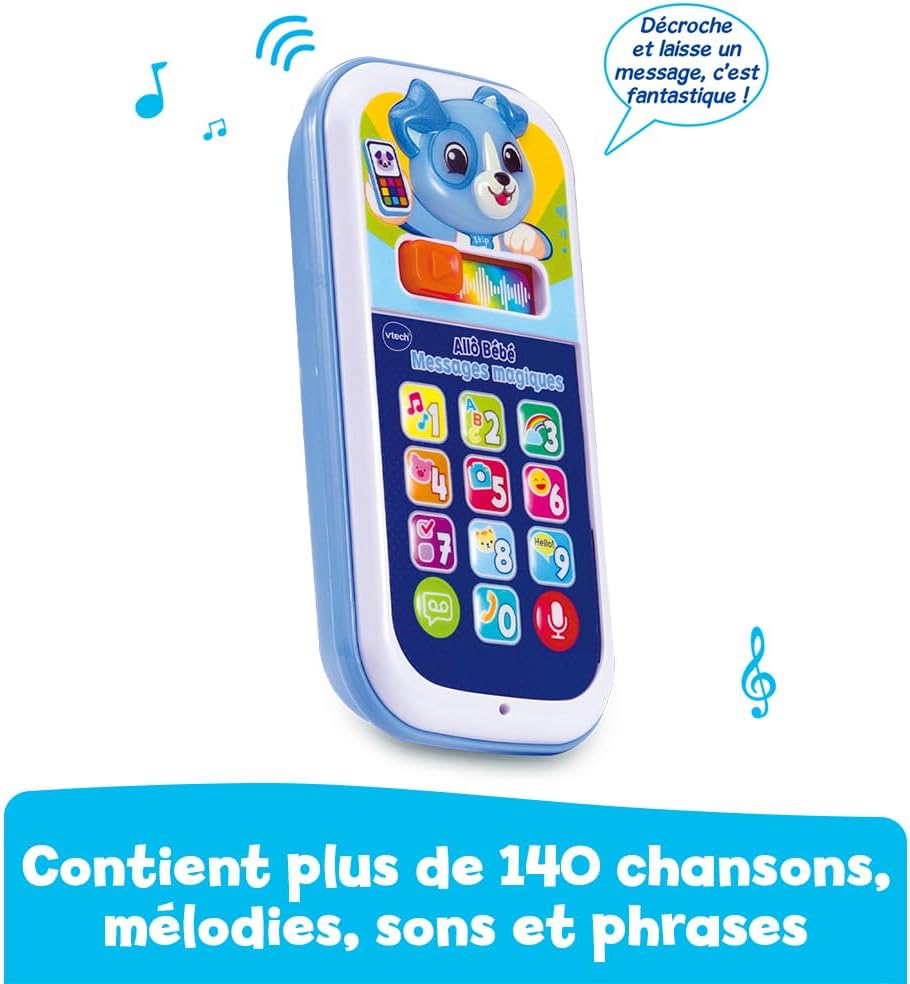
Image 5.1: A woman demonstrating how to record a message on the toy phone.
5.3. Playing Messages
The toy has a dedicated voicemail button that flashes when a new message is available. To listen to recorded messages:
- അമർത്തുക Voicemail button (often indicated by an envelope or play icon). The button will flash when a message is waiting.
- The recorded message will play back.

Image 5.2: A child listening to a message on the toy phone.
5.4. Applying Voice Effects
After recording a message, you can add fun effects:
- സ്ലൈഡ് ചെയ്യുക magic slider (usually located near the screen) to the right.
- This will apply various voice effects or transform the voice into a song.

Image 5.3: A child interacting with the voice effects feature.
5.5. Interactive Play with Number Buttons
Pressing the 10 numbered buttons will trigger lights, sounds, and phrases that introduce colors, animals, and numbers. The dog's face on the screen will also light up in rhythm with the sounds.

Image 5.4: A child engaging in interactive play with the toy phone.
5.6. Music and Melodies
The toy includes 6 songs and various melodies. These will play during different interactions or when specific buttons are pressed, enhancing the play experience.

Image 5.5: The toy phone features a variety of songs and melodies.
6. പരിപാലനം
6.1. വൃത്തിയാക്കൽ
To clean the toy, wipe it with a slightly damp cloth. Do not immerse the toy in water or use harsh cleaning agents. Ensure the toy is completely dry before use.
6.2. സംഭരണം
Store the toy in a cool, dry place away from direct sunlight. If the toy will not be used for an extended period, remove the batteries to prevent leakage.
7. പ്രശ്നപരിഹാരം
- Toy not turning on:
- ഓൺ/ഓഫ് സ്വിച്ച് 'ഓൺ' സ്ഥാനത്താണോ എന്ന് പരിശോധിക്കുക.
- Ensure batteries are correctly installed with the correct polarity.
- Replace old batteries with new LR03-AAA batteries.
- Low or no sound:
- Check the volume control switch and ensure it is not set to the lowest setting.
- Replace batteries, as low battery power can affect sound output.
- ലൈറ്റുകൾ പ്രവർത്തിക്കുന്നില്ല:
- ബാറ്ററികൾ മാറ്റിസ്ഥാപിക്കുക.
- Recording/playback issues:
- Ensure you are pressing the correct buttons for recording and playback.
- Speak clearly and close to the microphone during recording.
- ബാറ്ററികൾ മാറ്റിസ്ഥാപിക്കുക.
8 സ്പെസിഫിക്കേഷനുകൾ
| ഉൽപ്പന്ന അളവുകൾ (L x W x H) | 7.1 x 3.1 x 14 സെ.മീ |
| ഭാരം | 185 ഗ്രാം |
| ശുപാർശ ചെയ്യുന്ന പ്രായം | 9 മാസം - 3 വർഷം |
| വിദ്യാഭ്യാസ മൂല്യം | Promotes speech development and familiarization with sounds and animal names. |
| Language (Toy Content) | ഫ്രഞ്ച് |
| മോഡൽ നമ്പർ | 80-620965 |
| ബാറ്ററികൾ ആവശ്യമാണ് | അതെ |
| ബാറ്ററികൾ ഉൾപ്പെടുത്തിയിട്ടുണ്ട് | Yes (3 x LR03-AAA Alkaline) |
| പ്രധാന മെറ്റീരിയൽ | പ്ലാസ്റ്റിക് |
| നിറം | Blue (Multicolor) |
| ASIN | B0DP2X64SM |
9 സുരക്ഷാ വിവരങ്ങൾ
No specific safety warnings were provided for this product beyond standard toy safety guidelines. Always supervise children during play. Regularly inspect the toy for any damage or loose parts that could pose a choking hazard. Discard the toy if it becomes damaged.
10. വാറൻ്റിയും പിന്തുണയും
For warranty information and customer support, please refer to the documentation included with your purchase or visit the official VTech website. You can also contact VTech customer service for assistance with product inquiries or technical support.
വിടെക് ഔദ്യോഗിക Webസൈറ്റ്: www.vtech.com


