ആമുഖം
Welcome to the Teko Reachr Vacuum user manual. This guide provides comprehensive instructions for the safe and efficient operation, maintenance, and troubleshooting of your new Teko Reachr Vacuum. Designed for easy and efficient use, this powerful and lightweight cleaning tool is ideal for various surfaces and hard-to-reach areas.
സുരക്ഷാ വിവരങ്ങൾ
ഉപകരണം ഉപയോഗിക്കുന്നതിന് മുമ്പ് ദയവായി എല്ലാ സുരക്ഷാ നിർദ്ദേശങ്ങളും ശ്രദ്ധാപൂർവ്വം വായിക്കുക. ഭാവിയിലെ റഫറൻസിനായി ഈ മാനുവൽ സൂക്ഷിക്കുക.
- വെള്ളത്തിലോ മറ്റ് ദ്രാവകങ്ങളിലോ വാക്വം മുക്കരുത്.
- ഗ്യാസോലിൻ പോലുള്ള കത്തുന്നതോ കത്തുന്നതോ ആയ ദ്രാവകങ്ങൾ എടുക്കാനോ അവ ഉള്ള സ്ഥലങ്ങളിൽ ഉപയോഗിക്കാനോ ഉപയോഗിക്കരുത്.
- കത്തുന്നതോ പുകവലിക്കുന്നതോ ആയ സിഗരറ്റ്, തീപ്പെട്ടി, ചൂടുള്ള ചാരം എന്നിവയൊന്നും എടുക്കരുത്.
- മുടി, അയഞ്ഞ വസ്ത്രങ്ങൾ, വിരലുകൾ, ശരീരത്തിൻ്റെ എല്ലാ ഭാഗങ്ങളും തുറസ്സുകളിൽ നിന്നും ചലിക്കുന്ന ഭാഗങ്ങളിൽ നിന്നും അകറ്റി നിർത്തുക.
- ഈ മാനുവലിൽ വിവരിച്ചിരിക്കുന്നതുപോലെ മാത്രം ഉപയോഗിക്കുക. നിർമ്മാതാവ് ശുപാർശ ചെയ്യുന്ന അറ്റാച്ചുമെന്റുകൾ മാത്രം ഉപയോഗിക്കുക.
- കേടായ ചരടോ പ്ലഗോ ഉപയോഗിച്ച് ഉപയോഗിക്കരുത്. ഉപകരണം ശരിയായി പ്രവർത്തിക്കുന്നില്ലെങ്കിൽ, അത് താഴെ വീണിട്ടുണ്ടെങ്കിൽ, കേടുപാടുകൾ സംഭവിച്ചിട്ടുണ്ടെങ്കിൽ, പുറത്ത് വച്ചിട്ടുണ്ടെങ്കിൽ, അല്ലെങ്കിൽ വെള്ളത്തിൽ വീണിട്ടുണ്ടെങ്കിൽ, അത് ഒരു സർവീസ് സെന്ററിലേക്ക് തിരികെ നൽകുക.
- ഉപയോഗത്തിലില്ലാത്തപ്പോഴും സർവീസ് ചെയ്യുന്നതിന് മുമ്പും ഔട്ട്ലെറ്റിൽ നിന്ന് അൺപ്ലഗ് ചെയ്യുക.
- ഈ ഉപകരണം ഗാർഹിക ഉപയോഗത്തിന് മാത്രമുള്ളതാണ്.
പാക്കേജ് ഉള്ളടക്കം
എല്ലാ ഇനങ്ങളും നിങ്ങളുടെ പാക്കേജിൽ ഉൾപ്പെടുത്തിയിട്ടുണ്ടെന്ന് ഉറപ്പാക്കുക:
- Teko Reachr Vacuum Unit
- Corner Attachment
- ഫ്ലോർ അറ്റാച്ച്മെൻ്റ്
- ബ്രഷ് അറ്റാച്ച്മെന്റ്
- Air Filter (pre-installed or spare)
- ചാർജിംഗ് കേബിൾ/അഡാപ്റ്റർ

Image: The Teko Reachr Vacuum unit displayed with its various attachments: a corner attachment, a floor attachment, a brush attachment, and an air filter. This image shows the complete set of components included with the vacuum.
ഉൽപ്പന്നം കഴിഞ്ഞുview
Familiarize yourself with the main components of your Teko Reachr Vacuum.
- പ്രധാന യൂണിറ്റ്: Contains the powerful brushless motor and dustbin.
- വിപുലീകരണ പോൾ: Allows the vacuum to extend over 36 inches for reaching high or low areas.
- ഓൺ/ഓഫ് ബട്ടൺ: യൂണിറ്റിലേക്കുള്ള വൈദ്യുതി നിയന്ത്രിക്കുന്നു.
- ലെവൽ സൂചകം: Shows current power or battery level.
- ഡസ്റ്റ്ബിൻ: Collects debris, easily detachable for emptying.
- ഫിൽട്ടർ: Foam filter for effective dust capture.
- അറ്റാച്ചുമെൻ്റുകൾ:
- Corner Attachment: ഇടുങ്ങിയ ഇടങ്ങൾക്കും കോണുകൾക്കും അനുയോജ്യം.
- Floor Attachment: For general floor cleaning on various surfaces.
- ബ്രഷ് അറ്റാച്ച്മെൻ്റ്: Useful for upholstery, car interiors, and delicate surfaces.
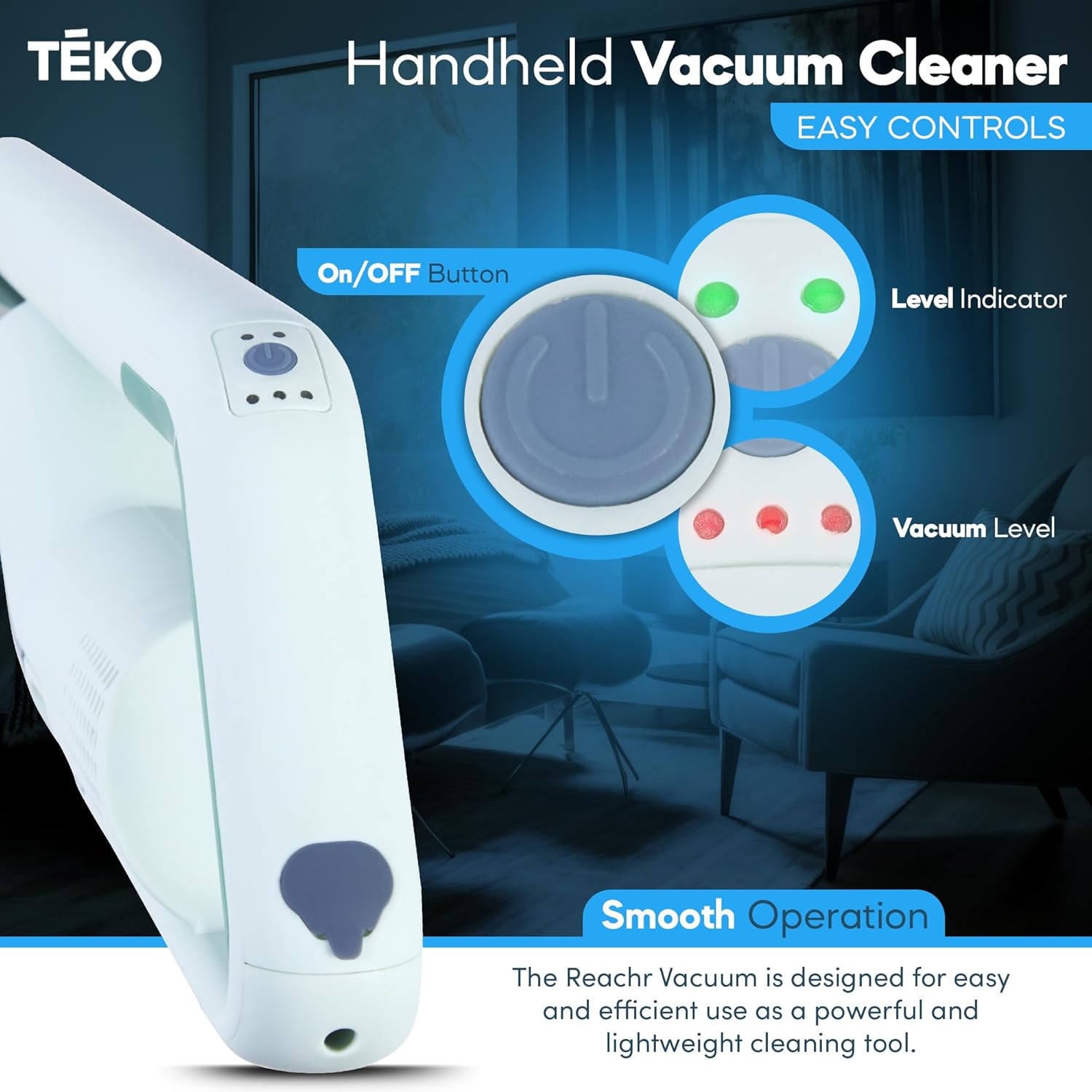
ചിത്രം: ഒരു ക്ലോസ്-അപ്പ് view of the Teko Reachr Vacuum's handle, highlighting the On/Off button, level indicator, and vacuum level controls. This illustrates the simple and intuitive control panel.

Image: The Teko Reachr Vacuum shown with its various attachments laid out, including the corner, floor, and brush attachments, along with the air filter. This image provides a clear visual of all the accessories.
സജ്ജമാക്കുക
അസംബ്ലി
- പാക്കേജിംഗിൽ നിന്ന് എല്ലാ ഘടകങ്ങളും അൺപാക്ക് ചെയ്യുക.
- Attach the desired cleaning attachment (e.g., floor attachment) to the end of the extension pole.
- Connect the extension pole to the main vacuum unit. Ensure it clicks securely into place.
- For handheld use, attachments can be connected directly to the main unit without the extension pole.
ചാർജിംഗ്
Before first use, fully charge the vacuum. Connect the charging cable to the charging port on the vacuum and plug the adapter into a wall outlet. The level indicator lights will show charging status.
പ്രവർത്തന നിർദ്ദേശങ്ങൾ
അടിസ്ഥാന പ്രവർത്തനം
- Ensure the dustbin is properly installed and the filter is clean.
- Press the On/Off button to start the vacuum.
- Select the desired vacuum level if multiple settings are available (refer to level indicator).
- Guide the vacuum over the surface to be cleaned.
- ഓഫുചെയ്യാൻ, വീണ്ടും ഓൺ/ഓഫ് ബട്ടൺ അമർത്തുക.
അറ്റാച്ചുമെൻ്റുകൾ ഉപയോഗിക്കുന്നു
- Floor Attachment: Best for hard floors, rugs, and carpets.
- Corner Attachment: Use for narrow gaps, edges, and corners.
- ബ്രഷ് അറ്റാച്ച്മെൻ്റ്: Ideal for dusting, cleaning car interiors, and delicate surfaces like keyboards or vents.

Image: The Teko Reachr Vacuum shown in its extended configuration, demonstrating its ability to reach high areas like ceiling fans or cobwebs. This highlights the extendable design feature.

Image: A close-up of the Teko Reachr Vacuum's brush attachment being used to clean the interior of a car, specifically around the seatbelt buckle area. This demonstrates its utility for tight spaces and car cleaning.
മെയിൻ്റനൻസ്
ഡസ്റ്റ്ബിൻ ശൂന്യമാക്കുന്നു
- വാക്വം ക്ലീനർ ഓഫാക്കിയിട്ടുണ്ടെന്ന് ഉറപ്പാക്കുക.
- Locate the dustbin release button/latch and detach the dustbin from the main unit.
- Open the dustbin and empty its contents into a trash receptacle.
- Close the dustbin and reattach it to the vacuum until it clicks into place.
ഫിൽട്ടർ വൃത്തിയാക്കുന്നു
The foam filter should be cleaned regularly to maintain optimal suction power.
- മുകളിൽ വിവരിച്ചതുപോലെ മാലിന്യക്കൂമ്പാരം നീക്കം ചെയ്യുക.
- Carefully remove the foam filter from the dustbin.
- പൊടി നീക്കം ചെയ്യാൻ ഫിൽട്ടറിൽ സൌമ്യമായി ടാപ്പ് ചെയ്യുക.
- If heavily soiled, rinse the filter under cool running water. Do not use detergent.
- Allow the filter to air dry completely for at least 24 hours before reinserting it into the dustbin. Do not use the vacuum with a wet filter.
ജനറൽ ക്ലീനിംഗ്
വാക്വമിന്റെ പുറംഭാഗം മൃദുവായ, ഡി ക്ലീനർ ഉപയോഗിച്ച് തുടയ്ക്കുക.amp തുണി. ഉരച്ചിലുകളുള്ള ക്ലീനറുകളോ ലായകങ്ങളോ ഉപയോഗിക്കരുത്.
ട്രബിൾഷൂട്ടിംഗ്
| പ്രശ്നം | സാധ്യമായ കാരണം | പരിഹാരം |
|---|---|---|
| വാക്വം ഓണാകുന്നില്ല. | ബാറ്ററി തീർന്നു. | വാക്വം പൂർണ്ണമായും ചാർജ് ചെയ്യുക. |
| കുറഞ്ഞ സക്ഷൻ പവർ. | മാലിന്യക്കൂമ്പാരം നിറഞ്ഞിരിക്കുന്നു. | ഡസ്റ്റ്ബിൻ ശൂന്യമാക്കുക. |
| കുറഞ്ഞ സക്ഷൻ പവർ. | ഫിൽറ്റർ അടഞ്ഞുപോയി അല്ലെങ്കിൽ നനഞ്ഞിരിക്കുന്നു. | Clean and dry the filter thoroughly. Replace if damaged. |
| കുറഞ്ഞ സക്ഷൻ പവർ. | നോസിലോ ഹോസോ അടഞ്ഞിരിക്കുന്നു. | Check for and remove any obstructions in the nozzle or extension pole. |
| Vacuum makes unusual noise. | Obstruction in the motor area or attachments. | Turn off and inspect for debris. If noise persists, contact customer support. |
സ്പെസിഫിക്കേഷനുകൾ
- ബ്രാൻഡ്: ടെക്കോ
- മോഡലിൻ്റെ പേര്: Reachr
- മോഡൽ നമ്പർ: HI2180BE
- നിറം: പിങ്ക്
- പ്രത്യേക സവിശേഷത: Lightweight, Cordless, Compact, Rechargeable
- ഫിൽട്ടർ തരം: നുര
- ശേഷി: 50 ഗ്രാം
- ഫോം ഘടകം: ഹാൻഡ്ഹെൽഡ്
- ഉൽപ്പന്ന അളവുകൾ: 36"L x 5"W x 5"H (extended)
- ഇനത്തിൻ്റെ ഭാരം: 3 പൗണ്ട്
- നിർമ്മാതാവ്: ടെക്കോ
- മാതൃരാജ്യം: യുഎസ്എ
വാറൻ്റിയും പിന്തുണയും
Teko products are designed for durability and performance. For warranty information, please refer to the warranty card included with your product or visit the official Teko website. If you encounter any issues or have questions not covered in this manual, please contact Teko customer support.
ഉപഭോക്തൃ പിന്തുണ: ദയവായി സന്ദർശിക്കുക Teko's Amazon Storefront or the official Teko website for contact information and further assistance.


