ആമുഖം
This manual provides detailed instructions for the setup, operation, maintenance, and troubleshooting of your MageGee V550 Wireless Gaming Keyboard and Mouse Combo. Please read this manual thoroughly before using the product to ensure optimal performance and longevity.
സജ്ജമാക്കുക
2.4GHz വയർലെസ് കണക്ഷൻ
The MageGee V550 keyboard and mouse utilize a 2.4GHz wireless connection for stable and reliable performance. No drivers are required for installation; it is a plug-and-play device.

Image: The MageGee V550 keyboard and mouse connected via a single USB receiver, highlighting the 2.4G wireless technology and 33ft connection distance.
- യുഎസ്ബി റിസീവർ കണ്ടെത്തുക: The shared USB receiver for both the keyboard and mouse is conveniently stored in a slot on the bottom of the mouse.
- കമ്പ്യൂട്ടറുമായി ബന്ധിപ്പിക്കുക: നിങ്ങളുടെ കമ്പ്യൂട്ടറിൽ ലഭ്യമായ USB പോർട്ടിലേക്ക് USB റിസീവർ പ്ലഗ് ചെയ്യുക.
- പവർ ഓൺ ഉപകരണങ്ങൾ: Turn on the power switches for both the keyboard and the mouse. These switches are located on the bottom of each device.
- കണക്ഷൻ സ്ഥിരീകരിക്കുക: The devices should connect automatically. If they do not function properly, ensure both power switches are in the 'ON' position.
ഉപകരണം ചാർജ് ചെയ്യുന്നു
Both the keyboard and mouse are rechargeable via the included USB Type-C cable, eliminating the need for frequent battery replacements.
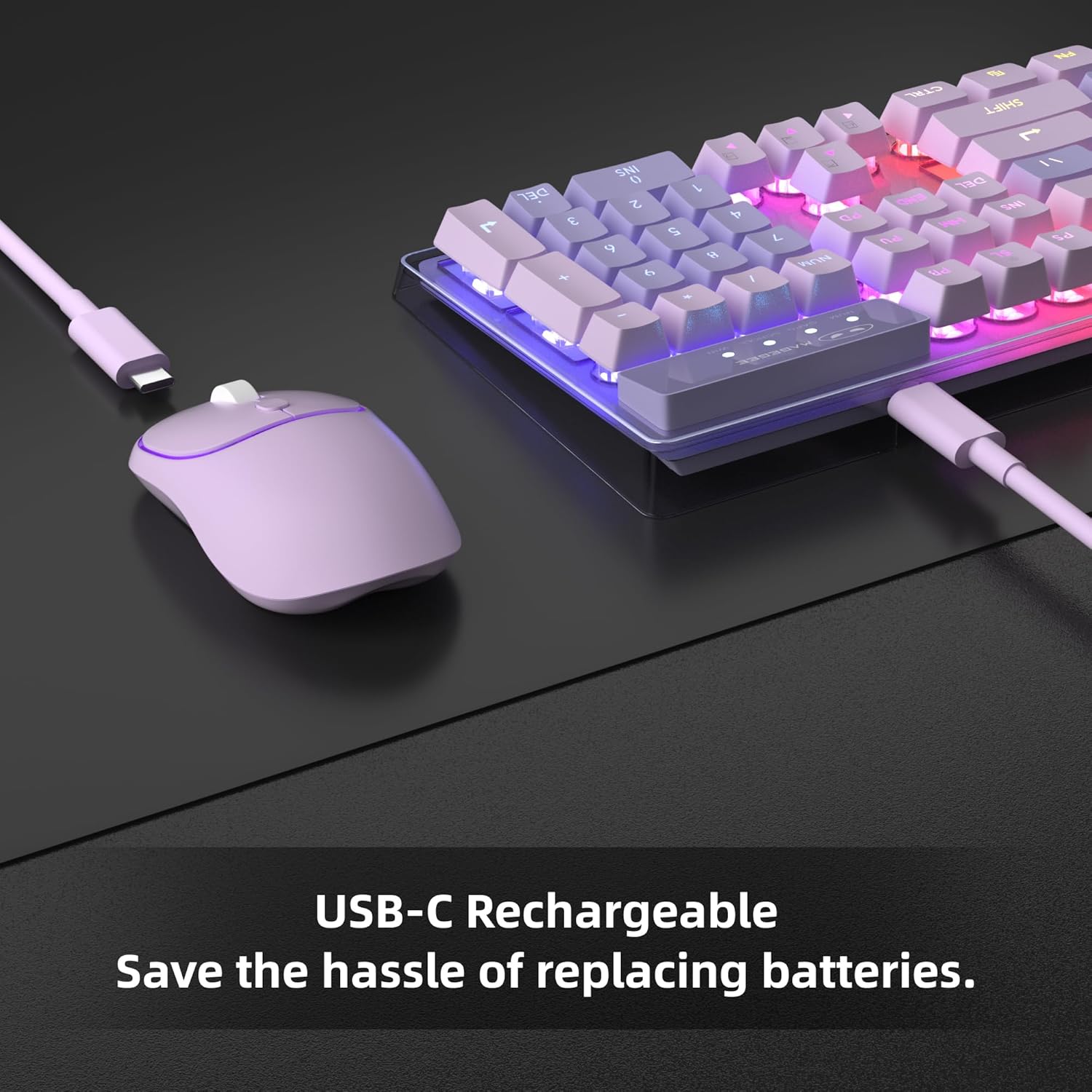
Image: The MageGee V550 keyboard and mouse being charged via USB-C cables, emphasizing the rechargeable feature.
- കേബിൾ ബന്ധിപ്പിക്കുക: For charging, connect the included USB Type-C cable to the charging port on the keyboard first.
- പവർ സ്രോതസ്സിലേക്ക് പ്ലഗ് ഇൻ ചെയ്യുക: Then, plug the other end of the USB cable into a computer USB port or a compatible USB wall adapter.
- Ensure Full Insertion: Make sure the USB cable is fully inserted into the charging port.
- വൈദ്യുതി ലാഭിക്കൽ: The devices feature an auto-sleep mode to conserve power. They can be woken up by clicking any key.
പ്രവർത്തന നിർദ്ദേശങ്ങൾ
ഡൈനാമിക് RGB ബാക്ക്ലൈറ്റ്
The V550 keyboard and mouse feature dynamic RGB backlighting for an enhanced user experience.

Image: The MageGee V550 keyboard displaying various RGB backlight modes, with a list of features including 5 light modes, 8 colors, adjustable speed/brightness, and on/off function.
- കീബോർഡ് ലൈറ്റിംഗ്: The keyboard offers 5 light modes, 7 solid color backlights, and 1 rainbow backlight.
- ക്രമീകരണങ്ങൾ: You can adjust 3 brightness levels and 4 light speeds.
- ദൃശ്യപരത: The shine-through keys ensure visibility in low-light environments.
- Mouse Lighting: The wireless mouse includes a vibrant RGB light strip.
- ടോഗിൾ ചെയ്യുക: The backlight can be turned off at any time.
കീബോർഡ് സവിശേഷതകൾ
The V550 keyboard is designed for comfort and functionality.
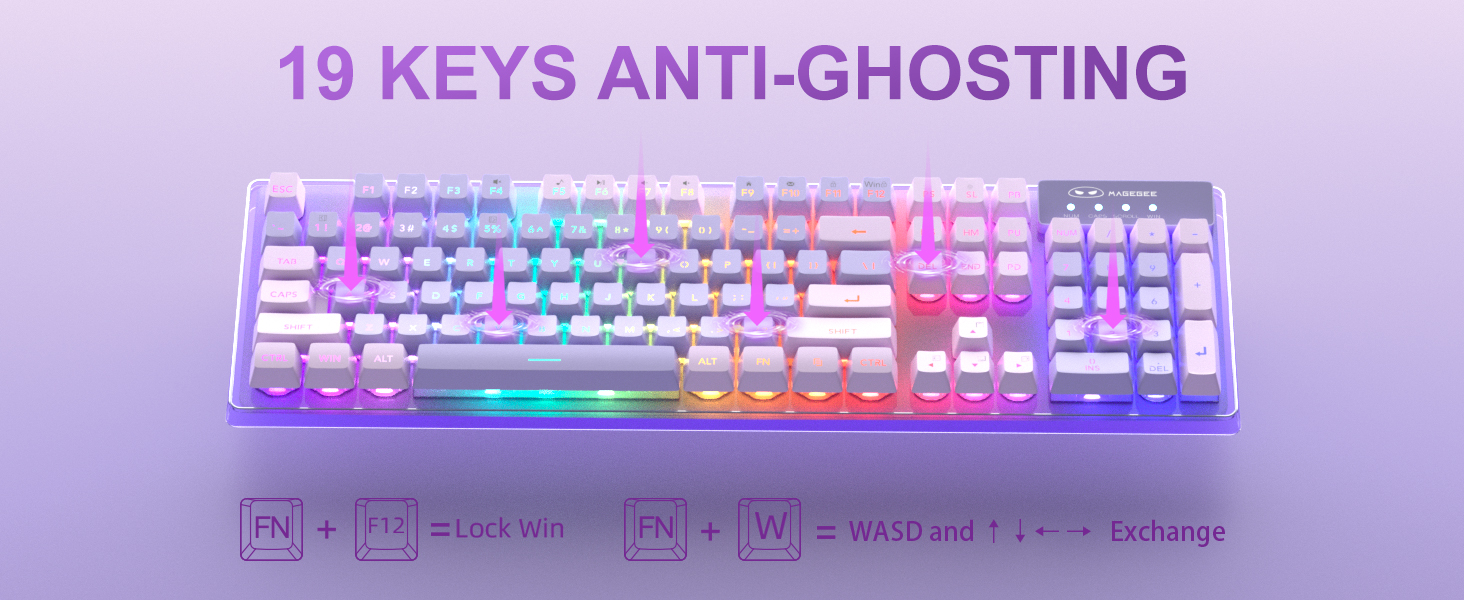
Image: The MageGee V550 keyboard highlighting the 19-key anti-ghosting feature, showing key combinations for Lock Win (FN+F12) and WASD/Arrow key exchange (FN+W).
- പൂർണ്ണ വലുപ്പത്തിലുള്ള ലേഔട്ട്: A standard 104-key layout includes a number pad and 12 multimedia shortcuts.
- കീക്യാപ്പുകൾ: Features floating double-shot keycaps for durability and a comfortable typing feel.
- സ്ഥിരത: Non-slip pads on the bottom enhance typing stability.
- ആന്റി ഗോസ്റ്റിംഗ്: Supports 19-key anti-ghosting for accurate input during gaming.
മൗസ് സവിശേഷതകൾ
The V550 mouse is designed for precise control and quiet operation.

ചിത്രം: വിശദമായത് view of the MageGee V550 mouse, showing its 4 buttons (scroll wheel, right, left, tracking speed), ergonomic design, and silent clicking feature.
- ബട്ടണുകൾ: Features 4 buttons including a scroll wheel, left button, right button, and tracking speed button.
- ട്രാക്കിംഗ് വേഗത: Adjustable tracking speed levels (1000-1200-1600 DPI).
- എർണോണോമിക്സ്: വിപുലീകൃത ഉപയോഗ സമയത്ത് സുഖപ്രദമായ പിടിയ്ക്കായി രൂപകൽപ്പന ചെയ്തിരിക്കുന്നു.
- ശാന്തമായ പ്രവർത്തനം: Features silent clicking for a less disruptive experience.
മെയിൻ്റനൻസ്
വൃത്തിയാക്കൽ
Regular cleaning helps maintain the performance and appearance of your keyboard and mouse.
- പൊതുവായ ശുചീകരണം: Use a soft, dry cloth to wipe down the surfaces of the keyboard and mouse.
- കീക്യാപ്പുകൾ: For deeper cleaning, gently remove keycaps (if applicable and designed for removal) and use compressed air to clear debris from underneath. Wipe keycaps with a slightly damp തുണിയും വീര്യം കുറഞ്ഞ സോപ്പ് ലായനിയും ഉപയോഗിച്ച് നന്നായി ഉണക്കി വീണ്ടും ഘടിപ്പിക്കുക.
- മൗസ് സെൻസർ: ഒരു കോട്ടൺ സ്വാബ് ഉപയോഗിച്ച് ചെറുതായി നനയ്ക്കുക dampened with rubbing alcohol to clean the optical sensor on the bottom of the mouse.
- ദ്രാവകങ്ങൾ ഒഴിവാക്കുക: Do not immerse the devices in water or use excessive liquid cleaners.
ട്രബിൾഷൂട്ടിംഗ്
കണക്ഷൻ പ്രശ്നങ്ങൾ
- ബന്ധമില്ല: നിങ്ങളുടെ കമ്പ്യൂട്ടറിലെ പ്രവർത്തിക്കുന്ന ഒരു USB പോർട്ടിലേക്ക് USB റിസീവർ സുരക്ഷിതമായി പ്ലഗ് ചെയ്തിട്ടുണ്ടെന്ന് ഉറപ്പാക്കുക.
- പവർ സ്വിച്ചുകൾ: Verify that the power switches on both the keyboard and mouse (located on the bottom) are turned ON.
- ബാറ്ററി നില: Check if the keyboard and mouse have sufficient battery charge. Recharge if necessary.
- ഇടപെടൽ: Move the devices closer to the USB receiver or away from other wireless devices that might cause interference.
ചാർജിംഗ് പ്രശ്നങ്ങൾ
- ചാര്ജ്ജ് ആകുന്നില്ല: Ensure the USB Type-C cable is fully inserted into both the device's charging port and the power source (computer USB port or wall adapter).
- ഊർജ്ജ സ്രോതസ്സ്: Confirm that the computer or wall adapter providing power is turned on and functioning correctly.
- കേബിൾ സമഗ്രത: Try using a different USB Type-C cable to rule out a faulty cable.
സ്പെസിഫിക്കേഷനുകൾ
Detailed technical specifications for the MageGee V550 Wireless Gaming Keyboard and Mouse Combo.

Image: Technical drawing showing the dimensions of the MageGee V550 keyboard (17.13 x 5.4 x 1.34 inches) and mouse (4.45 x 2.56 x 1.42 inches).
| ഫീച്ചർ | വിശദാംശങ്ങൾ |
|---|---|
| ബ്രാൻഡ് | മേജ്ഗീ |
| മോഡൽ നമ്പർ | V550 |
| കണക്റ്റിവിറ്റി ടെക്നോളജി | 2.4G വയർലെസ് |
| കീബോർഡ് ലേഔട്ട് | പൂർണ്ണ വലുപ്പത്തിലുള്ള 104-കീ |
| കീബോർഡ് ബാക്ക്ലൈറ്റ് | Dynamic RGB (5 modes, 7 solid colors, 1 rainbow, 3 brightness, 4 speeds) |
| Mouse Tracking Speed | 1000-1200-1600 ഡിപിഐ |
| പ്രത്യേക സവിശേഷതകൾ | Backlit, Ergonomic, Rechargeable, Transparent Base, 19-Key Anti-Ghosting |
| അനുയോജ്യമായ ഉപകരണങ്ങൾ | ലാപ്ടോപ്പ്, പേഴ്സണൽ കമ്പ്യൂട്ടർ |
| കീബോർഡ് അളവുകൾ | 17.13 x 5.4 x 1.34 ഇഞ്ച് |
| മൗസിൻ്റെ അളവുകൾ | 4.45 x 2.56 x 1.42 ഇഞ്ച് |
| ഇനത്തിൻ്റെ ഭാരം | 2.16 പൗണ്ട് (സംയോജിപ്പിച്ചത്) |
വാറൻ്റിയും പിന്തുണയും
For warranty information, technical support, or service inquiries, please refer to the contact information provided with your product packaging or visit the official MageGee webസൈറ്റ്. വാങ്ങിയതിന്റെ തെളിവായി നിങ്ങളുടെ വാങ്ങൽ രസീത് സൂക്ഷിക്കുക.


