1. ഉൽപ്പന്നം കഴിഞ്ഞുview
This package provides a complete teleworking solution, combining the Cleyver AS690 DECT Cordless Phone with the Cleyver ODHW10 Mono Headset. Designed for hands-free communication, this system offers flexibility and clear audio for your daily calls.

Image: The Cleyver AS690 DECT Cordless Phone and the Cleyver ODHW10 Mono Headset, shown together as a complete communication system.
The AS690 cordless phone features a large backlit display and a user-friendly keypad, ensuring excellent audio quality. The ODHW10 mono headset is lightweight and adjustable, providing optimal comfort for extended calls.

Image: A man wearing the Cleyver ODHW10 Mono Headset while working at a computer, demonstrating its use in a professional setting.
Enjoy freedom of movement with a range of up to 300 meters outdoors and 50 meters indoors. Practical features include a 200-contact directory, caller ID, hands-free mode, and automatic redial function.
2. ബോക്സിൽ എന്താണുള്ളത്?
നിങ്ങളുടെ പാക്കേജിൽ ഇനിപ്പറയുന്ന എല്ലാ ഘടകങ്ങളും ഉണ്ടെന്ന് ഉറപ്പാക്കുക:
- Gigaset AS690 DECT Phone Handset
- Cleyver ODHW10 Headset
- Base Station for DECT Phone
- Charging Cradle for Headset
- Power Adapters for Phone Base and Headset Cradle
- Telephone Connection Cable
- AAA Batteries (for DECT Phone Handset)
3. സജ്ജീകരണം
3.1. DECT Phone Setup
- ബേസ് സ്റ്റേഷൻ ബന്ധിപ്പിക്കുക: Plug the power adapter into the DECT phone base station and then into a power outlet. Connect the telephone cable from the base station to your telephone wall socket.
- ബാറ്ററികൾ ഇൻസ്റ്റാൾ ചെയ്യുക: Open the battery compartment on the back of the DECT phone handset. Insert the provided AAA batteries, ensuring correct polarity. Close the compartment.
- ഹാൻഡ്സെറ്റ് ചാർജ് ചെയ്യുക: Place the handset on the base station or charging cradle. The display will indicate charging. Allow the handset to charge for at least 6-8 hours before first use to ensure optimal battery life.

Image: The Cleyver AS690 DECT Cordless Phone handset placed on its charging base.
3.2. Headset Setup
- ഹെഡ്സെറ്റ് ചാർജ് ചെയ്യുക: Place the Cleyver ODHW10 headset on its charging cradle. Connect the cradle's power adapter to a power outlet. The indicator light on the headset or cradle will show charging status.
- Pairing the Headset with the DECT Phone: The product is designed for compatibility. For detailed pairing instructions, please refer to the official pairing guide available at: Cleyver Pairing Guide (PDF). Follow the steps carefully to ensure proper connection between your phone and headset.

Image: The Cleyver ODHW10 Mono Headset on its charging base.
4. പ്രവർത്തന നിർദ്ദേശങ്ങൾ
4.1. കോളുകൾ ചെയ്യലും സ്വീകരിക്കലും
- ഒരു കോൾ ചെയ്യുന്നു: Dial the number using the keypad and press the green call button.
- ഒരു കോൾ സ്വീകരിക്കുന്നു: When the phone rings, press the green call button to answer.
- ഒരു കോൾ അവസാനിപ്പിക്കുന്നു: Press the red end call button or place the handset back on the base/cradle.
4.2. ഹെഡ്സെറ്റ് ഉപയോഗിക്കുന്നു
Once paired, you can use the headset for hands-free communication:
- Answering/Ending Calls with Headset: Depending on the headset model and phone settings, you may be able to answer/end calls directly from the headset button. Refer to the headset's specific instructions for details.
- Switching to Headset: During a call on the handset, you can typically switch to the headset by pressing a dedicated button on the phone or headset.
- ഹെഡ്സെറ്റ് വോളിയം ക്രമീകരിക്കുന്നു: Use the volume controls on the headset or the phone handset to adjust call volume.

Image: The Cleyver ODHW10 Mono Headset resting on a desk, ready for use.
4.3 പ്രധാന സവിശേഷതകൾ
- ഫോണ്നമ്പറുകള് അടങ്ങിയ പുസ്തകം: Store up to 200 contacts in the phone's directory.
- കോളർ ഐഡി: View incoming caller information (requires network service).
- ഹാൻഡ്സ് ഫ്രീ മോഡ്: Activate speakerphone function on the handset for group listening.
- Automatic Redial: Quickly redial the last number called.
- കോൾ തടയൽ: Block up to 32 unwanted numbers.
- വോളിയം നിയന്ത്രണം: Adjust handset volume with 5 levels.
- പരിധി: Up to 300 meters outdoors and 50 meters indoors, providing significant mobility.
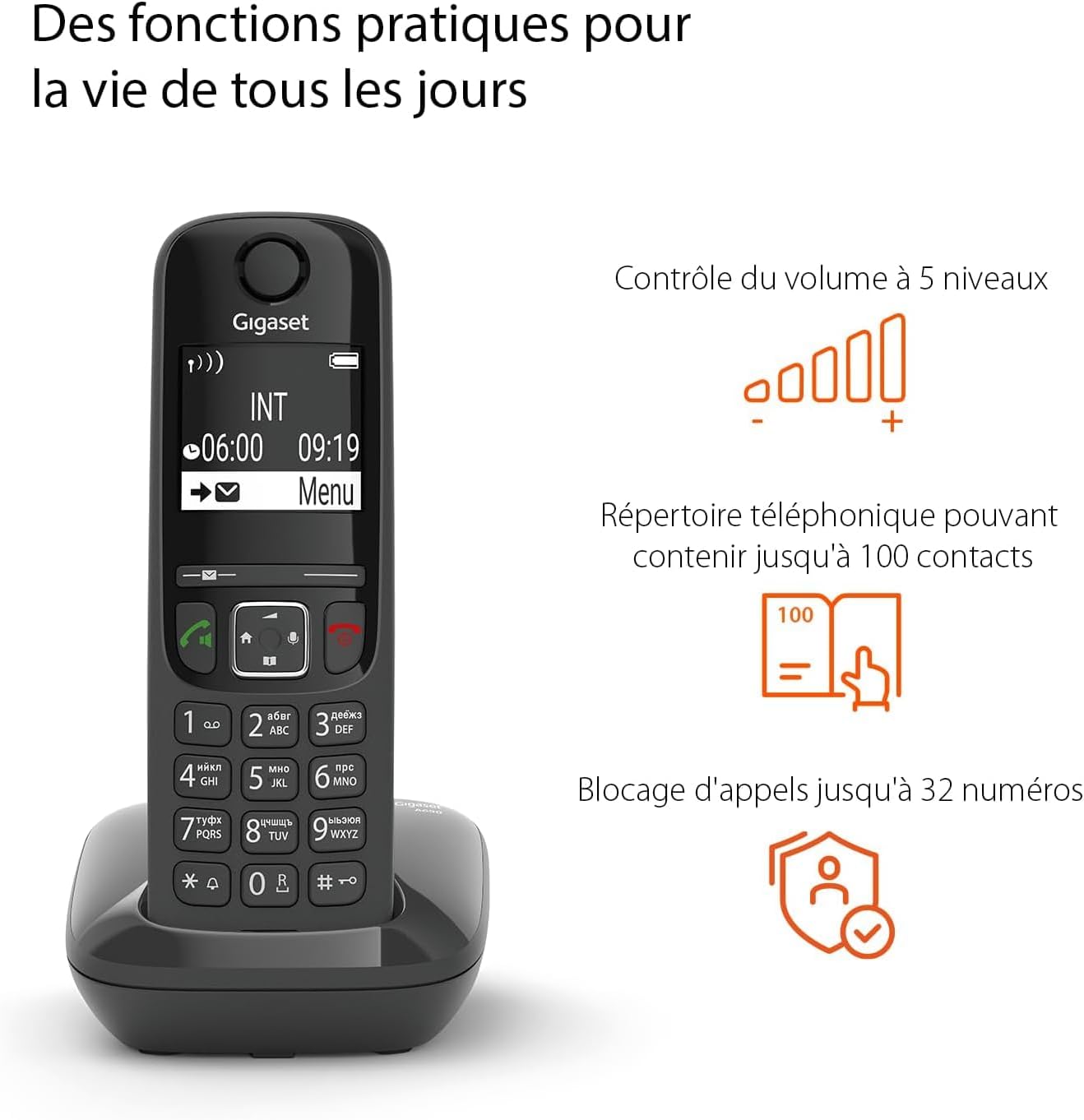
Image: The Cleyver AS690 DECT Phone displaying its screen and keypad, with visual icons illustrating features like volume control, phonebook, and call blocking.
5. പരിപാലനം
- വൃത്തിയാക്കൽ: Use a soft, dry cloth to clean the phone and headset. Do not use liquid cleaners or aerosols.
- ബാറ്ററി കെയർ: For optimal battery life, fully charge the handset and headset regularly. Avoid extreme temperatures. If the phone will not be used for an extended period, remove the batteries.
- സംഭരണം: Store the devices in a cool, dry place away from direct sunlight and moisture.
6. പ്രശ്നപരിഹാരം
| പ്രശ്നം | സാധ്യമായ കാരണം | പരിഹാരം |
|---|---|---|
| ഫോണിൽ ഡയൽ ടോൺ ഇല്ല. | Phone not connected to line; power issue; batteries low. | Check telephone line connection. Ensure base station is powered. Recharge handset batteries. |
| Poor audio quality (static, low volume). | പരിധിക്ക് പുറത്താണ്; തടസ്സം; കുറഞ്ഞ ബാറ്ററി. | Move closer to the base station. Avoid placing near other electronic devices. Recharge batteries. Adjust volume. |
| Headset not connecting to phone. | Not paired correctly; headset battery low. | Ensure headset is charged. Re-attempt the pairing process as described in Section 3.2 and the Cleyver Pairing Guide. |
| Phone display is blank. | ഹാൻഡ്സെറ്റ് ബാറ്ററി പൂർണ്ണമായും തീർന്നു. | Place the handset on the charging base and allow it to charge for several minutes before attempting to power on. |
7 സ്പെസിഫിക്കേഷനുകൾ
| ഫീച്ചർ | വിശദാംശങ്ങൾ |
|---|---|
| ബ്രാൻഡ് | Cleyver |
| മോഡൽ | AS690 (Phone), ODHW10 (Headset) |
| നിറം | കറുപ്പ് |
| അനുയോജ്യമായ ഉപകരണങ്ങൾ | Fixed Telephone |
| മെറ്റീരിയൽ | പ്ലാസ്റ്റിക് |
| പവർ ഉറവിടം | റീചാർജ് ചെയ്യാവുന്ന ബാറ്ററി |
| ഇനത്തിൻ്റെ ഭാരം | 450 ഗ്രാം |
| അളവുകൾ (L x W x H) | 15 x 20 centimeters (approximate) |
| ഫോൺബുക്ക് ശേഷി | Up to 200 contacts |
| കോൾ ബ്ലോക്കിംഗ് ശേഷി | 32 നമ്പറുകൾ വരെ |
| ഇൻഡോർ റേഞ്ച് | 50 മീറ്റർ വരെ |
| Do ട്ട്ഡോർ ശ്രേണി | 300 മീറ്റർ വരെ |
| Battery Type (Phone) | AAA ബാറ്ററികൾ ആവശ്യമാണ് |
| ECO DECT Technology | Yes, for reduced energy consumption |

Image: The Cleyver AS690 DECT Phone highlighting its ECO DECT technology for energy efficiency.
8. വാറൻ്റിയും പിന്തുണയും
Your Cleyver AS690 DECT Cordless Phone and ODHW10 Mono Headset come with a 2 വർഷത്തെ നിർമ്മാതാവിന്റെ വാറന്റി.
For technical support, warranty claims, or further assistance, please contact Cleyver customer service through their official website or the retailer where you purchased the product. Keep your proof of purchase for warranty purposes.
For additional resources and product information, you may visit the Cleyver brand store on Amazon: Cleyver Amazon Store.


