1. ആമുഖം
Welcome to the user manual for your TP-Link AXE5400 Tri-Band Mesh Wi-Fi 6E Range Extender, model RE815XE. This device is designed to expand your existing Wi-Fi network coverage, providing a stable and high-speed wireless connection throughout your home or office. The RE815XE utilizes Tri-Band Wi-Fi 6E technology to deliver enhanced performance and reduce network congestion.
2. ഉൽപ്പന്നം കഴിഞ്ഞുview
The TP-Link RE815XE is equipped with four external antennas and 6x high-power FEMs to ensure maximum Wi-Fi performance and extended coverage. It supports Beamforming technology, which detects device locations and concentrates Wi-Fi signals for stronger, more reliable connections.

ചിത്രം 1: ഫ്രണ്ട് view of the TP-Link RE815XE Range Extender, showing the power, 2.4G, 5G, and 6G LED indicators.
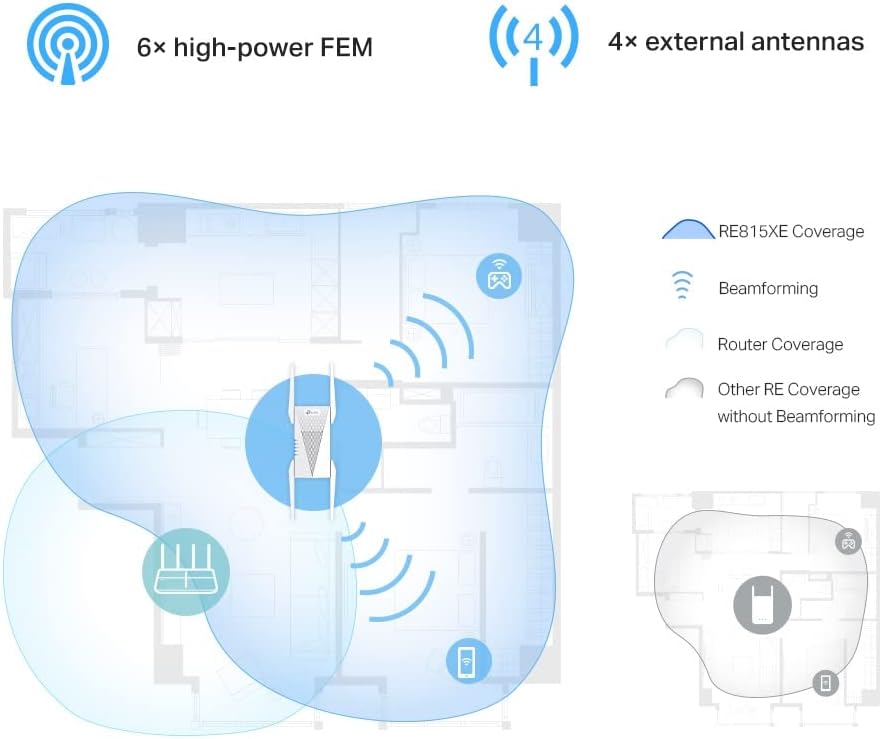
ചിത്രം 2: Illustration of the RE815XE's extended coverage and Beamforming technology.
3 പ്രധാന സവിശേഷതകൾ
- AXE5400 Tri-Band Wi-Fi: Boosts overall speeds up to an incredible 5400 Mbps across 2.4 GHz, 5 GHz, and 6 GHz bands.
- 6 GHz ബാൻഡ്: Provides a dedicated, clearer band to prevent Wi-Fi interference and congestion, ideal for Wi-Fi 6E compatible devices.
- 160 MHz Channel Bandwidth: Expands bandwidth to double the network speed of traditional 80 MHz channels, enhancing data throughput.
- തടസ്സമില്ലാത്ത റോമിംഗ്: Part of the OneMesh™ system, allowing your devices to automatically switch to the router or extender that provides the fastest connection as you move around your home.
- Improved Capacity, Less Lag: Supports more connected devices simultaneously, ensuring smooth streaming and gaming experiences.
- ലളിതമായ ഇൻസ്റ്റാളേഷൻ: Easy setup via the TP-Link Tether App or a web ബ്രൗസർ.

ചിത്രം 3: കഴിഞ്ഞുview of the RE815XE's Wi-Fi capabilities, including speed distribution across bands and key technologies.
4. പാക്കേജ് ഉള്ളടക്കം
Upon opening the package, verify that you have received the following items:
- TP-Link AXE5400 Tri-Band Mesh Wi-Fi 6E Range Extender (RE815XE)
- ദ്രുത ഇൻസ്റ്റലേഷൻ ഗൈഡ്
- Ethernet Cable (optional, may vary by region)
5. സജ്ജീകരണവും ഇൻസ്റ്റാളേഷനും
5.1. പ്ലേസ്മെന്റ് മാർഗ്ഗനിർദ്ദേശങ്ങൾ
For optimal performance, place the range extender between your main router and the area where you need improved Wi-Fi coverage. Avoid placing it near large metal objects, concrete walls, or other sources of interference such as microwave ovens or cordless phones.

ചിത്രം 4: Recommended placement for the range extender to maximize coverage.
5.2. പവർ ചെയ്യുന്നു
- Plug the RE815XE into an electrical outlet near your main router.
- Wait for the Power LED to turn solid blue, indicating the device is ready.
5.3. Configuration via TP-Link Tether App (Recommended)
- ഡൗൺലോഡ് ചെയ്യുക ടിപി-ലിങ്ക് ടെതർ ആപ്പ് ആപ്പ് സ്റ്റോറിൽ നിന്നോ ഗൂഗിൾ പ്ലേ സ്റ്റോറിൽ നിന്നോ.
- Connect your smartphone or tablet to the RE815XE's default Wi-Fi network (e.g., "TP-Link_Extender").
- Open the Tether App and follow the on-screen instructions to set up your range extender. This typically involves selecting your main Wi-Fi network and entering its password.
- Once configured, the Signal LED on the extender should turn solid blue, indicating a successful connection to your router.
5.4. കോൺഫിഗറേഷൻ വഴി Web ബ്രൗസർ
- Plug the RE815XE into an electrical outlet.
- Connect your computer to the RE815XE's default Wi-Fi network (e.g., "TP-Link_Extender") or via an Ethernet cable.
- എ തുറക്കുക web ബ്രൗസറും ടൈപ്പും tplinkrepeater.net or 192.168.0.254 വിലാസ ബാറിലേക്ക്.
- Create a login password when prompted.
- Follow the on-screen instructions to select your main Wi-Fi network and enter its password.
- Once configured, the Signal LED on the extender should turn solid blue.
6. പ്രവർത്തന നിർദ്ദേശങ്ങൾ
6.1. OneMesh™ Functionality
The RE815XE supports TP-Link OneMesh™, which creates a unified Wi-Fi network with a single Wi-Fi name (SSID) when paired with a compatible TP-Link OneMesh™ router. This allows your devices to automatically switch to the router or extender that provides the fastest connection as you move around your home.
6.2. എൽഇഡി സൂചകങ്ങൾ
| എൽഇഡി | നില | സൂചന |
|---|---|---|
| ശക്തി | സോളിഡ് ബ്ലൂ | Extender is powered on and functioning normally. |
| ഓഫ് | Extender is powered off. | |
| 2.4G / 5G / 6G | സോളിഡ് ബ്ലൂ | Connected to the router's 2.4 GHz / 5 GHz / 6 GHz network. |
| ഓഫ് | Not connected to the respective band. | |
| സിഗ്നൽ | സോളിഡ് ബ്ലൂ | Good connection to the router. |
| കടും ചുവപ്പ് | Poor connection to the router. Relocate the extender closer to the router. | |
| ഓഫ് | No connection to the router. |
7. പരിപാലനം
- ഫേംവെയർ അപ്ഡേറ്റുകൾ: Regularly check for and install firmware updates via the Tether App or the web ഒപ്റ്റിമൽ പ്രകടനവും സുരക്ഷയും ഉറപ്പാക്കാൻ മാനേജ്മെന്റ് ഇന്റർഫേസ്.
- വൃത്തിയാക്കൽ: ഉപകരണം വൃത്തിയായും പൊടി രഹിതമായും സൂക്ഷിക്കുക. വൃത്തിയാക്കാൻ മൃദുവായതും ഉണങ്ങിയതുമായ തുണി ഉപയോഗിക്കുക. ലിക്വിഡ് ക്ലീനറുകളോ എയറോസോളുകളോ ഉപയോഗിക്കരുത്.
- വെൻ്റിലേഷൻ: Ensure the extender is placed in a well-ventilated area to prevent overheating. Do not block the ventilation openings.
- റീബൂട്ട് ചെയ്യുന്നു: If you experience intermittent connectivity or performance issues, try rebooting the extender by unplugging it from the power outlet for 10 seconds and then plugging it back in.
8. പ്രശ്നപരിഹാരം
8.1. Extender is not connecting to the router.
- നിങ്ങളുടെ പ്രധാന റൂട്ടർ ഓണാണെന്നും ഒരു വൈഫൈ സിഗ്നൽ പ്രക്ഷേപണം ചെയ്യുന്നുണ്ടെന്നും ഉറപ്പാക്കുക.
- Verify that you have entered the correct Wi-Fi password for your main network during setup.
- Relocate the extender closer to your main router. The Signal LED should turn solid blue for a good connection.
- നിങ്ങളുടെ റൂട്ടറും എക്സ്റ്റെൻഡറും പുനരാരംഭിക്കാൻ ശ്രമിക്കുക.
8.2. Wi-Fi signal is weak or drops frequently.
- Adjust the position of the extender. It should be within the range of your main router but also close enough to the areas needing coverage.
- ഇടപെടലുകളുടെ ഉറവിടങ്ങൾ പരിശോധിക്കുക (ഉദാ: മൈക്രോവേവ്, കോർഡ്ലെസ് ഫോണുകൾ, കട്ടിയുള്ള ഭിത്തികൾ).
- Ensure the extender's antennas are properly oriented.
- Update the firmware of both your router and the extender to the latest version.
8.3. Cannot access the web മാനേജ്മെൻ്റ് പേജ്.
- Ensure your device is connected to the extender's Wi-Fi network or via an Ethernet cable.
- Verify that you are using the correct address: tplinkrepeater.net or 192.168.0.254.
- നിങ്ങളുടെ ബ്രൗസറിന്റെ കാഷെയും കുക്കികളും മായ്ക്കുക, അല്ലെങ്കിൽ മറ്റൊന്ന് പരീക്ഷിക്കുക web ബ്രൗസർ.
- നിങ്ങളുടെ കമ്പ്യൂട്ടറിലെ ഏതെങ്കിലും VPN അല്ലെങ്കിൽ ഫയർവാൾ സോഫ്റ്റ്വെയർ താൽക്കാലികമായി പ്രവർത്തനരഹിതമാക്കുക.
9 സ്പെസിഫിക്കേഷനുകൾ
| ഫീച്ചർ | വിശദാംശങ്ങൾ |
|---|---|
| മോഡൽ | RE815XE |
| വയർലെസ് സ്റ്റാൻഡേർഡ് | IEEE 802.11ax/ac/n/a (5 GHz/6 GHz), IEEE 802.11ax/n/g/b (2.4 GHz) |
| ഡാറ്റ കൈമാറ്റ നിരക്ക് | Up to 5400 Mbps (2402 Mbps on 6 GHz, 2402 Mbps on 5 GHz, 574 Mbps on 2.4 GHz) |
| ആൻ്റിനകൾ | 4 ബാഹ്യ ആൻ്റിനകൾ |
| അളവുകൾ | 8.27 x 5.47 x 4.8 ഇഞ്ച് (പാക്കേജ് അളവുകൾ) |
| ഇനത്തിൻ്റെ ഭാരം | 1.17 പൗണ്ട് |
| നിറം | വെള്ള |
| അനുയോജ്യമായ ഉപകരണങ്ങൾ | Wi-Fi enabled devices (routers, smartphones, tablets, laptops, computers, smart TVs, gaming consoles, printers, security cameras) |
10. വാറൻ്റിയും പിന്തുണയും
വാറന്റി വിവരങ്ങൾക്കും സാങ്കേതിക പിന്തുണയ്ക്കും, ദയവായി ഔദ്യോഗിക ടിപി-ലിങ്ക് പരിശോധിക്കുക. website or contact TP-Link customer service directly. The specific warranty period may vary by region and retailer. Keep your purchase receipt for warranty claims.
ടിപി-ലിങ്ക് പിന്തുണ Webസൈറ്റ്: https://www.tp-link.com/support/


