1. ആമുഖവും അവസാനവുംview
This manual provides essential information for the Waveshare 13.3-inch E Ink Spectra 6 (E6) Full Color E-Paper Display. This raw E-Ink display features a 1600×1200 resolution and utilizes a Serial Peripheral Interface (SPI) for communication. It is designed for applications requiring high contrast, high color saturation, and ultra-low power consumption, as it retains the last displayed content without continuous power.
2. പാക്കേജ് ഉള്ളടക്കം
താഴെ ലിസ്റ്റ് ചെയ്തിരിക്കുന്ന എല്ലാ ഇനങ്ങളും നിങ്ങളുടെ പാക്കേജിൽ ഉൾപ്പെടുത്തിയിട്ടുണ്ടെന്ന് ഉറപ്പാക്കുക:
- 13.3inch e-Paper (E) x1

Figure 2.1: Package content showing the 13.3-inch e-Paper display.
3 പ്രധാന സവിശേഷതകൾ
- Adopts E Ink Spectra 6 (E6) technology, featuring high contrast and high color saturation.
- No backlight required; the display retains its content indefinitely even when powered off.
- Ultra-low power consumption, with power primarily consumed only during display refreshes.
- Offers rich Wiki resources for development, including examples for Raspberry Pi, Arduino, ESP32, and STM32.
- Optional e-Paper Driver HAT available, supporting standard Raspberry Pi 40PIN GPIO header for Raspberry Pi series boards.
- HAT+ standard compliance improves interoperability and simplifies design and development.
- Adapting SPI interface for compatibility with various controller boards (Arduino, ESP32, STM32, Raspberry Pi).
- ഓൺബോർഡ് വോളിയംtage translator ensures compatibility with 3.3V / 5V MCUs.

ചിത്രം 3.1: ഓവർview of the 13.3-inch full color e-Paper display and its features.
4 സാങ്കേതിക സവിശേഷതകൾ
| പരാമീറ്റർ | മൂല്യം | പരാമീറ്റർ | മൂല്യം |
|---|---|---|---|
| ഓപ്പറേറ്റിംഗ് വോളിയംtage | Raw display: 3.3V with Driver HAT: 3.3V/5V | ഡിസ്പ്ലേ കളർ | E6 full color (E Ink Spectra 6) |
| ഇൻ്റർഫേസ് | 3-വയർ SPI, 4-വയർ SPI | ഗ്രേ സ്കെയിൽ | 2 |
| രൂപരേഖ അളവുകൾ | Raw display: 284.70 × 208.80 × 0.85mm e-Paper driver HAT: 65.00 × 30.50mm | പൂർണ്ണ പുതുക്കൽ സമയം | 19 സെ |
| ഡിസ്പ്ലേ വലിപ്പം | 270.40 × 202.80 മിമി | Total Refresh Power | <0.5W |
| ഡോട്ട് പിച്ച് | 0.169 × 0.169 മിമി | Standby Current of Raw Display | <0.01uA (ഏകദേശം ഒന്നുമില്ല) |
| റെസലൂഷൻ | 1600 × 1200 പിക്സലുകൾ | Viewing ആംഗിൾ | >170° |

Figure 4.1: Detailed specifications of the 13.3-inch e-Paper display.

Figure 4.2: Outline dimensions of the e-Paper display and the e-Paper Driver HAT.
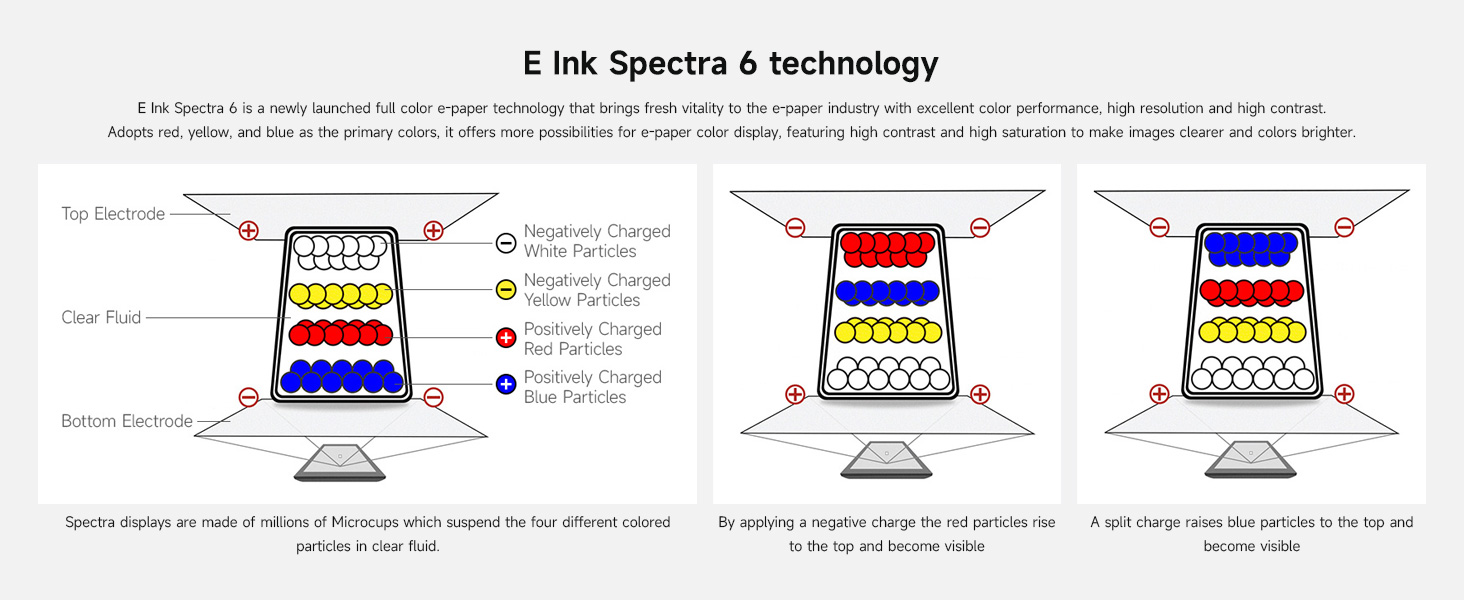
5. E Ink Spectra 6 Technology
The E Ink Spectra 6 is a full-color e-paper technology that enhances the e-paper industry with superior color performance, high resolution, and high contrast. It utilizes red, yellow, and blue as primary colors, offering more possibilities for e-paper color display, resulting in clearer and brighter images.

Figure 5.1: Explanation of E Ink Spectra 6 technology.
This advanced performance includes a resolution of up to 200ppi, a wider operating temperature range, and faster screen refresh times. It is also more power-saving, aligning with ESG trends for energy efficiency and carbon reduction.
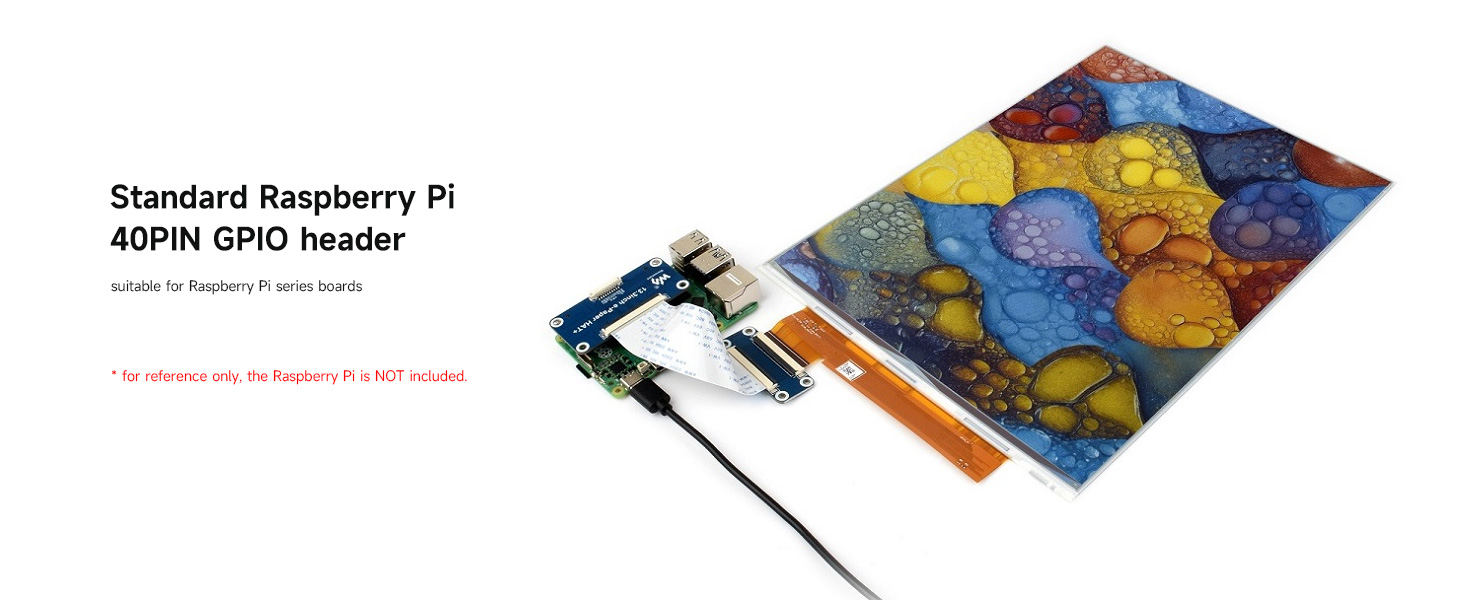
Figure 5.2: Evolution of E Ink Spectra technology.
6. അഡ്വാൻtages and Applications of E Ink
E-paper displays utilize microcapsule electrophoretic technology for displaying content. Charged particles suspended in a clear fluid move to the sides of microcapsules when an electric field is applied, making the microcapsule visible by reflecting ambient light, similar to traditional printed paper. E-paper displays clearly show images and text under lamplight or natural light, require no backlight, and offer a nearly 180° viewing angle. This technology is commonly used in e-readers due to its paper-like effect.
ചിത്രം 6.1: അഡ്വാൻtages of E Ink and various application exampലെസ്.
7. സജ്ജീകരണവും കണക്ഷനും
7.1 Connecting to Raspberry Pi (with optional HAT)
If using the optional e-Paper Driver HAT, it connects directly to the standard Raspberry Pi 40PIN GPIO header. This setup is suitable for Raspberry Pi series boards. The HAT+ standard ensures improved interoperability and automatic detection by Raspberry Pi software/firmware, simplifying the development process.

Figure 7.1: Raspberry Pi GPIO header connection and example display content.
7.2 SPI Control Interface
The display features an onboard SPI control interface, making it compatible with various controller boards such as Arduino, ESP32, and STM32. The onboard voltage translator ensures compatibility with both 3.3V and 5V microcontrollers.

Figure 7.2: SPI control interface pinout for the e-Paper Driver HAT.
8. ഓപ്പറേഷൻ
Operating the E Ink display primarily involves sending image data via the SPI interface to refresh the screen. Due to its bistable nature, the display will maintain the image without consuming power once refreshed. Power is only required during the refresh cycle. Refer to the provided Wiki resources for specific code examples and libraries for your chosen microcontroller platform.
9. പരിപാലനം
To ensure the longevity and optimal performance of your E Ink display:
- കൈകാര്യം ചെയ്യൽ: Handle the display with care, avoiding excessive pressure or bending, especially on the flexible FPC cable.
- വൃത്തിയാക്കൽ: Use a soft, dry, lint-free cloth to gently wipe the display surface. Avoid abrasive materials or chemical cleaners.
- സംഭരണം: Store the display in a cool, dry environment, away from direct sunlight and extreme temperatures.
- ശക്തി: ശരിയായ വൈദ്യുതി വിതരണം വോളിയം ഉറപ്പാക്കുകtage (3.3V or 5V depending on setup) to prevent damage.
10. പ്രശ്നപരിഹാരം
If you encounter issues with your E Ink display, consider the following:
- Display Not Refreshing: Check power connections and ensure the SPI interface is correctly wired. Verify that your code is sending refresh commands.
- Partial Refresh Issues: Ensure your code is performing full refreshes when necessary, especially for color changes, as partial refreshes may not clear all previous content effectively.
- തെറ്റായ നിറങ്ങൾ: Double-check your image data format and color palette settings in your software.
- ഡിസ്പ്ലേ ഔട്ട്പുട്ട് ഇല്ല: Confirm that the display's FPC cable is securely connected to the driver board/HAT. Verify the power supply is stable and within the specified voltagഇ ശ്രേണി.
- സോഫ്റ്റ്വെയർ പിശകുകൾ: Consult the Waveshare Wiki for updated libraries, example code, and community forums for common issues related to your specific microcontroller.
11 പിന്തുണയും വിഭവങ്ങളും
Waveshare provides comprehensive Wiki resources to assist with the development and use of this e-Paper display. These resources include detailed documentation, circuit diagrams, example code, and data sheets. For further information or technical support, please refer to the official Waveshare webസൈറ്റ് സന്ദർശിക്കുക അല്ലെങ്കിൽ അവരുടെ പിന്തുണാ ടീമിനെ നേരിട്ട് ബന്ധപ്പെടുക.
ഔദ്യോഗിക വിക്കി ഉറവിടങ്ങൾ: Please contact Waveshare for specific links and access to their Wiki documentation.


