1. ഉൽപ്പന്നം കഴിഞ്ഞുview
The KIDYWOLF Kidyweather is an educational weather station designed to introduce children aged 6 and above to fundamental meteorological concepts. This device includes an outdoor sensor for comprehensive weather monitoring, covering aspects such as hygrometry (humidity), barometry (atmospheric pressure), and thermometry (temperature).
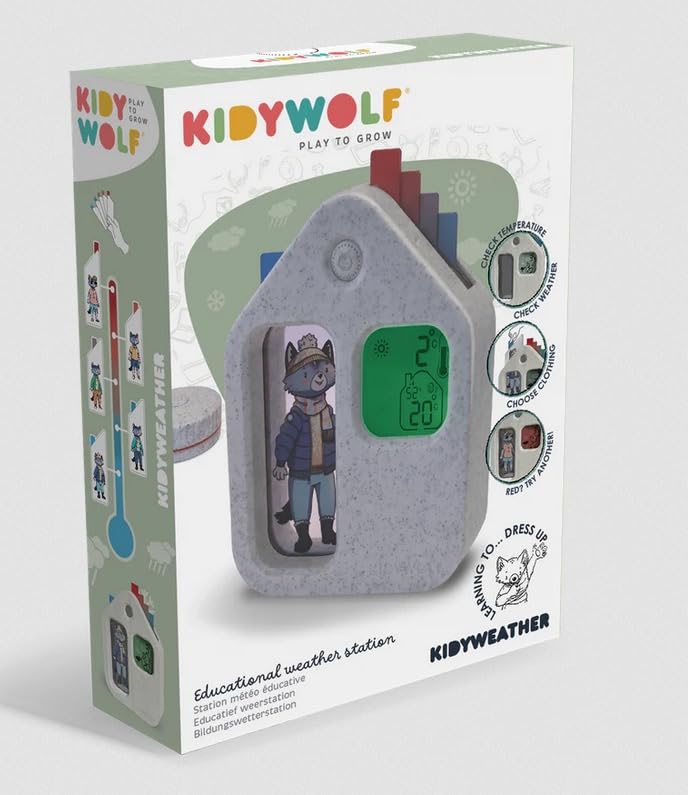
Image of the KIDYWOLF Kidyweather educational weather station, showing its main display unit and the external sensor.
2. ബോക്സിൽ എന്താണുള്ളത്?
- KIDYWOLF Kidyweather Main Unit
- Do ട്ട്ഡോർ സെൻസർ
- പവർ കോർഡ്
3. സജ്ജീകരണ നിർദ്ദേശങ്ങൾ
- ഘടകങ്ങൾ അൺപാക്ക് ചെയ്യുക: പാക്കേജിംഗിൽ നിന്ന് എല്ലാ ഇനങ്ങളും ശ്രദ്ധാപൂർവ്വം നീക്കം ചെയ്യുക.
- ബാറ്ററികൾ ചേർക്കുക: The main unit requires 2 AAA batteries (not included). Open the battery compartment on the back of the unit and insert the batteries, ensuring correct polarity.
- പവർ ബന്ധിപ്പിക്കുക: Plug the provided power cord into the main unit and then into a standard electrical outlet.
- Position Outdoor Sensor: Place the outdoor sensor in a location that is sheltered from direct sunlight and rain, but still allows for accurate ambient temperature and humidity readings. Ensure it is within range of the main unit for wireless communication.
- പ്രാരംഭ സമന്വയം: The main unit and outdoor sensor should automatically synchronize. If not, refer to the troubleshooting section.
4. പ്രവർത്തന നിർദ്ദേശങ്ങൾ
The Kidyweather station displays various meteorological data. Once set up, the unit will begin to show readings from both its internal sensors and the external sensor.
- താപനില പ്രദർശനം: The screen will show indoor and outdoor temperatures. Units (Celsius/Fahrenheit) may be switchable via a button (refer to specific button labels on your device).
- ഹ്യുമിഡിറ്റി ഡിസ്പ്ലേ: Indoor and outdoor humidity levels (hygrometry) are displayed as a percentage.
- ബാരോമെട്രിക് മർദ്ദം: The station provides barometric pressure readings, often with an indicator for rising or falling pressure, which can help predict weather changes.
- വിദ്യാഭ്യാസ സവിശേഷതകൾ: The Kidyweather is designed to be intuitive for children, presenting weather data in an engaging format. Explore the display for any animated weather icons or simple forecasts.
5. പരിപാലനം
- വൃത്തിയാക്കൽ: Wipe the main unit and outdoor sensor with a soft, dry cloth. Do not use abrasive cleaners or immerse in water.
- ബാറ്ററി മാറ്റിസ്ഥാപിക്കൽ: Replace the AAA batteries in the main unit when the low battery indicator appears on the display.
- Sട്ട്ഡോർ സെൻസർ പ്ലേസ്മെന്റ്: Periodically check the outdoor sensor's placement to ensure it remains protected from extreme weather conditions and is providing accurate readings.
- സംഭരണം: ഉപകരണം ദീർഘനേരം സൂക്ഷിക്കുകയാണെങ്കിൽ, ചോർച്ച തടയാൻ എല്ലാ ബാറ്ററികളും നീക്കം ചെയ്യുക.
6. പ്രശ്നപരിഹാരം
- ഡിസ്പ്ലേ/പവർ ഇല്ല:
- Ensure the power cord is securely plugged into both the unit and the electrical outlet.
- Check if the AAA batteries in the main unit are inserted correctly and are not depleted.
- ഔട്ട്ഡോർ സെൻസർ കണക്റ്റുചെയ്യുന്നില്ല:
- Ensure the outdoor sensor is within the specified wireless range of the main unit.
- Check if the outdoor sensor has its own power source (if applicable, though not specified in provided data, it's a common point).
- Try repositioning both the main unit and the outdoor sensor to improve signal.
- Perform a manual re-synchronization if your device has this feature (consult the device's physical buttons for a 'Sync' or 'Channel' button).
- കൃത്യമല്ലാത്ത വായനകൾ:
- Ensure the outdoor sensor is not in direct sunlight or near heat sources, which can skew temperature readings.
- Verify that the main unit is not placed near appliances that generate heat or humidity.
7 സ്പെസിഫിക്കേഷനുകൾ
| ഫീച്ചർ | വിശദാംശങ്ങൾ |
|---|---|
| നിർമ്മാതാവ് | കിഡിവുൾഫ് |
| മോഡൽ റഫറൻസ് | KIDYWEATHER |
| ഉൽപ്പന്ന അളവുകൾ (L x W x H) | 14.5 x 27 x 4.5 സെ.മീ |
| ഭാരം | 494 ഗ്രാം |
| പവർ ഉറവിടം | കോർഡഡ് ഇലക്ട്രിക് |
| ബാറ്ററികൾ ആവശ്യമാണ് | 2 AAA (for main unit, not included) |
| പ്രത്യേക സവിശേഷതകൾ | External Sensor, Hygrometer, Barometer, Thermometer |
| അളക്കൽ കൃത്യത | +/- 5% |
| താപനില കൃത്യത | 1 °C |
| ശുപാർശ ചെയ്യുന്ന ഉപയോഗം | Educational Weather Monitoring |
| ഉൾപ്പെടുത്തിയ ഘടകങ്ങൾ | പവർ കോർഡ് |
8. വാറൻ്റിയും പിന്തുണയും
Warranty information for the KIDYWOLF Kidyweather educational weather station is typically provided with the product packaging or can be found on the official KIDYWOLF website. For technical support, product inquiries, or warranty claims, please refer to the contact information provided in your product documentation or visit the manufacturer's webസൈറ്റ്.
നിർമ്മാതാവ് Webസൈറ്റ്: KIDYWOLF Official Store


