1. ആമുഖം
This manual provides detailed instructions for the installation, operation, and maintenance of your Xigmatek Aqua V AIR Arctic Mid-Tower PC Case. Please read this manual thoroughly before beginning any installation to ensure proper setup and safe operation. Retain this manual for future reference.
2 സുരക്ഷാ വിവരങ്ങൾ
ഇൻസ്റ്റാളേഷനും പ്രവർത്തനവും നടത്തുമ്പോൾ ഇനിപ്പറയുന്ന സുരക്ഷാ മുൻകരുതലുകൾ പാലിക്കുക:
- ഏതെങ്കിലും ഘടകങ്ങൾ ഇൻസ്റ്റാൾ ചെയ്യുന്നതിനോ നീക്കം ചെയ്യുന്നതിനോ മുമ്പ് എല്ലായ്പ്പോഴും വാൾ ഔട്ട്ലെറ്റിൽ നിന്ന് വൈദ്യുതി വിതരണം വിച്ഛേദിക്കുക.
- സെൻസിറ്റീവ് ഘടകങ്ങൾക്ക് ഇലക്ട്രോസ്റ്റാറ്റിക് ഡിസ്ചാർജ് (ഇഎസ്ഡി) കേടുപാടുകൾ സംഭവിക്കുന്നത് തടയാൻ ആന്റി-സ്റ്റാറ്റിക് റിസ്റ്റ് സ്ട്രാപ്പ് ധരിക്കുക.
- Handle components carefully. Avoid touching pins or circuit boards directly.
- പിസി കേസിന് ചുറ്റും ശരിയായ വായുസഞ്ചാരം ഉറപ്പാക്കുക, അങ്ങനെ അത് അമിതമായി ചൂടാകുന്നത് തടയാം.
- കുട്ടികളിൽ നിന്ന് ചെറിയ ഭാഗങ്ങളും ഉപകരണങ്ങളും സൂക്ഷിക്കുക.
- Do not attempt to modify the case or its components, as this may void your warranty and pose safety risks.
3. പാക്കേജ് ഉള്ളടക്കം
പാക്കേജിൽ എല്ലാ ഇനങ്ങളും ഉണ്ടെന്ന് ഉറപ്പാക്കുക:
- Xigmatek Aqua V AIR Arctic Mid-Tower PC Case
- Accessory kit (screws, standoffs, cable ties)
- ഉപയോക്തൃ മാനുവൽ (ഈ പ്രമാണം)
If any items are missing or damaged, contact your retailer or Xigmatek support.
4. ഉൽപ്പന്നം കഴിഞ്ഞുview
The Xigmatek Aqua V AIR Arctic is a mid-tower PC case designed for high-performance gaming configurations. It features tempered glass panels for component visibility and optimized airflow with pre-installed ARGB fans.

ചിത്രം 4.1: മുൻ-ഇടത് view of the Xigmatek Aqua V AIR Arctic PC case, showcasing the tempered glass front and side panels, and the pre-installed ARGB fans.

ചിത്രം 4.2: പിൻഭാഗം view of the PC case, showing the I/O shield cutout, expansion slots, and rear fan mount.
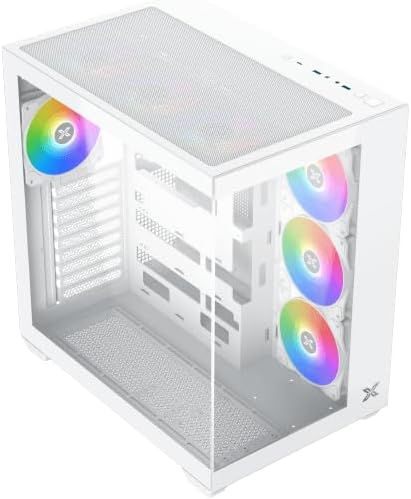
ചിത്രം 4.3: മുകളിൽ നിന്ന് താഴേക്ക് കോണുള്ളത് view, highlighting the top mesh panel for additional cooling and the internal layout.
5. സജ്ജീകരണവും ഇൻസ്റ്റാളേഷനും
Follow these steps to install your PC components into the Xigmatek Aqua V AIR Arctic case.
5.1. കേസ് തയ്യാറാക്കൽ
- കേസ് ഒരു പരന്നതും സ്ഥിരതയുള്ളതുമായ പ്രതലത്തിൽ വയ്ക്കുക.
- Remove the tempered glass side panel by unscrewing the thumb screws at the rear and carefully sliding it off. Place it on a soft, non-abrasive surface to prevent scratches.
- Remove the opposite steel side panel by unscrewing the thumb screws and sliding it off.
5.2. മദർബോർഡ് ഇൻസ്റ്റാളേഷൻ
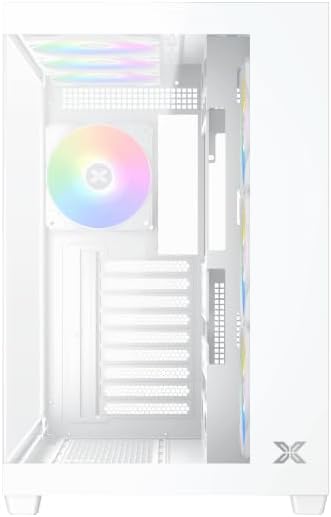
ചിത്രം 5.1: ഇൻ്റീരിയർ view of the case, illustrating the motherboard mounting area and cable routing cutouts.
- കേസിന്റെ പിൻഭാഗത്തുള്ള കട്ടൗട്ടിൽ I/O ഷീൽഡ് ഇൻസ്റ്റാൾ ചെയ്യുക.
- Align your motherboard with the pre-installed standoffs. Ensure the standoffs match your motherboard's form factor (ATX, Micro ATX).
- Secure the motherboard using the provided screws from the accessory kit. Do not overtighten.
5.3. പവർ സപ്ലൈ യൂണിറ്റ് (പിഎസ്യു) ഇൻസ്റ്റാളേഷൻ
- Locate the PSU mounting bracket at the bottom rear of the case.
- Slide your PSU into the designated compartment from the rear of the case.
- Secure the PSU to the case using the screws provided with your power supply.
5.4. സ്റ്റോറേജ് ഡ്രൈവ് ഇൻസ്റ്റാളേഷൻ
The case supports multiple storage drives:
- 2.5" എസ്എസ്ഡികൾ: Mount directly to the SSD trays located behind the motherboard tray. Secure with screws.
- 3.5" എച്ച്ഡിഡികൾ: Install into the drive cage located beneath the PSU shroud. Slide the drive into the tray and secure with screws.
5.5. ഗ്രാഫിക്സ് കാർഡ് (GPU) ഉം എക്സ്പാൻഷൻ കാർഡ് ഇൻസ്റ്റലേഷനും
- കേസിന്റെ പിൻഭാഗത്തുള്ള ആവശ്യമായ എക്സ്പാൻഷൻ സ്ലോട്ട് കവറുകൾ നീക്കം ചെയ്യുക.
- Insert your graphics card or other expansion cards into the appropriate PCIe slots on the motherboard.
- Secure the cards with the provided screws.
5.6. കേബിൾ മാനേജ്മെന്റ്
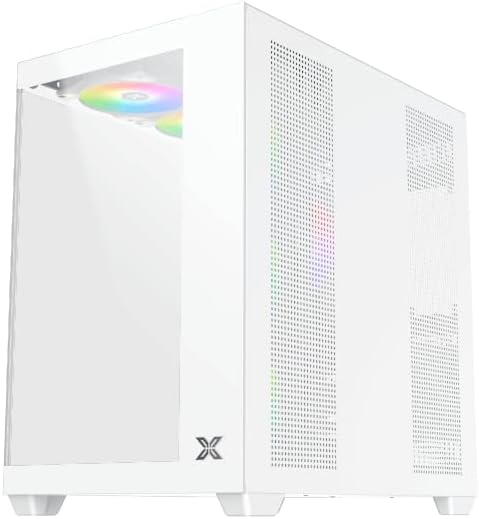
ചിത്രം 5.2: View behind the motherboard tray, illustrating the ample space and tie-down points for effective cable management.
കേബിളുകൾ ക്രമീകരിക്കുന്നതിന് മദർബോർഡ് ട്രേയ്ക്ക് പിന്നിലുള്ള കേബിൾ റൂട്ടിംഗ് കട്ടൗട്ടുകളും ടൈ-ഡൗൺ പോയിന്റുകളും ഉപയോഗിക്കുക. ഇത് വായുസഞ്ചാരവും സൗന്ദര്യശാസ്ത്രവും മെച്ചപ്പെടുത്തുന്നു.
- Connect all necessary power cables from the PSU to the motherboard, GPU, and storage drives.
- Connect front panel cables (USB, audio, power/reset switches, LED indicators) to the corresponding headers on your motherboard. Refer to your motherboard manual for specific header locations.
- Connect the ARGB fan cables to the integrated fan controller or directly to your motherboard's ARGB headers if available.
5.7. Fan and Radiator Support
The Xigmatek Aqua V AIR Arctic comes with 7 pre-installed 120mm ARGB fans. Additional cooling options are available:
- മുൻഭാഗം: Supports up to 3 x 120mm or 2 x 140mm fans / 240mm, 280mm, 360mm radiators.
- മുകളിൽ: Supports up to 3 x 120mm or 2 x 140mm fans / 240mm, 280mm, 360mm radiators.
- പിൻഭാഗം: Supports 1 x 120mm fan.
- താഴെ: Supports up to 3 x 120mm fans.
Ensure proper fan orientation for optimal airflow (intake at front/bottom, exhaust at rear/top).
6. പ്രവർത്തിക്കുന്നു
Once all components are installed and cables are connected, replace the side panels. Connect your monitor, keyboard, mouse, and power cable. Press the power button on the front panel to start your system.
The pre-installed ARGB fans can be controlled via the integrated controller (if present) or through compatible motherboard software, allowing customization of lighting effects and fan speeds.
7. പരിപാലനം
നിങ്ങളുടെ പിസി ഘടകങ്ങളുടെ ഒപ്റ്റിമൽ പ്രകടനവും ദീർഘായുസ്സും ഉറപ്പാക്കാൻ പതിവ് അറ്റകുറ്റപ്പണികൾ സഹായിക്കുന്നു.
- പൊടി വൃത്തിയാക്കൽ: Periodically clean dust filters (top, front, bottom) to maintain good airflow. Use compressed air to remove dust from inside the case and components.
- ബാഹ്യ ശുചീകരണം: ഒരു മൃദുവായ, ഡി ഉപയോഗിച്ച് ബാഹ്യ പ്രതലങ്ങൾ തുടയ്ക്കുകamp തുണി. ഉരച്ചിലുകൾ ഉണ്ടാക്കുന്ന ക്ലീനറുകളോ ലായകങ്ങളോ ഒഴിവാക്കുക.
- കേബിൾ മാനേജ്മെന്റ് പരിശോധന: Occasionally check cable routing to ensure no cables are obstructing fans or airflow.
8. പ്രശ്നപരിഹാരം
നിങ്ങൾക്ക് പ്രശ്നങ്ങൾ നേരിടുകയാണെങ്കിൽ, ഇനിപ്പറയുന്ന പൊതുവായ ട്രബിൾഷൂട്ടിംഗ് ഘട്ടങ്ങൾ പരിശോധിക്കുക:
- സിസ്റ്റം പവർ ഓൺ ചെയ്യുന്നില്ല:
- പിഎസ്യു ഓണാക്കിയിട്ടുണ്ടെന്നും വാൾ ഔട്ട്ലെറ്റുമായി ശരിയായി ബന്ധിപ്പിച്ചിട്ടുണ്ടെന്നും ഉറപ്പാക്കുക.
- Verify all power cables (24-pin ATX, 8-pin CPU, PCIe, SATA) are securely connected.
- Check front panel power switch connections to the motherboard.
- ഡിസ്പ്ലേ ഔട്ട്പുട്ട് ഇല്ല:
- Ensure the monitor cable is connected to the graphics card (not the motherboard I/O if using a dedicated GPU).
- ഗ്രാഫിക്സ് കാർഡും റാം മൊഡ്യൂളുകളും വീണ്ടും ഇൻസ്റ്റാൾ ചെയ്യുക.
- Fans not spinning or ARGB not working:
- Check fan power connections to the motherboard or fan controller.
- Verify ARGB connections to the controller or motherboard headers.
- Ensure any fan control software or BIOS settings are correctly configured.
For more complex issues, consult your component manuals or contact Xigmatek technical support.
9 സ്പെസിഫിക്കേഷനുകൾ
| ഫീച്ചർ | വിശദാംശങ്ങൾ |
|---|---|
| മോഡലിൻ്റെ പേര് | Aqua V AIR Arctic |
| മോഡൽ നമ്പർ | EN45837 |
| കേസ് തരം | മിഡ്-ടവർ |
| മദർബോർഡ് അനുയോജ്യത | ATX, മൈക്രോ ATX |
| മെറ്റീരിയൽ | Steel Alloy, Tempered Glass |
| നിറം | വെള്ള |
| മുൻകൂട്ടി ഇൻസ്റ്റാൾ ചെയ്ത ഫാനുകൾ | 7 x 120mm ARGB ആരാധകർ |
| പരമാവധി GPU ദൈർഘ്യം | 410 മി.മീ |
| USB പോർട്ടുകൾ | 3 |
| ഭാരം | 8.8 കിലോഗ്രാം |
10. വാറൻ്റിയും പിന്തുണയും
Xigmatek products are manufactured to high quality standards. For warranty information, please refer to the warranty card included with your product or visit the official Xigmatek website. For technical support or inquiries, please contact Xigmatek customer service through their official channels.
ഉദ്യോഗസ്ഥൻ Webസൈറ്റ്: www.xigmatek.com


