1. ഉൽപ്പന്നം കഴിഞ്ഞുview
The Wanbo X5 Air is a high-performance projector designed for home entertainment, offering a superior visual and audio experience. It features 1100 ANSI lumens for bright, clear images even in daylight, and supports Full HD 1080p resolution with 4K video decoding. The projector runs on Wanbo OS (Android) and comes with pre-installed streaming applications like Netflix, YouTube, Disney+, and Prime Video, with access to Google Play for a wider selection of apps.

Image: The Wanbo X5 Air projector, highlighting its compatibility with popular streaming services like YouTube, Netflix, Prime Video, Disney+, and Hulu.
Equipped with advanced ASA 3.0 technology, the X5 Air provides fully automatic features including auto-focus, auto keystone correction, obstacle avoidance, and auto screen adjustment, ensuring a hassle-free setup and perfectly aligned, sharp visuals every time.

Image: A summary of the Wanbo X5 Air's key features, including 1100 ANSI lumens, HiFi stereo speakers, Android Wanbo OS, 1080P FHD resolution, 3000:1 contrast, low noise, 2+32GB memory, Dual-band WiFi 6, and ASA3.0 automatic adjustments.
2. സജ്ജീകരണ ഗൈഡ്
2.1 പ്രാരംഭ പ്ലേസ്മെന്റ്
Place the projector on a stable, flat surface or mount it to a ceiling. Ensure there is adequate ventilation around the device. For optimal viewപ്രൊജക്ടർ നിങ്ങളുടെ പ്രൊജക്ഷൻ പ്രതലത്തിന് നേരെ മുന്നിൽ സ്ഥാപിക്കുക.
2.2 പവർ കണക്ഷൻ
പ്രൊജക്ടറിന്റെ പവർ ഇൻപുട്ടിലേക്കും തുടർന്ന് അനുയോജ്യമായ ഒരു ഇലക്ട്രിക്കൽ ഔട്ട്ലെറ്റിലേക്കും പവർ കേബിൾ ബന്ധിപ്പിക്കുക.
2.3 Automatic Adjustments (ASA 3.0)
The Wanbo X5 Air features ASA 3.0 technology for automatic setup. Upon powering on, the projector will automatically perform the following:
- ഓട്ടോ ഫോക്കസ്: The projector will automatically adjust the lens to achieve a sharp, clear image.
- യാന്ത്രിക കീസ്റ്റോൺ തിരുത്തൽ: It will correct trapezoidal distortion to ensure a rectangular image, even if the projector is not perfectly aligned with the screen.
- തടസ്സം ഒഴിവാക്കൽ: The projector can detect and adjust the image to avoid obstacles on the projection surface.
- ഓട്ടോ സ്ക്രീൻ ഫിറ്റ്: The image will automatically scale and fit within the boundaries of your projection screen.
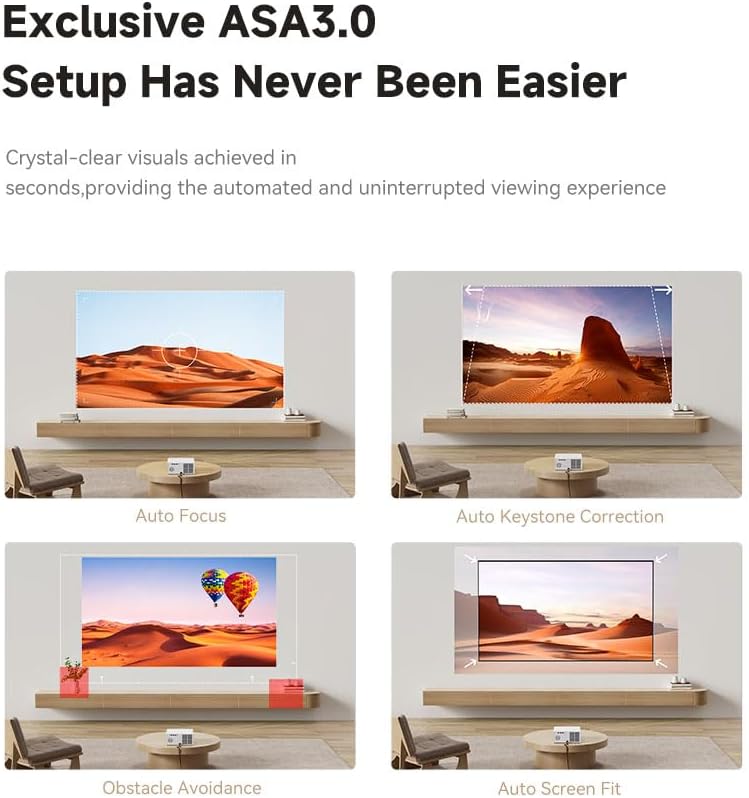
Image: Visual representation of the ASA3.0 features: Auto Focus, Auto Keystone Correction, Obstacle Avoidance, and Auto Screen Fit, demonstrating how the projector automatically optimizes the display.
Allow a few moments for these automatic adjustments to complete after startup.
3. പ്രവർത്തന നിർദ്ദേശങ്ങൾ
3.1 പവർ ഓൺ/ഓഫ്
ഉപകരണം ഓൺ അല്ലെങ്കിൽ ഓഫ് ചെയ്യാൻ പ്രൊജക്ടറിലെ പവർ ബട്ടൺ അല്ലെങ്കിൽ റിമോട്ട് കൺട്രോൾ അമർത്തുക.
3.2 നാവിഗേഷനും ഇന്റർഫേസും
Use the remote control to navigate the Wanbo OS interface. The home screen provides access to pre-installed applications, settings, and input sources.
3.3 കണക്റ്റിവിറ്റി ഓപ്ഷനുകൾ
The Wanbo X5 Air offers versatile connectivity:
- Wi-Fi 6 (Dual-Band): Connect to your wireless network for streaming and internet access. Navigate to Settings > Network > Wi-Fi to select and connect to your network.
- Bluetooth (Dual): Pair with Bluetooth audio devices (speakers, headphones) or use the projector as a Bluetooth speaker. Navigate to Settings > Bluetooth.
- എച്ച്ഡിഎംഐ ആർസി: Connect external devices like gaming consoles, Blu-ray players, or set-top boxes. The HDMI ARC port supports high-quality audio return.
- USB: Two USB ports are available for connecting USB drives to play media files.
- ഓഡിയോ Outട്ട്: A dedicated audio output port for connecting external audio systems.
- വയർലെസ് സ്ക്രീൻ മിററിംഗ്: Share content from your smartphone or tablet wirelessly. Refer to the on-screen instructions for specific mirroring protocols (e.g., Miracast, AirPlay).
- Wired Mirroring: Supports wired screen mirroring for compatible devices.

Image: The rear panel of the Wanbo X5 Air projector, showing its interface options including two USB ports, one HDMI port, and one Audio output port.
3.4 ഓഡിയോ സവിശേഷതകൾ
The projector is equipped with 2x5W HiFi speakers featuring fully sealed sound chambers and digital signal processing (DSP) technology for rich, immersive audio. For an enhanced experience, consider connecting external audio systems via Bluetooth or the audio output port.

Image: Details of the Wanbo X5 Air's 2x5W HiFi speaker system, emphasizing its full-range capabilities, fully sealed sound chamber, and Digital Signal Processing (DSP) technology for enhanced audio.
4. പരിപാലനം
4.1 ലെൻസ് വൃത്തിയാക്കൽ
പ്രൊജക്ടർ ലെൻസ് മൃദുവായി തുടയ്ക്കാൻ ഒപ്റ്റിക്കൽ ലെൻസുകൾക്കായി പ്രത്യേകം രൂപകൽപ്പന ചെയ്ത മൃദുവായ, ലിന്റ് രഹിത തുണി ഉപയോഗിക്കുക. ലെൻസിൽ പോറൽ വീഴ്ത്താൻ സാധ്യതയുള്ള അബ്രാസീവ് ക്ലീനറുകളോ അമിത മർദ്ദമോ ഉപയോഗിക്കുന്നത് ഒഴിവാക്കുക.
4.2 പുറംഭാഗം വൃത്തിയാക്കൽ
പ്രൊജക്ടറിന്റെ പുറംഭാഗം മൃദുവായതും ഉണങ്ങിയതുമായ തുണി ഉപയോഗിച്ച് തുടയ്ക്കുക. കഠിനമായ അടയാളങ്ങൾക്ക്, അല്പം ഡി.amp cloth can be used, but ensure no moisture enters the ventilation openings.
4.3 വെന്റിലേഷൻ
Ensure that the projector's ventilation vents are not blocked. Proper airflow is crucial for preventing overheating and maintaining optimal performance and lifespan of the device.
5. പ്രശ്നപരിഹാരം
5.1 ഇമേജ് പ്രദർശിപ്പിച്ചിട്ടില്ല
- പ്രൊജക്ടർ ഓൺ ആണോ എന്ന് പരിശോധിക്കുക.
- Verify that the input source is correctly selected (e.g., HDMI, USB).
- എല്ലാ കേബിളുകളും സുരക്ഷിതമായി ബന്ധിപ്പിച്ചിട്ടുണ്ടെന്ന് ഉറപ്പാക്കുക.
- ലെൻസ് തൊപ്പി നീക്കം ചെയ്തിട്ടുണ്ടോയെന്ന് പരിശോധിക്കുക.
5.2 Image is Blurry or Distorted
- Allow the automatic focus and keystone correction (ASA 3.0) to complete.
- പ്രൊജക്ടർ സ്ഥിരതയുള്ള പ്രതലത്തിൽ സ്ഥാപിച്ചിട്ടുണ്ടെന്ന് ഉറപ്പാക്കുക.
- Check for any physical obstructions in the projection path.
5.3 ശബ്ദമില്ല
- പ്രൊജക്ടറിലും ബന്ധിപ്പിച്ചിട്ടുള്ള ഏതെങ്കിലും ഓഡിയോ ഉപകരണങ്ങളിലും വോളിയം ലെവൽ പരിശോധിക്കുക.
- ബാഹ്യ ഓഡിയോ ഉപകരണങ്ങൾ ശരിയായി ബന്ധിപ്പിച്ചിട്ടുണ്ടെന്നും പവർ ഓൺ ചെയ്തിട്ടുണ്ടെന്നും ഉറപ്പാക്കുക.
- Verify that the correct audio output is selected in the projector's settings.
5.4 വൈ-ഫൈ കണക്റ്റിവിറ്റി പ്രശ്നങ്ങൾ
- Ensure your Wi-Fi router is working correctly.
- Restart the projector and your Wi-Fi router.
- നൽകിയ വൈഫൈ പാസ്വേഡ് ശരിയാണോ എന്ന് പരിശോധിക്കുക.
- Move the projector closer to the Wi-Fi router to improve signal strength.
6 സ്പെസിഫിക്കേഷനുകൾ
| ഫീച്ചർ | വിവരണം |
|---|---|
| ബ്രാൻഡ് | വാൻബോ |
| മോഡൽ നമ്പർ | 6970885350641 |
| നിറം | വെള്ള |
| ഉൽപ്പന്ന തരം | പോർട്ടബിൾ പ്രൊജക്ടർ |
| തെളിച്ചം | 1100 ആൻസി ലുമെൻസ് |
| ഡിസ്പ്ലേ റെസല്യൂഷൻ | Native 1920 x 1080 (Full HD), supports 4K decoding |
| കോൺട്രാസ്റ്റ് റേഷ്യോ | 3000:1 |
| പ്രകാശ സ്രോതസ്സിന്റെ ആയുസ്സ് | 20,000+ മണിക്കൂർ |
| ഓപ്പറേറ്റിംഗ് സിസ്റ്റം | Wanbo OS (Android) |
| മെമ്മറി | 2 ജിബി റാം + 32 ജിബി സ്റ്റോറേജ് |
| കണക്റ്റിവിറ്റി | Dual-band Wi-Fi 6, Dual Bluetooth, HDMI ARC, 2x USB, Audio Out |
| പ്രത്യേക സവിശേഷതകൾ | ASA 3.0 (Auto Focus, Auto Keystone, Obstacle Avoidance, Auto Screen Fit), HiFi Stereo Speaker, Wireless Screen Mirroring, Wired Mirroring |
| അനുയോജ്യമായ ഉപകരണങ്ങൾ | TV Box, Game Console, Laptop, Smartphone |
| ഉൽപ്പന്ന അളവുകൾ | 25.2L x 24.6W x 11.5H സെ.മീ |
| ഫോം ഫാക്ടർ | പോർട്ടബിൾ |
| മൗണ്ടിംഗ് തരം | Tabletop, Ceiling |
7. വാറൻ്റിയും പിന്തുണയും
The Wanbo X5 Air Projector comes with a 1-year Pan India warranty. This warranty includes free pickup and drop-off services from the customer's location. For warranty claims or technical support, please contact your point of purchase or the authorized service center.
For further assistance, please refer to the official Wanbo support channels or visit their webസൈറ്റ്.


