1. ഉൽപ്പന്നം കഴിഞ്ഞുview
The Phomemo M834 is a portable wireless thermal printer designed for convenient printing on the go. It offers high-resolution 300 dpi printing without the need for ink, toner, or ribbons, utilizing thermal technology. This printer supports various paper sizes and types, and connects via Bluetooth to smartphones or USB to PCs, making it compatible with a wide range of operating systems.
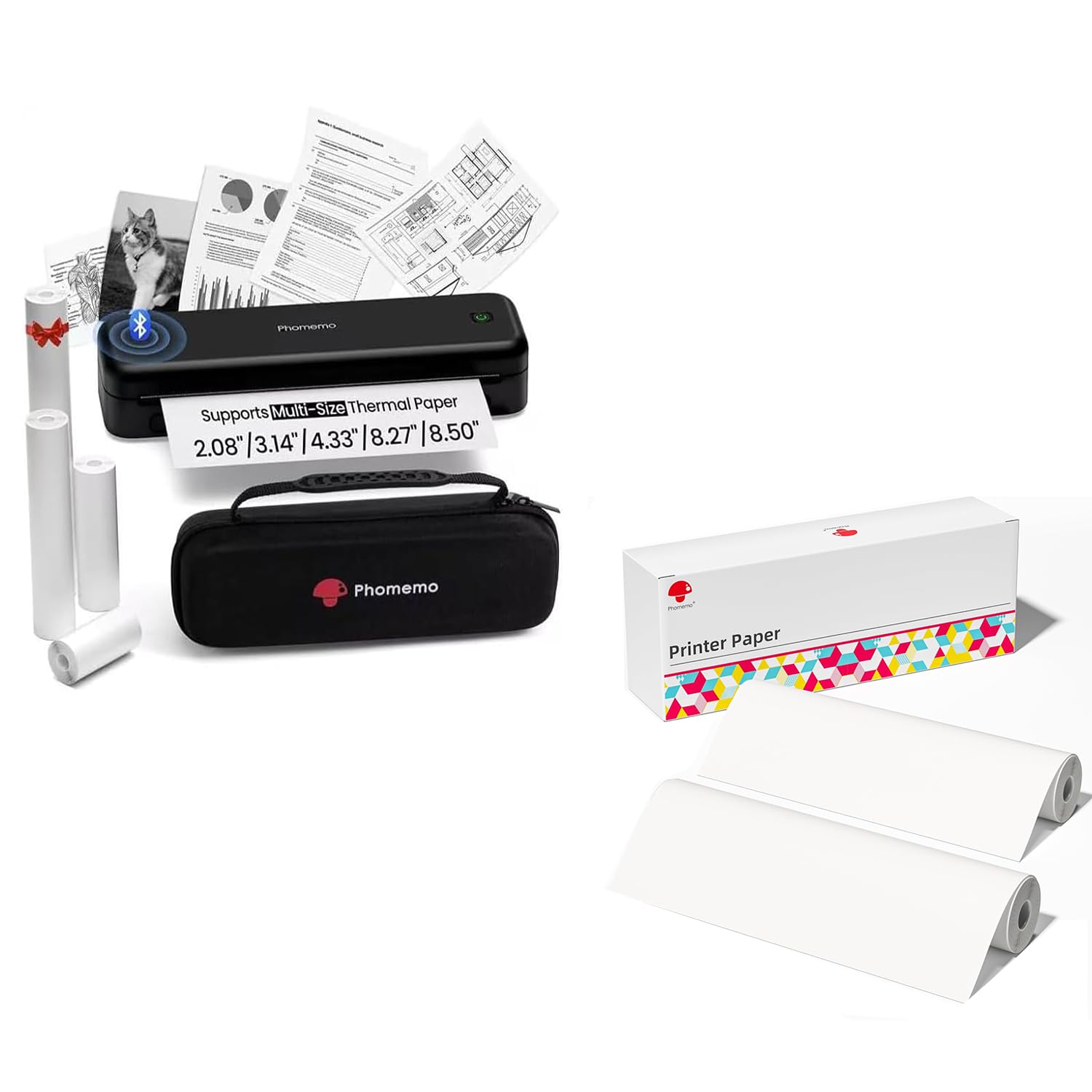
Image 1.1: Phomemo M834 Portable Printer with included accessories and supported paper sizes.
പ്രധാന സവിശേഷതകൾ:
- മെച്ചപ്പെടുത്തിയ പ്രിന്റ് വ്യക്തത: 300 dpi resolution for sharp, clear documents.
- വൈവിധ്യമാർന്ന പേപ്പർ പിന്തുണ: Compatible with US Letter, A4, 4.33'', 3.14'', 2.08'' paper sizes, including roll, fold, and ordinary thermal paper.
- വിപുലീകരിച്ച ബാറ്ററി ലൈഫ്: Equipped with a 2600mAh rechargeable battery, capable of printing over 160 pages continuously.
- വിശാലമായ ഉപകരണ അനുയോജ്യത: Supports Bluetooth connection for Android/iOS and USB connection for Windows 10/11, Linux, ChromeOS, and macOS.
- മഷിയില്ലാത്ത സാങ്കേതികവിദ്യ: Uses thermal printing, eliminating the need for ink cartridges, toner, or ribbons.
2. സജ്ജീകരണ ഗൈഡ്
2.1 പാക്കേജിൽ എന്താണുള്ളത്
ആരംഭിക്കുന്നതിന് മുമ്പ്, നിങ്ങളുടെ പാക്കേജിൽ എല്ലാ ഘടകങ്ങളും ഉണ്ടെന്ന് ഉറപ്പാക്കുക:

Image 2.1: Contents of the Phomemo M834 package, including the printer, various thermal paper rolls, a user guide, a USB-C cable, and a USB-C to USB adapter.
- Phomemo M834 Portable Printer
- Thermal Paper Roll(s) (various widths)
- പ്രിന്റർ കേസ്
- ഉപയോക്തൃ ഗൈഡ്
- യുഎസ്ബി-സി കേബിൾ
- USB-C മുതൽ USB അഡാപ്റ്റർ വരെ
2.2 പ്രിന്റർ ചാർജ് ചെയ്യുന്നു
The printer comes with a built-in 2600mAh rechargeable battery. For optimal performance, fully charge the printer before first use.
- Connect the provided USB-C cable to the printer's charging port.
- USB-C കേബിളിന്റെ മറ്റേ അറ്റം ഒരു USB പവർ അഡാപ്റ്ററുമായി (ഉൾപ്പെടുത്തിയിട്ടില്ല) അല്ലെങ്കിൽ കമ്പ്യൂട്ടറിന്റെ USB പോർട്ടുമായി ബന്ധിപ്പിക്കുക.
- The indicator light will show charging status (refer to the LED indicator section in the user guide for details).
- സാധാരണയായി ഒരു പൂർണ്ണ ചാർജ് ഏകദേശം 3-4 മണിക്കൂർ എടുക്കും.

Image 2.2: The Phomemo M834 features a 2600mAh large capacity battery, supporting fast charging via USB-C and enabling over 160 sheets of continuous printing.
2.3 തെർമൽ പേപ്പർ ലോഡുചെയ്യുന്നു
The Phomemo M834 supports various types and sizes of thermal paper. Only use thermal paper with this printer. Regular copy paper is not compatible.

Image 2.3: The Phomemo M834 supports 5 different sizes (2.08", 3.14", 4.33", A4, US Letter) and 4 types of thermal paper, including single sheets, continuous folding paper, inner roll paper, and stickers.
- പ്രിന്ററിന്റെ പേപ്പർ കവർ തുറക്കുക.
- Insert the thermal paper roll or stack, ensuring the printable side (usually smoother) is facing the print head. For roll paper, ensure it feeds smoothly from the bottom.
- Adjust the paper guides to fit the width of your paper snugly, but without creasing അത്.
- പേപ്പർ കവർ സുരക്ഷിതമായി അടയ്ക്കുക.

ചിത്രം 2.4: ഉദാample of Phomemo thermal printer paper rolls.
2.4 നിങ്ങളുടെ ഉപകരണത്തിലേക്ക് കണക്റ്റുചെയ്യുന്നു
The Phomemo M834 offers both Bluetooth and USB connectivity.

Image 2.5: The Phomemo M834 printer demonstrates multiple system compatibility, connecting via Bluetooth to iOS, Android, and tablets, and via USB to Windows, macOS, Chrome OS, and Linux.
2.4.1 Bluetooth Connection (for Smartphones/Tablets)
- പ്രിൻ്റർ ഓണാണെന്ന് ഉറപ്പാക്കുക.
- നിങ്ങളുടെ സ്മാർട്ട്ഫോണിലോ ടാബ്ലെറ്റിലോ ബ്ലൂടൂത്ത് പ്രവർത്തനക്ഷമമാക്കുക.
- Download and install the Phomemo app from your device's app store.
- Open the Phomemo app and follow the in-app instructions to search for and connect to your M834 printer.
2.4.2 USB Connection (for PCs)
- പ്രിൻ്റർ ഓണാണെന്ന് ഉറപ്പാക്കുക.
- Connect the printer to your PC using the provided USB-C cable and adapter if necessary.
- Install the appropriate printer drivers for your operating system (Windows, macOS, Linux, ChromeOS). Drivers can typically be found on the official Phomemo webസൈറ്റ്.
- Once drivers are installed, the printer should appear in your system's printer list.
3. പ്രവർത്തന നിർദ്ദേശങ്ങൾ
3.1 പവർ ഓൺ/ഓഫ്
- പവർ ഓണാക്കാൻ: ഇൻഡിക്കേറ്റർ ലൈറ്റ് പ്രകാശിക്കുന്നത് വരെ പവർ ബട്ടൺ അമർത്തിപ്പിടിക്കുക.
- പവർ ഓഫ് ചെയ്യാൻ: ഇൻഡിക്കേറ്റർ ലൈറ്റ് ഓഫ് ആകുന്നതുവരെ പവർ ബട്ടൺ അമർത്തിപ്പിടിക്കുക.
3.2 Printing from the Phomemo App (Bluetooth)
- Ensure your printer is connected via Bluetooth to your smartphone/tablet.
- Phomemo ആപ്പ് തുറക്കുക.
- Select the document, image, or text you wish to print within the app.
- Adjust print settings (e.g., number of copies, density) as needed.
- പ്രിന്റ് ചെയ്യാൻ തുടങ്ങാൻ പ്രിന്റ് ബട്ടൺ ടാപ്പ് ചെയ്യുക.
3.3 Printing from a PC (USB)
- Ensure your printer is connected via USB to your PC and drivers are installed.
- പ്രമാണം തുറക്കുക അല്ലെങ്കിൽ file you wish to print (e.g., Word, PDF, Excel, image).
- Go to 'File' > 'Print' (or use the print shortcut Ctrl+P/Cmd+P).
- Select 'Phomemo M834' from the list of available printers.
- ആവശ്യാനുസരണം പ്രിന്റ് ക്രമീകരണങ്ങൾ ക്രമീകരിക്കുക (ഉദാ: പേപ്പർ വലുപ്പം, ഓറിയന്റേഷൻ).
- 'പ്രിന്റ്' ക്ലിക്ക് ചെയ്യുക.

Image 3.1: The Phomemo M834 delivers high-definition printouts with 300 DPI, resulting in significantly clearer text and images compared to standard 203 DPI printers.
4. പരിപാലനം
4.1 പ്രിന്റ് ഹെഡ് വൃത്തിയാക്കൽ
Regular cleaning of the print head ensures optimal print quality and extends the printer's lifespan.
- Ensure the printer is powered off and disconnected from any power source.
- പേപ്പർ കവർ തുറക്കുക.
- Gently wipe the print head (the dark strip inside the printer) with a cotton swab lightly dampഐസോപ്രോപൈൽ ആൽക്കഹോൾ ഉപയോഗിച്ചാണ് നിർവഹിച്ചത്.
- കവർ അടച്ച് പ്രിന്റർ ഓണാക്കുന്നതിന് മുമ്പ് പ്രിന്റ് ഹെഡ് പൂർണ്ണമായും ഉണങ്ങാൻ അനുവദിക്കുക.
4.2 ബാറ്ററി കെയർ
- ബാറ്ററി ഇടയ്ക്കിടെ പൂർണ്ണമായും ഡിസ്ചാർജ് ചെയ്യുന്നത് ഒഴിവാക്കുക.
- If storing the printer for an extended period, charge it to about 50-70% and recharge every few months to prevent deep discharge.
- ചാർജ് ചെയ്യുന്നതിന് നൽകിയിരിക്കുന്ന USB-C കേബിൾ മാത്രം ഉപയോഗിക്കുക.
4.3 പേപ്പർ കൈകാര്യം ചെയ്യൽ
- Always use high-quality thermal paper to prevent damage to the print head and ensure clear prints.
- Store thermal paper in a cool, dry place away from direct sunlight and heat to preserve its printability.
- Do not use wrinkled or damaged paper.
5. പ്രശ്നപരിഹാരം
നിങ്ങളുടെ Phomemo M834 പ്രിന്ററിൽ പ്രശ്നങ്ങൾ നേരിടുകയാണെങ്കിൽ, ഇനിപ്പറയുന്ന പൊതുവായ പ്രശ്നങ്ങളും പരിഹാരങ്ങളും പരിശോധിക്കുക:
| പ്രശ്നം | സാധ്യമായ കാരണം | പരിഹാരം |
|---|---|---|
| പ്രിന്റർ പവർ ഓൺ ചെയ്യുന്നില്ല | ബാറ്ററി ചാർജ് കുറവാണ്; പവർ ബട്ടൺ ശരിയായി അമർത്തിയിട്ടില്ല. | പ്രിന്റർ ചാർജ് ചെയ്യുക; പവർ ബട്ടൺ കുറച്ച് സെക്കൻഡ് അമർത്തിപ്പിടിക്കുക. |
| Poor print quality (faint, streaky) | Print head dirty; Low battery; Poor quality thermal paper | Clean the print head (Section 4.1); Charge the printer; Use high-quality thermal paper. |
| ബ്ലൂടൂത്ത് വഴി ബന്ധിപ്പിക്കാൻ കഴിയില്ല | Bluetooth off on device; Printer not in pairing mode; App issue | Ensure Bluetooth is enabled; Restart printer and device; Reinstall Phomemo app. |
| Cannot print from PC via USB | Drivers not installed; Loose USB connection; Incorrect printer selected | Install/reinstall printer drivers; Check USB cable connection; Select 'Phomemo M834' in print dialog. |
| പേപ്പർ ഫീഡിംഗ് ചെയ്യുന്നില്ല | Paper loaded incorrectly; Paper jam; No paper | Re-load paper correctly (Section 2.3); Clear any obstructions; Ensure paper is loaded. |
6 സ്പെസിഫിക്കേഷനുകൾ
Detailed technical specifications for the Phomemo M834 Portable Wireless Thermal Printer:
| ഫീച്ചർ | സ്പെസിഫിക്കേഷൻ |
|---|---|
| മോഡലിൻ്റെ പേര് | M834 |
| പ്രിൻ്റിംഗ് ടെക്നോളജി | തെർമൽ |
| പരമാവധി പ്രിന്റ് റെസലൂഷൻ | 300 dpi (മോണോക്രോം) |
| കണക്റ്റിവിറ്റി ടെക്നോളജി | ബ്ലൂടൂത്ത്, യുഎസ്ബി |
| ഹാർഡ്വെയർ ഇന്റർഫേസ് | USB |
| ബാറ്ററി ശേഷി | 2600mAh |
| പരമാവധി മീഡിയ വലുപ്പം | US Letter (8.5 x 11 inches / 216 mm) |
| പിന്തുണയ്ക്കുന്ന പേപ്പർ വലുപ്പങ്ങൾ | US Letter, A4, 4.33'', 3.14'', 2.08'' |
| അച്ചടി മാധ്യമം | Thermal Paper (plain, roll, fold, stickers) |
| പരമാവധി ഇൻപുട്ട് ഷീറ്റ് ശേഷി | 30 sheets (for folded paper) |
| പ്രിൻ്റർ ഔട്ട്പുട്ട് | മോണോക്രോം |
| ഇരട്ട-വശങ്ങളുള്ള പ്രിന്റിംഗ് | ഇല്ല (സിംപ്ലക്സ്) |
| നിറം | കറുപ്പ് |
| ഇനം മോഡൽ നമ്പർ | M834 |
7. വാറൻ്റിയും പിന്തുണയും
7.1 വാറൻ്റി വിവരങ്ങൾ
The Phomemo M834 Portable Wireless Thermal Printer comes with a പരിമിതമായ വാറൻ്റി. Please refer to the warranty card included in your package or visit the official Phomemo webവാറന്റി കവറേജും കാലാവധിയും സംബന്ധിച്ച വിശദമായ നിബന്ധനകൾക്കും വ്യവസ്ഥകൾക്കും സൈറ്റ് സന്ദർശിക്കുക.
7.2 ഉപഭോക്തൃ പിന്തുണ
For further assistance, technical support, or inquiries regarding your Phomemo M834 printer, please contact Phomemo customer service through their official webസൈറ്റ് അല്ലെങ്കിൽ നിങ്ങളുടെ ഉൽപ്പന്ന പാക്കേജിംഗിൽ നൽകിയിരിക്കുന്ന ബന്ധപ്പെടാനുള്ള വിവരങ്ങൾ.


