1. ആമുഖം
The LAUNCH X431 Creader 5011 V2 is a comprehensive diagnostic tool designed for automotive professionals and enthusiasts. It integrates advanced Tire Pressure Monitoring System (TPMS) functions, standard On-Board Diagnostics II (OBDII) capabilities, and 12 essential reset services. This device supports activation, reading, relearning, and programming of 315MHz and 433MHz TPMS sensors, offers full OBDII engine diagnostics, and provides various maintenance resets. Operating on Android 8.1, it features Wi-Fi connectivity for lifetime free software updates, ensuring broad vehicle compatibility and up-to-date functionality.

Image: The LAUNCH X431 Creader 5011 V2 device, along with its included diagnostic cable, charging cable, and user manual.
2. ബോക്സിൽ എന്താണുള്ളത്?
Upon unboxing your LAUNCH X431 Creader 5011 V2, please verify that all the following items are present:
- Diagnostic equipment (Main unit)
- ഡാറ്റ കേബിൾ ചാർജ് ചെയ്യുന്നു
- Diagnostic mainline (OBDII cable)
- നിർദ്ദേശങ്ങൾ (ഉപയോക്തൃ മാനുവൽ)
3. സജ്ജീകരണം
- പ്രാരംഭ ചാർജിംഗ്: Connect the device to a power source using the provided charging data cable. Ensure the device is fully charged before first use.
- പവർ ഓൺ: Press and hold the power button to turn on the device. Follow the on-screen prompts for initial setup, including language selection.
- Wi-Fi കണക്ഷൻ: Navigate to 'Settings' on the device and connect to an available Wi-Fi network. This is crucial for software updates and accessing online features.
- സോഫ്റ്റ്വെയർ അപ്ഡേറ്റ്: After connecting to Wi-Fi, go to the 'Upgrade' section to check for and install the latest software updates. Regular updates ensure optimal performance and expanded vehicle coverage.
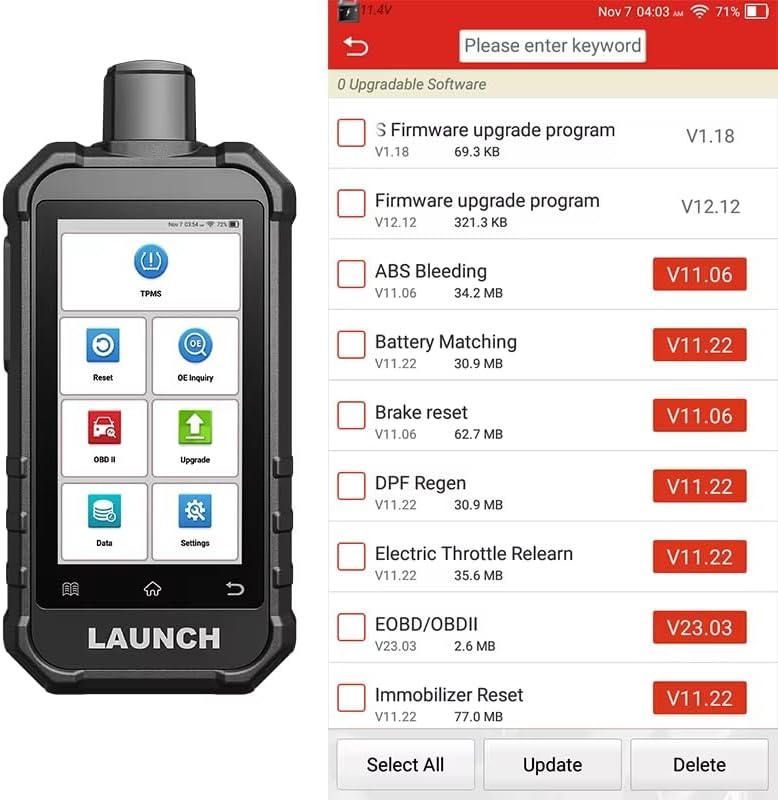
Image: The device display showing available firmware and diagnostic software updates, ready for selection and installation.
4. പ്രവർത്തന നിർദ്ദേശങ്ങൾ
4.1. ടിപിഎംഎസ് പ്രവർത്തനങ്ങൾ
The Creader 5011 V2 provides comprehensive TPMS services for 315MHz and 433MHz sensors.
- സെൻസർ സജീവമാക്കൽ: Easily activate most OEM 315/433MHz TPMS sensors to read sensor ID, tire pressure, and temperature.
- സെൻസർ റീഡിംഗ്: Read sensor data directly from the activated sensors.
- ടിപിഎംഎസ് പുനഃപഠനം: Supports three relearn methods: OBD Relearn, Automatic Relearn, and Stationary Relearn. This registers new sensor IDs to the vehicle's ECU.
- സെൻസർ പ്രോഗ്രാമിംഗ്: Program LAUNCH LTR-03 sensors using various methods including automatic creation, manual creation, OBD copy ID, and active copy ID. Note: This feature is exclusive to LAUNCH LTR-03 sensors.
- TPMS ഡയഗ്നോസ്റ്റിക്സ്: Perform a comprehensive health check of the TPMS system and turn off TPMS Malfunction Indicator Lamps (MILs).

Image: The device displaying TPMS functions, including support for 315/433MHz sensors, 99% vehicle coverage, sensor check, activation, diagnosis, relearn, OE number check, read/write sensor ID, and warning light turn-off.
TPMS Operation Steps
- Select vehicle brand, series, and year.
- Activate and detect all four sensors.
- Replace any faulty sensors as needed.
- Measure tire pressure.
- View process description for guidance.
- Activate all four tire sensors again.
- Connect the vehicle with the OBDII diagnostic mainline.
- Perform learning process to register sensor IDs into the TPMS ECU.
- Conduct an on-road test to confirm proper operation.

Image: Detailed screenshots illustrating the step-by-step process for TPMS activation, programming, and learning on the device interface.
4.2. Standard OBDII/EOBD Functions
The device supports all 10 modes of OBDII/EOBD tests for engine systems.
- കോഡുകൾ വായിക്കുക: Retrieve generic (P0, P2, P3, and U0), manufacturer specific (P1, P3, and U1) codes, and pending codes.
- കോഡുകൾ മായ്ക്കുക: Erase Diagnostic Trouble Codes (DTCs) and reset the Check Engine Light (MIL).
- I/M സന്നദ്ധത: എമിഷൻ സംബന്ധിയായ മോണിറ്ററുകളുടെ സന്നദ്ധത നില പരിശോധിക്കുക.
- ഡാറ്റ സ്ട്രീം: View live data parameters from the vehicle's sensors in real-time.
- View ഫ്രീസ് ഫ്രെയിം ഡാറ്റ: Display a snapshot of operating conditions at the time an emission-related fault occurred.
- O2 സെൻസർ ടെസ്റ്റ്: O2 സെൻസർ മോണിറ്റർ പരിശോധനാ ഫലങ്ങൾ വീണ്ടെടുക്കുക.
- വാഹന വിവരം: വാഹന തിരിച്ചറിയൽ നമ്പർ (VIN), കാലിബ്രേഷൻ ഐഡി, കാലിബ്രേഷൻ വെരിഫിക്കേഷൻ നമ്പർ (CVN) എന്നിവ വീണ്ടെടുക്കുക.
Note: Standard OBD software is primarily for gasoline vehicle engines and does not support diagnosis of other gasoline vehicle systems or JOBD diagnosis for Japanese brand car engines.
4.3. 12 Service Reset Functions
The Creader 5011 V2 offers 12 commonly used maintenance reset functions:
- ബ്രേക്ക് റീസെറ്റ്
- ഓയിൽ റീസെറ്റ്
- ബാറ്ററി റീസെറ്റ്
- SAS (സ്റ്റിയറിങ് ആംഗിൾ സെൻസർ) റീസെറ്റ് ചെയ്യുക
- എ ബി എസ് രക്തസ്രാവം
- ത്രോട്ടിൽ റീസെറ്റ്
- ഡിപിഎഫ് (ഡീസൽ പാർട്ടിക്കുലേറ്റ് ഫിൽറ്റർ) പുനരുജ്ജീവനം
- ഇൻജക്ടർ കോഡിംഗ്
- സീറ്റുകളുടെ കാലിബ്രേഷൻ
- സൺറൂഫ് റീസെറ്റ്
- വിൻഡോസ് കാലിബ്രേഷൻ
- IMMO (Immobilizer) Reset

Image: Visual representation of the 12 service reset functions, each with an illustrative icon, including Brake Reset, Oil Reset, Battery Reset, SAS Reset, ABS Bleeding, Throttle Reset, DPF Regeneration, IMMO Reset, Injector Coding, Seats Calibration, Sunroof Reset, and Windows Calibration.
5. പരിപാലനം
- സോഫ്റ്റ്വെയർ അപ്ഡേറ്റുകൾ: Regularly connect the device to Wi-Fi and check for software updates in the 'Upgrade' section. This ensures access to the latest vehicle models, diagnostic functions, and bug fixes.
- വൃത്തിയാക്കൽ: ഉപകരണം വൃത്തിയാക്കാൻ മൃദുവായതും ഉണങ്ങിയതുമായ തുണി ഉപയോഗിക്കുക. സ്ക്രീനിനോ സി. സി. യ്ക്കോ കേടുവരുത്താൻ സാധ്യതയുള്ള അബ്രസീവ് ക്ലീനറുകളോ ലായകങ്ങളോ ഉപയോഗിക്കുന്നത് ഒഴിവാക്കുക.asing.
- സംഭരണം: ഉപകരണം തണുത്തതും വരണ്ടതുമായ സ്ഥലത്ത് സൂക്ഷിക്കുക, നേരിട്ടുള്ള സൂര്യപ്രകാശത്തിൽ നിന്നും തീവ്രമായ താപനിലയിൽ നിന്നും അകറ്റി നിർത്തുക.
- ബാറ്ററി കെയർ: For optimal battery life, avoid fully discharging the device frequently. Charge it regularly, especially if storing for extended periods.
6. പ്രശ്നപരിഹാരം
- ഉപകരണം പവർ ചെയ്യുന്നില്ല: Ensure the device is sufficiently charged. Connect it to the charging cable and allow it to charge for at least 30 minutes before attempting to power it on again.
- Connection Issues (OBDII): Verify that the diagnostic mainline is securely connected to both the device and the vehicle's OBDII port. Ensure the vehicle's ignition is on.
- വൈഫൈ കണക്ഷൻ പരാജയം: Check your Wi-Fi network settings and ensure the password is correct. Try restarting the device and your Wi-Fi router.
- Software Update Problems: Ensure a stable Wi-Fi connection during updates. If an update fails, try restarting the device and attempting the update again. Contact support if issues persist.
- Inaccurate Readings/Functions: Ensure the vehicle's ignition is on and the device is properly connected. For TPMS, confirm sensors are activated and relearned correctly.
If you encounter issues not covered here, please refer to the detailed instructions within the device's software or contact customer support.
7 സ്പെസിഫിക്കേഷനുകൾ
| ഫീച്ചർ | സ്പെസിഫിക്കേഷൻ |
|---|---|
| ബ്രാൻഡ് | ലോഞ്ച് |
| മോഡൽ | Creader TPMS 5011 V2 |
| ഉൽപ്പന്ന അളവുകൾ | 9.8"L x 6.9"W x 3"H |
| ഓപ്പറേറ്റിംഗ് സിസ്റ്റം | ആൻഡ്രോയിഡ് |
| ഓട്ടോമോട്ടീവ് ഫിറ്റ് തരം | യൂണിവേഴ്സൽ ഫിറ്റ് |
| ഇനത്തിൻ്റെ ഭാരം | 1.75 പൗണ്ട് |
| ബാറ്ററികൾ | 1 P76 ബാറ്ററി ആവശ്യമാണ് (ഉൾപ്പെടുത്തിയിരിക്കുന്നു) |
| യു.പി.സി | 884508004490 |
8. വാറൻ്റിയും പിന്തുണയും
The LAUNCH X431 Creader 5011 V2 comes with a 2 വർഷത്തെ വാറൻ്റി, ensuring peace of mind regarding product quality and performance. LAUNCH provides dedicated customer support with 7*24 technical assistance to address any inquiries or issues you may encounter.
For further assistance or to explore other LAUNCH products, please visit the official LAUNCH Store.


