1. ആമുഖം
This manual provides detailed instructions for the EMPIRE GAMING EH20 Wireless Gaming Headset. It covers setup, operation, maintenance, and troubleshooting to ensure optimal performance and longevity of your device. The EH20 headset offers versatile connectivity options and is compatible with PC, Mac, PlayStation 4, PlayStation 5, and Nintendo Switch.

Image: The EMPIRE GAMING EH20 Wireless Gaming Headset, showcasing അതിന്റെ രൂപകൽപ്പനയും ബ്രാൻഡിംഗും.

Image: A user engaged in gaming while wearing the EMPIRE GAMING EH20 headset, illustrating its intended use.
2. പാക്കേജ് ഉള്ളടക്കം
താഴെ ലിസ്റ്റ് ചെയ്തിരിക്കുന്ന എല്ലാ ഇനങ്ങളും നിങ്ങളുടെ പാക്കേജിൽ ഉൾപ്പെടുത്തിയിട്ടുണ്ടെന്ന് ദയവായി പരിശോധിക്കുക:
- EMPIRE GAMING EH20 Wireless Headset
- വേർപെടുത്താവുന്ന മൈക്രോഫോൺ
- USB-C Wireless Receiver (2.4 GHz)
- യുഎസ്ബി ചാർജിംഗ് കേബിൾ
- 3.5 എംഎം ഓഡിയോ കേബിൾ
- ഉപയോക്തൃ മാനുവൽ (ഈ പ്രമാണം)

Image: The EMPIRE GAMING EH20 headset along with its USB wireless receiver and USB-C adapter, illustrating the primary components.
3. ഉൽപ്പന്നം കഴിഞ്ഞുview
Familiarize yourself with the various components and controls of your EH20 headset.
3.1. Headset Controls
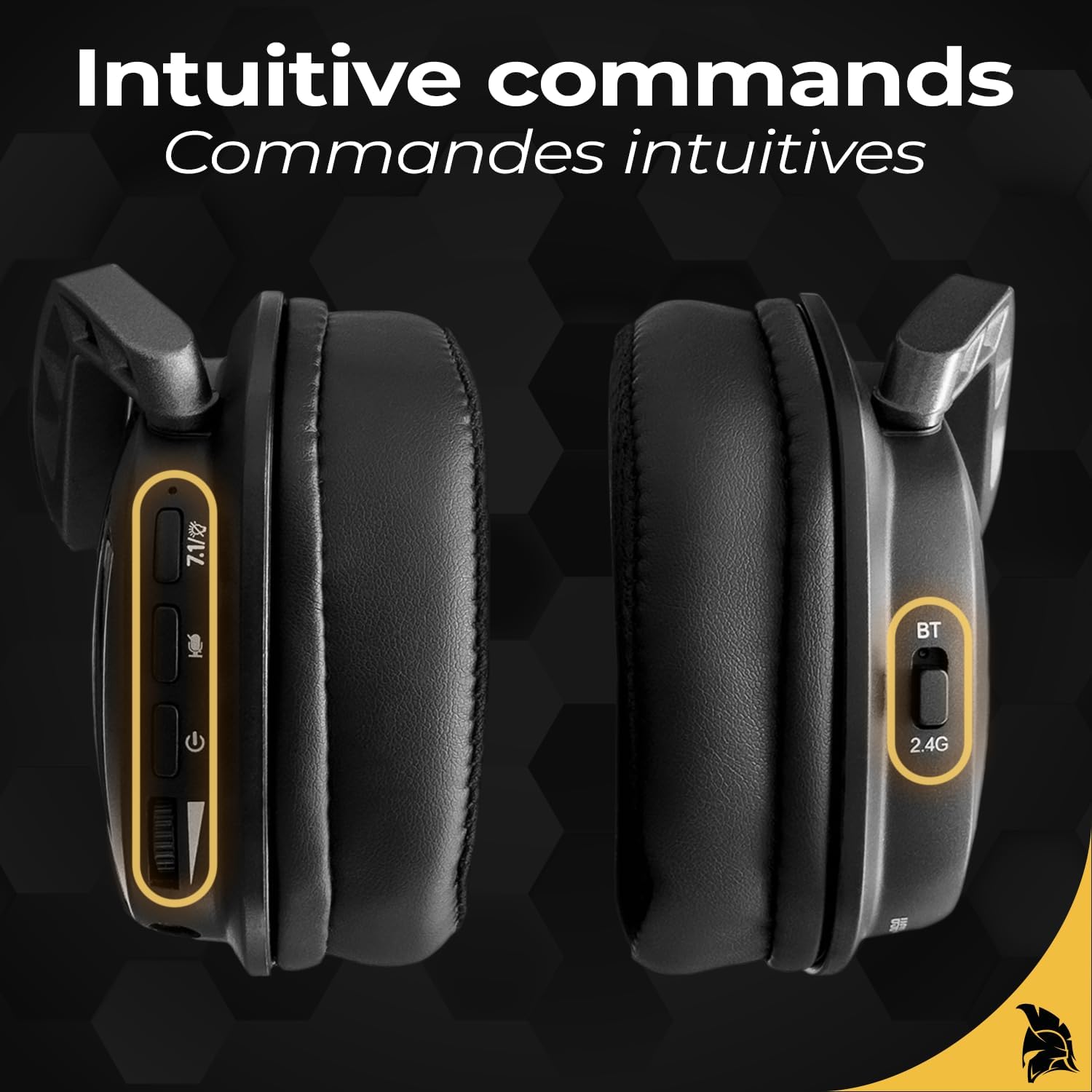
Image: Close-up of the EH20 headset's earcups, highlighting the intuitive control buttons for power, volume, and mode selection.
- പവർ ബട്ടൺ: പവർ ഓൺ/ഓഫ് ചെയ്യാൻ അമർത്തിപ്പിടിക്കുക.
- വോളിയം വീൽ: ഓഡിയോ ഔട്ട്പുട്ട് ലെവൽ ക്രമീകരിക്കുന്നു.
- മൈക്രോഫോൺ മ്യൂട്ട് ബട്ടൺ: Toggles microphone on/off.
- Mode Switch (BT/2.4G): Selects between Bluetooth and 2.4 GHz wireless modes.
- 7.1 Surround Sound Button: Activates/deactivates 7.1 virtual surround sound.
3.2. വേർപെടുത്താവുന്ന മൈക്രോഫോൺ

Image: Illustration of the EH20 headset's detachable and flexible microphone, showing how it connects to the earcup.
The EH20 features a flexible, detachable microphone for clear communication. It can be easily attached or removed based on your usage needs.
4. സജ്ജീകരണവും കണക്റ്റിവിറ്റിയും
The EH20 headset offers three connectivity options: 2.4 GHz Wireless, Bluetooth, and Wired (3.5mm).

Image: Visual representation of the EH20 headset's triple-mode connectivity: WiFi (2.4 GHz), Bluetooth, and Wired.
4.1. 2.4 GHz Wireless Connection (PC, PS4, PS5, Switch via Dock)
- Insert the USB-C wireless receiver into an available USB port on your device (PC, PS4, PS5, or Nintendo Switch dock).
- Power on the EH20 headset by pressing and holding the Power button.
- Ensure the mode switch on the headset is set to "2.4G". The headset should automatically pair with the receiver.
- On your device, select "EMPIRE GAMING EH20" as the audio output and input device.
4.2. Bluetooth Connection (PC, Mac, Mobile Devices)
- Power on the EH20 headset.
- Set the mode switch on the headset to "BT". The headset will enter pairing mode, indicated by a flashing LED.
- On your device (PC, Mac, or mobile), navigate to Bluetooth settings and search for available devices.
- Select "EMPIRE GAMING EH20" from the list to pair.
4.3. Wired Connection (PC, PS4, PS5, Switch, Mobile Devices)
- Connect one end of the 3.5mm audio cable to the headset's 3.5mm jack.
- Connect the other end of the 3.5mm audio cable to the audio output jack of your device.
- The headset will operate in wired mode. Note that some headset functions (e.g., RGB lighting, 7.1 surround sound) may be limited or unavailable in wired mode.

Image: A visual guide showing the EH20 headset's compatibility across multiple platforms including PS4, PS5, Nintendo Switch, PC, and Mac.
5. പ്രവർത്തന നിർദ്ദേശങ്ങൾ
5.1. പവർ ഓൺ/ഓഫ്
Press and hold the Power button on the headset for approximately 3 seconds to turn it on or off.
5.2. വോളിയം അഡ്ജസ്റ്റ്മെൻ്റ്
Rotate the Volume wheel on the earcup upwards to increase volume and downwards to decrease volume.
5.3. മൈക്രോഫോൺ ഉപയോഗം
Attach the detachable microphone to the designated port on the headset. Press the Microphone Mute button to toggle the microphone on (unmuted) or off (muted). A red LED indicator on the microphone or headset may indicate mute status.
5.4. 7.1 Virtual Surround Sound

Image: The EH20 headset with a graphic illustrating the immersive 7.1 virtual surround sound experience and crystal-clear voice.
Press the 7.1 Surround Sound button to activate or deactivate the virtual 7.1 surround sound feature. This feature enhances spatial audio awareness, particularly beneficial for gaming.
5.5. Dynamic RGB Lighting

Image: Close-up of the EH20 headset's earcup displaying its dynamic RGB lighting effects with multiple color options.
The headset features dynamic RGB lighting. Specific controls for changing RGB modes or turning them off may be available via a dedicated button or software (if applicable). Refer to the product's official webലഭ്യമായ ഏതെങ്കിലും സോഫ്റ്റ്വെയറിനുള്ള സൈറ്റ്.
6. ചാർജിംഗും ബാറ്ററിയും
The EH20 headset is equipped with a rechargeable Lithium-polymer battery.
- ചാർജിംഗ്: Connect the USB charging cable to the headset's charging port and the other end to a USB power source (e.g., computer USB port, USB wall adapter). The LED indicator will show charging status.
- ബാറ്ററി ലൈഫ്: A full charge provides approximately 30 hours of usage, depending on volume levels and RGB lighting usage.
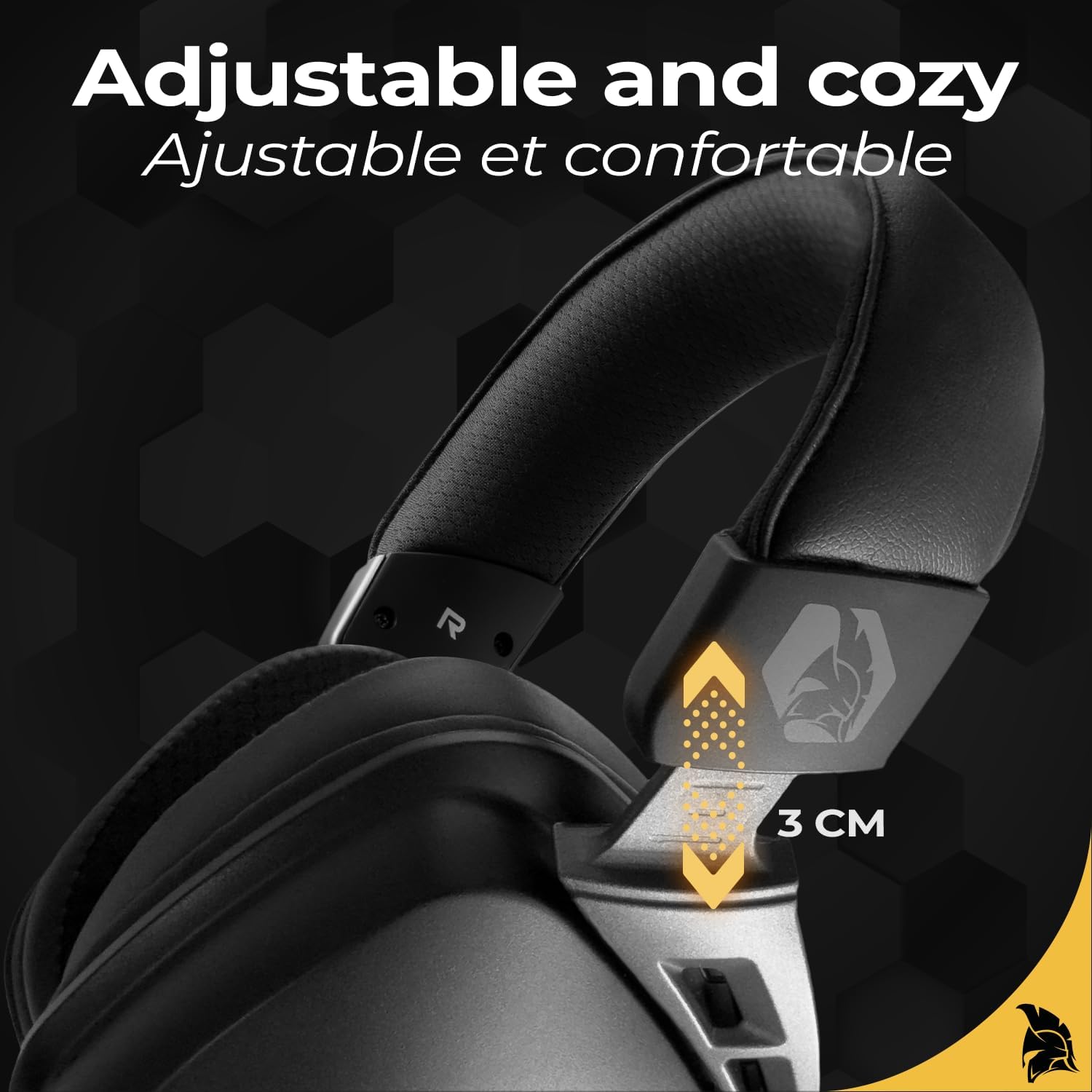
Image: The EH20 headset highlighting its impressive 30-hour battery life for extended gaming sessions.
7. പരിപാലനം
നിങ്ങളുടെ ഹെഡ്സെറ്റിന്റെ ദീർഘായുസ്സും ഒപ്റ്റിമൽ പ്രകടനവും ഉറപ്പാക്കാൻ, ഈ പരിപാലന മാർഗ്ഗനിർദ്ദേശങ്ങൾ പാലിക്കുക:
- വൃത്തിയാക്കൽ: Use a soft, dry cloth to clean the headset. For earcups, a slightly damp cloth can be used, but avoid excessive moisture. Do not use harsh chemicals or abrasive materials.
- സംഭരണം: ഹെഡ്സെറ്റ് നേരിട്ട് സൂര്യപ്രകാശം ഏൽക്കാത്തതും ഉയർന്ന താപനില ഏൽക്കാത്തതുമായ ഒരു തണുത്ത വരണ്ട സ്ഥലത്ത് സൂക്ഷിക്കുക.
- കൈകാര്യം ചെയ്യൽ: ഹെഡ്സെറ്റ് താഴെയിടുകയോ ശക്തമായ ആഘാതങ്ങൾക്ക് വിധേയമാക്കുകയോ ചെയ്യരുത്. കേബിളുകൾ അമിതമായി വളച്ചൊടിക്കുകയോ വലിക്കുകയോ ചെയ്യരുത്.
7.1. Comfortable Design

ചിത്രം: ഒരു മുറിച്ചെടുത്ത ഭാഗം view of the EH20 headset's earcup, revealing the comfortable memory foam padding designed for extended wear.
7.2. Adjustable Fit

Image: The adjustable headband mechanism of the EH20 headset, showing its flexibility for a personalized fit.
8. പ്രശ്നപരിഹാരം
If you encounter issues with your EH20 headset, refer to the following common solutions:
- ശബ്ദമില്ല:
- ഹെഡ്സെറ്റ് ഓണാക്കി ചാർജ് ചെയ്തിട്ടുണ്ടെന്ന് ഉറപ്പാക്കുക.
- ഹെഡ്സെറ്റിലും കണക്റ്റുചെയ്തിരിക്കുന്ന ഉപകരണത്തിലും വോളിയം ലെവൽ പരിശോധിക്കുക.
- Verify the correct audio output device is selected on your computer or console.
- For wireless connections, ensure the receiver is properly inserted and the headset is in the correct mode (2.4G or BT).
- For wired connections, ensure the 3.5mm cable is fully inserted into both the headset and the device.
- മൈക്രോഫോൺ പ്രവർത്തിക്കുന്നില്ല:
- Ensure the microphone is securely attached and not muted (check the mute button and any LED indicators).
- Verify the correct audio input device is selected on your computer or console.
- Test the microphone on another device if possible.
- Connection Issues (Wireless):
- Ensure the headset and receiver/device are within range.
- Try re-pairing the headset (for Bluetooth) or re-inserting the 2.4 GHz receiver.
- Avoid interference from other wireless devices operating on similar frequencies.
- RGB ലൈറ്റുകൾ പ്രവർത്തിക്കുന്നില്ല:
- ഹെഡ്സെറ്റിന് ആവശ്യത്തിന് ബാറ്ററി ചാർജ് ഉണ്ടെന്ന് ഉറപ്പാക്കുക.
- RGB functionality may be limited or unavailable in wired mode.
9 സ്പെസിഫിക്കേഷനുകൾ
| മോഡലിൻ്റെ പേര് | EH20 |
| മോഡൽ നമ്പർ | OE-HE-20RF |
| കണക്റ്റിവിറ്റി ടെക്നോളജി | 2.4 GHz Wireless, Bluetooth (BT), 3.5mm Wired |
| അനുയോജ്യമായ ഉപകരണങ്ങൾ | PC, Mac, PlayStation 4, PlayStation 5, Nintendo Switch |
| ഫ്രീക്വൻസി റേഞ്ച് | 20 ഹെർട്സ് - 20,000 ഹെർട്സ് |
| പ്രതിരോധം | 20 ഓം |
| മൈക്രോഫോൺ | വേർപെടുത്താവുന്നത് |
| ശബ്ദ സവിശേഷതകൾ | 7.1 Virtual Surround Sound, Passive Noise Reduction |
| ബാറ്ററി തരം | Lithium-polymer (Rechargeable) |
| ബാറ്ററി ലൈഫ് | ഏകദേശം 30 മണിക്കൂർ |
| മെറ്റീരിയൽ | മെറ്റൽ, പ്ലാസ്റ്റിക് |
| നിറം | കറുപ്പ് |
10. വാറൻ്റിയും പിന്തുണയും
The EMPIRE GAMING EH20 Wireless Gaming Headset comes with a 2 വർഷത്തെ നിർമ്മാതാവിന്റെ വാറന്റി വാങ്ങിയ തീയതി മുതൽ. സാധാരണ ഉപയോഗത്തിലുള്ള മെറ്റീരിയലുകളിലെയും വർക്ക്മാൻഷിപ്പുകളിലെയും വൈകല്യങ്ങൾ ഈ വാറന്റി ഉൾക്കൊള്ളുന്നു.
For warranty claims, technical support, or further assistance, please contact EMPIRE GAMING customer service through their official webഉൽപ്പന്നം വാങ്ങിയ സൈറ്റിലോ റീട്ടെയിലറിലോ വാറന്റി സാധൂകരണത്തിനായി നിങ്ങളുടെ വാങ്ങിയതിന്റെ തെളിവ് സൂക്ഷിക്കുക.


