ആമുഖം
The Panasonic LUMIX TZ/ZS99 DC-TZ99 is a compact digital camera designed for versatility and portability. It features a powerful 24-720mm LEICA DC lens with 30x optical zoom, enabling capture of wide landscapes and distant subjects with clarity. The camera supports 4K video recording and 4K PHOTO modes, along with 5-Axis HYBRID O.I.S.+ for stable shots. Its tiltable 1,840k-dot monitor, USB Type-C charging, and integrated Wi-Fi and Bluetooth connectivity enhance usability for travel and everyday photography.
സജ്ജമാക്കുക
1 ബാറ്ററി ചാർജ് ചെയ്യുന്നു
The camera includes a rechargeable Lithium Ion battery. Connect the camera to a power source using a USB Type-C cable for charging. Ensure the camera is powered off during charging. The battery weighs approximately 44 grams and provides an average life of 2 hours.
2 ഒരു മെമ്മറി കാർഡ് ചേർക്കുന്നു
The camera supports SDXC flash memory cards. Open the memory card slot cover, typically located on the side or bottom of the camera, and insert the card until it clicks into place. Ensure the card is inserted in the correct orientation.
3. പ്രാരംഭ പവർ ഓൺ
Press the power button to turn on the camera. Follow any on-screen prompts for initial setup, such as setting the date, time, and language.

ചിത്രം: വശം view of the Panasonic LUMIX TZ/ZS99 camera, highlighting the USB Type-C port for charging and data transfer, and the Micro HDMI port.
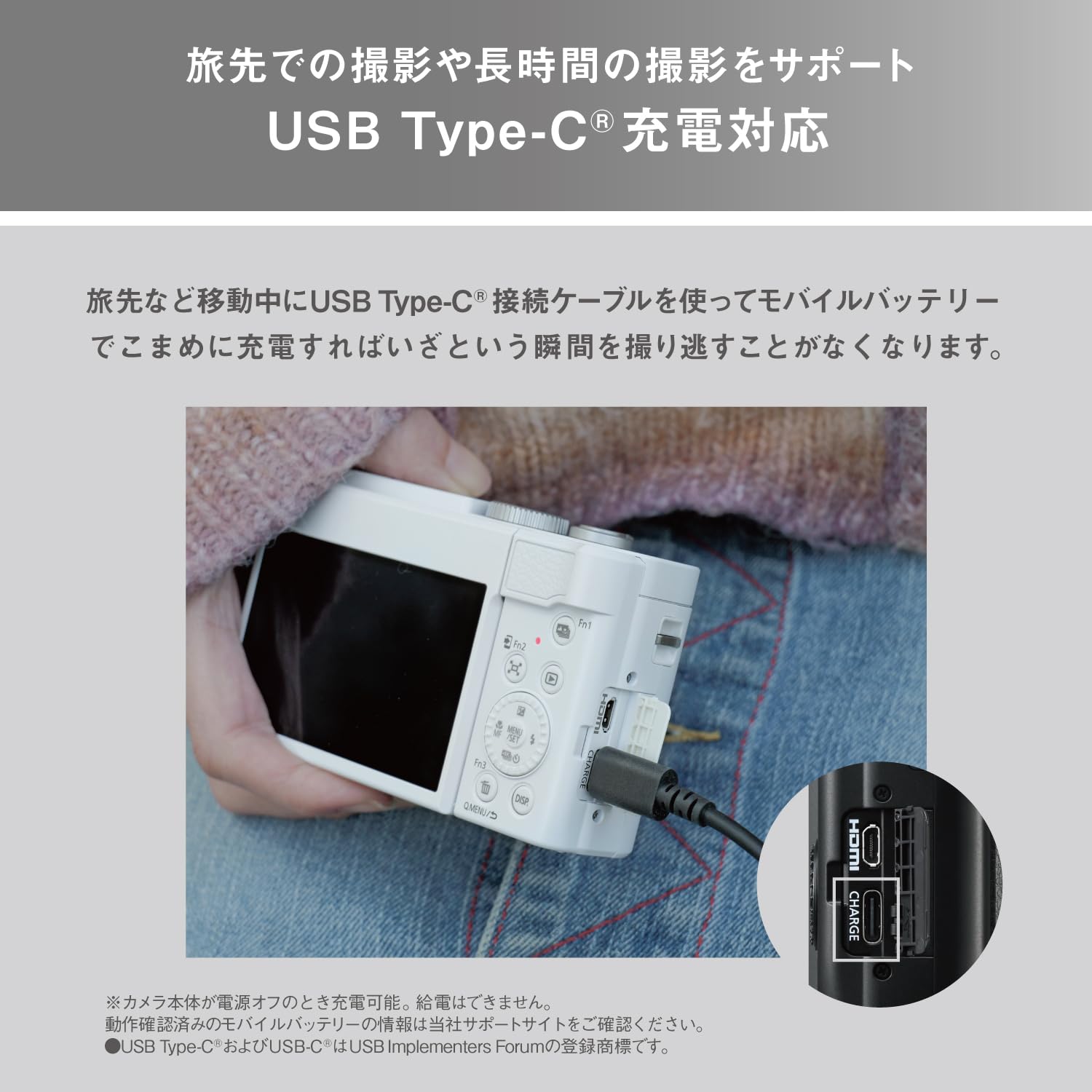
Image: The Panasonic LUMIX TZ/ZS99 camera with its lens fully extended, demonstrating its 30x optical zoom range.
അടിസ്ഥാന പ്രവർത്തനം
1. ഒരു ഷൂട്ടിംഗ് മോഡ് തിരഞ്ഞെടുക്കൽ
Rotate the mode dial, typically located on the top of the camera, to select your desired shooting mode. Available modes include:
- സ്വയമേവ: പൊതുവായ പോയിന്റ്-ആൻഡ്-ഷൂട്ട് ഫോട്ടോഗ്രാഫിക്ക്.
- ലാൻഡ്സ്കേപ്പ്: Optimized for wide scenic views.
- സിനിമ: വീഡിയോ റെക്കോർഡിംഗിനായി.
- കായികം: For capturing fast-moving subjects.
2. സൂം ഉപയോഗം
Use the zoom lever, usually around the shutter button, to adjust the 30x optical zoom (24-720mm equivalent). Push the lever towards 'W' for wide-angle and 'T' for telephoto.
3. ഫോക്കസിംഗ്
The camera features Contrast Detection Auto Focus with Hybrid focus capabilities. Half-press the shutter button to activate autofocus. The camera will automatically detect and focus on the subject. For manual focus, refer to the camera's menu settings.
4. വീഡിയോ റെക്കോർഡിംഗ്
Switch to Movie mode on the mode dial or press the dedicated video recording button. The camera supports 4K video recording at 2160p and HD high-speed video at 120fps for slow-motion effects. Video is captured in MP4 format.
വിപുലമായ സവിശേഷതകൾ
1. 4K PHOTO Mode
Utilize 4K PHOTO mode to capture quick bursts of images at 30 frames per second, allowing you to extract high-resolution still photos from 4K video footage. This is ideal for capturing decisive moments.
2. കണക്റ്റിവിറ്റി
The camera offers built-in Bluetooth v5.0 and Wi-Fi for seamless image sharing. Use the dedicated Send Image button to transfer photos and videos to your smartphone via the Panasonic Image App. The camera also features Micro HDMI and Micro USB ports for wired connections.
3. Tiltable Touchscreen Monitor
The 3-inch, 1,840k-dot tiltable touchscreen monitor allows for flexible shooting from various angles, including selfies. It provides intuitive control over camera settings and playback.
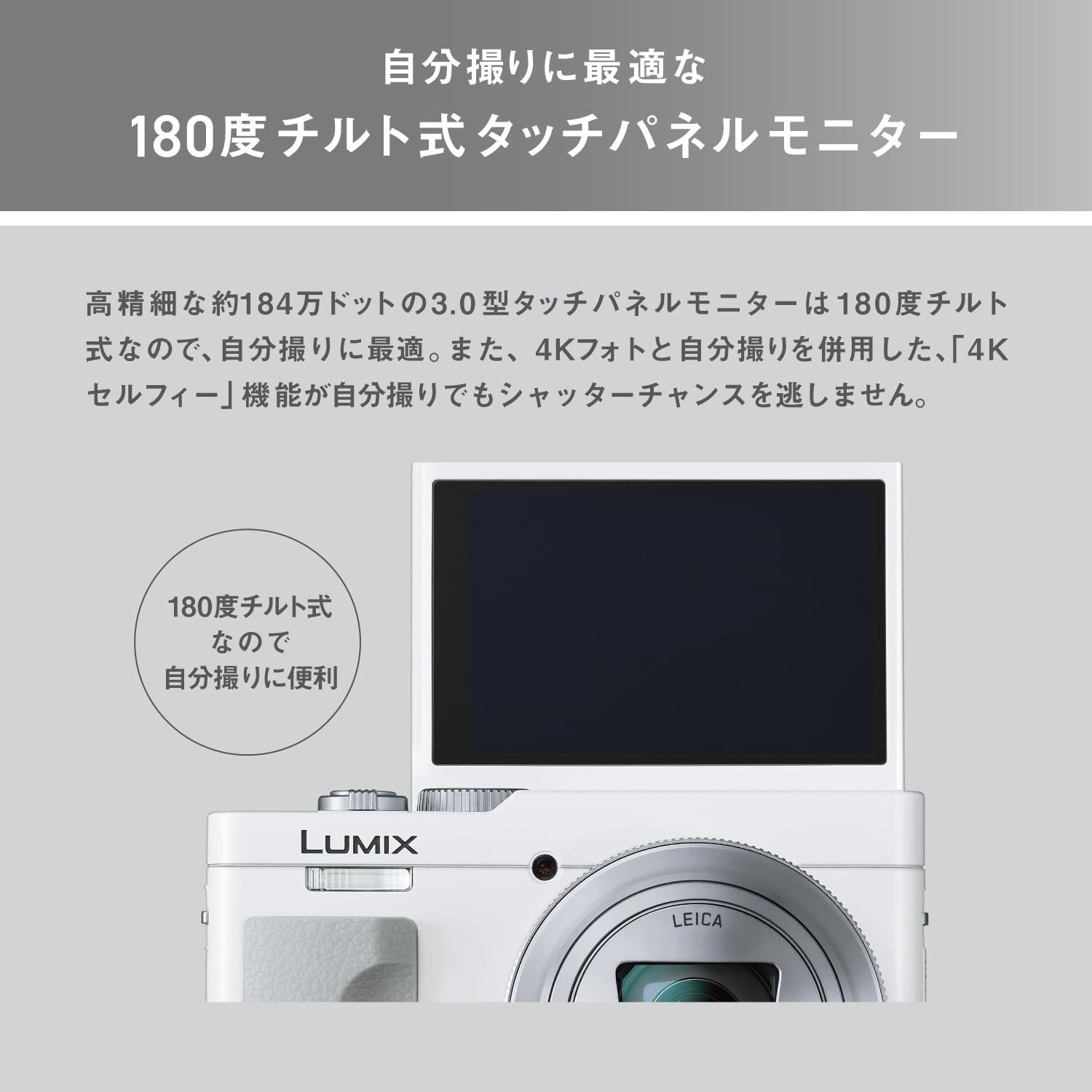
Image: The Panasonic LUMIX TZ/ZS99 camera with its 180-degree tiltable touchscreen monitor flipped upwards, demonstrating its utility for self-portraits or creative angles.
Image: The Panasonic LUMIX TZ/ZS99 camera with its lens fully extended, demonstrating its 30x optical zoom range.
4. നിയന്ത്രണ റിംഗ്
The control ring on the front of the camera body provides intuitive operation for various settings. It can be used to adjust exposure compensation, aperture, shutter speed, or manual focus, offering flexible control during shooting.
ചിത്രം: മുൻഭാഗം view of the Panasonic LUMIX TZ/ZS99 camera, showcasing the control ring around the lens for quick adjustments.
മെയിൻ്റനൻസ്
1. ക്യാമറ വൃത്തിയാക്കൽ
Use a soft, lint-free cloth to clean the camera body. For the lens, use a specialized lens cleaning cloth and solution. Avoid using harsh chemicals or abrasive materials.
2. സംഭരണം
When not in use, store the camera in a dry, cool place away from direct sunlight and extreme temperatures. It is recommended to remove the battery if storing for extended periods.
ട്രബിൾഷൂട്ടിംഗ്
If you encounter issues with your camera, please refer to the following common troubleshooting steps:
- ക്യാമറ പവർ ഓൺ ചെയ്യുന്നില്ല: ബാറ്ററി പൂർണ്ണമായും ചാർജ്ജ് ചെയ്തിട്ടുണ്ടെന്നും ശരിയായി ചേർത്തിട്ടുണ്ടെന്നും ഉറപ്പാക്കുക.
- ചിത്രങ്ങൾ മങ്ങിയതാണ്: Check focus settings, ensure sufficient lighting, and verify image stabilization is active.
- സ്മാർട്ട്ഫോണിലേക്ക് കണക്റ്റുചെയ്യാൻ കഴിയുന്നില്ല: Ensure Wi-Fi and Bluetooth are enabled on both devices and the Panasonic Image App is installed and updated.
- മെമ്മറി കാർഡ് പിശക്: Reinsert the memory card or try a different compatible SDXC card. Ensure the card is not full.
For more detailed troubleshooting, please consult the full user manual available on the Panasonic support webസൈറ്റ്.
സ്പെസിഫിക്കേഷനുകൾ
| ഫീച്ചർ | സ്പെസിഫിക്കേഷൻ |
|---|---|
| ബ്രാൻഡ് | പാനസോണിക് |
| മോഡലിൻ്റെ പേര് | DDC-TZ99 |
| മോഡൽ നമ്പർ | DC-TZ99-W |
| ഫോട്ടോ സെൻസർ റെസല്യൂഷൻ | 20.3 എം.പി |
| ഒപ്റ്റിക്കൽ സൂം | 30 x |
| ഫോക്കൽ ലെങ്ത് | 24-720 മി.മീ |
| പരമാവധി അപ്പേർച്ചർ | 2.8 എഫ് |
| ഇമേജ് സ്റ്റെബിലൈസേഷൻ | ഒപ്റ്റിക്കൽ (5-ആക്സിസ് ഹൈബ്രിഡ് OIS+) |
| വീഡിയോ റെസല്യൂഷൻ | 2160p (4K) |
| സ്ക്രീൻ വലിപ്പം | 3 ഇഞ്ച് |
| Viewകണ്ടെത്തുന്നയാൾ | ഇലക്ട്രോണിക് |
| കണക്റ്റിവിറ്റി ടെക്നോളജി | Bluetooth, Micro HDMI, Micro USB, Wi-Fi |
| ഫ്ലാഷ് മെമ്മറി തരം | SDXC |
| ബാറ്ററി തരം | ലിഥിയം അയോൺ |
| ഇനത്തിൻ്റെ ഭാരം | 280 ഗ്രാം |
| നിറം | വെള്ള |
വാറൻ്റിയും പിന്തുണയും
This Panasonic LUMIX TZ/ZS99 DC-TZ99 camera comes with a 1 വർഷത്തെ വാറൻ്റി from the manufacturer. For warranty claims, technical support, or additional product information, please visit the official Panasonic support webസൈറ്റ് അല്ലെങ്കിൽ അവരുടെ ഉപഭോക്തൃ സേവനവുമായി ബന്ധപ്പെടുക.
നിങ്ങൾക്ക് സന്ദർശിക്കാനും കഴിയും ആമസോണിലെ പാനസോണിക് സ്റ്റോർ കൂടുതൽ ഉൽപ്പന്നങ്ങൾക്കും വിവരങ്ങൾക്കും.


