1. ആമുഖം
The Teslong USB-C Digital Microscope MS100-C is a portable digital imaging device designed for detailed inspection and observation. It offers a magnification range of 10X to 200X, making it suitable for examining intricate details on various objects. This manual provides essential information for setting up, operating, and maintaining your microscope.

Image 1.1: Teslong USB-C Digital Microscope with smartphone connection and accessories.
2. ബോക്സിൽ എന്താണുള്ളത്?
നിങ്ങളുടെ പാക്കേജിൽ എല്ലാ ഇനങ്ങളും ഉണ്ടെന്ന് ഉറപ്പാക്കുക:
- Teslong USB-C Digital Microscope (MS100-C)
- Rotating Metal Stand
- 2 Ear Specula
- 1 സംരക്ഷണ കവർ
- 1 Side-viewമിറർ
- ഉപയോക്തൃ മാനുവൽ

Image 2.1: Package contents of the Teslong USB-C Digital Microscope.
3. സജ്ജീകരണം
3.1. ആപ്പ് ഡൗൺലോഡ്
To use the microscope with your smartphone or tablet, download the recommended application. Scan the QR code or visit the provided link:
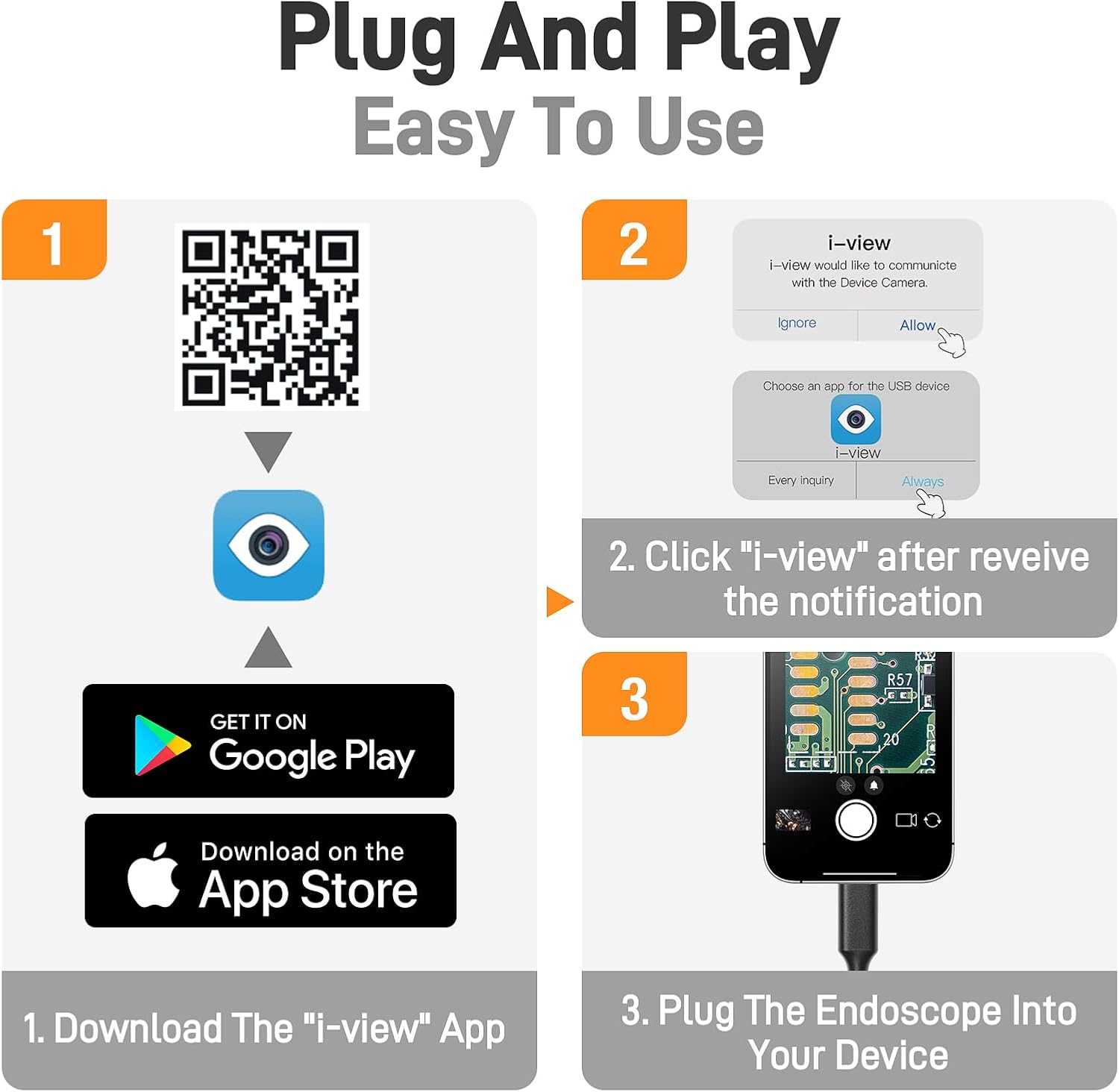
Image 3.1: App download and connection guide.
ഡൗൺലോഡ് ലിങ്ക്: https://gto.so/i-camera
3.2. ഉപകരണ കണക്ഷൻ
The microscope is compatible with various devices. Ensure your device has a compatible port.
- USB-C ഉപകരണങ്ങൾ: Connect the microscope's USB-C cable directly to your iPhone 15/16, Android device with a Type-C port, or MacBook.
- Windows PCs: Use the included USB-A adapter to connect the microscope to a standard USB port on your Windows PC.

Image 3.2: Universal compatibility with USB-C and USB-A devices.
After connecting, open the downloaded application. You may receive a notification asking for permission to communicate with the device camera; select "Allow" or "Always" to proceed.
4. പ്രവർത്തന നിർദ്ദേശങ്ങൾ
4.1. Adjusting Magnification
The microscope offers a magnification range from 10X to 200X. To change the magnification, adjust the distance between the microscope lens and the object. Closer proximity increases magnification.

Image 4.1: Demonstrating 10X to 200X magnification range.
4.2. LED ലൈറ്റുകൾ ക്രമീകരിക്കൽ
The microscope is equipped with 8 adjustable LED lights to provide optimal illumination. Use the control wheel on the cable to cycle through three brightness levels or turn the lights off. Proper lighting enhances image clarity.

Image 4.2: Adjustable LED lights and IP67 waterproof feature.
4.3. ഫോക്കസിംഗ്
Achieve a clear image by rotating the focusing ring located on the microscope body. Adjust slowly until the image on your connected device appears sharp.
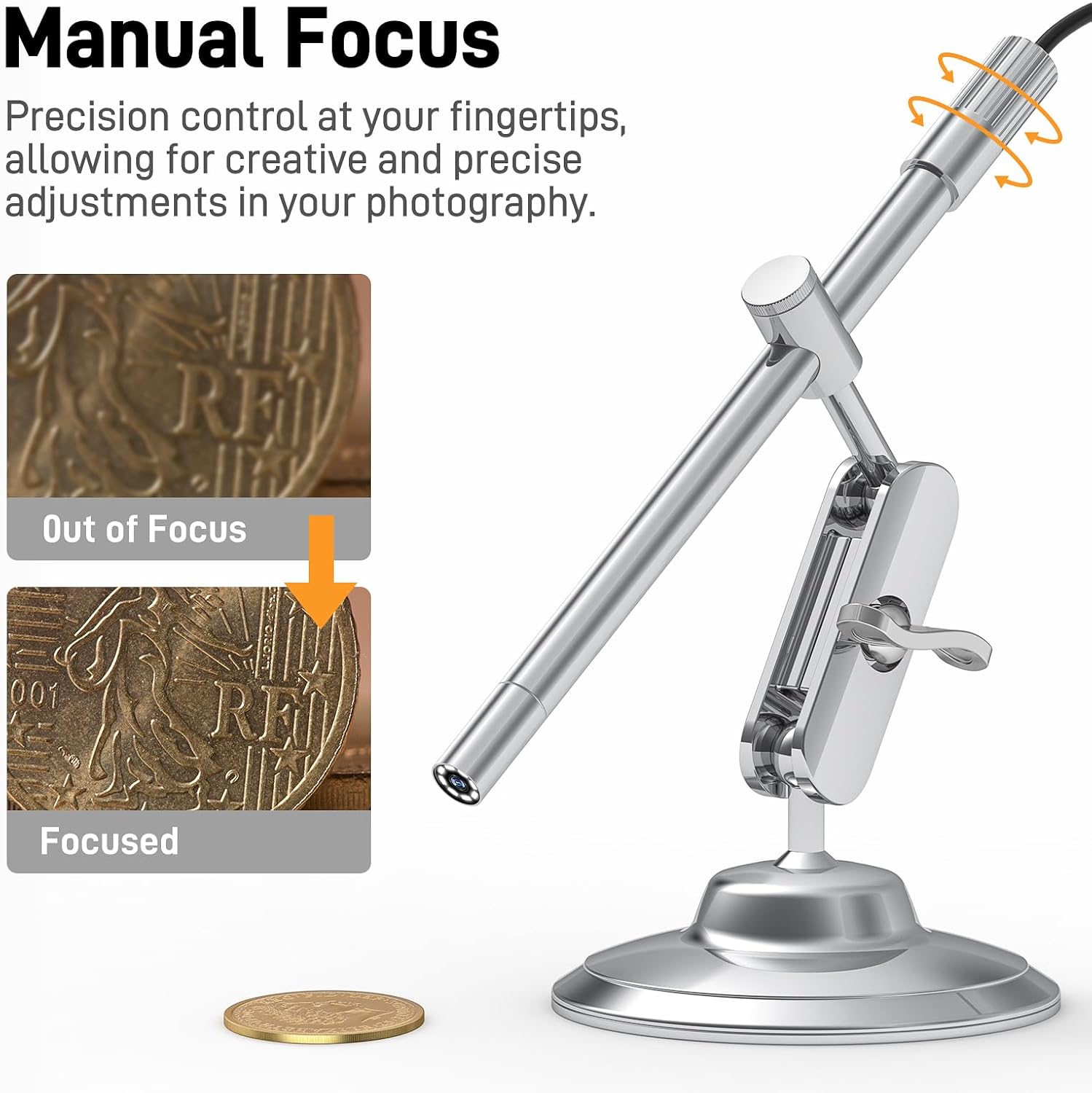
Image 4.3: Manual focus adjustment.
4.4. Using the Rotating Metal Stand
The included metal stand provides stability and allows for flexible viewing angles. Adjust the arm and base to position the microscope precisely over your subject. The stand can rotate 360 degrees for versatile observation.
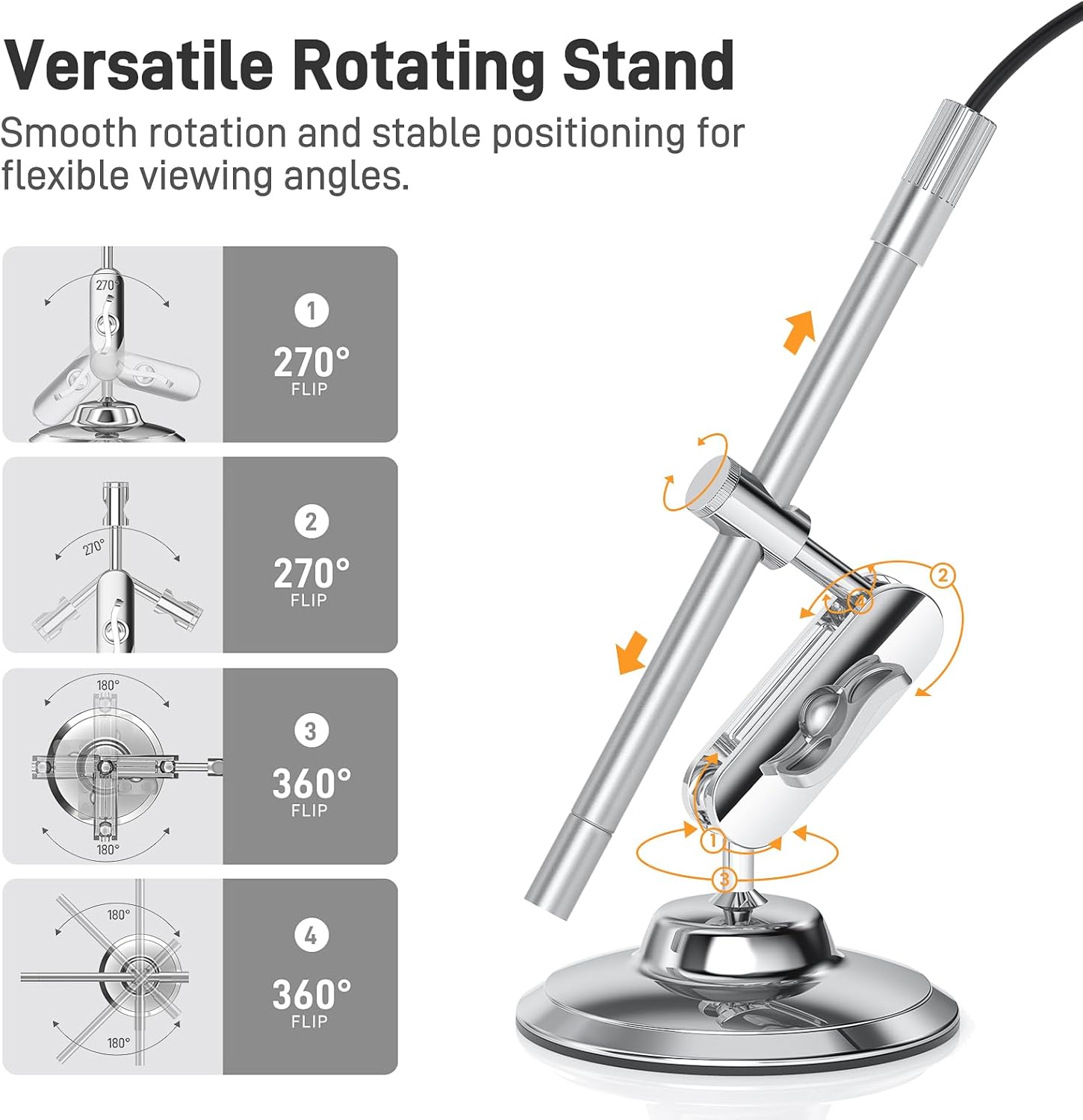
Image 4.4: Versatile rotating stand adjustments.
4.5. ആക്സസറികൾ ഉപയോഗിക്കുന്നത്
The accessory kit enhances the microscope's functionality:
- Ear Specula: For safe and hygienic ear inspections.
- സംരക്ഷണ കവർ: Use for hygiene during pet health checks or skin assessments.
- വശം-viewing Mirror: Attach to the microscope tip to inspect hard-to-reach areas or view objects from an angled perspective.

Image 4.5: Complete accessory kit.
5. അപേക്ഷകൾ
The Teslong USB-C Digital Microscope is suitable for a wide range of applications:
- Coin Inspection: Examine details on coins for collection or authentication.
- ഇലക്ട്രോണിക്സ് പരിശോധന: Assess circuit boards, solder joints, and small electronic components.
- Jewelry Examination: Appraise gemstones and inspect intricate jewelry designs.
- ചർമ്മ പരിശോധന: Observe skin conditions or hair follicles.
- പ്രാണികളുടെ നിരീക്ഷണം: Explore the microscopic world of insects for educational or research purposes.


6. പരിപാലനം
- വൃത്തിയാക്കൽ: Use a soft, dry cloth to clean the microscope body. For the lens, use a lens cleaning cloth and solution. Avoid abrasive materials or harsh chemicals.
- സംഭരണം: Store the microscope and its accessories in a clean, dry place away from direct sunlight and extreme temperatures.
- ജല പ്രതിരോധം: The microscope tip is IP67 rated, meaning it is protected against dust and can withstand immersion in water up to 1 meter for 30 minutes. However, avoid prolonged exposure to water and ensure the USB connection is dry before use.
7. പ്രശ്നപരിഹാരം
- സ്ക്രീനിൽ ചിത്രമില്ല:
- Ensure the microscope is securely connected to your device.
- Verify that the application has permission to access the device camera.
- Restart the application or your device.
- മങ്ങിയ ചിത്രം:
- Adjust the focusing ring on the microscope body.
- Ensure the object is within the microscope's working distance.
- Clean the microscope lens if smudges are present.
- അപര്യാപ്തമായ വെളിച്ചം:
- Adjust the LED light brightness using the control wheel on the cable.
- ആപ്പ് ഉപകരണം തിരിച്ചറിയുന്നില്ല:
- നിങ്ങളുടെ ഉപകരണത്തിന്റെ ഓപ്പറേറ്റിംഗ് സിസ്റ്റം കാലികമാണെന്ന് ഉറപ്പാക്കുക.
- Try a different USB-C port or adapter if available.
- Some third-party USB camera applications may offer better compatibility or features.
8 സ്പെസിഫിക്കേഷനുകൾ
| ഫീച്ചർ | സ്പെസിഫിക്കേഷൻ |
|---|---|
| മോഡലിൻ്റെ പേര് | MS100-C |
| മാഗ്നിഫിക്കേഷൻ | 10X മുതൽ 200X വരെ |
| പ്രകാശ സ്രോതസ്സ് | 8 ക്രമീകരിക്കാവുന്ന LED ലൈറ്റുകൾ |
| കണക്റ്റിവിറ്റി | USB-C (USB-A അഡാപ്റ്ററിനൊപ്പം) |
| അനുയോജ്യത | iPhone 15+, Android (Type-C), Windows PC, MacBook |
| വാട്ടർപ്രൂഫ് റേറ്റിംഗ് | IP67 (Microscope Tip) |
| മെറ്റീരിയൽ | ലോഹം |
| ഇനത്തിൻ്റെ ഭാരം | 7 ഔൺസ് (0.2 കിലോഗ്രാം) |
9. വാറൻ്റിയും പിന്തുണയും
For warranty information, technical support, or any inquiries regarding your Teslong USB-C Digital Microscope MS100-C, please refer to the official Teslong webസൈറ്റിൽ നേരിട്ട് ബന്ധപ്പെടുകയോ അവരുടെ ഉപഭോക്തൃ സേവനവുമായി നേരിട്ട് ബന്ധപ്പെടുകയോ ചെയ്യുക. കോൺടാക്റ്റ് വിശദാംശങ്ങൾ സാധാരണയായി ഉൽപ്പന്ന പാക്കേജിംഗിലോ ഔദ്യോഗിക ബ്രാൻഡിലോ നൽകിയിട്ടുണ്ട്. webസൈറ്റ്.