ആമുഖം
This user manual provides comprehensive instructions for the MONODEAL Sleep Headphones, model YJCA01. It covers product features, setup, operation, maintenance, and troubleshooting to ensure optimal performance and user experience. These invisible sleep headphones are designed for comfort and effective noise isolation, making them ideal for sleeping and relaxation.

Image: MONODEAL Sleep Headphones, showing the earbuds and their charging case, with a person sleeping in the background, illustrating their intended use.
പാക്കേജ് ഉള്ളടക്കം
പാക്കേജിൽ എല്ലാ ഇനങ്ങളും ഉണ്ടെന്ന് ദയവായി പരിശോധിക്കുക:
- MONODEAL Sleep Headphones (2 earbuds)
- ചാർജിംഗ് കേസ്
- ചാർജിംഗ് കേബിൾ
- ഉപയോക്തൃ മാനുവൽ
സജ്ജമാക്കുക
1. എങ്ങനെ ധരിക്കാം
For optimal comfort and noise isolation, ensure the earbuds are correctly inserted and tucked into your ear canal.
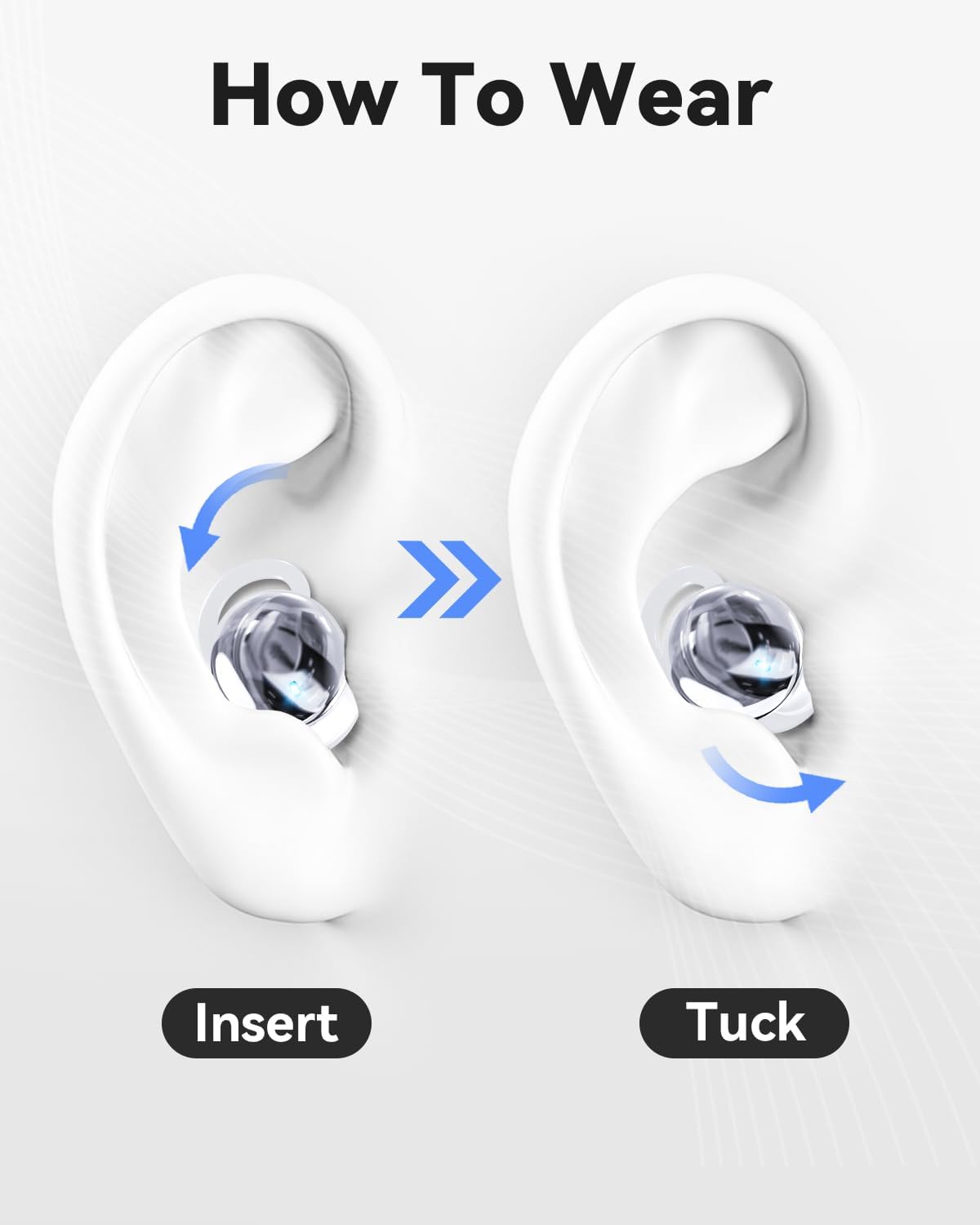
Image: Visual guide demonstrating the two-step process of inserting the earbud into the ear and then tucking it for a secure and comfortable fit.
- തിരുകുക: Gently place the earbud into your ear canal.
- ടക്ക്: Rotate and tuck the earbud to ensure it sits snugly and comfortably, minimizing pressure, especially for side sleepers.
2. ഇയർബഡുകളും കേസും ചാർജ് ചെയ്യുന്നു
Before first use, fully charge the earbuds and the charging case. Place the earbuds into the charging case. Connect the charging cable to the case and a compatible USB power source.
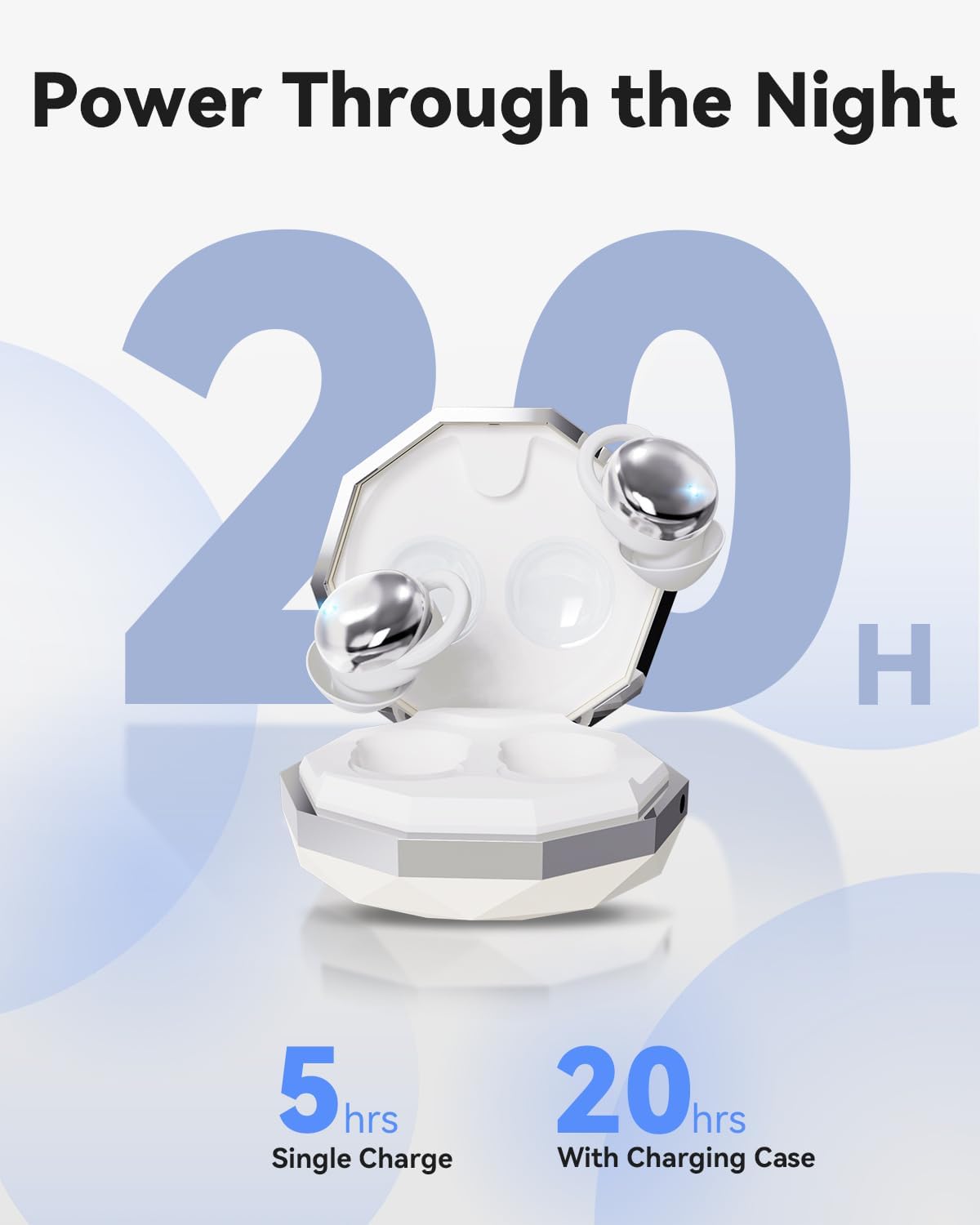
Image: The charging case for the MONODEAL Sleep Headphones, illustrating the battery life: 5 hours on a single charge for the earbuds, and up to 20 hours total with the charging case.
- A single charge provides up to 5 hours of playback.
- The charging case extends the total battery life to approximately 20 hours.
3. ബ്ലൂടൂത്ത് ജോടിയാക്കൽ
The earbuds utilize Bluetooth 5.4 for stable and fast connectivity.
- ഇയർബഡുകൾ ചാർജ് ചെയ്തിട്ടുണ്ടെന്നും ചാർജിംഗ് കെയ്സിൽ നിന്ന് നീക്കം ചെയ്തിട്ടുണ്ടെന്നും ഉറപ്പാക്കുക. അവ സ്വയമേവ ജോടിയാക്കൽ മോഡിലേക്ക് പ്രവേശിക്കും.
- നിങ്ങളുടെ ഉപകരണത്തിൽ (സ്മാർട്ട്ഫോൺ, ടാബ്ലെറ്റ് മുതലായവ), ബ്ലൂടൂത്ത് പ്രവർത്തനക്ഷമമാക്കുക.
- ഇതിനായി തിരയുക "MONODEAL YJCA01" or a similar name in the list of available Bluetooth devices.
- Select the device to connect. Once paired, you will hear an audible confirmation.
പ്രവർത്തന നിർദ്ദേശങ്ങൾ
അടിസ്ഥാന നിയന്ത്രണങ്ങൾ
The MONODEAL Sleep Headphones feature intuitive controls for media playback and calls.
| ഫംഗ്ഷൻ | ആക്ഷൻ |
|---|---|
| പവർ ഓൺ | Remove from charging case. |
| പവർ ഓഫ് | Place back into charging case. |
| പ്ലേ/താൽക്കാലികമായി നിർത്തുക | ഇയർബഡുകളിൽ ഏതെങ്കിലുമൊന്നിൽ ഒറ്റ ടാപ്പ് ചെയ്യുക. |
| അടുത്ത ട്രാക്ക് | വലതുവശത്തെ ഇയർബഡിൽ രണ്ടുതവണ ടാപ്പ് ചെയ്യുക. |
| മുമ്പത്തെ ട്രാക്ക് | ഇടതുവശത്തെ ഇയർബഡിൽ രണ്ടുതവണ ടാപ്പ് ചെയ്യുക. |
| വോളിയം കൂട്ടുക | വലതുവശത്തെ ഇയർബഡിൽ മൂന്ന് തവണ ടാപ്പ് ചെയ്യുക. |
| വോളിയം ഡൗൺ | ഇടതുവശത്തെ ഇയർബഡിൽ മൂന്ന് തവണ ടാപ്പ് ചെയ്യുക. |
കോൾ മാനേജുമെന്റ്
| ഫംഗ്ഷൻ | ആക്ഷൻ |
|---|---|
| ഉത്തരം / കോൾ അവസാനിപ്പിക്കുക | ഇയർബഡുകളിൽ ഏതെങ്കിലുമൊന്നിൽ ഒറ്റ ടാപ്പ് ചെയ്യുക. |
| കോൾ നിരസിക്കുക | ഏതെങ്കിലും ഇയർബഡിൽ 2 സെക്കൻഡ് അമർത്തിപ്പിടിക്കുക. |
മെയിൻ്റനൻസ്
വൃത്തിയാക്കൽ
Regular cleaning ensures hygiene and extends the lifespan of your earbuds. The earbuds are made of liquid silicone, which is easy to clean.
- ഇയർബഡുകളും ചാർജിംഗ് കെയ്സും മൃദുവായതും ഉണങ്ങിയതും ലിന്റ് രഹിതവുമായ തുണി ഉപയോഗിച്ച് തുടയ്ക്കുക.
- കഠിനമായ അഴുക്കിന്, ചെറുതായി dampതുണിയിൽ വെള്ളം ഒഴിക്കുക. കഠിനമായ രാസവസ്തുക്കളോ ഉരച്ചിലുകളോ ഉള്ള വസ്തുക്കൾ ഉപയോഗിക്കുന്നത് ഒഴിവാക്കുക.
- ചാർജ് ചെയ്യുന്നതിന് മുമ്പ് ഇയർബഡുകളിലെയും കേസിലെയും ചാർജിംഗ് കോൺടാക്റ്റുകൾ വൃത്തിയുള്ളതും വരണ്ടതുമാണെന്ന് ഉറപ്പാക്കുക.
സംഭരണം
ഉപയോഗത്തിലില്ലാത്തപ്പോൾ, പൊടിയിൽ നിന്നും കേടുപാടുകളിൽ നിന്നും സംരക്ഷിക്കാൻ ഇയർബഡുകൾ അവയുടെ ചാർജിംഗ് കേസിൽ സൂക്ഷിക്കുക.
- നേരിട്ടുള്ള സൂര്യപ്രകാശത്തിൽ നിന്നും അങ്ങേയറ്റത്തെ താപനിലയിൽ നിന്നും അകലെ തണുത്തതും വരണ്ടതുമായ സ്ഥലത്ത് സൂക്ഷിക്കുക.
- Avoid exposing the earbuds to excessive moisture.
ട്രബിൾഷൂട്ടിംഗ്
If you encounter issues with your MONODEAL Sleep Headphones, refer to the following common solutions:
| പ്രശ്നം | സാധ്യമായ കാരണം / പരിഹാരം |
|---|---|
| ഇയർബഡുകൾ ഓണാക്കുന്നില്ല | Ensure earbuds are charged. Place them in the charging case for a few minutes, then remove. |
| ഉപകരണവുമായി ജോടിയാക്കാൻ കഴിയില്ല |
|
| ശബ്ദമോ കുറഞ്ഞ വോളിയമോ ഇല്ല |
|
| ഇയർബഡുകൾ ചാർജ് ചെയ്യുന്നില്ല |
|
| മോശം ശബ്ദ നിലവാരം |
|
സ്പെസിഫിക്കേഷനുകൾ
Key technical specifications for the MONODEAL Sleep Headphones YJCA01:
- മോഡൽ: YJCA01
- ബ്രാൻഡ്: മോണോഡീൽ
- കണക്റ്റിവിറ്റി ടെക്നോളജി: വയർലെസ്സ് (ബ്ലൂടൂത്ത് 5.4)
- ഫോം ഘടകം: ചെവിയിൽ
- മെറ്റീരിയൽ: സിലിക്കൺ
- നിറം: സിൽവർ വൈറ്റ്
- ഇയർബഡ് ഭാരം: ഒരു ഇയർബഡിന് ഏകദേശം 2.5 ഗ്രാം
- ബാറ്ററി ലൈഫ് (ഇയർബഡുകൾ): ഒറ്റ ചാർജിൽ 5 മണിക്കൂർ വരെ
- മൊത്തം ബാറ്ററി ലൈഫ് (ചാർജിംഗ് കേസിനൊപ്പം): 20 മണിക്കൂർ വരെ
- നോയ്സ് ഐസൊലേഷൻ: Up to 24 dB (passive noise isolation)
- ശുപാർശ ചെയ്യുന്ന ഉപയോഗം: Sleep, relaxation
- അളവുകൾ (പാഴ്സൽ): 10.4 x 10.3 x 3.4 സെ.മീ
- Total Weight (Parcel): 100 ഗ്രാം

Image: The MONODEAL Sleep Earbuds, highlighting their cloud-like softness, 2.5g weight, noise reduction capabilities, comfort, and snug fit, all contributing to a better sleep experience.
വാറൻ്റിയും പിന്തുണയും
For warranty information and customer support, please refer to the contact details provided on the product packaging or the official MONODEAL webസൈറ്റ്. വാറൻ്റി ക്ലെയിമുകൾക്കായി നിങ്ങളുടെ വാങ്ങൽ രസീത് സൂക്ഷിക്കുക.
നിർമ്മാതാവ്: മോണോഡീൽ
ASIN: B0DQL8GWFZ


