1. ആമുഖം
Thank you for choosing the GGSTOPWATER AI Translate True Wireless OWS Headset JM13. This innovative headset combines open-ear audio with advanced AI translation capabilities, allowing you to enjoy music and calls while remaining aware of your surroundings, and facilitating communication across 150 languages. This manual provides detailed instructions for setup, operation, and maintenance to ensure optimal performance and longevity of your device.
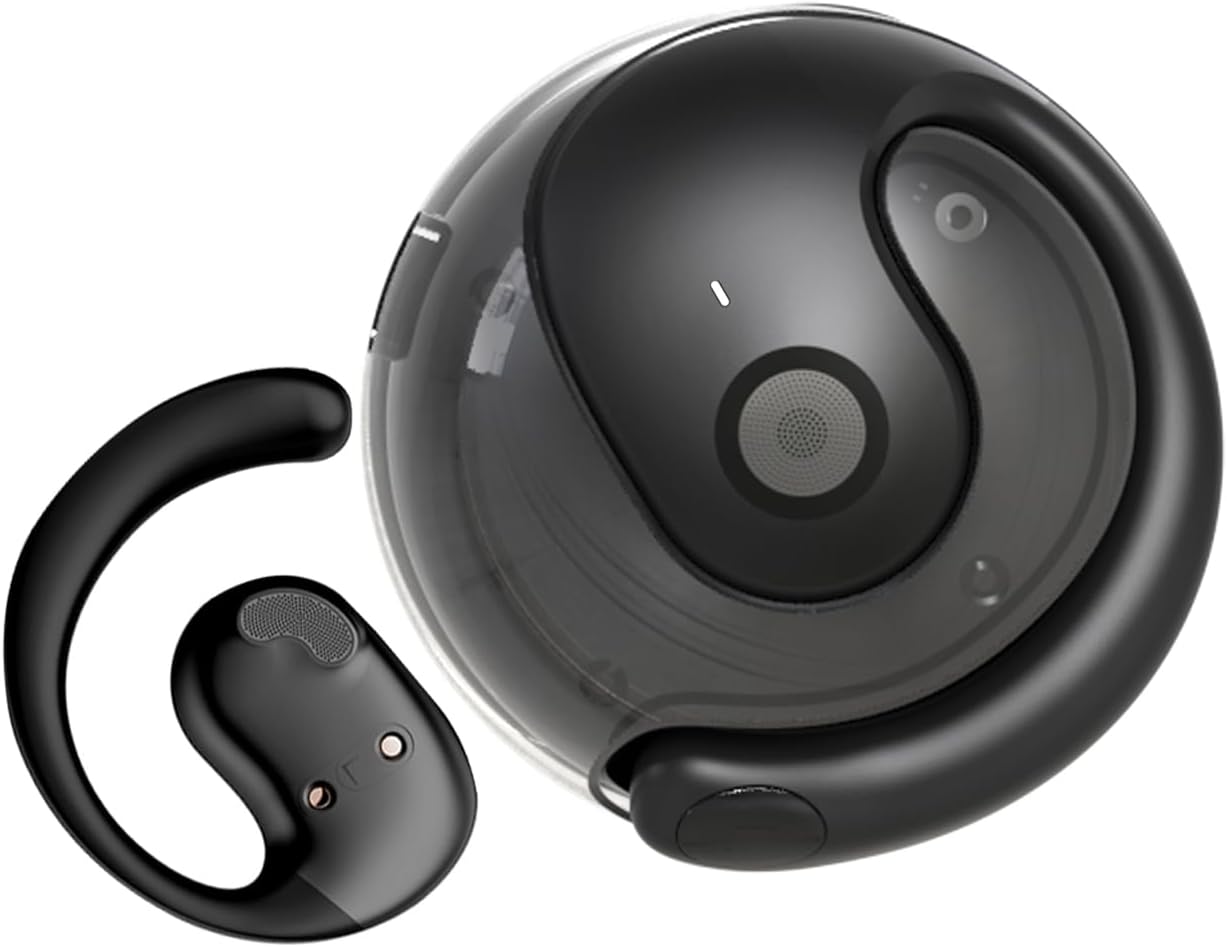
Image: The JM13 AI Translate True Wireless OWS Headset, showing one earbud and its compact charging case.
2 പ്രധാന സവിശേഷതകൾ
- AI Translation Technology: Supports real-time online translation in 150 languages via the EarJoy Intelligence APP, enabling binaural translation, headphone + mobile phone translation, and AI chat functions.
- Open-Ear Design (OWS): Allows you to listen to audio while maintaining awareness of your surroundings, providing a comfortable and secure fit without entering the ear canal.
- ഒതുക്കമുള്ളതും പോർട്ടബിൾ: Lightweight and round design, easily fits into backpacks or pockets, includes a silicone lanyard for convenience.
- ഉയർന്ന വിശ്വാസ്യതയുള്ള ഓഡിയോ: Built-in 16mm dynamic speaker delivers 360° Hi-Fi stereo sound.
- IPX5 Water and Dust Resistance: Nano waterproof coating protects against daily sweat and rain, ideal for sports and outdoor activities.
- ബ്ലൂടൂത്ത് 5.4 കണക്റ്റിവിറ്റി: Ensures lower power consumption, lower latency, longer battery life, and enhanced sound quality.

Image: Individuals wearing the OWS open-ear earbuds while exercising, working, and relaxing, demonstrating the ability to hear surroundings.
3. ബോക്സിൽ എന്താണുള്ളത്?
Upon opening your package, please verify that all the following components are included:
- True Wireless Bluetooth Headphones (2 units)
- Battery Compartment (Charging Case) (1 unit)
- ടൈപ്പ്-സി ചാർജിംഗ് കേബിൾ (1 യൂണിറ്റ്)
- Instructions Manual (1 unit)
- Silicone Lanyard (1 unit)

Image: A visual representation of the items included in the JM13 product package, such as the earbuds, charging case, and accessories.
4. സജ്ജീകരണ ഗൈഡ്
4.1 ഹെഡ്സെറ്റ് ചാർജ് ചെയ്യുന്നു
Before first use, fully charge the headset and charging case. The charging case has a 300mAh battery capacity.
- ചാർജിംഗ് കെയ്സിലേക്ക് ഇയർബഡുകൾ സ്ഥാപിക്കുക.
- ടൈപ്പ്-സി ചാർജിംഗ് കേബിൾ കേസിലെ ചാർജിംഗ് പോർട്ടിലേക്കും ഒരു യുഎസ്ബി പവർ സ്രോതസ്സിലേക്കും ബന്ധിപ്പിക്കുക.
- Charging time for the case is approximately 1.5 hours. The earbuds provide approximately 4 hours of usage time on a full charge, with a standby time of 120 hours.
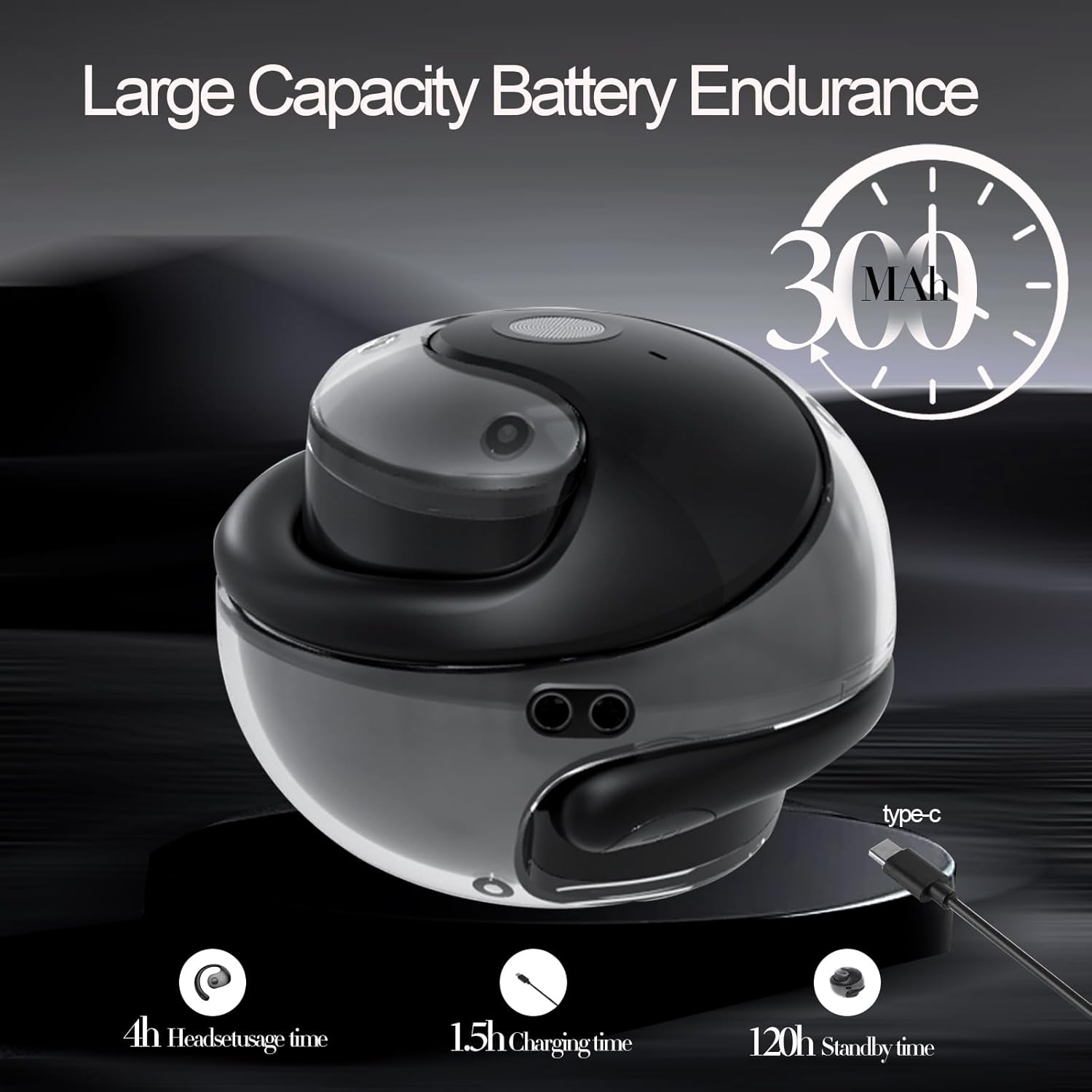
Image: An illustration detailing the battery capacity (300mAh), headset usage time (4h), charging time (1.5h), and standby time (120h) of the JM13 headset and case.
4.2 ഹെഡ്സെറ്റ് ധരിക്കൽ
The JM13 headset is ergonomically designed for comfort and stability.
- ഘട്ടം 1: Pick up the headset and wear it along the back of the ear, ensuring the speaker portion is positioned near your ear canal without entering it.
- ഘട്ടം 2: Gently adjust the headphones to a comfortable and secure position on your ear.
- ഘട്ടം 3: Once adjusted, the headphones are ready for use.

Image: A visual guide demonstrating the correct way to wear the JM13 headset, from picking it up to adjusting it for a comfortable fit.
4.3 ബ്ലൂടൂത്ത് ജോടിയാക്കൽ
To connect your JM13 headset to your device:
- ഹെഡ്സെറ്റ് ചാർജ് ചെയ്തിട്ടുണ്ടെന്നും ഓൺ ചെയ്തിട്ടുണ്ടെന്നും ഉറപ്പാക്കുക.
- Open the Bluetooth settings on your smartphone, tablet, or other compatible device.
- ഇതിനായി തിരയുക available devices. The headset will appear as "JM13" or similar.
- Select "JM13" to pair. Once connected, you will hear an audible confirmation.

Image: A graphic highlighting the benefits of Bluetooth 5.4 technology in the JM13 headset, including lower power consumption, lower latency, longer battery life, and improved sound quality.
4.4 EarJoy Intelligence APP Installation
For full access to AI translation and other smart features, download the "EarJoy Intelligence" application from your device's app store (available for iOS and Android).
- Scan the QR code provided in the quick start guide (if applicable) or search for "EarJoy Intelligence" in your app store.
- Install the application and follow the on-screen instructions to connect your JM13 headset.
5. പ്രവർത്തന നിർദ്ദേശങ്ങൾ
5.1 അടിസ്ഥാന ടച്ച് നിയന്ത്രണങ്ങൾ
The JM13 headset features intuitive touch controls on each earbud. Refer to the diagram below for specific commands:

Image: A detailed chart illustrating the touch commands for the JM13 earbuds, covering functions for telephone mode (reject call, answer call, hang up, volume control) and music mode (play/pause, previous/next song, power on/off).
Telephone Mode:
- കോൾ നിരസിക്കുക: 2 സെക്കൻഡ് ദീർഘനേരം അമർത്തുക.
- Incoming Call (Answer): Single click to answer.
- ഹാംഗ് അപ്പ് കോൾ: Single click during a call.
- വോളിയം താഴേക്ക്: Three touch (L) (Left earbud).
- വോളിയം കൂട്ടുക: Three touch (R) (Right earbud).
സംഗീത മോഡ്:
- പ്ലേ/താൽക്കാലികമായി നിർത്തുക: ഒറ്റ സ്പർശനം.
- മുൻ ഗാനം: Double touch (L) (Left earbud).
- അടുത്ത ഗാനം: Double touch (R) (Right earbud).
Binaural Mode (Power):
- പവർ ഓൺ: 3 സെക്കൻഡ് ദീർഘനേരം അമർത്തുക.
- പവർ ഓഫ്: 3 സെക്കൻഡ് ദീർഘനേരം അമർത്തുക.
5.2 AI Translation Features
The JM13 headset leverages AI technology through the EarJoy Intelligence APP for various translation functions:
- AI Binaural Translation: This mode allows for real-time translation during conversations. One person speaks into their phone/headset, and the translation is heard by the other person through their headset or phone. This requires both parties to be using the app or a compatible setup.
- Headphone + Mobile Phone Translation: Use your headset for listening to translations while speaking into your phone's microphone, or vice-versa. This is ideal for one-on-one conversations where you can pass the phone to the other person.
- AI ചാറ്റ്: Engage in translated text or voice chats within the EarJoy Intelligence APP, facilitating communication across language barriers.
Note: The translation feature relies on an active internet connection and the EarJoy Intelligence APP. It is designed for assisted communication, not always instantaneous, direct ear-to-ear real-time translation without app interaction.
6. പരിപാലനവും പരിചരണവും
To ensure the longevity and optimal performance of your JM13 headset, follow these maintenance guidelines:
- വൃത്തിയാക്കൽ: മൃദുവായതും ഉണങ്ങിയതും ലിന്റ് രഹിതവുമായ തുണി ഉപയോഗിച്ച് ഇയർബഡുകളും ചാർജിംഗ് കെയ്സും പതിവായി തുടയ്ക്കുക. ഉരച്ചിലുകളുള്ള വസ്തുക്കളോ കഠിനമായ രാസവസ്തുക്കളോ ഉപയോഗിക്കുന്നത് ഒഴിവാക്കുക.
- ജല പ്രതിരോധം: The headset is IPX5 water and dust resistant, meaning it can withstand splashes of water and sweat. Do not submerge the headset in water or expose it to heavy rain. Ensure the charging port is dry before charging.
- സംഭരണം: ഉപയോഗത്തിലില്ലാത്തപ്പോൾ, പൊടിയിൽ നിന്നും കേടുപാടുകളിൽ നിന്നും സംരക്ഷിക്കാൻ ചാർജിംഗ് കേസിൽ ഹെഡ്സെറ്റ് സൂക്ഷിക്കുക. കടുത്ത താപനിലയിൽ നിന്ന് മാറി തണുത്തതും വരണ്ടതുമായ സ്ഥലത്ത് സൂക്ഷിക്കുക.
- ബാറ്ററി കെയർ: Avoid fully draining the battery frequently. Charge the headset regularly, even if not in constant use, to maintain battery health.

Image: The JM13 headset being splashed with water, illustrating its IPX5 water and dust resistance, suitable for various environments.
7. പ്രശ്നപരിഹാരം
If you encounter issues with your JM13 headset, please refer to the following common solutions:
| പ്രശ്നം | സാധ്യമായ കാരണം | പരിഹാരം |
|---|---|---|
| ഹെഡ്സെറ്റ് പവർ ഓണാക്കുന്നില്ല | Low battery; Earbuds not properly seated in case | Charge the headset and charging case fully. Ensure earbuds are correctly placed in the charging case. |
| ഉപകരണവുമായി ജോടിയാക്കാൻ കഴിയില്ല | Bluetooth is off; Headset not in pairing mode; Device list full | Ensure Bluetooth is enabled on your device. Power off and on the headset to re-enter pairing mode. Forget previous Bluetooth connections on your device and try again. |
| ശബ്ദമോ മോശം ശബ്ദ നിലവാരമോ ഇല്ല | Volume too low; Headset out of range; Obstructions; Earbuds dirty | Increase volume on both headset and connected device. Move closer to your device. Clear any obstructions between headset and device. Clean the speaker mesh gently. |
| Translation feature not working as expected (e.g., not real-time in ear) | No internet connection; App not running; Misunderstanding of feature | Ensure your phone has a stable internet connection. Confirm the EarJoy Intelligence APP is open and properly connected to the headset. Understand that translation requires app interaction and may not be instantaneous direct ear-to-ear without phone involvement. Refer to section 5.2 for details on translation modes. |
| ടച്ച് നിയന്ത്രണങ്ങൾ പ്രതികരിക്കുന്നില്ല | Temporary software glitch; Dirty touch sensor | Power off and restart the headset. Clean the touch sensor area on the earbuds. |
8 സ്പെസിഫിക്കേഷനുകൾ
Detailed technical specifications for the GGSTOPWATER AI Translate True Wireless OWS Headset JM13:
| ഫീച്ചർ | വിശദാംശങ്ങൾ |
|---|---|
| മോഡലിൻ്റെ പേര് | JM13 |
| ബ്രാൻഡ് | ജിജിഎസ്ടോപ് വാട്ടർ |
| കണക്റ്റിവിറ്റി ടെക്നോളജി | വയർലെസ് (ബ്ലൂടൂത്ത്) |
| വയർലെസ് കമ്മ്യൂണിക്കേഷൻ ടെക്നോളജി | ബ്ലൂടൂത്ത് 5.4 |
| ഇയർപീസ് ആകൃതി | തുറന്ന ചെവി |
| ഓഡിയോ ഡ്രൈവർ തരം | ഡൈനാമിക് ഡ്രൈവർ (16mm) |
| ഫ്രീക്വൻസി റേഞ്ച് | 20 ഹെർട്സ് - 20,000 ഹെർട്സ് |
| പ്രതിരോധം | 20 ഓം |
| നിയന്ത്രണ രീതി | ആപ്പ്, ടച്ച് |
| ജല പ്രതിരോധ നില | IPX5 (വാട്ടർപ്രൂഫ്) |
| മെറ്റീരിയൽ | സിലിക്കൺ |
| നിറം | കറുപ്പ് |
| ഉൽപ്പന്ന അളവുകൾ | 0.5 x 1 x 0.5 ഇഞ്ച് |
| ഇനത്തിൻ്റെ ഭാരം | 3.84 ഔൺസ് |
| ബാറ്ററികൾ | 1 CR5 ബാറ്ററി ആവശ്യമാണ് (ഉൾപ്പെടുന്നു) |
| ഉൾപ്പെടുത്തിയ ഘടകങ്ങൾ | വയർലെസ് ചാർജിംഗ് കേസ് |
| അനുയോജ്യമായ ഉപകരണങ്ങൾ | സ്മാർട്ട്ഫോണുകൾ, ടാബ്ലെറ്റുകൾ, ലാപ്ടോപ്പുകൾ, ഡെസ്ക്ടോപ്പുകൾ, സ്മാർട്ട് സ്പീക്കറുകൾ |
9. വാറൻ്റിയും പിന്തുണയും
GGSTOPWATER products are manufactured to the highest quality standards. For warranty information and customer support, please refer to the warranty card included in your product packaging or visit the official GGSTOPWATER website. If you experience any issues not covered in this manual, please contact our customer service team for assistance.