1. ആമുഖം
This manual provides essential information for setting up, operating, and maintaining your new HONOR Magic7 Pro smartphone. Please read this guide thoroughly to ensure optimal performance and longevity of your device.
The HONOR Magic7 Pro is a powerful 5G smartphone featuring a 4.32 GHz Octa-core processor, 12GB of RAM, and 512GB of internal storage. It operates on Android 15 with MagicOS 7.1 and is equipped with a 5850mAh non-removable battery. It supports Dual SIM functionality (SIM + eSIM) and is compatible with 2G, 3G, 4G LTE, and 5G SA/NSA networks.
2. ബോക്സിൽ എന്താണുള്ളത്?
അൺബോക്സിംഗ് ചെയ്യുമ്പോൾ എല്ലാ ഇനങ്ങളും ഉണ്ടെന്ന് ഉറപ്പാക്കുക:
- HONOR Magic7 Pro സ്മാർട്ട്ഫോൺ
- യുഎസ്ബി കേബിൾ (ടൈപ്പ്-എ മുതൽ ടൈപ്പ്-സി വരെ)
- 66W SuperCharge Charger
- സിം എജക്ടർ ഉപകരണം
- ദ്രുത ആരംഭ ഗൈഡ്
- വാറൻ്റി കാർഡ്
3. ഡിവൈസ് ഓവർview
Familiarize yourself with the physical components of your HONOR Magic7 Pro.

ചിത്രം 3.1: മുന്നിലും പിന്നിലും View of HONOR Magic7 Pro. The device features a large display on the front and a distinctive circular camera module on the back.

ചിത്രം 3.2: വശം View of HONOR Magic7 Pro. The right side of the device houses the power button and volume rocker for easy access.

Figure 3.3: Rear Camera Module. The back of the phone features a prominent circular camera module with multiple lenses, designed for advanced photography.
ശാരീരിക സവിശേഷതകൾ:
- ഡിസ്പ്ലേ: 6.8-inch LTPO OLED, 1B colors, 1280 x 2800 pixels.
- ബട്ടണുകൾ: പവർ ബട്ടണും വോളിയം റോക്കറും വശത്ത് സ്ഥിതിചെയ്യുന്നു.
- തുറമുഖങ്ങൾ: ചാർജിംഗിനും ഡാറ്റ കൈമാറ്റത്തിനുമായി യുഎസ്ബി ടൈപ്പ്-സി പോർട്ട്.
- ക്യാമറ മൊഡ്യൂൾ: Unique 'Dual Ring Axymmetric' design on the rear.
- ഫിംഗർപ്രിന്റ് സെൻസർ: In-display optical fingerprint reader.
4. സജ്ജീകരണം
4.1. Installing SIM Cards
- നിങ്ങളുടെ ഉപകരണത്തിന്റെ വശത്ത് സിം കാർഡ് ട്രേ കണ്ടെത്തുക.
- Insert the SIM ejector tool into the small hole on the SIM card tray and push gently until the tray pops out.
- Place your Nano-SIM cards into the designated slots on the tray. The HONOR Magic7 Pro supports two 5G SIMs simultaneously.
- Carefully reinsert the SIM card tray into the device. Ensure it is fully seated to maintain water resistance.
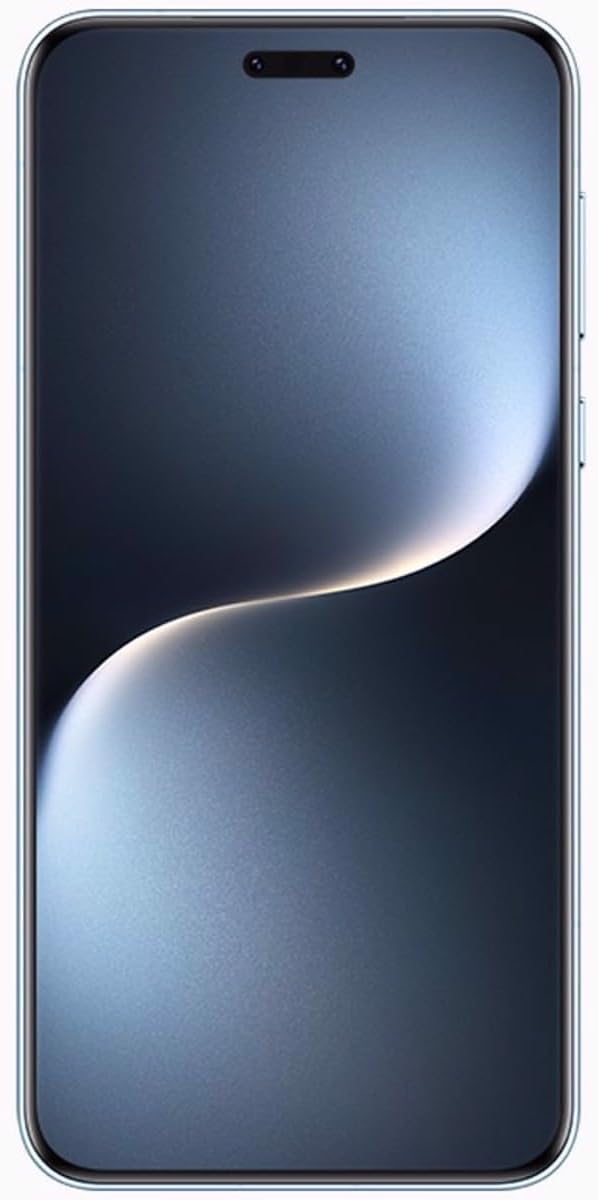
ചിത്രം 4.1: മുൻഭാഗം view of the HONOR Magic7 Pro. The device features a curved display with minimal bezels.
4.2. പ്രാരംഭ പവർ ഓണും കോൺഫിഗറേഷനും
- HONOR ലോഗോ ദൃശ്യമാകുന്നതുവരെ പവർ ബട്ടൺ അമർത്തിപ്പിടിക്കുക.
- നിങ്ങളുടെ ഭാഷ തിരഞ്ഞെടുക്കുന്നതിനും, ഒരു Wi-Fi നെറ്റ്വർക്കിലേക്ക് കണക്റ്റുചെയ്യുന്നതിനും, നിങ്ങളുടെ Google അക്കൗണ്ട് സജ്ജീകരിക്കുന്നതിനും ഓൺ-സ്ക്രീൻ നിർദ്ദേശങ്ങൾ പാലിക്കുക.
- Configure your preferred security methods, including the in-display optical fingerprint reader.
5. നിങ്ങളുടെ ഉപകരണം പ്രവർത്തിപ്പിക്കുന്നു
5.1. ഡിസ്പ്ലേ സവിശേഷതകൾ
The 6.8-inch LTPO OLED display offers vibrant colors and a peak brightness of 1600 nits, ensuring excellent visibility even in bright conditions. The screen is curved on all four sides for an immersive viewഅനുഭവം.
5.2. Software and User Interface
Your HONOR Magic7 Pro runs on Android 15 with HONOR's custom MagicOS 7.1 interface. This combination provides a user-friendly experience with various customization options and enhanced privacy features.
5.3. ചാർജിംഗ്
Utilize the included 66W SuperCharge charger and USB Type-A to Type-C cable for rapid charging. Ensure you use HONOR-approved accessories to prevent damage and maintain battery health.
6. ക്യാമറ സവിശേഷതകൾ
The HONOR Magic7 Pro is equipped with an advanced camera system designed to capture high-quality photos and videos.
6.1. പിൻ ക്യാമറ സിസ്റ്റം
- പ്രൈമറി ക്യാമറ: 50 MP, f/1.4-2.0, 24mm (wide), 1/1.3", 1.2µm, multi-directional PDAF, OIS.
- Periscope Telephoto: 200 MP, f/2.6, 72mm, 1/1.4", 0.56µm, multi-directional PDAF, OIS, 3x optical zoom.
- അൾട്രാവൈഡ് ക്യാമറ: 50 MP, f/2.0, 12mm, 122˚, 1/2.88", 0.61µm, PDAF.
The primary camera utilizes 16-in-1 pixel binning for improved light capture, especially in low-light conditions. The ultrawide lens also functions as a super macro lens for detailed close-up shots.
6.2. മുൻ ക്യാമറ
- സെൽഫി ക്യാമറ: 50 MP, f/2.0, 21mm (wide), 1/2.93", 0.6µm, PDAF, TOF 3D (depth/biometrics sensor).
6.3. വീഡിയോ റെക്കോർഡിംഗ്
The device supports video recording up to 4K resolution at 30 frames per second, offering clear and stable footage.
7 സ്പെസിഫിക്കേഷനുകൾ
| ഫീച്ചർ | വിശദാംശങ്ങൾ |
|---|---|
| മോഡലിൻ്റെ പേര് | HONOR Magic7 Pro |
| മോഡൽ നമ്പർ | 5109BQHH |
| ഓപ്പറേറ്റിംഗ് സിസ്റ്റം | Android 15, MagicOS 7.1 |
| പ്രോസസ്സർ | Qualcomm SM8750-AB Snapdragon 8 Elite (3 nm), Octa-core (2x4.32 GHz Oryon V2 Phoenix L + 6x3.53 GHz Oryon V2 Phoenix M) |
| പ്രദർശിപ്പിക്കുക | 6.8 inches, LTPO OLED, 1B colors, 1280 x 2800 pixels, 1600 nits (peak) |
| റാം | 12 ജിബി |
| ആന്തരിക സംഭരണം | 512GB (വികസിപ്പിക്കാനാവാത്തത്) |
| പിൻ ക്യാമറ | 50 MP (wide) + 200 MP (periscope telephoto) + 50 MP (ultrawide) |
| മുൻ ക്യാമറ | 50 MP (wide) + TOF 3D |
| ബാറ്ററി | 5850mAh (നീക്കംചെയ്യാനാകാത്തത്) |
| ചാർജിംഗ് | 66W SuperCharge |
| സിം പിന്തുണ | ഡ്യുവൽ സിം (സിം + ഇസിം) |
| നെറ്റ്വർക്ക് അനുയോജ്യത | 2G, 3G, 4G LTE, 5G SA/NSA |
| അളവുകൾ | 162.7 x 77.1 x 8.8 മിമി (6.41 x 3.04 x 0.35 ഇഞ്ച്) |
| ഭാരം | 223 ഗ്രാം (7.87 ഔൺസ്) |
| നിറം | Breeze Blue |
8. പരിപാലനം
8.1. നിങ്ങളുടെ ഉപകരണം വൃത്തിയാക്കൽ
Use a soft, lint-free cloth to clean the screen and body of your smartphone. Avoid using harsh chemicals or abrasive materials that could damage the finish or screen coating.
8.2. സോഫ്റ്റ്വെയർ അപ്ഡേറ്റുകൾ
Regularly check for and install software updates to ensure your device has the latest security patches, features, and performance improvements. Navigate to ക്രമീകരണങ്ങൾ > സിസ്റ്റവും അപ്ഡേറ്റുകളും > സോഫ്റ്റ്വെയർ അപ്ഡേറ്റ് ലഭ്യമായ അപ്ഡേറ്റുകൾ പരിശോധിക്കാൻ.
8.3. ബാറ്ററി പരിചരണം
To prolong battery life, avoid exposing your device to extreme temperatures. It is recommended to keep the battery charge between 20% and 80% for optimal long-term health.
9. പ്രശ്നപരിഹാരം
9.1. ഉപകരണം ഓണാക്കുന്നില്ല
- ബാറ്ററി ചാർജ്ജ് ചെയ്തിട്ടുണ്ടെന്ന് ഉറപ്പാക്കുക. ഉപകരണം ചാർജറുമായി ബന്ധിപ്പിച്ച് വീണ്ടും പവർ ചെയ്യാൻ ശ്രമിക്കുന്നതിന് മുമ്പ് കുറച്ച് മിനിറ്റ് കാത്തിരിക്കുക.
- നിർബന്ധിതമായി റീബൂട്ട് ചെയ്യുന്നതിന് പവർ ബട്ടൺ കുറഞ്ഞത് 10-15 സെക്കൻഡ് അമർത്തിപ്പിടിക്കുക.
9.2. നെറ്റ്വർക്ക് കണക്റ്റിവിറ്റി പ്രശ്നങ്ങൾ
- Check if your SIM cards are correctly inserted and activated.
- Verify that mobile data is enabled in your device settings.
- നിങ്ങളുടെ ഉപകരണം പുനരാരംഭിക്കുക.
- Contact your network provider to confirm service availability in your area.
9.3. ഫിംഗർപ്രിന്റ് സെൻസർ പ്രവർത്തിക്കുന്നില്ല
- നിങ്ങളുടെ വിരലും സ്ക്രീനും വൃത്തിയുള്ളതും വരണ്ടതുമാണെന്ന് ഉറപ്പാക്കുക.
- Re-register your fingerprints in the device settings.
9.4. ഉപകരണം അമിതമായി ചൂടാക്കൽ
If your device feels excessively warm, close any demanding applications, reduce screen brightness, and avoid direct sunlight. If the issue persists, contact customer support.
10. വാറൻ്റിയും പിന്തുണയും
Your HONOR Magic7 Pro is covered by a manufacturer's warranty. Please refer to the warranty card included in your product packaging for detailed terms and conditions, including coverage period and service procedures.
For technical assistance, troubleshooting beyond this manual, or warranty claims, please contact HONOR customer support through their official website or authorized service centers. Keep your proof of purchase and device serial number readily available when seeking support.


