ആമുഖം
This manual provides detailed instructions for the Contixo V10 7-inch Kids Learning Tablet and the Contixo KW1 Kids Smart Watch bundle. Please read this manual thoroughly before using your devices to ensure proper operation and to maximize their educational and entertainment potential.

Image: The Contixo V10 Kids Tablet and KW1 Smart Watch bundle, including the blue tablet in a protective case, a blue stylus, and a blue smartwatch with a dinosaur-themed strap.
എന്താണ് ഉൾപ്പെടുത്തിയിരിക്കുന്നത്
The Contixo V10-KW1 bundle includes the following items:
- 1 x Contixo V10 7-inch IPS HD 1024 x 600 Kids Learning Tablet
- 1 x Contixo Kids Smart Watch KW1
- 1 x സ്റ്റൈലസ്
- 1 x AC Adapter with USB-C Cable
- 1 x Case with Kick Stand
ഉൽപ്പന്നം കഴിഞ്ഞുview - Contixo V10 Kids Learning Tablet
ടാബ്ലെറ്റ് ഘടകങ്ങൾ

Image: A diagram illustrating the components of the Contixo V10 tablet, including the Front Facing Camera, 7" IPS Display, Headphone Jack, MicroSD Card Slot, Type C Charging Port, Microphone, Rear Facing Camera, Digital Pen, Volume Control, Power Button, and Reset Button.
പ്രധാന സവിശേഷതകൾ
- ഡിസ്പ്ലേ: 7-inch IPS HD screen (1024 x 600 pixels)
- ഓപ്പറേറ്റിംഗ് സിസ്റ്റം: Android 11 Go OS
- പ്രോസസ്സർ: 1.5GHz ക്വാഡ്-കോർ
- സംഭരണം: 32ജിബി ഇൻ്റേണൽ സ്റ്റോറേജ്
- ക്യാമറകൾ: Dual cameras (front and rear)
- കണക്റ്റിവിറ്റി: Wi-Fi (802.11n), Bluetooth
- ബാറ്ററി: 3,000mAh battery, providing up to 6 hours of use
- Pre-installed Content: 50 Disney e-books and 15+ teacher-approved learning games/apps
- രക്ഷാകർതൃ നിയന്ത്രണങ്ങൾ: Google Family Link integration for content management and screen time limits
- ഭാഷാ ക്രമീകരണങ്ങൾ: 189 ഭാഷകളെ പിന്തുണയ്ക്കുന്നു
ഉൽപ്പന്നം കഴിഞ്ഞുview - Contixo KW1 Kids Smart Watch
പ്രധാന സവിശേഷതകൾ
- ഗെയിമുകൾ: 14 engaging educational games designed to enhance coordination, logical analysis, and creative thinking.
- ക്യാമറ: Adjustable rotating camera for photos and videos.
- സംഗീത പ്ലേബാക്ക്: Supports HD music playback via SD card (not included).
- സംഭരണം: 1GB built-in SD card for saving media.
- ഡിസൈൻ: Non-toxic ABS plastic material with a soft, durable, and adjustable silicone strap. Sweatproof.
- ബാറ്ററി ലൈഫ്: Built-in rechargeable battery with 3 to 7 days standby time. Approximately 2 hours for a full charge.
സജ്ജമാക്കുക
Contixo V10 Kids Learning Tablet
- ചാർജിംഗ്: Before first use, fully charge the tablet using the provided AC adapter and USB-C cable. The charging port is located on the side of the tablet.
- പവർ ഓൺ: Press and hold the Power Button (located on the side) until the Contixo logo appears.
- പ്രാരംഭ സജ്ജീകരണം: നിങ്ങളുടെ ഭാഷ തിരഞ്ഞെടുക്കുന്നതിനും, ഒരു Wi-Fi നെറ്റ്വർക്കിലേക്ക് കണക്റ്റുചെയ്യുന്നതിനും, നിങ്ങളുടെ Google അക്കൗണ്ട് സജ്ജീകരിക്കുന്നതിനും ഓൺ-സ്ക്രീൻ നിർദ്ദേശങ്ങൾ പാലിക്കുക.
- Google Family Link: For parental control features, download and set up Google Family Link on your own device and link it to the tablet. This allows you to manage content, screen time, and app permissions.
Contixo KW1 Kids Smart Watch
- ചാർജിംഗ്: Connect the smart watch to its charger. Ensure it is fully charged before first use.
- പവർ ഓൺ: Press and hold the power button on the smart watch until the screen illuminates.
- സമയവും തീയതിയും: Set the correct time and date through the watch settings.
പ്രവർത്തന നിർദ്ദേശങ്ങൾ
Using the Contixo V10 Kids Learning Tablet
- നാവിഗേഷൻ: Use touch gestures (tap, swipe, pinch) to navigate the Android interface.
- Accessing Disney E-books: The tablet comes pre-loaded with 50 Disney e-books. Locate the Disney Books application icon on the home screen or in the app drawer and tap to open. Browse and select books for reading.
- Educational Apps & Games: Access the pre-loaded educational games and apps from the app drawer. Additional kid-friendly apps can be downloaded from Google Play Store.
- രക്ഷാകർതൃ നിയന്ത്രണങ്ങൾ: Utilize Google Family Link to set daily screen time limits, manage app access, and filter web content. These settings can be adjusted as your child grows.
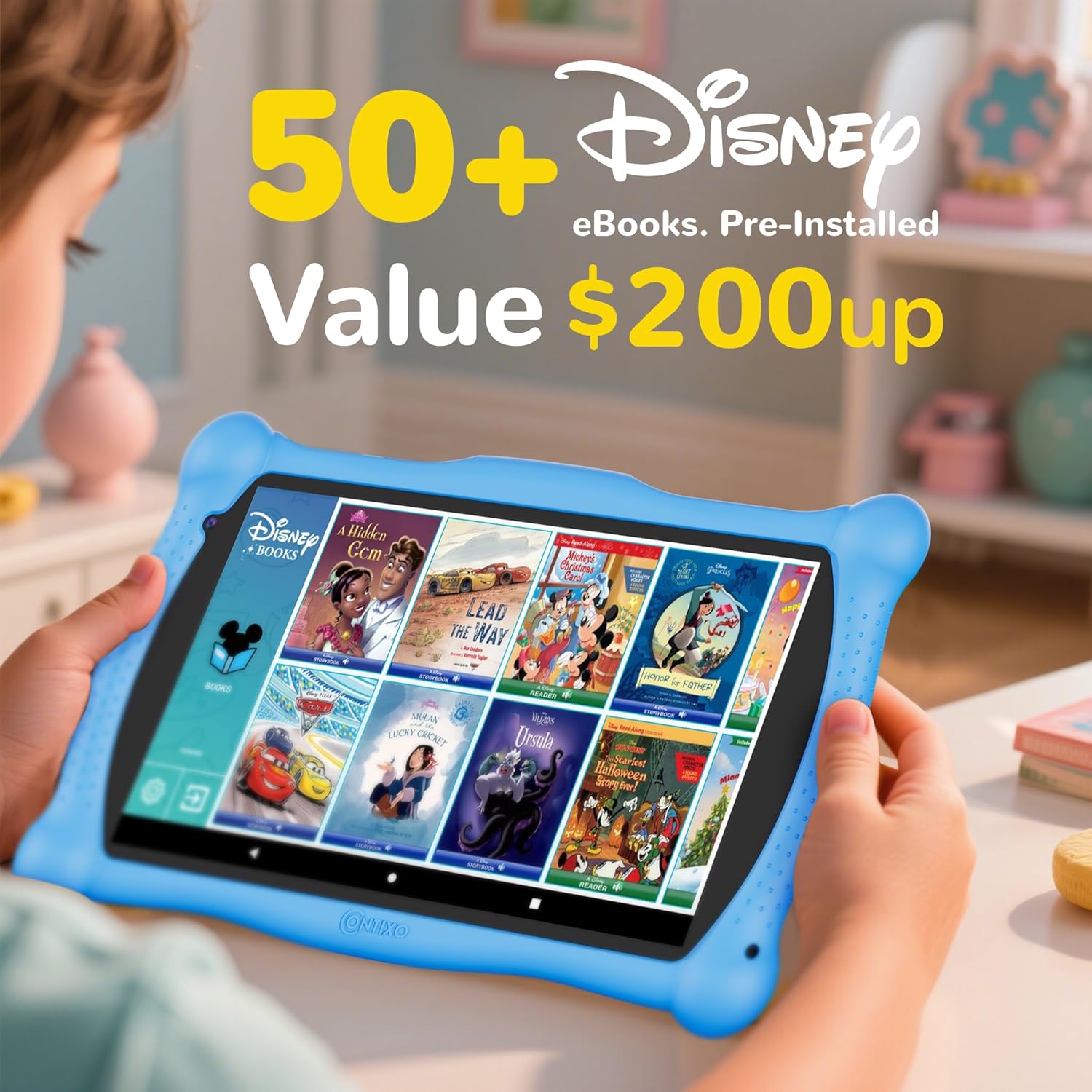
Image: The Contixo V10 tablet screen showing a selection of Disney e-books, including titles like 'Mickey's Christmas Carol' and 'Beauty and the Beast'.

Image: A parent and child interacting with the Contixo V10 tablet, with an overlay showing 'Intelligent Parental Controls' features like 'Control Screen Time', 'Set Educational Goals', 'Block From Unsafe Internet Content', and 'Manage Permissions and Apps' via Google Family Link.
Using the Contixo KW1 Kids Smart Watch
- ഗെയിമുകൾ കളിക്കുന്നു: Navigate through the watch interface to find and select from the 14 pre-installed educational games.
- ക്യാമറ പ്രവർത്തനം: Use the adjustable rotating camera to take photos and record videos. Saved media can be set as wallpaper.
- സംഗീതം കേൾക്കുന്നു: ട്രാൻസ്ഫർ മീഡിയ files to an SD card (not included) and insert it into the watch to access and play HD music. The watch can also connect directly to a computer for file കൈമാറ്റം.
മീഡിയ ഇന്റഗ്രേഷൻ
Contixo Kids Tablet V10 Overview
വീഡിയോ: ഒരു ഓവർview of the Contixo Kids Tablet V10, demonstrating its features such as Disney e-books, educational games, and the durable design. This video highlights the tablet's user interface and protective casing.
Contixo Kids Tablet Pre-Loaded Disney E-Books
Video: A demonstration of the pre-loaded Disney e-books on the Contixo Kids Tablet, showcasing the variety of titles and the interactive reading experience available to users.
മെയിൻ്റനൻസ്
- വൃത്തിയാക്കൽ: Use a soft, dry cloth to clean the screens and surfaces of both the tablet and smart watch. Avoid abrasive cleaners or excessive moisture.
- ബാറ്ററി കെയർ: To prolong battery life, avoid fully discharging the devices frequently. Charge them regularly.
- സംഭരണം: ദീർഘനേരം ഉപയോഗത്തിലില്ലാത്തപ്പോൾ, ഉപകരണങ്ങൾ തണുത്തതും വരണ്ടതുമായ സ്ഥലത്ത് സൂക്ഷിക്കുക.
- സോഫ്റ്റ്വെയർ അപ്ഡേറ്റുകൾ: Periodically check for software updates on the tablet to ensure optimal performance and security.
ട്രബിൾഷൂട്ടിംഗ്
Contixo V10 Kids Learning Tablet
- ഉപകരണം ഓണാക്കുന്നില്ല: Ensure the tablet is fully charged. If the issue persists, press and hold the power button for 10-15 seconds. If still unresponsive, use a pin to press the Reset Button (refer to the component diagram).
- വൈഫൈ കണക്റ്റിവിറ്റി പ്രശ്നങ്ങൾ: Check if other devices can connect to the Wi-Fi network. Restart the tablet and your Wi-Fi router. Ensure the Wi-Fi password is entered correctly.
- ആപ്പുകൾ ക്രാഷാകുന്നു/ഫ്രീസാകുന്നു: Close and reopen the app. Clear the app's cache in the tablet's settings (Settings > Apps > [App Name] > Storage > Clear Cache). If the problem continues, uninstall and reinstall the app.
- മന്ദഗതിയിലുള്ള പ്രകടനം: Close unnecessary background applications. Clear cached data. Consider uninstalling unused apps to free up storage space.
Contixo KW1 Kids Smart Watch
- വാച്ച് ഓണാക്കുന്നില്ല: വാച്ച് പൂർണ്ണമായും ചാർജ് ചെയ്തിട്ടുണ്ടെന്ന് ഉറപ്പാക്കുക.
- സ്ക്രീൻ പ്രതികരിക്കുന്നില്ല: Restart the watch by holding down the power button.
- സംഗീതം പ്ലേ ചെയ്യുന്നില്ല: Verify that an SD card with music files is properly inserted and that the fileകൾ അനുയോജ്യമായ ഫോർമാറ്റിലാണ്.
സ്പെസിഫിക്കേഷനുകൾ
Contixo V10 Kids Learning Tablet
| ഫീച്ചർ | സ്പെസിഫിക്കേഷൻ |
|---|---|
| സ്റ്റാൻഡിംഗ് സ്ക്രീൻ ഡിസ്പ്ലേ വലുപ്പം | 7 ഇഞ്ച് |
| സ്ക്രീൻ റെസല്യൂഷൻ | 1024 x 600 പിക്സലുകൾ |
| പരമാവധി സ്ക്രീൻ റെസല്യൂഷൻ | 1024 x 600 പിക്സലുകൾ |
| പ്രോസസ്സർ | 1.5 GHz ക്വാഡ് കോർ |
| വയർലെസ് തരം | 802.11n |
| ശരാശരി ബാറ്ററി ലൈഫ് | 4 Hours (up to 6 hours of play) |
| ഓപ്പറേറ്റിംഗ് സിസ്റ്റം | Android 11 Go |
| ഇനത്തിൻ്റെ ഭാരം | 1.5 പൗണ്ട് |
| ഉൽപ്പന്ന അളവുകൾ | 7.46 x 4.31 x 0.39 ഇഞ്ച് |
| മെമ്മറി സ്റ്റോറേജ് കപ്പാസിറ്റി | 32 ജിബി |
| ബാറ്ററികൾ | 1 ലിഥിയം അയോൺ ബാറ്ററി (ഉൾപ്പെടുത്തിയിരിക്കുന്നു) |
Contixo KW1 Kids Smart Watch
| ഫീച്ചർ | സ്പെസിഫിക്കേഷൻ |
|---|---|
| മെറ്റീരിയൽ | Non-Toxic ABS Plastic, Silicone Strap |
| ആന്തരിക സംഭരണം | 1GB (for media) |
| ബാറ്ററി ലൈഫ് (സ്റ്റാൻഡ്ബൈ) | 3 മുതൽ 7 ദിവസം വരെ |
| ചാർജിംഗ് സമയം | ഏകദേശം 2 മണിക്കൂർ |
വാറൻ്റിയും പിന്തുണയും
The Contixo V10 Kids Learning Tablet and KW1 Smart Watch bundle includes a 1-year warranty. For technical support, warranty claims, or further assistance, please refer to the contact information provided on the official Contixo webസൈറ്റ് അല്ലെങ്കിൽ നിങ്ങളുടെ വാങ്ങൽ ഡോക്യുമെന്റേഷൻ.


