1. ആമുഖം
Thank you for choosing the BoyKeep 2K Outdoor Security Camera. This manual provides essential information for the proper installation, operation, and maintenance of your camera. Please read this manual thoroughly before using the product and retain it for future reference.
സുരക്ഷാ വിവരങ്ങൾ
- കേടുപാടുകൾ തടയുന്നതിന് ക്യാമറയുടെ ആവശ്യകതകൾ പാലിക്കുന്നുണ്ടെന്ന് വൈദ്യുതി വിതരണം ഉറപ്പാക്കുക.
- Do not expose the camera to extreme temperatures, humidity, or direct water immersion.
- ശക്തമായ വൈദ്യുതകാന്തിക മണ്ഡലങ്ങൾക്ക് സമീപം ക്യാമറ വയ്ക്കുന്നത് ഒഴിവാക്കുക.
- Handle the camera with care; avoid dropping or subjecting it to strong impacts.
- For outdoor installation, ensure the camera is securely mounted to prevent falling.
2. ഉൽപ്പന്നം കഴിഞ്ഞുview കൂടാതെ പാക്കേജ് ഉള്ളടക്കം
The BoyKeep K20-6 is a 2K outdoor security camera featuring 360° pan/tilt capabilities, color night vision, motion detection, tracking, and two-way audio communication. It connects via 2.4GHz Wi-Fi for remote monitoring.

Image: Multiple BoyKeep K20-6 cameras, showcasing their design and compact form factor.
ബോക്സിൽ എന്താണുള്ളത്
- Camera Body (K20-6)
- പവർ അഡാപ്റ്റർ (കോർഡഡ് ഇലക്ട്രിക്)
- മൗണ്ടിംഗ് സ്ക്രൂകളും വാൾ പ്ലഗുകളും
- ഉപയോക്തൃ മാനുവൽ (ഈ പ്രമാണം)
Note: A memory card for local storage is not included and must be purchased separately if desired.
3. സജ്ജീകരണ ഗൈഡ്
3.1 ഫിസിക്കൽ ഇൻസ്റ്റലേഷൻ
ക്യാമറ ചുമരിൽ ഘടിപ്പിക്കുന്നതിനായി രൂപകൽപ്പന ചെയ്തിരിക്കുന്നു. ആവശ്യമുള്ള സ്ഥലം നൽകുന്ന ഒരു സ്ഥലം തിരഞ്ഞെടുക്കുക viewing angle and is within reach of a power outlet. Ensure the mounting surface is sturdy enough to support the camera.

Image: Illustrates the camera's mounting and its 360° pan and tilt capabilities.
- ക്യാമറയുടെ ബേസ് ഒരു ടെംപ്ലേറ്റായി ഉപയോഗിച്ച് ചുമരിൽ ഡ്രില്ലിംഗ് സ്ഥാനങ്ങൾ അടയാളപ്പെടുത്തുക.
- ദ്വാരങ്ങൾ തുരന്ന് വാൾ പ്ലഗുകൾ ഇടുക.
- നൽകിയിരിക്കുന്ന സ്ക്രൂകൾ ഉപയോഗിച്ച് ക്യാമറ ബേസ് ഭിത്തിയിൽ ഉറപ്പിക്കുക.
- മൗണ്ട് ചെയ്ത ശേഷം ആവശ്യാനുസരണം ക്യാമറ ആംഗിൾ ക്രമീകരിക്കുക.
3.2 പവർ കണക്ഷൻ
Connect the provided power adapter to the camera's power input port and then plug it into a standard electrical outlet. The camera will power on automatically.
3.3 ആപ്പ് ഇൻസ്റ്റാളേഷനും വൈഫൈ കണക്ഷനും
The camera operates via a smartphone application. Please ensure your Wi-Fi network is 2.4GHz, as the camera does not support 5GHz Wi-Fi.
- Download the official BoyKeep app from your smartphone's app store (iOS or Android).
- ഒരു പുതിയ അക്കൗണ്ടിനായി രജിസ്റ്റർ ചെയ്യുക അല്ലെങ്കിൽ നിങ്ങൾക്ക് ഇതിനകം ഒന്ന് ഉണ്ടെങ്കിൽ ലോഗിൻ ചെയ്യുക.
- Follow the in-app instructions to add your new camera. This typically involves scanning a QR code on the camera or entering its serial number, and then connecting it to your 2.4GHz Wi-Fi network.
- കണക്റ്റുചെയ്തുകഴിഞ്ഞാൽ, നിങ്ങൾക്ക് കഴിയും view the live feed and control the camera through the app.
4. പ്രവർത്തന നിർദ്ദേശങ്ങൾ
4.1 തത്സമയം View കൂടാതെ പാൻ/ടിൽറ്റ് നിയന്ത്രണം
Open the BoyKeep app and select your camera to access the live video feed. You can control the camera's pan (horizontal) and tilt (vertical) movements directly from the app interface to achieve a 360° field of view.

Image: Demonstrates the 360° view capability controlled via the smartphone app.
4.2 2K Image Quality and Night Vision
The camera provides clear 2K resolution video. It features both color night vision and infrared night vision modes. In low-light conditions, the camera can automatically switch to night vision. Color night vision is activated when sufficient ambient light or the camera's spotlight is on, providing full-color images even in darkness.

Image: Highlights the 2K Full HD resolution for clear video capture.
Image: Compares Color Night Vision (with spotlight) and Infrared Night Vision (without spotlight).
4.3 മോഷൻ ഡിറ്റക്ഷനും ട്രാക്കിംഗും
The camera is equipped with intelligent motion and sound detection. When motion or sound is detected, the camera can automatically track the moving object or person, ensuring comprehensive coverage. You will receive warning messages on your mobile phone via the app.

Image: Depicts the smart motion tracking feature, showing the camera's ability to follow moving subjects.
4.4 Customize Activity Area
You can define specific activity zones within the camera's field of view through the app. This allows you to focus motion detection on critical areas and reduce false alarms from irrelevant movements.
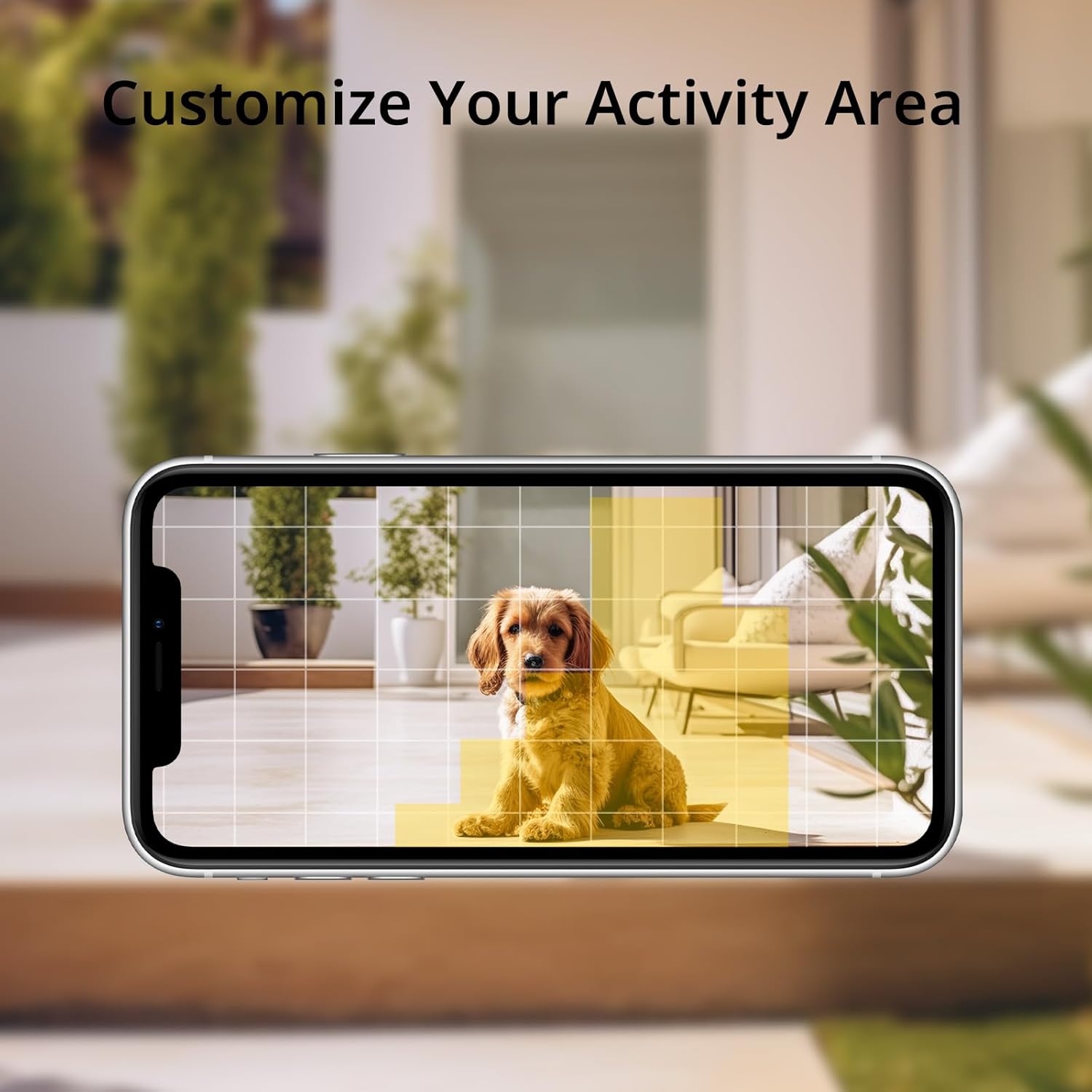
Image: Shows how to customize activity areas for motion detection within the app.
4.5 ടു-വേ ഓഡിയോ
The camera supports two-way audio communication. You can speak through the camera using your smartphone app and hear responses from the camera's location, allowing for real-time interaction with visitors or delivery personnel.
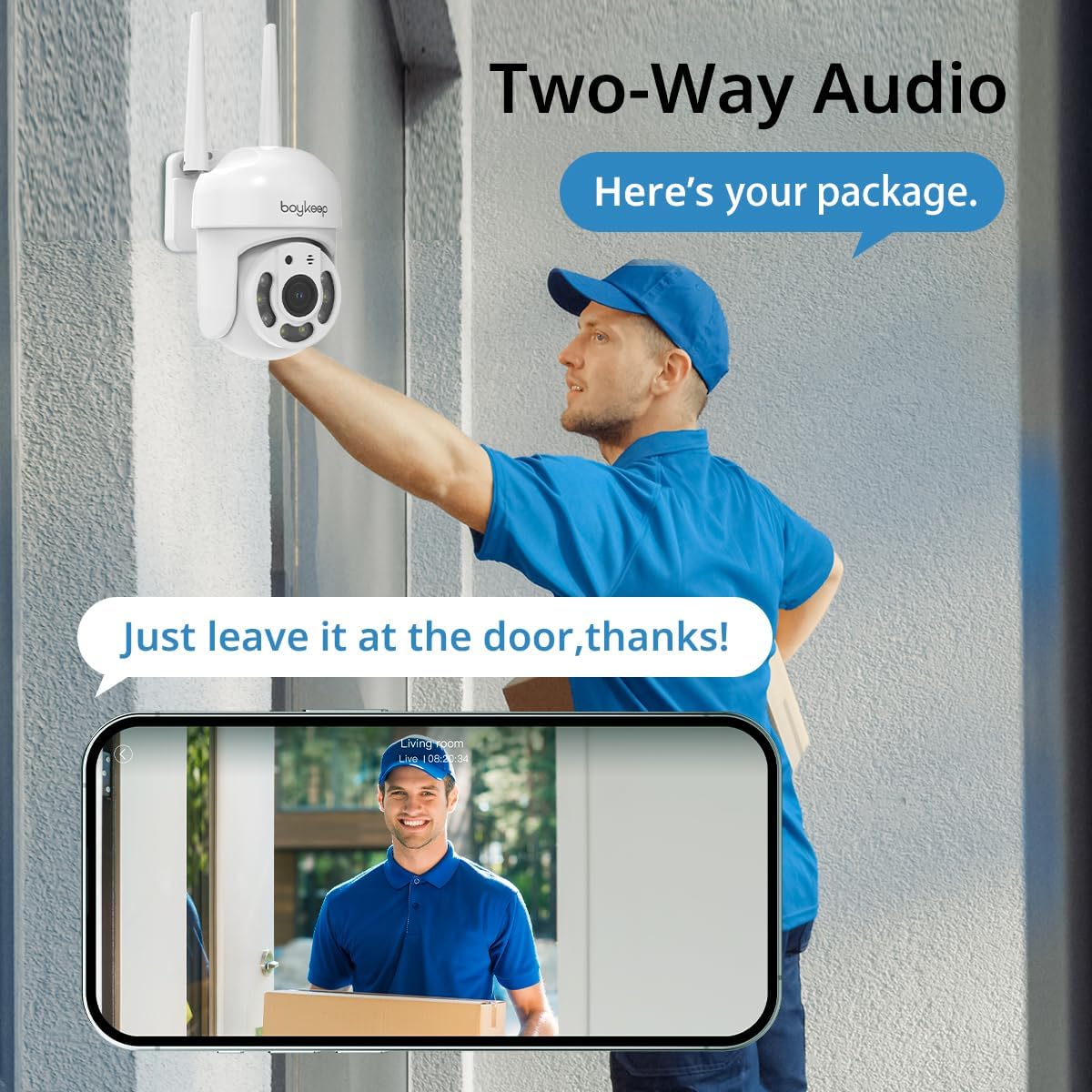
Image: Illustrates the two-way audio feature, enabling communication through the camera.
4.6 റെക്കോർഡിംഗും സംഭരണവും
The camera supports both cloud storage and local storage via a memory card (not included). You can enable 24/7 continuous recording to a memory card to minimize the risk of losing important information. A 30-day free trial of cloud storage is also available.
4.7 Multi-Device Viewഡൌൺലോഡ് ചെയ്യലും പങ്കിടലും
The BoyKeep app allows you to add multiple cameras and view up to four real-time video feeds simultaneously. You can also share camera access with family members on up to 10 devices, enabling multiple users to monitor the property.
5. പരിപാലനം
- വൃത്തിയാക്കൽ: മൃദുവായതും ഉണങ്ങിയതുമായ തുണി ഉപയോഗിച്ച് ക്യാമറ ലെൻസും ബോഡിയും സൌമ്യമായി തുടയ്ക്കുക. കഠിനമായ രാസവസ്തുക്കളോ അബ്രസീവ് ക്ലീനറുകളോ ഉപയോഗിക്കരുത്.
- ഫേംവെയർ അപ്ഡേറ്റുകൾ: Periodically check the BoyKeep app for available firmware updates. Keeping your camera's firmware up-to-date ensures optimal performance and security.
- കണക്ഷൻ പരിശോധന: Regularly verify that the power cable and Wi-Fi connection are secure and stable.
6. പ്രശ്നപരിഹാരം
| പ്രശ്നം | സാധ്യമായ കാരണം | പരിഹാരം |
|---|---|---|
| ക്യാമറ ഓണാക്കുന്നില്ല | No power, faulty adapter, loose connection | Check power outlet, ensure adapter is securely connected to camera and outlet. Try a different outlet. |
| Wi-Fi-ലേക്ക് കണക്റ്റുചെയ്യാനായില്ല | Incorrect Wi-Fi password, 5GHz network, camera too far from router | Ensure correct 2.4GHz Wi-Fi password. Move camera closer to router. Restart router and camera. |
| മോശം ചിത്ര നിലവാരം | Dirty lens, poor network connection, low light | Clean the camera lens. Check Wi-Fi signal strength. Ensure adequate lighting for color night vision. |
| മോഷൻ ഡിറ്റക്ഷൻ പ്രവർത്തിക്കുന്നില്ല | Detection sensitivity too low, activity zone not set correctly, disabled in app | Adjust motion detection sensitivity in the app. Verify activity zones. Ensure motion detection is enabled. |
| ടു-വേ ഓഡിയോ പ്രശ്നങ്ങൾ | Microphone/speaker blocked, app permissions, network delay | Ensure nothing is obstructing the microphone or speaker. Check app permissions for microphone access. Verify stable network connection. |
If you encounter issues not listed here or if troubleshooting steps do not resolve the problem, please contact BoyKeep customer support for assistance.
7 സ്പെസിഫിക്കേഷനുകൾ
| ഫീച്ചർ | വിശദാംശങ്ങൾ |
|---|---|
| മോഡൽ നമ്പർ | കെ 20-6 |
| വീഡിയോ ക്യാപ്ചർ റെസല്യൂഷൻ | 3 എംപി (2കെ) |
| കണക്റ്റിവിറ്റി പ്രോട്ടോക്കോൾ | വൈഫൈ (2.4GHz മാത്രം) |
| പാൻ/ടിൽറ്റ് ശ്രേണി | 355° തിരശ്ചീനം, 120° ലംബം |
| നൈറ്റ് വിഷൻ | Color Night Vision, Infrared Night Vision |
| ഓഡിയോ | 2-വേ ടോക്ക് |
| സ്റ്റോറേജ് ഓപ്ഷനുകൾ | Memory Card (not included), Cloud Service |
| പവർ ഉറവിടം | കോർഡഡ് ഇലക്ട്രിക് |
| മൗണ്ടിംഗ് തരം | മതിൽ മൗണ്ട് |
| ഇൻഡോർ/ഔട്ട്ഡോർ ഉപയോഗം | ഔട്ട്ഡോർ |
| അനുയോജ്യമായ ഉപകരണങ്ങൾ | Smartphone (via App) |
8. വാറൻ്റിയും പിന്തുണയും
BoyKeep provides a 24 മാസ വാറൻ്റി for this product. If you encounter any issues or have suggestions, please do not hesitate to contact our customer service team. We are committed to providing 100% satisfactory solutions within 3 working days.
For support, please refer to the contact information provided in the BoyKeep app or on the official BoyKeep webസൈറ്റ്.


