1. ആമുഖം
Thank you for choosing the Ozeino Wireless Gaming Headset (Model OW810). This manual provides comprehensive instructions for setting up, operating, and maintaining your new headset. Designed for an immersive gaming experience, this headset features advanced wireless technology, a convenient flip microphone, and multi-platform compatibility. Please read this manual thoroughly before use to ensure optimal performance and longevity of your device.
ബോക്സിൽ എന്താണുള്ളത്
- Ozeino Wireless Gaming Headset
- യുഎസ്ബി വയർലെസ് ഡോംഗിൾ
- Type-C Wireless Dongle
- യുഎസ്ബി ചാർജിംഗ് കേബിൾ
- 3.5 എംഎം ഓഡിയോ കേബിൾ
- ഉപയോക്തൃ മാനുവൽ (ഈ പ്രമാണം)

The Ozeino Wireless Gaming Headset, featuring a sleek black and red design, comes with a detachable flip microphone and a USB wireless dongle for seamless connectivity.
2 പ്രധാന സവിശേഷതകൾ
- Ultra-Low Latency Wireless: Experience seamless audio with less than 30ms delay via 2.4GHz wireless technology.
- ഇമ്മേഴ്സീവ് ഓഡിയോ: Enjoy 7.1 surround sound and deep bass for a fully immersive gaming experience.
- ഫ്ലിപ്പ്-ടു-മ്യൂട്ട് മൈക്രോഫോൺ: Conveniently mute your microphone by simply flipping it up.
- ദീർഘകാല ബാറ്ററി: ഒറ്റ ചാർജിൽ 40 മണിക്കൂർ വരെ പ്ലേടൈം.
- മൾട്ടി-പ്ലാറ്റ്ഫോം അനുയോജ്യത: Connects to PC, Laptops, Mac, PS5, PS4, Nintendo Switch, and mobile phones.
- സുഖപ്രദമായ ഡിസൈൻ: Over-ear earcups with breathable padding for extended wear.

ഒരു ആന്തരികം view highlighting the advanced 2.4GHz wireless chip, ensuring ultra-low latency of less than 30ms and seamless audio-visual synchronization. The headset is equipped with an 800mAh battery providing up to 40 hours of usage.

Designed for fully immersive gaming, this headset delivers 7.1 surround sound and deep bass, enhancing the audio experience with rich, detailed soundscapes.
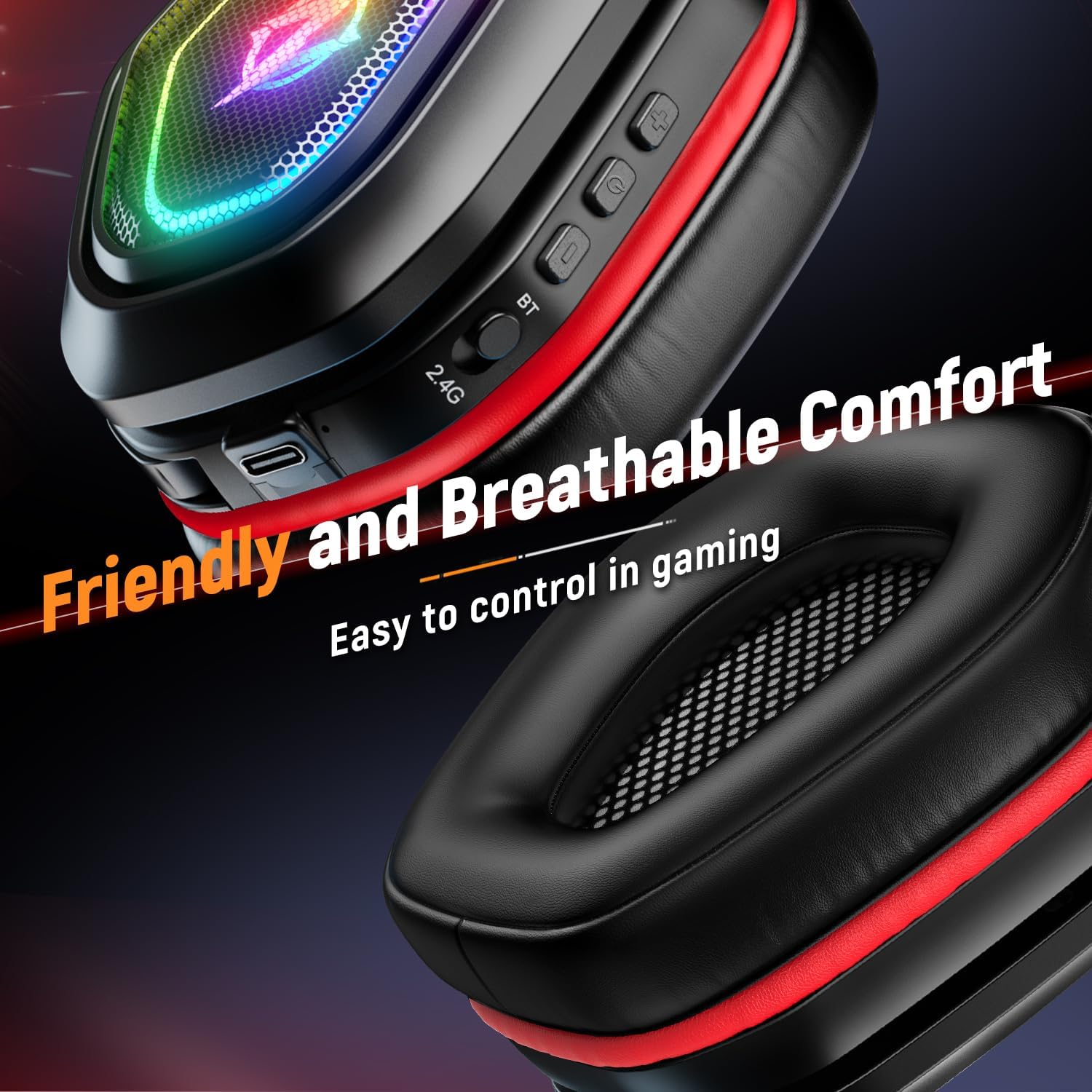
The earcups are designed for friendly and breathable comfort, allowing for extended gaming sessions. Conveniently located controls on the earcup provide easy access to functions during gameplay.
3. സജ്ജീകരണം
3.1. 2.4GHz Wireless Mode (Recommended for PC, PS5, PS4, Switch)
- Identify the appropriate wireless dongle (USB for PC/PS5/PS4, Type-C for Switch/some laptops/phones).
- Plug the wireless dongle into an available USB or Type-C port on your device.
- LED ഇൻഡിക്കേറ്റർ പ്രകാശിക്കുന്നത് വരെ പവർ ബട്ടൺ അമർത്തിപ്പിടിച്ചുകൊണ്ട് ഹെഡ്സെറ്റ് ഓണാക്കുക.
- The headset will automatically pair with the dongle. The LED indicator will show a steady light once connected.
- On your device, ensure the Ozeino headset is selected as the default audio output and input device in your sound settings.
3.2. Bluetooth Mode (For PC, Laptops, Mac, Mobile Phones)
- ഹെഡ്സെറ്റ് പവർ ഓഫ് ആണെന്ന് ഉറപ്പാക്കുക.
- Press and hold the Bluetooth (BT) button on the headset until the LED indicator flashes rapidly, indicating pairing mode.
- നിങ്ങളുടെ ഉപകരണത്തിൽ, ബ്ലൂടൂത്ത് ക്രമീകരണത്തിലേക്ക് പോയി ലഭ്യമായ ഉപകരണങ്ങൾക്കായി തിരയുക.
- Select "Ozeino OW810" from the list to connect. The LED indicator will show a steady light once connected.
3.3. Wired Mode (For PC, Laptops, PS5, PS4)
- Connect one end of the included 3.5mm audio cable to the headset's audio jack.
- Connect the other end of the 3.5mm audio cable to the audio output port on your device.
- The headset will function as a wired headset. Note: Microphone functionality may vary depending on the device's 3.5mm port configuration.

This headset offers multi-platform compatibility, allowing flexible switching between various systems including PC, laptops, Mac, Nintendo Switch, PlayStation 5, PlayStation 4, and mobile phones. Note: Not all modes are compatible with Xbox.
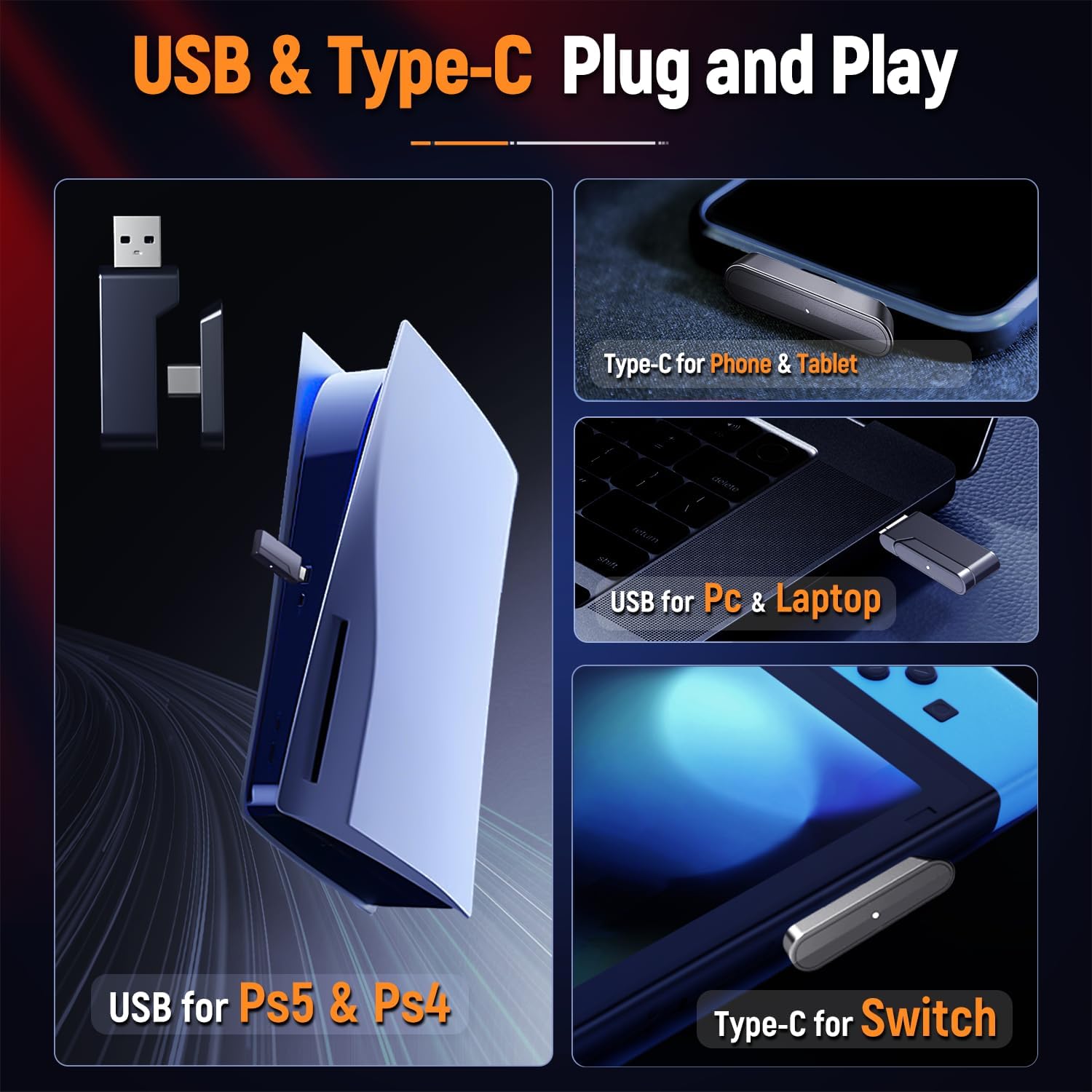
The headset supports plug-and-play connectivity with both USB and Type-C dongles. The USB dongle is ideal for PS5, PS4, PC, and laptops, while the Type-C dongle is suitable for phones, tablets, and Nintendo Switch.
4. പ്രവർത്തന നിർദ്ദേശങ്ങൾ
4.1. നിയന്ത്രിക്കുന്നുview
- പവർ ബട്ടൺ: Press and hold to power on/off. Short press to play/pause audio (in Bluetooth mode).
- വോളിയം വീൽ: Roll up to increase volume, roll down to decrease volume.
- മൈക്രോഫോൺ: Flip down to activate, flip up to mute.
- LED ലൈറ്റ് ബട്ടൺ: Short press to cycle through LED lighting modes or turn off LEDs.
- ബ്ലൂടൂത്ത് (ബിടി) ബട്ടൺ: ബ്ലൂടൂത്ത് ജോടിയാക്കൽ മോഡിൽ പ്രവേശിക്കാൻ അമർത്തിപ്പിടിക്കുക.
4.2. മൈക്രോഫോൺ ഉപയോഗം
The integrated flip microphone is designed for clear voice communication. To activate the microphone, simply flip it down into the speaking position. To mute the microphone, flip it back up. An audible cue or LED indicator on the microphone may confirm its status.
4.3. ഹെഡ്സെറ്റ് ചാർജ് ചെയ്യുന്നു
Connect the included USB charging cable to the headset's charging port and the other end to a USB power source (e.g., computer USB port, wall adapter). The LED indicator will show charging status and turn off or change color when fully charged.

Detailed battery life information: A 10-minute charge provides 90 minutes of use with lights on or 120 minutes with lights off. A full 3-hour charge offers 20+ hours with lights on or 40+ hours with lights off. Low power reminders occur after 10-15 minutes of remaining power.
5. പരിപാലനം
5.1. വൃത്തിയാക്കൽ
- Use a soft, dry cloth to wipe down the headset's surfaces.
- ഇയർകപ്പുകൾക്കായി, ചെറുതായി ഡി-ലിങ്ക് ഉപയോഗിച്ച് സൌമ്യമായി തുടയ്ക്കുക.amp ഉപയോഗിക്കുന്നതിന് മുമ്പ് തുണികൊണ്ട് പൂർണ്ണമായും ഉണങ്ങാൻ അനുവദിക്കുക.
- കഠിനമായ രാസവസ്തുക്കളോ, ലായകങ്ങളോ, അബ്രസീവ് ക്ലീനറുകളോ ഉപയോഗിക്കരുത്.
5.2. സംഭരണം
- ഹെഡ്സെറ്റ് നേരിട്ട് സൂര്യപ്രകാശം ഏൽക്കാത്തതും ഉയർന്ന താപനില ഏൽക്കാത്തതുമായ ഒരു തണുത്ത വരണ്ട സ്ഥലത്ത് സൂക്ഷിക്കുക.
- Avoid placing heavy objects on the headset to prevent damage.
5.3. ബാറ്ററി പരിചരണം
- ബാറ്ററി ലൈഫ് വർദ്ധിപ്പിക്കാൻ, ഹെഡ്സെറ്റ് ഇടയ്ക്കിടെ പൂർണ്ണമായും ഡിസ്ചാർജ് ചെയ്യുന്നത് ഒഴിവാക്കുക.
- Charge the headset regularly, even if not in use for extended periods (e.g., once every 3 months).
6. പ്രശ്നപരിഹാരം
| പ്രശ്നം | സാധ്യമായ കാരണം | പരിഹാരം |
|---|---|---|
| ഹെഡ്സെറ്റിൽ നിന്ന് ശബ്ദമില്ല | Headset not powered on; Not paired/connected; Volume too low; Incorrect audio output selected. | Ensure headset is on and charged. Re-pair with dongle/Bluetooth. Increase headset and device volume. Select Ozeino headset as default audio output. |
| മൈക്രോഫോൺ പ്രവർത്തിക്കുന്നില്ല | Microphone muted (flipped up); Incorrect audio input selected; Driver issue. | Flip microphone down. Ensure Ozeino headset is selected as default audio input. Check device privacy settings for microphone access. Restart device. |
| Connectivity issues (dropping out) | Too far from dongle/device; Interference; Low battery. | Move closer to the dongle/device. Avoid obstacles. Charge the headset. Try a different USB port. |
| ഹെഡ്സെറ്റ് ചാർജ് ചെയ്യുന്നില്ല | Faulty cable/port; Power source issue. | Try a different USB cable or charging port. Ensure the power source is active. |
7 സ്പെസിഫിക്കേഷനുകൾ
| ഫീച്ചർ | വിശദാംശങ്ങൾ |
|---|---|
| മോഡലിൻ്റെ പേര് | OW810 |
| ബ്രാൻഡ് | ഒസീനോ |
| നിറം | ചുവപ്പ് |
| കണക്റ്റിവിറ്റി ടെക്നോളജി | വയർലെസ് (2.4GHz, ബ്ലൂടൂത്ത്) |
| വയർലെസ് കമ്മ്യൂണിക്കേഷൻ ടെക്നോളജി | ബ്ലൂടൂത്ത് |
| അനുയോജ്യമായ ഉപകരണങ്ങൾ | Gaming Consoles (PS5, PS4, Switch), Desktops, Laptops, Tablets, Mobile Phones |
| ഇയർപീസ് ആകൃതി | ചെവിക്ക് മുകളിൽ |
| ഫോം ഫാക്ടർ | ചെവിക്ക് മുകളിൽ |
| ഓഡിയോ ഡ്രൈവർ തരം | ഡൈനാമിക് ഡ്രൈവർ |
| ഫ്രീക്വൻസി റേഞ്ച് | 20 ഹെർട്സ് - 20,000 ഹെർട്സ് |
| നിയന്ത്രണ രീതി | Remote (on-earcup controls) |
| ഇനത്തിൻ്റെ ഭാരം | 0.49 കിലോഗ്രാം (1.08 പൗണ്ട്) |
| ബാറ്ററി ലൈഫ് | Up to 40 hours (lights off) |
| നിർമ്മാതാവ് | ഒസീനോ |
| പാക്കേജ് അളവുകൾ | 8.54 x 7.6 x 3.43 ഇഞ്ച് |
8. വാറൻ്റിയും പിന്തുണയും
Specific warranty details for the Ozeino Wireless Gaming Headset (Model OW810) are not provided within this manual. For information regarding warranty coverage, technical support, or service inquiries, please refer to the product packaging, the official Ozeino website, or contact the retailer from whom you purchased the product.
ഏതെങ്കിലും വാറന്റി ക്ലെയിമുകൾക്കായി നിങ്ങളുടെ വാങ്ങിയതിന്റെ തെളിവ് സൂക്ഷിക്കുക.


