ആമുഖം
Welcome to the OUKITEL BT20 Smartwatch user manual. This guide provides essential information for setting up, operating, maintaining, and troubleshooting your new smartwatch. Please read this manual carefully to ensure proper use and to maximize the device's features.
1. ആരംഭിക്കുന്നു
1.1 പാക്കേജ് ഉള്ളടക്കം
ആരംഭിക്കുന്നതിന് മുമ്പ്, നിങ്ങളുടെ പാക്കേജിൽ എല്ലാ ഇനങ്ങളും ഉണ്ടെന്ന് ദയവായി പരിശോധിക്കുക:
- OUKITEL BT20 Smartwatch
- ചാർജിംഗ് കേബിൾ
- ഉപയോക്തൃ മാനുവൽ
1.2 ഉപകരണം ചാർജ് ചെയ്യുന്നു
Before first use, fully charge your smartwatch. Connect the magnetic charging cable to the charging contacts on the back of the watch and plug the USB end into a power adapter (not included) or a computer's USB port. A full charge typically takes approximately 2.5 hours.
1.3 പവർ ഓൺ/ഓഫ്
- പവർ ഓൺ: സ്ക്രീൻ പ്രകാശിക്കുന്നത് വരെ പവർ ബട്ടൺ (സാധാരണയായി വശത്ത്) അമർത്തിപ്പിടിക്കുക.
- പവർ ഓഫ്: Press and hold the power button, then select the 'Power Off' option on the screen.
1.4 ആപ്പ് ഇൻസ്റ്റാളേഷനും ജോടിയാക്കലും
To unlock the full potential of your OUKITEL BT20 Smartwatch, download and install the FitCloudPro നിങ്ങളുടെ സ്മാർട്ട്ഫോണിലെ ആപ്പ്.
- Scan the QR code in the manual or on the watch, or search for "FitCloudPro" in your phone's app store (Android or iOS).
- Install and open the FitCloudPro app.
- നിങ്ങളുടെ സ്മാർട്ട്ഫോണിൽ ബ്ലൂടൂത്ത് പ്രവർത്തനക്ഷമമാക്കിയിട്ടുണ്ടെന്ന് ഉറപ്പാക്കുക.
- In the app, navigate to 'Device' and select 'Add Device'.
- Choose 'OUKITEL BT20' from the list of available devices to pair.
- ജോടിയാക്കൽ പ്രക്രിയ പൂർത്തിയാക്കാൻ ഓൺ-സ്ക്രീൻ നിർദ്ദേശങ്ങൾ പാലിക്കുക.
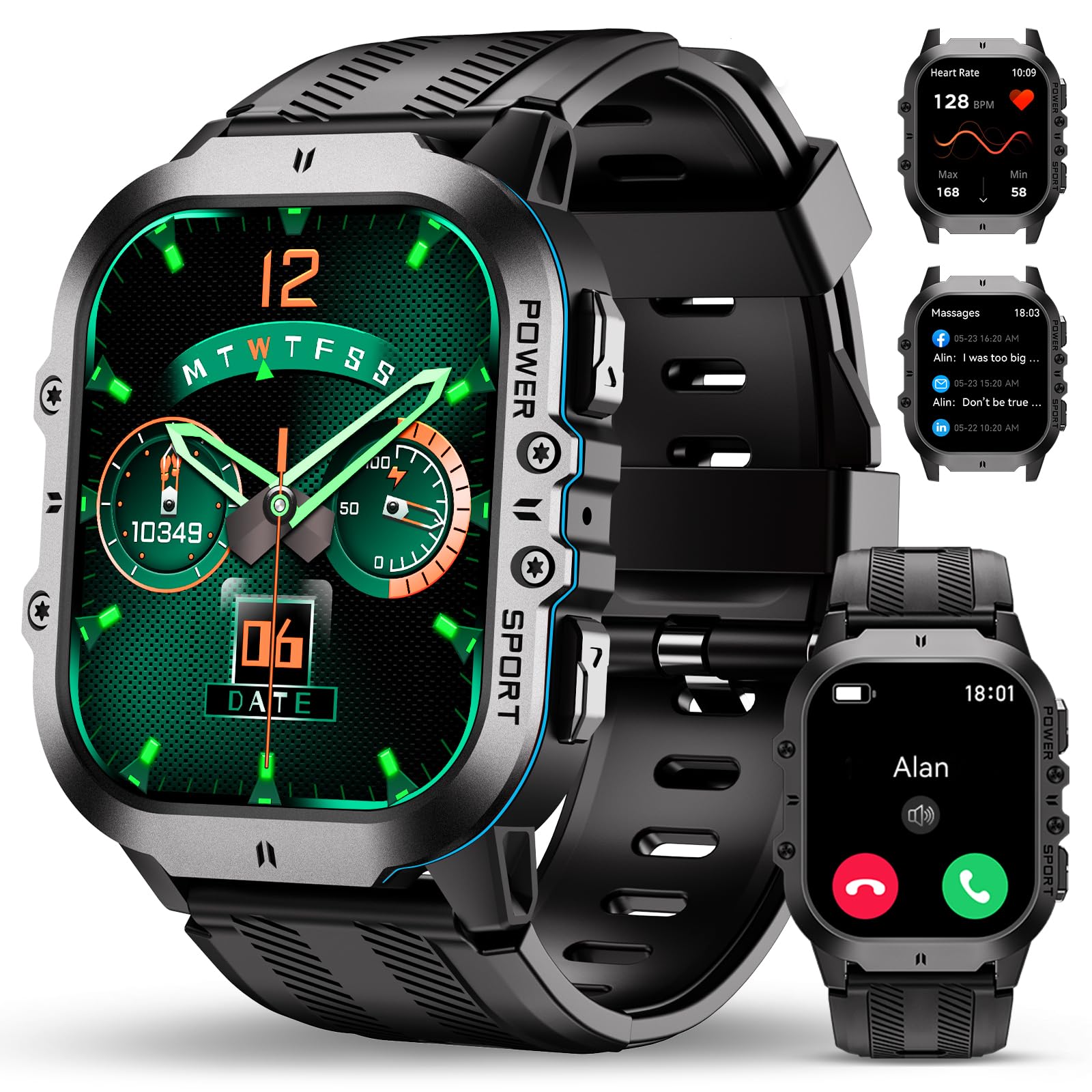
Image: The OUKITEL BT20 Smartwatch paired with a smartphone, demonstrating the Bluetooth calling feature.
2. അടിസ്ഥാന പ്രവർത്തനം
2.1 ഇന്റർഫേസ് നാവിഗേറ്റ് ചെയ്യൽ
- മുകളിലേക്കും താഴേക്കും സ്വൈപ്പ് ചെയ്യുക: മെനുകളിലൂടെയും അറിയിപ്പുകളിലൂടെയും സ്ക്രോൾ ചെയ്യുക.
- ഇടത്തേക്ക്/വലത്തേക്ക് സ്വൈപ്പ് ചെയ്യുക: ദ്രുത ഫംഗ്ഷനുകളോ വിജറ്റുകളോ ആക്സസ് ചെയ്യുക.
- ടാപ്പ് ചെയ്യുക: ഒരു ഇനം തിരഞ്ഞെടുക്കുക അല്ലെങ്കിൽ ഒരു പ്രവർത്തനം സ്ഥിരീകരിക്കുക.
- സൈഡ് ബട്ടണുകൾ: The watch features dedicated 'POWER' and 'SPORT' buttons for quick access to functions.
2.2 ബ്ലൂടൂത്ത് കോളിംഗ്
The OUKITEL BT20 supports Bluetooth calls, allowing you to make and receive calls directly from your wrist when connected to your smartphone.
- Ensure your watch is paired via Bluetooth to your phone.
- Access the call function from the watch menu.
- You can dial numbers or access your synchronized phone contacts.
- ഇൻകമിംഗ് കോൾ അറിയിപ്പുകൾ സ്വീകരിക്കുകയും വാച്ചിൽ നേരിട്ട് ഉത്തരം നൽകുകയും ചെയ്യുക.
2.3 വാച്ച് ഫെയ്സുകൾ ഇഷ്ടാനുസൃതമാക്കൽ
Personalize your smartwatch with over 200 rich user interfaces and custom watch face designs available through the FitCloudPro app.
- നിങ്ങളുടെ സ്മാർട്ട്ഫോണിൽ FitCloudPro ആപ്പ് തുറക്കുക.
- Navigate to the 'Watch Faces' or 'Dial Settings' section.
- Browse available designs or upload your own photos to create a custom watch face.
- Select and synchronize your chosen watch face to the smartwatch.

Image: The OUKITEL BT20 Smartwatch showcasing diverse watch face designs and the customization options within the companion app.
3. ആരോഗ്യ നിരീക്ഷണം
The OUKITEL BT20 Smartwatch is equipped with precise optical tracking sensors to monitor your health 24 hours a day.
3.1 ഹൃദയമിടിപ്പ് നിരീക്ഷണം
The watch continuously tracks your heart rate. View real-time data on the watch or detailed historical trends in the FitCloudPro app.
3.2 രക്തത്തിലെ ഓക്സിജൻ (SpO2) നിരീക്ഷണം
Monitor your blood oxygen levels to understand your physical condition. Ensure the watch is worn snugly on your wrist for accurate readings.
3.3 Blood Pressure Monitoring
The smartwatch can detect and record your blood pressure. For medical accuracy, consult a healthcare professional and do not rely solely on smartwatch readings.
3.4 സ്ലീപ്പ് ട്രാക്കിംഗ്
The watch automatically records your sleep status throughout the night, providing data on sleep duration and quality. Connect to the FitCloudPro app for detailed sleep analysis and insights to improve your sleep habits.

Image: The OUKITEL BT20 Smartwatch's 24-hour health monitoring features, including heart rate, blood pressure, and blood oxygen tracking.

Image: The OUKITEL BT20 Smartwatch's scientific sleep tracking mode, recording comprehensive sleep quality data.
4. സ്പോർട്സ് മോഡുകളും ആക്ടിവിറ്റി ട്രാക്കിംഗും
The OUKITEL BT20 Smartwatch supports over 120 sports modes to track your physical activities.
4.1 Accessing Sports Modes
From the watch menu, select the 'Sport' icon to browse and choose from a wide range of activities such as mountaineering, skiing, running, hiking, cycling, and more.
4.2 ജിപിഎസ് ട്രാക്കിംഗ്
When connected to your mobile phone, the smartwatch utilizes the phone's global positioning system to record your movement track. You can view specific movement routes and data in the FitCloudPro app.
4.3 Daily Activity Data
The BT20 automatically provides daily exercise data, including steps taken, calories burned, and distance covered, helping you stay informed about your fitness progress.

Image: The OUKITEL BT20 Smartwatch supporting over 100 sports modes, showing activity data like calories, distance, and steps.
5. Durability and Features
The OUKITEL BT20 Smartwatch is built with a hard, highly resistant metal and durable glass, designed for rugged environments.
5.1 5ATM Water Resistance
The smartwatch is 5ATM waterproof, suitable for swimming and other water activities up to 50 meters deep. It is resistant to water splashes, rain, and brief immersion.

Image: The OUKITEL BT20 Smartwatch submerged in water, highlighting its 5ATM water resistance suitable for swimming.
5.2 Extreme Temperature Resistance
The BT20 is designed to operate in extreme temperatures, from -40 degrees Celsius (anti-freeze) to 70 degrees Celsius (heat resistance), making it suitable for various outdoor adventures.
5.3 Shock and Drop Resistance
Engineered to be ultra-resistant to drops and scratches, the watch can withstand impacts and harsh conditions.
5.4 Dust Resistance
The watch is also dust-resistant, protecting its internal components from fine particles in dusty environments.
Video: This video demonstrates the OUKITEL BT20 Smartwatch's exceptional durability, showcasing its resistance to freezing temperatures, impacts, dust, and water submersion, along with its robust construction.

Image: The two-color injection molding process used in the OUKITEL BT20 Smartwatch, contributing to its enhanced water resistance and shock performance.
6 ബാറ്ററി ലൈഫ്
The OUKITEL BT20 Smartwatch is equipped with a 350 mAh large capacity battery, optimized for extended use.
- ചാർജിംഗ് സമയം: ഫുൾ ചാർജിനായി ഏകദേശം 2.5 മണിക്കൂർ.
- Typical Usage Duration: Up to 15 days on a single charge, depending on usage patterns and activated features.
7 സ്പെസിഫിക്കേഷനുകൾ
| ഫീച്ചർ | വിവരണം |
|---|---|
| ബ്രാൻഡ് | OUKITEL |
| മോഡൽ | BT20 |
| ഓപ്പറേറ്റിംഗ് സിസ്റ്റം | OS ധരിക്കുക |
| പ്രത്യേക സവിശേഷതകൾ | Phone call, Voice control, Notification, Custom activity tracker, Multisport tracker |
| ബാറ്ററി ശേഷി | 350 മില്ലിampമുൻ മണിക്കൂർ (mAh) |
| കണക്റ്റിവിറ്റി ടെക്നോളജി | ബ്ലൂടൂത്ത് |
| വയർലെസ് കമ്മ്യൂണിക്കേഷൻ സ്റ്റാൻഡേർഡ് | ബ്ലൂടൂത്ത് |
| ബാറ്ററി കോമ്പോസിഷൻ | ലിഥിയം-പോളിമർ |
| ജിപിഎസ് | സ്മാർട്ട്ഫോൺ വഴി ജിപിഎസ് |
| ആകൃതി | ദീർഘചതുരം |
| സ്ക്രീൻ വലിപ്പം | 1.95 ഇഞ്ച് |

Image: The OUKITEL BT20 Smartwatch features a 1.96-inch hardened AMOLED screen with 410*502 resolution, offering crash resistance and eye protection.
8. പരിപാലനം
8.1 നിങ്ങളുടെ സ്മാർട്ട് വാച്ച് വൃത്തിയാക്കൽ
Regularly clean your smartwatch to maintain its appearance and functionality. Use a soft, lint-free cloth to wipe the screen and body. For stubborn dirt, slightly dampതുണിയിൽ വെള്ളം ഒഴിക്കുക. കഠിനമായ രാസവസ്തുക്കളോ ഉരച്ചിലുകളോ ഉള്ള വസ്തുക്കൾ ഉപയോഗിക്കുന്നത് ഒഴിവാക്കുക.
8.2 സംഭരണം
When not in use for extended periods, store the smartwatch in a cool, dry place. Ensure it is partially charged (around 50%) to preserve battery health.
9. പ്രശ്നപരിഹാരം
9.1 കണക്റ്റിവിറ്റി പ്രശ്നങ്ങൾ
- വാച്ച് ജോടിയാക്കുന്നില്ല: നിങ്ങളുടെ ഫോണിൽ ബ്ലൂടൂത്ത് പ്രവർത്തനക്ഷമമാക്കിയിട്ടുണ്ടെന്നും വാച്ച് പരിധിക്കുള്ളിലാണെന്നും ഉറപ്പാക്കുക. രണ്ട് ഉപകരണങ്ങളും പുനരാരംഭിച്ച് വീണ്ടും ജോടിയാക്കാൻ ശ്രമിക്കുക.
- പതിവ് വിച്ഛേദങ്ങൾ: Check for app updates for FitCloudPro. Ensure the app is running in the background and not being closed by your phone's power-saving settings.
9.2 Sensor Inaccuracies
- ഹൃദയമിടിപ്പ്/SpO2: വാച്ച് നിങ്ങളുടെ കൈത്തണ്ടയിൽ നന്നായി ധരിച്ചിട്ടുണ്ടെന്ന് ഉറപ്പാക്കുക, അധികം ഇറുകിയതോ അധികം അയഞ്ഞതോ അല്ല. വാച്ചിന്റെ പിൻഭാഗത്തുള്ള സെൻസർ വൃത്തിയാക്കുക.
- പ്രവർത്തന ട്രാക്കിംഗ്: Ensure your personal information (height, weight) is accurately entered in the FitCloudPro app for optimal step and calorie tracking.
9.3 ബാറ്ററി ചാർജ് ചെയ്യുന്നില്ല
- Check if the charging cable is securely connected to both the watch and the power source.
- Ensure the charging contacts on the watch and cable are clean and free of debris.
- മറ്റൊരു USB പവർ അഡാപ്റ്ററോ പോർട്ടോ പരീക്ഷിക്കുക.
10. വാറൻ്റിയും പിന്തുണയും
For warranty information, please refer to the warranty card included with your product or contact OUKITEL customer support. If you encounter any issues not covered in this manual, please visit the official OUKITEL webകൂടുതൽ സഹായത്തിന് അവരുടെ സൈറ്റ് സന്ദർശിക്കുക അല്ലെങ്കിൽ അവരുടെ ഉപഭോക്തൃ സേവനവുമായി ബന്ധപ്പെടുക.