1. ആമുഖം
This manual provides detailed instructions for the FIDECO H708C43 Powered 7-Port USB 3.2 Gen2 Hub. This device is designed to expand your computer's connectivity with high-speed data transfer and charging capabilities. Please read this manual thoroughly before use to ensure proper operation and to maximize the product's lifespan.

Image 1.1: The FIDECO H708C43 7-Port USB Hub, showcasing its sleek design, power adapter, and connecting cables.
2. ഉൽപ്പന്നം കഴിഞ്ഞുview
2.1 പ്രധാന സവിശേഷതകൾ
- 7 ഹൈ-സ്പീഡ് പോർട്ടുകൾ: Equipped with 4 USB-A ports and 3 USB-C ports to accommodate various devices.
- USB 3.2 Gen 2 Standard: Supports data transfer speeds up to 10Gbps, significantly enhancing productivity and connectivity.
- BC1.2 Charging Support: One USB-A port and one USB-C port support BC1.2 charging, allowing simultaneous data transfer and device charging.
- അലുമിനിയം അലോയ് നിർമ്മാണം: Durable and ergonomic design for efficient heat dissipation, ensuring stable performance.
- പ്ലഗ് ആൻഡ് പ്ലേ: Driver-free installation for immediate use across compatible operating systems.
- വിശാലമായ അനുയോജ്യത: Works seamlessly with Windows, Mac OS, and Linux operating systems.
- അന്തർനിർമ്മിത പരിരക്ഷ: Features short-circuit, overcurrent, overvoltage, and overheat protection to safeguard connected devices and data.
2.2 പാക്കേജ് ഉള്ളടക്കം
- FIDECO H708C43 USB Hub
- USB-C to USB-C Cable with USB-A Adapter
- 5V/3A പവർ അഡാപ്റ്റർ
- ഉപയോക്തൃ മാനുവൽ
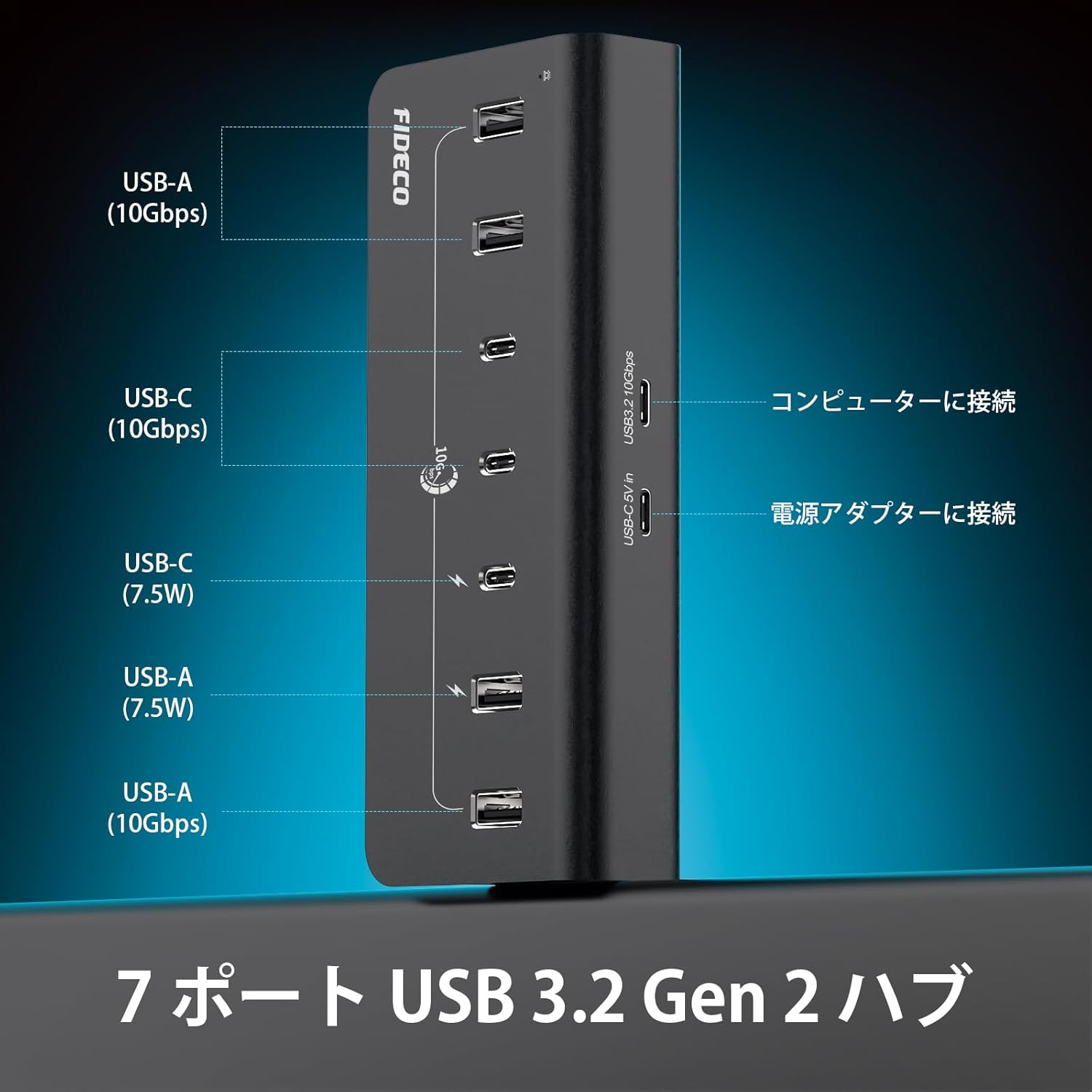
Image 2.1: A diagram illustrating the port layout of the FIDECO USB hub, detailing 4 USB-A (10Gbps), 3 USB-C (10Gbps), and the power input. It also shows connections to a computer and power adapter.
3. സജ്ജീകരണ നിർദ്ദേശങ്ങൾ
- പവർ അഡാപ്റ്റർ ബന്ധിപ്പിക്കുക: Plug the provided 5V/3A power adapter into the DC 5V IN port on the FIDECO USB Hub. Then, plug the power adapter into a wall outlet. This ensures stable power delivery to all connected devices.
- നിങ്ങളുടെ കമ്പ്യൂട്ടറിലേക്ക് ബന്ധിപ്പിക്കുക: Use the included USB-C to USB-C cable to connect the hub to a USB-C port on your computer. If your computer only has USB-A ports, use the provided USB-A adapter with the USB-C cable.
- കണക്ഷൻ സ്ഥിരീകരിക്കുക: The hub is plug-and-play, so no drivers are required. Your computer should automatically recognize the hub.
- പെരിഫറലുകൾ ബന്ധിപ്പിക്കുക: You can now connect your USB-A and USB-C devices (e.g., external hard drives, USB drives, keyboards, mice, webcams, smartphones, tablets) to the available ports on the hub.

Image 3.1: A user operating a computer setup with the FIDECO USB hub integrated, demonstrating its use in a professional or creative workflow.
4. പ്രവർത്തന നിർദ്ദേശങ്ങൾ
4.1 ഡാറ്റ കൈമാറ്റം
- Connect your USB 3.2 Gen 2 compatible devices to any of the 7 ports for optimal 10Gbps data transfer speeds.
- The hub is backward compatible with USB 3.0, USB 2.0, and USB 1.1 devices, though speeds will be limited by the connected device's standard.

Image 4.1: The FIDECO USB hub connected to a laptop, demonstrating high-speed 10Gbps data transfer with external SSDs.
4.2 ഉപകരണം ചാർജിംഗ്
- The hub supports BC1.2 charging on one USB-A port and one USB-C port. These ports can deliver up to 7.5W (5V/1.5A) for faster charging of compatible devices.
- Other ports provide standard USB charging capabilities.
- You can simultaneously transfer data and charge devices through the hub, reducing desktop clutter.

Image 4.2: The FIDECO USB hub connected to a laptop, showing two devices (a smartphone and another device) being charged via BC1.2 compatible USB-A and USB-C ports.

Image 4.3: The FIDECO USB hub connected to a laptop, illustrating simultaneous data transfer and device charging for a smartphone and a smartwatch.
5. പരിപാലനം
- Keep the hub clean by wiping it with a soft, dry cloth. Avoid using liquid cleaners or solvents.
- Ensure the hub is placed on a stable surface. The non-slip rubber pads on the bottom help maintain stability.
- ഹബ്ബിൽ തീവ്രമായ താപനില, ഈർപ്പം അല്ലെങ്കിൽ നേരിട്ടുള്ള സൂര്യപ്രകാശം ഏൽക്കുന്നത് ഒഴിവാക്കുക.
- Do not attempt to disassemble or repair the hub yourself. This may void the warranty and cause damage.
6. പ്രശ്നപരിഹാരം
6.1 ഉപകരണം തിരിച്ചറിഞ്ഞിട്ടില്ല
- Ensure the hub is properly connected to your computer and the power adapter is plugged in.
- Try connecting the device directly to your computer to confirm it is functioning correctly.
- മറ്റൊരു USB കേബിൾ ഉപയോഗിച്ച് പരീക്ഷിക്കുക.
- നിങ്ങളുടെ കമ്പ്യൂട്ടർ പുനരാരംഭിക്കുക.
6.2 മന്ദഗതിയിലുള്ള ഡാറ്റാ ട്രാൻസ്ഫർ വേഗത
- Verify that both your computer's USB port and the connected device support USB 3.2 Gen 2 (10Gbps).
- Ensure you are using a high-quality USB 3.2 Gen 2 compatible cable.
- Avoid connecting too many high-bandwidth devices simultaneously, as this can share the available bandwidth.
6.3 ചാർജിംഗ് പ്രശ്നങ്ങൾ
- Confirm that the power adapter is securely connected and receiving power.
- Ensure the device you are charging is compatible with BC1.2 charging for optimal speed.
- Some devices may require more power than the hub can provide. Check your device's power requirements.
7 സ്പെസിഫിക്കേഷനുകൾ
| മോഡൽ നമ്പർ | H708C43 |
| മൊത്തം USB പോർട്ടുകൾ | 7 |
| USB-A പോർട്ടുകൾ | 4 (USB 3.2 Gen 2, 10Gbps) |
| USB-C പോർട്ടുകൾ | 3 (USB 3.2 Gen 2, 10Gbps) |
| ചാർജിംഗ് പിന്തുണ | 1x USB-A, 1x USB-C with BC1.2 (7.5W) |
| ഡാറ്റ ട്രാൻസ്ഫർ വേഗത | 10Gbps വരെ |
| പവർ ഇൻപുട്ട് | 5V/3A Power Adapter (included) |
| അനുയോജ്യമായ OS | വിൻഡോസ്, മാക് ഒഎസ്, ലിനക്സ് |
| മെറ്റീരിയൽ | അലുമിനിയം അലോയ് |
| അളവുകൾ | 17.3 x 9.6 x 6.6 സെ.മീ |
| ഭാരം | 0.42 കി.ഗ്രാം |
| അധിക സവിശേഷതകൾ | Surge protection, Plug and Play, Non-slip design, Powered |

Image 7.1: The FIDECO USB hub placed on a tablet, showcasing its broad compatibility with various operating systems (Windows, Mac OS, Linux) and devices like mice, USB drives, webcams, hard drives, PCs, tablets, and phones.
8. വാറൻ്റി വിവരങ്ങൾ
Specific warranty details are not provided in the available product information. Please refer to the product packaging or contact FIDECO customer support for warranty terms and conditions.
9. പിന്തുണ
For technical support or any other inquiries, please contact FIDECO customer service at:
ഇമെയിൽ: സപ്പോർട്ട്@fideco.cn

ചിത്രം 9.1: ഒരു ആന്തരിക view of the FIDECO USB hub, highlighting its built-in protection features such as short-circuit, overcurrent, overvoltage, and overheat protection.


