ആമുഖം
This manual provides detailed instructions for the safe and efficient operation, maintenance, and troubleshooting of your Tuni Silver Conical Burr Coffee Grinder and Tuni Mini Coffee Scale. Please read this manual thoroughly before using the products to ensure optimal performance and longevity.
The Tuni Silver Conical Burr Coffee Grinder features 48 adjustable grind settings and a patented anti-static 40mm conical burr for precise and consistent grinding. The Tuni Mini Coffee Scale is equipped with a high-precision sensor, offering multiple measurement units and modes for accurate coffee preparation.
പ്രധാനപ്പെട്ട സുരക്ഷാ നിർദ്ദേശങ്ങൾ
- ഉപയോഗിക്കുന്നതിന് മുമ്പ് എല്ലാ നിർദ്ദേശങ്ങളും വായിക്കുക.
- Do not immerse the grinder or scale in water or other liquids.
- ജോലി ചെയ്യുമ്പോൾ കൈകളും പാത്രങ്ങളും ബീൻ ഹോപ്പറിൽ നിന്നും ഗ്രൗണ്ട് കോഫി കണ്ടെയ്നറിൽ നിന്നും അകറ്റി നിർത്തുക.
- Unplug the grinder from the outlet when not in use, before putting on or taking off parts, and before cleaning.
- ഒരു ഉപകരണവും കേടായ കോർഡ് അല്ലെങ്കിൽ പ്ലഗ് ഉപയോഗിച്ച് പ്രവർത്തിപ്പിക്കരുത്, അല്ലെങ്കിൽ ഉപകരണം തകരാറിലായതിന് ശേഷം അല്ലെങ്കിൽ ഏതെങ്കിലും വിധത്തിൽ വീഴുകയോ കേടുപാടുകൾ സംഭവിക്കുകയോ ചെയ്യരുത്.
- നിർമ്മാതാവ് ശുപാർശ ചെയ്യുന്നതോ വിൽക്കുന്നതോ ആയ അറ്റാച്ച്മെന്റുകൾ മാത്രം ഉപയോഗിക്കുക.
- ഈ ഉപകരണം ഗാർഹിക ഉപയോഗത്തിന് മാത്രമുള്ളതാണ്.
ഉൽപ്പന്ന ഘടകങ്ങൾ
Tuni G1 Conical Burr Coffee Grinder

- Bean Hopper (250g/8.8oz capacity)
- Grind Adjustment Collar
- Conical Burrs (Upper and Lower)
- Grinder Body with Control Panel (LED display, Start/Stop button, Grind Time/Cup Size adjustment)
- Ground Coffee Container (75g/2.6oz capacity)
- പോർട്ടഫിൽറ്റർ ഹോൾഡർ
- ക്ലീനിംഗ് ബ്രഷ്
Tuni Mini Coffee Scale
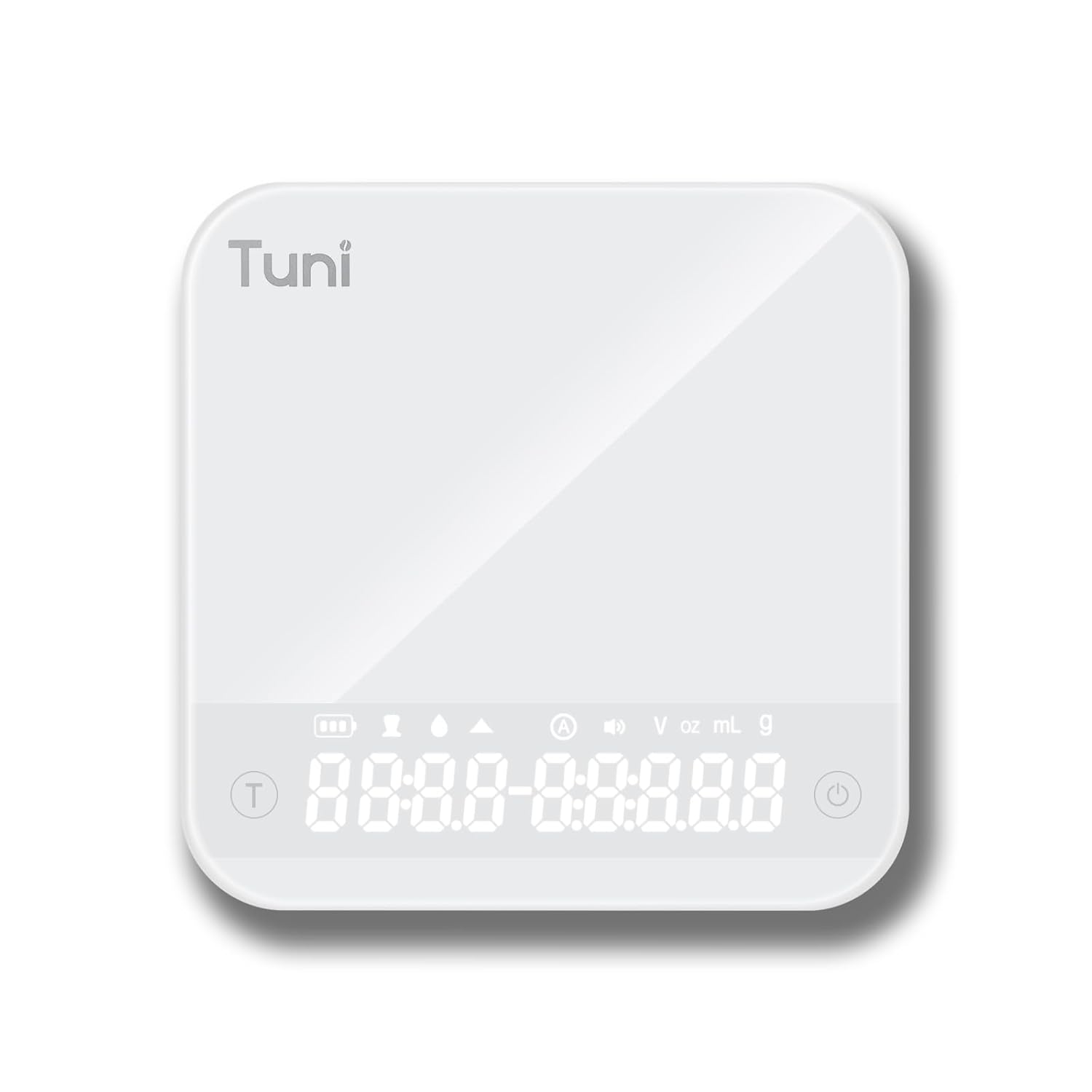
- Tempered Glass Weighing Platform
- Hidden LED Display
- പവർ/ടാർ ബട്ടൺ
- ടൈമർ ബട്ടൺ
- Unit Conversion Button (g, ml, oz)
സജ്ജമാക്കുക
ഗ്രൈൻഡർ സജ്ജീകരണം
- അൺപാക്ക് ചെയ്യുന്നു: പാക്കേജിംഗിൽ നിന്ന് എല്ലാ ഘടകങ്ങളും ശ്രദ്ധാപൂർവ്വം നീക്കം ചെയ്യുക. ഭാവിയിലെ സംഭരണത്തിനോ ഗതാഗതത്തിനോ വേണ്ടി പാക്കേജിംഗ് സൂക്ഷിക്കുക.
- വൃത്തിയാക്കൽ: ആദ്യ ഉപയോഗത്തിന് മുമ്പ്, ഗ്രൈൻഡറിന്റെ പുറംഭാഗം പരസ്യം ഉപയോഗിച്ച് തുടയ്ക്കുക.amp cloth. Wash the bean hopper and ground coffee container with warm, soapy water, rinse thoroughly, and dry completely.
- ഹോപ്പർ കൂട്ടിച്ചേർക്കുക: Place the bean hopper onto the grinder body, ensuring it is securely locked in place.
- പവർ കണക്ഷൻ: Plug the grinder into a grounded electrical outlet.
സ്കെയിൽ സജ്ജീകരണം
- അൺപാക്ക് ചെയ്യുന്നു: അതിന്റെ പാക്കേജിംഗിൽ നിന്ന് സ്കെയിൽ നീക്കം ചെയ്യുക.
- ചാർജിംഗ്: If necessary, charge the scale using the provided USB cable until fully charged.
- പ്ലേസ്മെൻ്റ്: കൃത്യമായ വായന ഉറപ്പാക്കാൻ സ്കെയിൽ പരന്നതും സ്ഥിരതയുള്ളതും നിരപ്പായതുമായ ഒരു പ്രതലത്തിൽ സ്ഥാപിക്കുക.
പ്രവർത്തന നിർദ്ദേശങ്ങൾ
Using the Tuni G1 Coffee Grinder

- ബീൻസ് ചേർക്കുക: Fill the bean hopper with whole roasted coffee beans. The hopper has a capacity of 250g (8.8oz).
- ഗ്രൈൻഡ് സെറ്റിംഗ് തിരഞ്ഞെടുക്കുക: Rotate the grind adjustment collar to select your desired grind size. The grinder offers 48 settings, suitable for:
- എസ്പ്രസ്സോ: Settings 0-16 (very fine)
- Drip/Pour Over: Settings 16-32 (medium)
- ഫ്രഞ്ച് പ്രസ്സ്: Settings 32-48 (coarse)

ചിത്രം: വിശദമായ ഒരു ചിത്രം view of the Tuni G1 Coffee Grinder's control panel and grind adjustment collar, emphasizing the 48 precision settings. - ഔട്ട്പുട്ട് രീതി തിരഞ്ഞെടുക്കുക: Place either the ground coffee container or your portafilter (using the included holder) under the dispensing chute.
- Set Grind Time/Cups: Use the control panel to adjust the grind time in 0.5-second increments (up to 40 seconds) or select the desired number of cups (2 to 12 cups).
- അരക്കൽ ആരംഭിക്കുക: Press the Start/Stop button to begin grinding. The grinder will automatically stop once the set time or quantity is reached. You can also manually stop grinding by pressing the button again.
- ശൂന്യമായ കണ്ടെയ്നർ: Once grinding is complete, remove the ground coffee container or portafilter.
Using the Tuni Mini Coffee Scale

- പവർ ഓൺ: Press the Power button to turn on the scale. The hidden LED display will illuminate.
- യൂണിറ്റ് തിരഞ്ഞെടുക്കുക: Press the Unit Conversion button to cycle through available units: grams (g), milliliters (ml), and ounces (oz).
- ടാരെ പ്രവർത്തനം: Place an empty container on the weighing platform. Press the Power/Tare button to zero out the weight of the container.
- തൂക്കം: Add your ingredients (e.g., coffee beans, water) to the container. The display will show the precise weight.
- ടൈമർ പ്രവർത്തനം:
- മാനുവൽ സമയം: Press the Timer button to start the timer. Press again to pause, and a third time to reset.
- യാന്ത്രിക മോഡ്: The scale features an automatic mode that can detect changes in weight and start the timer automatically, ideal for pour-over brewing. Refer to the scale's specific instructions for activating this mode.
- Powder/Water Ratio Mode: This mode assists in maintaining specific brewing ratios.
- Flow Rate Mode: Displays the flow rate of liquid, useful for precise pour-over techniques.
- പവർ ഓഫ്: Press and hold the Power button to turn off the scale. The scale will also auto-shutoff after a period of inactivity to conserve battery.
പരിപാലനവും ശുചീകരണവും
Grinder Cleaning
- അൺപ്ലഗ്: വൃത്തിയാക്കുന്നതിന് മുമ്പ് എല്ലായ്പ്പോഴും അരക്കൽ അഴിക്കുക.
- ഒഴിഞ്ഞ ഹോപ്പർ: ഹോപ്പറിൽ നിന്ന് ബാക്കിയുള്ള ഏതെങ്കിലും കാപ്പിക്കുരു നീക്കം ചെയ്യുക.
- Remove Burrs: Carefully remove the upper burr. Use the provided cleaning brush to brush away any coffee grounds from both the upper and lower burrs.
- Clean Chute: Use the brush to clean the dispensing chute.
- പുറം തുടയ്ക്കുക: Wipe the exterior of the grinder body with a soft, damp cloth. Do not use abrasive cleaners or immerse the grinder in water.
- വീണ്ടും കൂട്ടിച്ചേർക്കുക: Reassemble the burrs and hopper once all parts are dry.
സ്കെയിൽ ക്ലീനിംഗ്

- Wipe the tempered glass surface with a soft, damp തുണി.
- കഠിനമായ രാസവസ്തുക്കളോ ഉരച്ചിലുകളോ ഉപയോഗിക്കരുത്.
- The scale is water-resistant, but do not immerse it in water.
ട്രബിൾഷൂട്ടിംഗ്
Grinder Issues
| പ്രശ്നം | സാധ്യമായ കാരണം | പരിഹാരം |
|---|---|---|
| ഗ്രൈൻഡർ ആരംഭിക്കുന്നില്ല. | പ്ലഗ് ഇൻ ചെയ്തിട്ടില്ല; പവർ അല്ലെങ്കിൽtage; hopper not correctly seated; motor overheated. | Ensure plug is securely in outlet; check power supply; ensure hopper is locked in place; allow grinder to cool down for 30 minutes. |
| പൊരുത്തമില്ലാത്ത പൊടിക്കൽ. | Burrs are dirty or clogged; incorrect grind setting for bean type. | Clean burrs thoroughly; adjust grind setting to a finer or coarser level as needed. |
| Grinder is loud or struggling. | Beans are too oily/hard; burrs are clogged. | Clean burrs; try different beans; do not overfill hopper. |
Scale Issues
| പ്രശ്നം | സാധ്യമായ കാരണം | പരിഹാരം |
|---|---|---|
| കൃത്യമല്ലാത്ത വായനകൾ. | Scale not on a flat surface; battery low; overloaded; external vibrations. | Place on a stable, level surface; recharge battery; do not exceed 2000g capacity; avoid vibrations during use. |
| ഡിസ്പ്ലേ ഓണാക്കുന്നില്ല. | ബാറ്ററി തീർന്നു. | Charge the scale using the provided USB cable. |
സ്പെസിഫിക്കേഷനുകൾ
Tuni G1 Conical Burr Coffee Grinder
- ഗ്രൈൻഡ് ക്രമീകരണങ്ങൾ: 48 precision settings
- ബർ തരം: 40mm Stainless Steel Conical Burr
- അരക്കൽ വേഗത: 450 RPM (revolutions per minute)
- ബീൻ ഹോപ്പർ ശേഷി: 250 ഗ്രാം (8.8 oz)
- Grounds Container Capacity: 75 ഗ്രാം (2.6 oz)
- Grind Time Adjustment: 1-40 seconds (0.5s increments)
- കപ്പ് തിരഞ്ഞെടുപ്പ്: 2-12 കപ്പ്
- അളവുകൾ: 7.08" x 4.52" x 14.0"
- ബോഡി മെറ്റീരിയൽ: സ്റ്റെയിൻലെസ്സ് സ്റ്റീൽ
Tuni Mini Coffee Scale
- അളക്കൽ ശ്രേണി: 0.3g - 2000g (0.01oz - 70.5oz)
- കൃത്യത: 0.1 ഗ്രാം
- യൂണിറ്റുകൾ: g, ml, oz
- ടൈമർ: Max 99 minutes 59 seconds
- മോഡുകൾ: Manual Timing, Automatic Mode, Powder/Water Ratio Mode, Flow Rate Mode
- ഡിസ്പ്ലേ: Hidden LED Tempered Glass Display
- ശക്തി: റീചാർജ് ചെയ്യാവുന്ന (USB)
- അളവുകൾ: ഏകദേശം 4.1" x 4.1" x 0.8"
- ഉൽപ്പന്ന ഭാരം: 0.33lb
വാറൻ്റിയും പിന്തുണയും
Tuni products are manufactured with high-quality materials and craftsmanship. For warranty information and customer support, please refer to the warranty card included with your product or visit the official Tuni website. Please have your product model number and purchase date available when contacting support.
Official Tuni Store: Visit the Tuni Store on Amazon


