1. ആമുഖം
The Thermal Master X2 is a high-performance thermal imaging monocular designed for use with Android smartphones. It offers advanced thermal detection capabilities, making it suitable for a wide range of applications including hunting, wildlife observation, wilderness rescue, home inspections, and electrical diagnostics. This manual provides detailed instructions on setting up, operating, and maintaining your X2 thermal camera to ensure optimal performance and longevity.
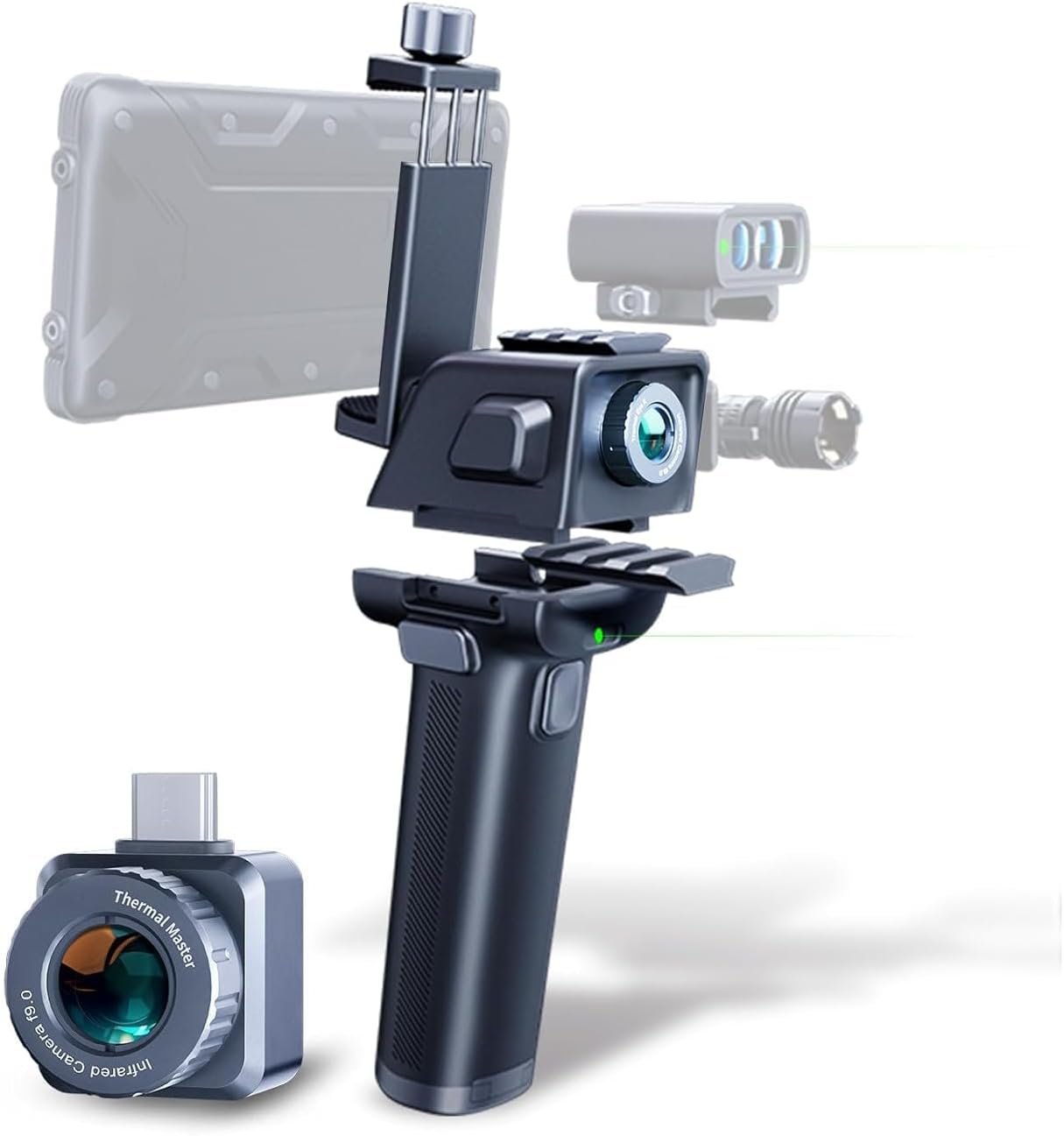
Figure 1.1: The Thermal Master X2 Thermal Camera system, showing the main camera module, the power handle, and a smartphone mount. The camera can be used independently or integrated with the handle for enhanced usability.
2. ഉൽപ്പന്ന സവിശേഷതകൾ
- Extended Detection Range: The X2 boasts a detection range of up to 950 yards, allowing for long-distance observation of heat signatures.
- X³ Super Algorithm: This advanced algorithm enhances the infrared (IR) resolution from 256×192 to 512×384, providing ultra-clear and sharp thermal images. It incorporates Razor X and TEMP IQ+ technologies for a high sensitivity of 40mk, detecting temperature changes as small as 0.04℃.
- ഉയർന്ന ഫ്രെയിം നിരക്ക്: With a 50Hz high frame rate, the X2 delivers smooth and fluid imaging, crucial for tracking fast-moving targets without lag.
- 15X ഡിജിറ്റൽ സൂം: Users can digitally zoom in from 1x to 15x, allowing for detailed inspection of distant objects.
- നീണ്ടുനിൽക്കുന്ന നിർമ്മാണം: Featuring an all-metal body and an IP65 rating, the X2 is designed to withstand heavy rain and harsh environmental conditions.
- Transformer Kit: The X2 is compatible with the "Transformer" accessory, which extends battery life up to 18 hours and offers 20 modification options, including integration with a compound bow, laser rangefinder, flashlight, and tactical helmet.

Figure 2.1: Demonstration of the X³ Super Algorithm, illustrating the enhanced 512x384 IR resolution compared to the standard 256x192 resolution.

Figure 2.2: The 15x digital zoom feature in action, allowing users to magnify thermal images for closer inspection of subjects like birds on a tree.
3. സജ്ജീകരണം
3.1 അൺബോക്സിംഗും ഘടകങ്ങളും
പാക്കേജ് തുറക്കുമ്പോൾ, എല്ലാ ഘടകങ്ങളും ഉണ്ടെന്ന് ഉറപ്പാക്കുക:
- Thermal Master X2 Camera Module
- Power Handle (Transformer)
- സ്മാർട്ട്ഫോൺ മൗണ്ട്
- യുഎസ്ബി-സി കേബിൾ
- ഉപയോക്തൃ മാനുവൽ (ഈ പ്രമാണം)
- ചുമക്കുന്ന കേസ്
Note: The X2 camera module is typically placed inside the handle during shipping. Check the handle if the main zipper bag appears empty.
3.2 അപ്ലിക്കേഷൻ ഇൻസ്റ്റാളേഷൻ
The Thermal Master X2 requires the "Thermal Master" application to function with your Android smartphone. Download the official app from the Google Play Store:
ഇതിനായി തിരയുക "Thermal Master" in the Google Play Store or visit the official download page via your device's browser.

Figure 3.1: The "Thermal Master" application available for download on Android devices.
3.3 ഉപകരണ അനുയോജ്യത
The Thermal Master X2 is designed for Android phones. It is crucial that your Android device supports OTG (On-The-Go) functionality. Without OTG support, the camera will not be able to connect and communicate with your phone. Please verify your phone's OTG compatibility before use.
3.4 Connecting the X2
- Ensure the "Thermal Master" app is installed on your Android phone.
- Carefully insert the USB-C connector of the X2 camera module into your smartphone's USB-C port.
- If using the Transformer handle, attach the X2 camera module to the handle, and then mount your smartphone onto the handle's phone clamp. The handle provides power and stability.
- Launch the "Thermal Master" app. The app should automatically detect and connect to the X2 camera.

Figure 3.2: The X2 camera module connected to an Android smartphone, displaying a thermal image comparison.
4. പ്രവർത്തന നിർദ്ദേശങ്ങൾ
4.1 Basic Operation and App Interface
Once connected, the Thermal Master app will display the live thermal feed. The app interface provides various controls for adjusting settings, capturing images/videos, and analyzing thermal data. Familiarize yourself with the on-screen icons for different functions.
4.2 സൂം പ്രവർത്തനം
The X2 supports 1x to 15x digital zoom. To adjust the zoom level, simply use a two-finger pinch-to-zoom gesture directly on your smartphone's screen within the Thermal Master app.
4.3 Image Enhancement and Sensitivity
The X2 utilizes the X³ Super Algorithm, Razor X, and TEMP IQ+ technologies to deliver high-quality thermal images. These features work automatically to optimize image clarity and detect subtle temperature variations (down to 0.04℃).

Figure 4.1: The Thermal Master High Sensitivity Core, which powers the X³ Super Algorithm for enhanced thermal imaging.
4.4 Display Modes and Color Palettes
The app offers various display modes and color palettes to suit different observation needs:
- HD മോഡ്: Provides more image details, ideal for winter conditions.
- Highlight Mode: Makes targets stand out more, suitable for summer conditions.
- 9 Professional Reticles: Various reticle options for precise targeting and measurement.
- 7 Color Palettes: Choose from White Bird, Black Bird, White Hot, Black Hot, Red Hot, Iron Rain, and Rain Bow to visualize thermal data differently.

Figure 4.2: HD and Highlight modes for optimized image detail and target visibility.

Figure 4.3: Selection of 9 professional reticles for various applications.

Figure 4.4: The 7 available color palettes for thermal visualization.
4.5 Transformer Kit Usage
The Transformer kit enhances the X2's functionality and battery life. It provides up to 18 hours of operation and allows for integration with various accessories. The kit includes a power handle and a Titan Pad (optional) with inbuilt refit bolt holes for attaching additional equipment like a laser rangefinder or flashlight.

Figure 4.5: Components of the Transformer kit, including the power handle and optional accessories.
To use the Transformer kit:
- Insert the X2 camera module into the designated slot on the Transformer power handle.
- Mount your smartphone securely onto the adjustable clamp ഹാൻഡിൽ.
- Connect the X2 to your phone via the USB-C cable. The handle will provide power to the X2 and your phone.
- Optional accessories like laser rangefinders or flashlights can be attached to the rails or Titan Pad (if acquired separately).
4.6 അപേക്ഷകൾ
The Thermal Master X2 is versatile and can be used in various scenarios:
- Hunting & Wildlife Observation: Easily spot animals like coyotes, deer, raccoons, and waterfowl at night or in dense foliage.
- Wilderness Rescue & Camping: Detect individuals or potential threats in low-visibility conditions, enhancing safety during outdoor activities.
- ഹോം പരിശോധനകൾ: Identify insulation gaps, drafts, moisture issues, and electrical hotspots within your home.
- വൈദ്യുത പരിശോധന: Pinpoint overheating components in electrical panels or circuits.
- പിസിബി പരിശോധന: Analyze heat distribution on printed circuit boards for diagnostics and design optimization.
ചിത്രം 4.6: ഉദാamples of industrial and home inspection applications.
ചിത്രം 4.7: ഉദാamples of outdoor and rescue applications.
5. പരിപാലനം
5.1 വൃത്തിയാക്കൽ
- ക്യാമറ ലെൻസ്: Gently wipe the thermal lens with a soft, lint-free cloth. For stubborn smudges, use a lens cleaning solution specifically designed for optics. Avoid abrasive materials or harsh chemicals.
- ഉപകരണ ബോഡി: Clean the all-metal body and handle with a damp cloth. Do not submerge the device in water, despite its IP65 rating, to prevent damage to internal components or the USB-C port.
5.2 സംഭരണം
When not in use, store the Thermal Master X2 in its provided carrying case. Keep it in a cool, dry place, away from direct sunlight, extreme temperatures, and high humidity. This helps preserve the device's components and battery life.
5.3 ബാറ്ററി കെയർ
The X2 uses a Lithium Ion battery (included, likely within the Transformer handle). To maximize battery lifespan:
- ആദ്യ ഉപയോഗത്തിന് മുമ്പ് ബാറ്ററി പൂർണ്ണമായും ചാർജ് ചെയ്യുക.
- റീചാർജ് ചെയ്യുന്നതിനുമുമ്പ് ബാറ്ററി പൂർണ്ണമായും ഡിസ്ചാർജ് ചെയ്യുന്നത് ഒഴിവാക്കുക.
- ദീർഘനേരം സൂക്ഷിക്കുകയാണെങ്കിൽ, ബാറ്ററി ഏകദേശം 50% ശേഷിയിലേക്ക് ചാർജ് ചെയ്യുക.
- Use only the provided USB-C cable and a compatible power adapter for charging.
6. പ്രശ്നപരിഹാരം
| പ്രശ്നം | സാധ്യമായ കാരണം | പരിഹാരം |
|---|---|---|
| Device not connecting to phone / App not detecting X2. |
|
|
| Poor image clarity or unexpected thermal readings. |
|
|
| Short battery life with Transformer kit. |
|
|
ഇവിടെ പട്ടികപ്പെടുത്തിയിട്ടില്ലാത്ത പ്രശ്നങ്ങൾ നേരിടുകയോ കൂടുതൽ സഹായം ആവശ്യമുണ്ടെങ്കിൽ, ദയവായി വാറന്റി, പിന്തുണ വിഭാഗം പരിശോധിക്കുക.
7 സ്പെസിഫിക്കേഷനുകൾ
| ഫീച്ചർ | വിശദാംശങ്ങൾ |
|---|---|
| മോഡൽ നമ്പർ | X2 Android |
| IR മിഴിവ് | 256×192 (Native), 512×384 (with X³ Super Algorithm) |
| ഫോക്കൽ ലെങ്ത് | 9 മി.മീ |
| ഫ്രെയിം റേറ്റ് | 50Hz |
| കണ്ടെത്തൽ പരിധി | 950 യാർഡ് വരെ |
| ഡിജിറ്റൽ സൂം | 1എക്സ് - 15എക്സ് |
| താപ സംവേദനക്ഷമത | 40mk (0.04℃) |
| വീഡിയോ ക്യാപ്ചർ റെസല്യൂഷൻ | 1080p |
| മീഡിയ തരം | Micro SD Card (for storage via phone) |
| പവർ ഉറവിടം | 1 Lithium Ion battery (included, within Transformer) |
| Battery Life (with Transformer) | 18 മണിക്കൂർ വരെ |
| ഇൻഗ്രെസ്സ് പ്രൊട്ടക്ഷൻ (IP) റേറ്റിംഗ് | IP65 (പൊടി ഇറുകിയതും വാട്ടർ ജെറ്റുകളിൽ നിന്ന് സംരക്ഷിതവുമാണ്) |
| ഇനത്തിൻ്റെ ഭാരം | 2.25 പൗണ്ട് |
| പാക്കേജ് അളവുകൾ | 9.92 x 8.39 x 3.58 ഇഞ്ച് |
| നിർമ്മാതാവ് | തെർമൽ മാസ്റ്റർ |
| ആദ്യ തീയതി ലഭ്യമാണ് | ഡിസംബർ 27, 2024 |

Figure 7.1: Key specifications of the Thermal Master X2, including focal length, IR resolution, zoom, and frame rate.
8. വാറൻ്റിയും പിന്തുണയും
Thermal Master products are manufactured to high-quality standards. For specific warranty information regarding your X2 Thermal Camera, please refer to the warranty card included in your product packaging or visit the official Thermal Master webസൈറ്റ്.
For technical support, troubleshooting assistance, or inquiries about replacement parts and accessories, please contact the manufacturer directly or reach out to the authorized seller from whom you purchased the product. The seller "Thermal Master Official" on Amazon can be contacted for support related to your purchase.
No official seller videos were found for this product to embed in this manual.


