1. ആമുഖം
This manual provides instructions for the safe and efficient operation, maintenance, and troubleshooting of your COWAY Airmega 450 Air Purifier. Please read this manual thoroughly before using the appliance and retain it for future reference.
The Airmega 450 is designed to improve indoor air quality by filtering various airborne particles and odors. Key features include HyperVortex air technology, a 3-in-1 custom filter system, real-time air quality monitoring, and multiple smart operating modes.
2 സുരക്ഷാ വിവരങ്ങൾ
Observe the following safety precautions to reduce the risk of electric shock, fire, or injury.
- കേടായ പവർ കോർഡ് അല്ലെങ്കിൽ പ്ലഗ് ഉപയോഗിച്ച് ഉപകരണം പ്രവർത്തിപ്പിക്കരുത്.
- ഉപകരണം താപ സ്രോതസ്സുകൾക്ക് സമീപമോ നേരിട്ടുള്ള സൂര്യപ്രകാശത്തിലോ സ്ഥാപിക്കരുത്.
- ഉപകരണം സുസ്ഥിരവും നിരപ്പും ഉള്ള പ്രതലത്തിൽ സ്ഥാപിച്ചിട്ടുണ്ടെന്ന് ഉറപ്പാക്കുക.
- Keep the air intake and outlet clear of obstructions.
- വൃത്തിയാക്കുന്നതിനോ അറ്റകുറ്റപ്പണികൾ നടത്തുന്നതിനോ മുമ്പ് ഉപകരണം അൺപ്ലഗ് ചെയ്യുക.
- ഉപകരണം പ്രവർത്തിപ്പിക്കാനോ കളിക്കാനോ കുട്ടികളെ അനുവദിക്കരുത്.
- വെറ്റ് അല്ലെങ്കിൽ ഡിയിൽ ഉപകരണം ഉപയോഗിക്കരുത്amp പരിസരങ്ങൾ.
3. പാക്കേജ് ഉള്ളടക്കം
പാക്കേജിൽ എല്ലാ ഇനങ്ങളും ഉണ്ടെന്ന് ഉറപ്പാക്കുക:
- COWAY Airmega 450 Air Purifier Unit
- 3-in-1 Filter Set (pre-installed or separately packaged)
- ഉപയോക്തൃ മാനുവൽ
4. ഉൽപ്പന്നം കഴിഞ്ഞുview
The COWAY Airmega 450 features a cylindrical design with a top-mounted control panel and 360-degree air intake. The unit utilizes HyperVortex air technology for efficient air circulation.
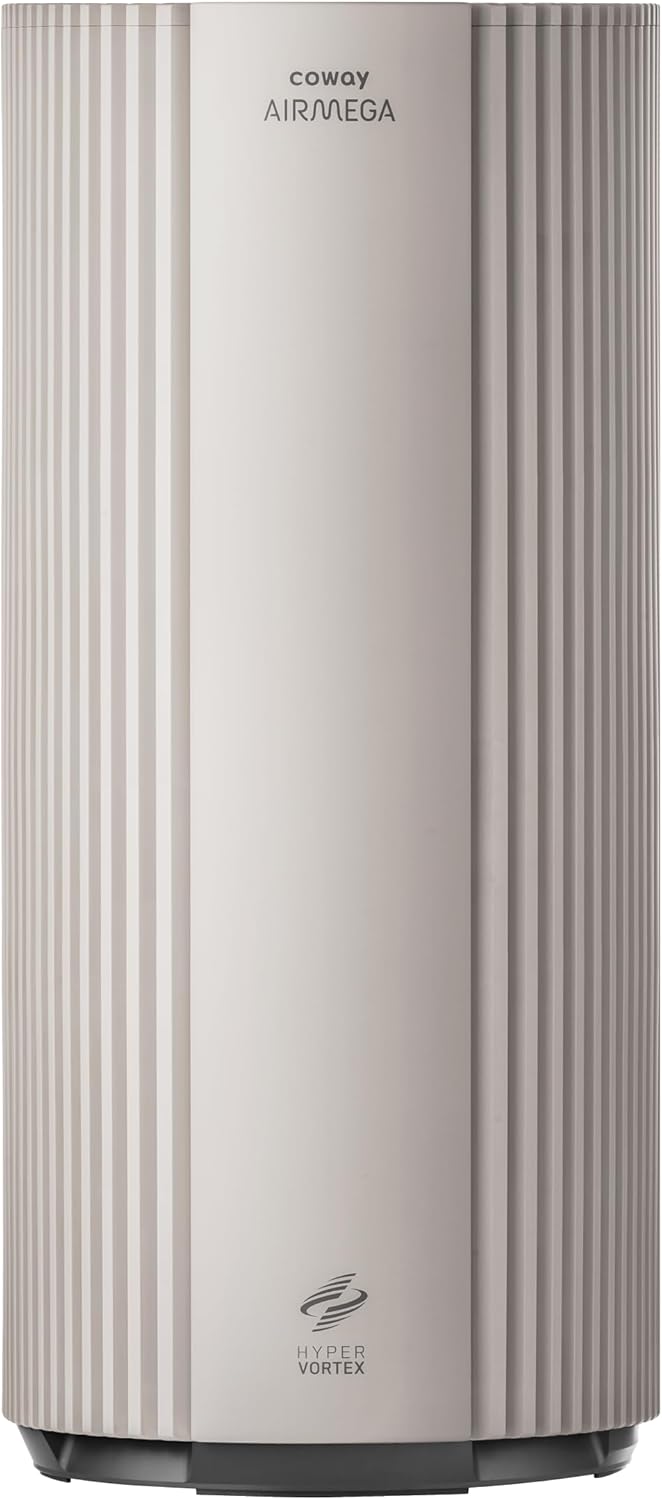
ചിത്രം 4.1: മുൻഭാഗം view of the COWAY Airmega 450 Air Purifier.

ചിത്രം 4.2: ഓവർview of Airmega 450 key features.
4.1. HyperVortex Air Technology
The HyperVortex system integrates an Eagle Vane, Vortex Generator Fan, and Dimple Duct to optimize airflow, enhance filtration, and minimize air loss. This design contributes to rapid air purification and quiet operation.
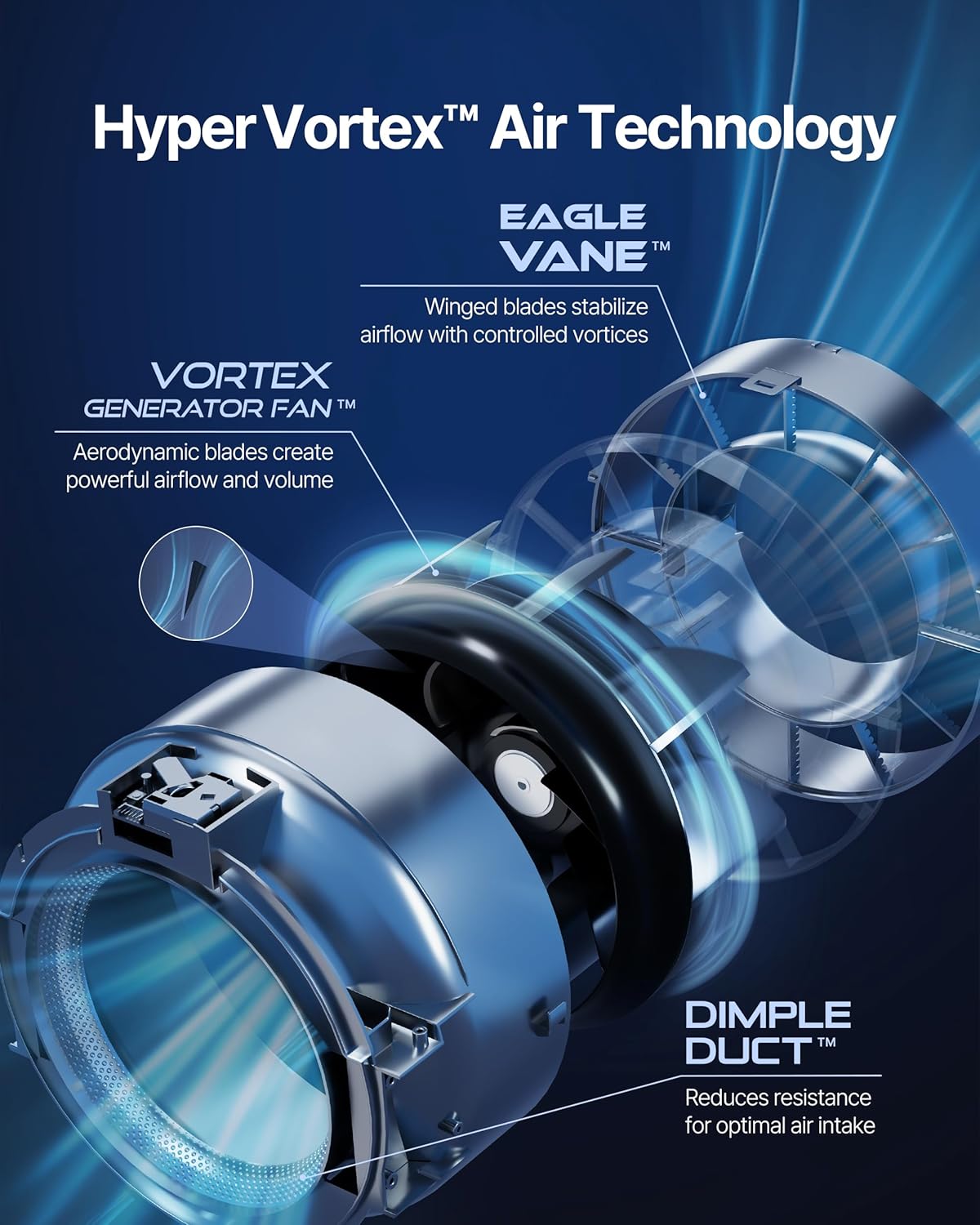
Figure 4.3: HyperVortex Air Technology components.
4.2. 3-in-1 Custom Filter System
The Airmega 450 uses a multi-stage filtration system to capture various pollutants. The standard filter included is the Fresh Starter+ filter. Other custom filters (Allergen+ and Intense Smoke+) can be purchased separately to address specific air quality concerns.

Figure 4.4: Available 3-in-1 Custom Filters.
4.3. നിയന്ത്രണ പാനൽ
The intuitive control panel is located on the top of the unit, providing access to all functions and displaying air quality information.

Figure 4.5: Intuitive Control Panel.
5. സജ്ജീകരണം
5.1 അൺപാക്ക് ചെയ്യുന്നു
- എയർ പ്യൂരിഫയർ അതിന്റെ പാക്കേജിംഗിൽ നിന്ന് ശ്രദ്ധാപൂർവ്വം നീക്കം ചെയ്യുക.
- എല്ലാ സംരക്ഷണ വസ്തുക്കളും പ്ലാസ്റ്റിക് ബാഗുകളും നീക്കം ചെയ്യുക.
5.2. ഫിൽറ്റർ ഇൻസ്റ്റാളേഷൻ
The 3-in-1 filter may come pre-installed but wrapped in plastic for protection. Ensure the plastic wrapping is removed before use.
- Open the filter cover. Refer to the diagram below for guidance.
- If the filter is wrapped, remove the plastic packaging from the 3-in-1 filter.
- Insert the filter into the unit, ensuring it is seated correctly.
- ഫിൽട്ടർ കവർ സുരക്ഷിതമായി അടയ്ക്കുക.

Figure 5.1: Filter Replacement Steps.
5.3. പ്ലേസ്മെന്റ്
Place the air purifier on a firm, level surface. For optimal performance, ensure there is adequate space around the unit for air circulation (at least 6-12 inches from walls or furniture).
5.4. പവർ കണക്ഷൻ
ഒരു സാധാരണ ഇലക്ട്രിക്കൽ ഔട്ട്ലെറ്റിലേക്ക് പവർ കോർഡ് പ്ലഗ് ചെയ്യുക.
6. പ്രവർത്തന നിർദ്ദേശങ്ങൾ
6.1. പവർ ഓൺ/ഓഫ്
Press the Power button on the control panel to turn the unit on or off.
6.2. സ്മാർട്ട് മോഡുകൾ
The Airmega 450 offers four smart modes to adapt to your environment:
- യാന്ത്രിക മോഡ്: Automatically adjusts fan speed based on real-time air quality readings.
- സ്ലീപ്പ് മോഡ്: Operates quietly with minimal fan speed and dimmed lights for undisturbed rest.
- ടർബോ മോഡ്: Activates maximum fan speed for rapid air purification.
- ഇക്കോ മോഡ്: Optimizes energy consumption by operating at the lowest airflow and increasing only when air quality requires it.
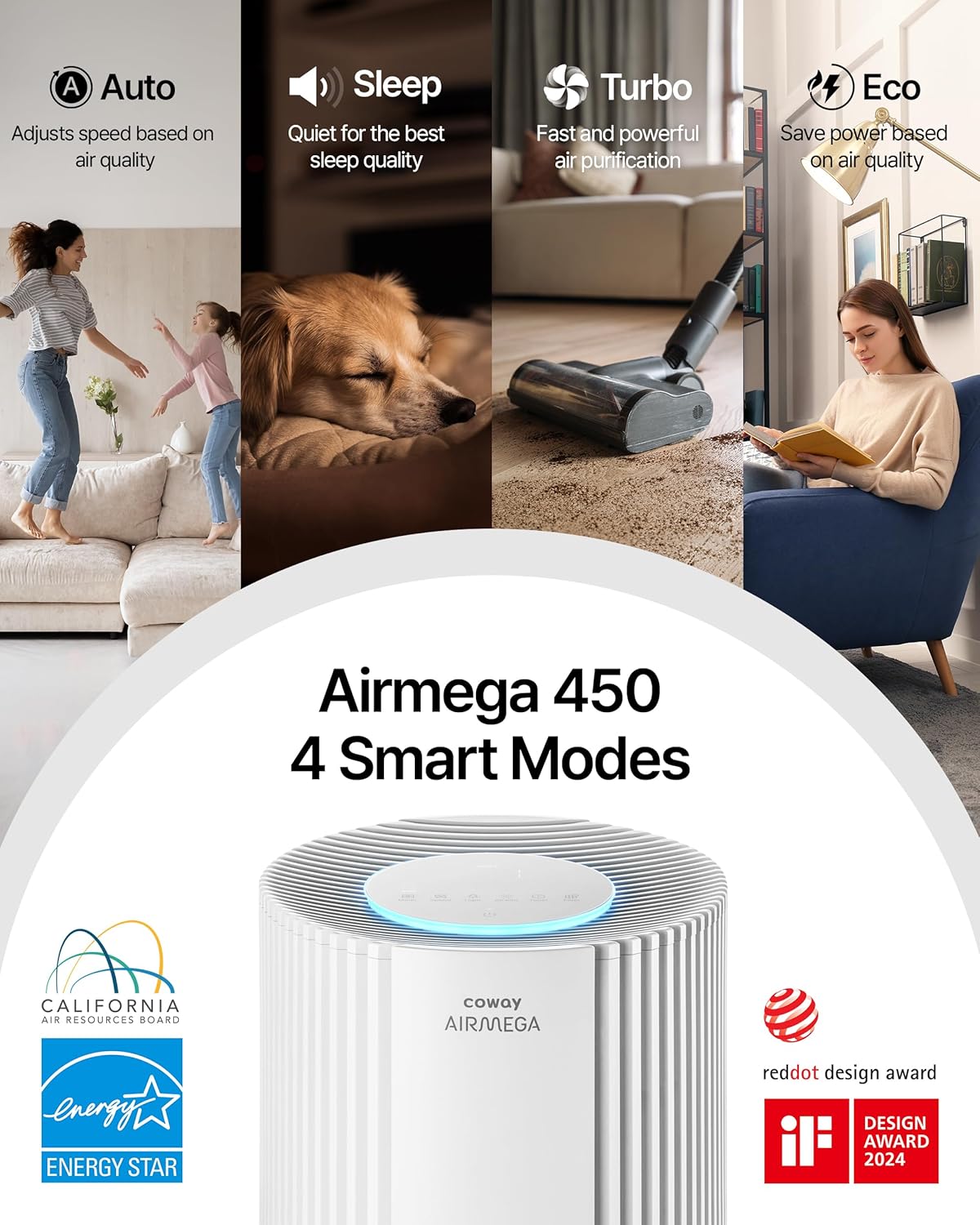
Figure 6.1: Airmega 450 Smart Modes.
6.3. Real-time Air Quality Indicator (AQI)
The unit continuously monitors air quality and displays it via a color-coded LED ring on the control panel. The colors indicate different levels of air quality (e.g., blue for good, red for poor).
6.4. അധിക സവിശേഷതകൾ
- ടൈമർ: Set the unit to operate for a specified duration (up to 24 hours).
- രാത്രി വെളിച്ചം: The LED ring can function as a night light.
- ബട്ടൺ മ്യൂട്ട്: Silence button press sounds.
- നിയന്ത്രണ പാനൽ ലോക്ക്: ക്രമീകരണങ്ങളിൽ ആകസ്മികമായ മാറ്റങ്ങൾ തടയുന്നു.
- Hidden Wheels: For easy relocation of the unit.

Figure 6.2: Convenience Features.
7. പരിപാലനം
7.1. Pre-filter Cleaning
The pre-filter captures larger particles and should be cleaned regularly (e.g., every 2-4 weeks) to maintain efficiency.
- എയർ പ്യൂരിഫയർ അൺപ്ലഗ് ചെയ്യുക.
- Open the filter cover and remove the pre-filter.
- Use a vacuum cleaner or soft brush to remove dust and debris from the pre-filter.
- Reinstall the clean pre-filter and close the cover.
7.2. 3-in-1 Filter Replacement
The 3-in-1 filter has a limited lifespan and requires replacement when indicated by the filter replacement indicator light on the control panel. The typical lifespan is approximately 12 months, but this can vary based on usage and air quality.
- എയർ പ്യൂരിഫയർ അൺപ്ലഗ് ചെയ്യുക.
- ഫിൽട്ടർ കവർ തുറക്കുക.
- പഴയ 3-ഇൻ-1 ഫിൽട്ടർ നീക്കം ചെയ്യുക.
- Unpack the new genuine COWAY 3-in-1 filter.
- Insert the new filter into the unit, ensuring proper orientation.
- ഫിൽട്ടർ കവർ അടയ്ക്കുക.
- എയർ പ്യൂരിഫയർ പ്ലഗ് ഇൻ ചെയ്യുക.
- Press and hold the Filter Reset button for 3 seconds to reset the filter life indicator.

ചിത്രം 7.1: 3-എസ്tagഇ ഫിൽട്ടറേഷൻ സിസ്റ്റം.
Using genuine COWAY replacement filters is recommended to ensure optimal performance and maintain warranty validity.

Figure 7.2: Importance of Genuine Filters.
8. പ്രശ്നപരിഹാരം
If you encounter issues with your Airmega 450, refer to the table below for common problems and solutions.
| പ്രശ്നം | സാധ്യമായ കാരണം | പരിഹാരം |
|---|---|---|
| യൂണിറ്റ് പവർ ഓണാക്കുന്നില്ല. | പവർ കോർഡ് സുരക്ഷിതമായി പ്ലഗ് ഇൻ ചെയ്തിട്ടില്ല. ഔട്ട്ലെറ്റിൽ നിന്ന് വൈദ്യുതിയില്ല. | പവർ കോർഡ് കണക്ഷൻ പരിശോധിക്കുക. മറ്റൊരു ഉപകരണം ഉപയോഗിച്ച് ഔട്ട്ലെറ്റ് പരിശോധിക്കുക. |
| മോശം വായു ശുദ്ധീകരണ പ്രകടനം. | Filters are dirty or clogged. Filter plastic wrapping not removed. Air intake/outlet blocked. | Clean the pre-filter. Replace the 3-in-1 filter. Ensure all filter packaging is removed. Clear obstructions. |
| യൂണിറ്റിൽ നിന്ന് അസാധാരണമായ ശബ്ദം. | Filter not installed correctly. Foreign object inside. Unit not on a level surface. | Reinstall filter. Check for foreign objects (unplug first). Place on a stable surface. |
| Air quality indicator always shows poor. | Sensor is dirty. High levels of pollutants in the environment. | Clean the air quality sensor (refer to maintenance section for sensor cleaning, if applicable). Continue operation in Turbo mode if necessary. |
ഈ പരിഹാരങ്ങൾ പരീക്ഷിച്ചതിനുശേഷവും പ്രശ്നം നിലനിൽക്കുകയാണെങ്കിൽ, ദയവായി ഉപഭോക്തൃ പിന്തുണയുമായി ബന്ധപ്പെടുക.
9 സ്പെസിഫിക്കേഷനുകൾ
| ഫീച്ചർ | വിശദാംശങ്ങൾ |
|---|---|
| മോഡൽ നമ്പർ | AP-2524B |
| ഉൽപ്പന്ന അളവുകൾ (D x W x H) | 13.4"D x 13.4"W x 29.6"H |
| ഇനത്തിൻ്റെ ഭാരം | 24.9 പൗണ്ട് |
| ഫ്ലോർ ഏരിയ കവറേജ് | Up to 3,285 Square Feet (based on 1 air change per hour) |
| ശബ്ദ നില | 20 dB (കുറഞ്ഞത്) |
| വാട്ട്tage | 72 വാട്ട്സ് |
| ഫിൽട്ടർ തരം | 3-in-1 Custom Filter (Pre-filter, True HEPA, Activated Carbon) |
| കണിക നിലനിർത്തൽ വലിപ്പം | 0.01 മൈക്രോമീറ്റർ |
| കൺട്രോളർ തരം | സ്പർശിക്കുക |
| പ്രത്യേക സവിശേഷതകൾ | Filter Life Indicator, Real Time Air Quality Indicator, Smart Mode |
| സർട്ടിഫിക്കേഷനുകൾ | CARB Certified, ETL Certified, Energy Star Certified |
10. വാറൻ്റി വിവരങ്ങൾ
The COWAY Airmega 450 Air Purifier is backed by a 3-year Manufacturer's Limited Warranty. This warranty covers defects in materials and workmanship under normal use.
For detailed terms and conditions, including coverage specifics and how to make a claim, please refer to the warranty card included with your product or visit the official Coway webസൈറ്റ്.
11. ഉപഭോക്തൃ പിന്തുണ
If you have questions, require technical assistance, or need to report an issue that cannot be resolved using the troubleshooting guide, please contact Coway customer support.
Contact information can typically be found on the Coway official webസൈറ്റ് അല്ലെങ്കിൽ ഉൽപ്പന്ന പാക്കേജിംഗിൽ.


