1. ഉൽപ്പന്നം കഴിഞ്ഞുview
The Google Nest Cam with Floodlight is an advanced outdoor security camera system designed to enhance the safety and monitoring of your home's exterior. It integrates a high-definition camera with powerful LED floodlights, providing clear visibility and intelligent detection capabilities.
This system is engineered to differentiate between people, animals, and vehicles, sending precise alerts directly to your Google Home app. The floodlights automatically activate upon detecting important activity, illuminating the area for improved visibility and deterrence. Users can access live HD video, review recorded events, and communicate via the built-in two-way audio feature.

Figure 1: Google Nest Cam with Floodlight and included replacement cable.
2. ബോക്സിൽ എന്താണുള്ളത്?
ഇൻസ്റ്റാളേഷൻ ആരംഭിക്കുന്നതിന് മുമ്പ് എല്ലാ ഘടകങ്ങളും നിലവിലുണ്ടെന്ന് ഉറപ്പാക്കുക:
- നെസ്റ്റ് ക്യാമറ
- Floodlight Unit
- മാറ്റിസ്ഥാപിക്കൽ കേബിൾ
- മൗണ്ടിംഗ് പ്ലേറ്റ്
- പവർ അഡാപ്റ്റർ
3. സജ്ജീകരണവും ഇൻസ്റ്റാളേഷനും
3.1 പ്രീ-ഇൻസ്റ്റലേഷൻ ആവശ്യകതകൾ
- ഊർജ്ജ സ്രോതസ്സ്: The Nest Cam with Floodlight is designed to replace an existing outdoor light fixture and requires hardwiring to a circuit. It is not powered by battery for the floodlight function. If no existing wiring is available, professional installation is recommended.
- വൈഫൈ കണക്റ്റിവിറ്റി: A stable 2.4 GHz or 5 GHz Wi-Fi network is required for full functionality, including mobile notifications, remote control, and video streaming.
- Google അക്കൗണ്ട്: A free Google Account is necessary to use the Google Home app, which is required to set up and manage your Nest Cam with Floodlight. This device is not compatible with the legacy Nest app.
3.2 ഇൻസ്റ്റലേഷൻ ഘട്ടങ്ങൾ
- പവർ ഓഫ് ചെയ്യുക: Before beginning any electrical work, ensure the power to the existing light fixture's circuit is turned off at the circuit breaker.
- നിലവിലുള്ള ഫിക്സ്ചർ നീക്കം ചെയ്യുക: Carefully remove your old outdoor light fixture from its mounting location.
- മൗണ്ടിംഗ് പ്ലേറ്റ് ഇൻസ്റ്റാളേഷൻ: Secure the Nest Cam Floodlight mounting plate to the junction box using the provided screws. Ensure it is firmly attached.
- വയർ കണക്ഷനുകൾ: Connect the electrical wires from your home's circuit to the corresponding wires on the Nest Cam Floodlight. Typically, this involves connecting live, neutral, and ground wires. If unsure, consult a qualified electrician.
- Attach Floodlight Unit: Secure the floodlight unit to the mounting plate.
- Attach Nest Cam: Connect the Nest Cam to the floodlight unit. The floodlight provides power to the camera.
- പവർ പുന ore സ്ഥാപിക്കുക: Once all connections are secure and the unit is mounted, restore power at the circuit breaker.
- ആപ്പ് സജ്ജീകരണം: Download the Google Home app on your smartphone or tablet. Follow the in-app instructions to add your new Nest Cam with Floodlight. This will involve scanning a QR code on the device and connecting it to your Wi-Fi network.

Figure 2: Nest Cam with Floodlight installed and operating at night.
4. പ്രവർത്തന നിർദ്ദേശങ്ങൾ
4.1 Google Home App Features
The Google Home app is your central control hub for the Nest Cam with Floodlight. Through the app, you can:
- Live HD Video: View a real-time, 1080p HDR video feed of your camera's view, day or night, with night vision capabilities.
- ബുദ്ധിപരമായ അലേർട്ടുകൾ: Receive notifications for detected people, animals, and vehicles. The system's intelligence helps reduce irrelevant alerts.
- Floodlight Control: Manually turn the floodlights on or off, adjust their brightness, and set customized routines for automatic activation based on motion or time of day.
- ടു-വേ ഓഡിയോ: Use the built-in speaker and microphone to talk to visitors or deter unwanted guests from your location.
- Event Video History: Access up to 3 hours of free event video history. For extended recording, a Nest Aware or Nest Aware Plus subscription is available (sold separately), offering up to 10 days of 24/7 recording and 60 days of event video history.
- ഓഫ്ലൈൻ സംഭരണം: In the event of a Wi-Fi outage or power loss, the Nest Cam can store up to an hour of recorded events locally, which will upload to the cloud once connectivity is restored.
- Familiar Face Alerts: With a Nest Aware subscription, the camera can recognize familiar faces and send specific alerts (feature availability may vary by region).
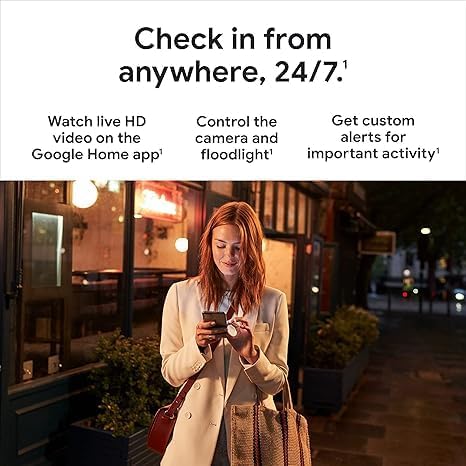
ചിത്രം 3: ഉദാample of intelligent alerts in the Google Home app.
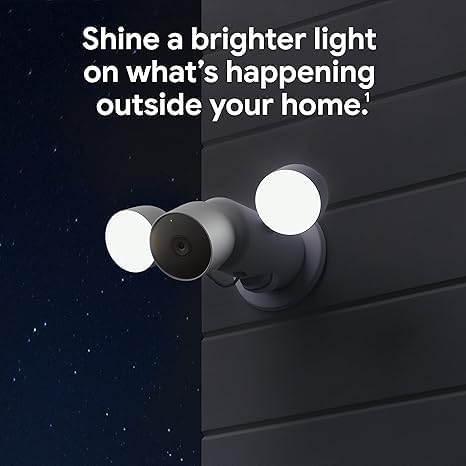
Figure 4: Monitoring your home remotely via the Google Home app.
5. പരിപാലനം
To ensure optimal performance and longevity of your Nest Cam with Floodlight, consider the following maintenance tips:
- Cleaning Lenses and Lights: Periodically wipe the camera lens and floodlight surfaces with a soft, damp തടസ്സമാകുന്ന പൊടി, അഴുക്ക് അല്ലെങ്കിൽ വെള്ളക്കെട്ടുകൾ നീക്കം ചെയ്യുന്നതിനുള്ള തുണി view or dim the lights. Avoid abrasive cleaners.
- കാലാവസ്ഥ സംരക്ഷണം: While the device is waterproof, ensure its mounting location provides adequate protection from direct, prolonged exposure to extreme weather conditions if possible, to minimize wear and tear.
- സോഫ്റ്റ്വെയർ അപ്ഡേറ്റുകൾ: Keep your Google Home app updated to the latest version to ensure access to new features, security enhancements, and bug fixes for your Nest Cam.
6. പ്രശ്നപരിഹാരം
If you encounter issues with your Nest Cam with Floodlight, try the following steps:
- വൈദ്യുതിയില്ല/ലൈറ്റുകൾ ഓണാകുന്നില്ല:
- ഫിക്സ്ചറിലേക്ക് വൈദ്യുതി വിതരണം ചെയ്തിട്ടുണ്ടെന്ന് ഉറപ്പാക്കാൻ സർക്യൂട്ട് ബ്രേക്കർ പരിശോധിക്കുക.
- Verify all electrical connections are secure. If unsure, consult an electrician.
- വൈഫൈ വിച്ഛേദിക്കൽ:
- Ensure your home Wi-Fi network is active and functioning correctly.
- നിങ്ങളുടെ വൈഫൈ റൂട്ടർ പുനരാരംഭിക്കുക.
- Check the signal strength in the Google Home app; consider relocating your router or using a Wi-Fi extender if the signal is weak.
- Alerts Not Received/Incorrect Alerts:
- Verify notification settings within the Google Home app are correctly configured.
- Adjust activity zones in the app to focus on areas of interest and reduce false alerts.
- ക്യാമറ ലെൻസ് വൃത്തിയുള്ളതും തടസ്സമില്ലാത്തതുമാണെന്ന് ഉറപ്പാക്കുക.
- മോശം വീഡിയോ നിലവാരം:
- Check your internet upload speed; a stable and sufficient speed is crucial for HD video streaming.
- ക്യാമറ ലെൻസ് വൃത്തിയാക്കുക.
- ടു-വേ ഓഡിയോ പ്രശ്നങ്ങൾ:
- Ensure microphone and speaker permissions are enabled for the Google Home app on your mobile device.
- ആപ്പിൽ വോളിയം ക്രമീകരണങ്ങൾ പരിശോധിക്കുക.
For further assistance, refer to the help section within the Google Home app or visit the official Google Nest support webസൈറ്റ്.
7 സ്പെസിഫിക്കേഷനുകൾ
| ഫീച്ചർ | വിശദാംശങ്ങൾ |
|---|---|
| മോഡലിൻ്റെ പേര് | Google Nest Cam; Floodlight |
| മോഡൽ നമ്പർ | G3AL9; GPLE9 |
| ഇൻഡോർ/ഔട്ട്ഡോർ ഉപയോഗം | ഔട്ട്ഡോർ |
| അനുയോജ്യമായ ഉപകരണങ്ങൾ | സ്മാർട്ട്ഫോൺ, ടാബ്ലെറ്റ്, ടെലിവിഷൻ |
| പവർ ഉറവിടം | Hardwired (replaces existing light fixture) |
| കണക്റ്റിവിറ്റി പ്രോട്ടോക്കോൾ | വൈഫൈ |
| കൺട്രോളർ തരം | Amazon Alexa, Google Assistant, Nest (via Google Home app) |
| മൗണ്ടിംഗ് തരം | മതിൽ മൗണ്ട് |
| വീഡിയോ ക്യാപ്ചർ റെസല്യൂഷൻ | 1080p HDR |
| നിറം | വെള്ള |
| നൈറ്റ് വിഷൻ റേഞ്ച് | 20 അടി |
| ഫ്രെയിം റേറ്റ് | സെക്കൻഡിൽ 30 ഫ്രെയിമുകൾ |
| വാല്യംtage | 240 വോൾട്ട് |
| വാട്ട്tage | 24 വാട്ട് മണിക്കൂർ |
| ജല പ്രതിരോധ നില | വാട്ടർപ്രൂഫ് |
| ഇനത്തിൻ്റെ ഭാരം | 3.4 പൗണ്ട് (ഏകദേശം 1.54 കിലോഗ്രാം) |
| ഒപ്റ്റിക്കൽ സൂം | 6x |
| വീഡിയോ എൻകോഡിംഗ് | H.264 |
| ലോ ലൈറ്റ് ടെക്നോളജി | രാത്രി നിറം |
| അലേർട്ട് തരം | Motion Only (with intelligent detection for people, animals, vehicles) |
| പ്രകാശ സ്രോതസ്സ് തരം | എൽഇഡി |
| യു.പി.സി | 197051800250 |
| ഉൽപ്പന്ന അളവുകൾ (L x W x H) | 6.5 x 12.4 x 3.66 ഇഞ്ച് |
8. വാറൻ്റിയും പിന്തുണയും
For information regarding product warranty, please refer to the warranty documentation included with your purchase or visit the official Google Nest support webസൈറ്റ്. പതിവുചോദ്യങ്ങൾ, ട്രബിൾഷൂട്ടിംഗ് ഗൈഡുകൾ, സാങ്കേതിക സഹായത്തിനായുള്ള കോൺടാക്റ്റ് ഓപ്ഷനുകൾ എന്നിവയുൾപ്പെടെ സമഗ്രമായ പിന്തുണാ ഉറവിടങ്ങൾ Google നൽകുന്നു.
You can also find extensive support and community forums through the Google Home app's help section, which offers direct access to product-specific information and troubleshooting steps.
ഓൺലൈൻ പിന്തുണ: സപ്പോർട്ട്.ഗൂഗിൾ.കോം/നെസ്റ്റ്


