1. ആമുഖം
This manual provides essential information for the safe and efficient operation of your JVC 65-inch AI Vision Series QLED Google TV, model LT-65NQ7165C. Please read these instructions thoroughly before using your television and retain them for future reference.
2. ബോക്സിൽ എന്താണുള്ളത്?
അൺപാക്ക് ചെയ്യുമ്പോൾ, താഴെ ലിസ്റ്റ് ചെയ്തിരിക്കുന്ന എല്ലാ ഇനങ്ങളും ഉണ്ടെന്നും നല്ല നിലയിലാണെന്നും ഉറപ്പാക്കുക:
- 1N LED ടിവി
- 1N Remote Control (with 2 AAA batteries included)
- 1N Wall Mount Bracket
- 1N Table Top Stand
- 4x സ്റ്റാൻഡ് സ്ക്രൂകൾ
- 1N പവർ കോർഡ്
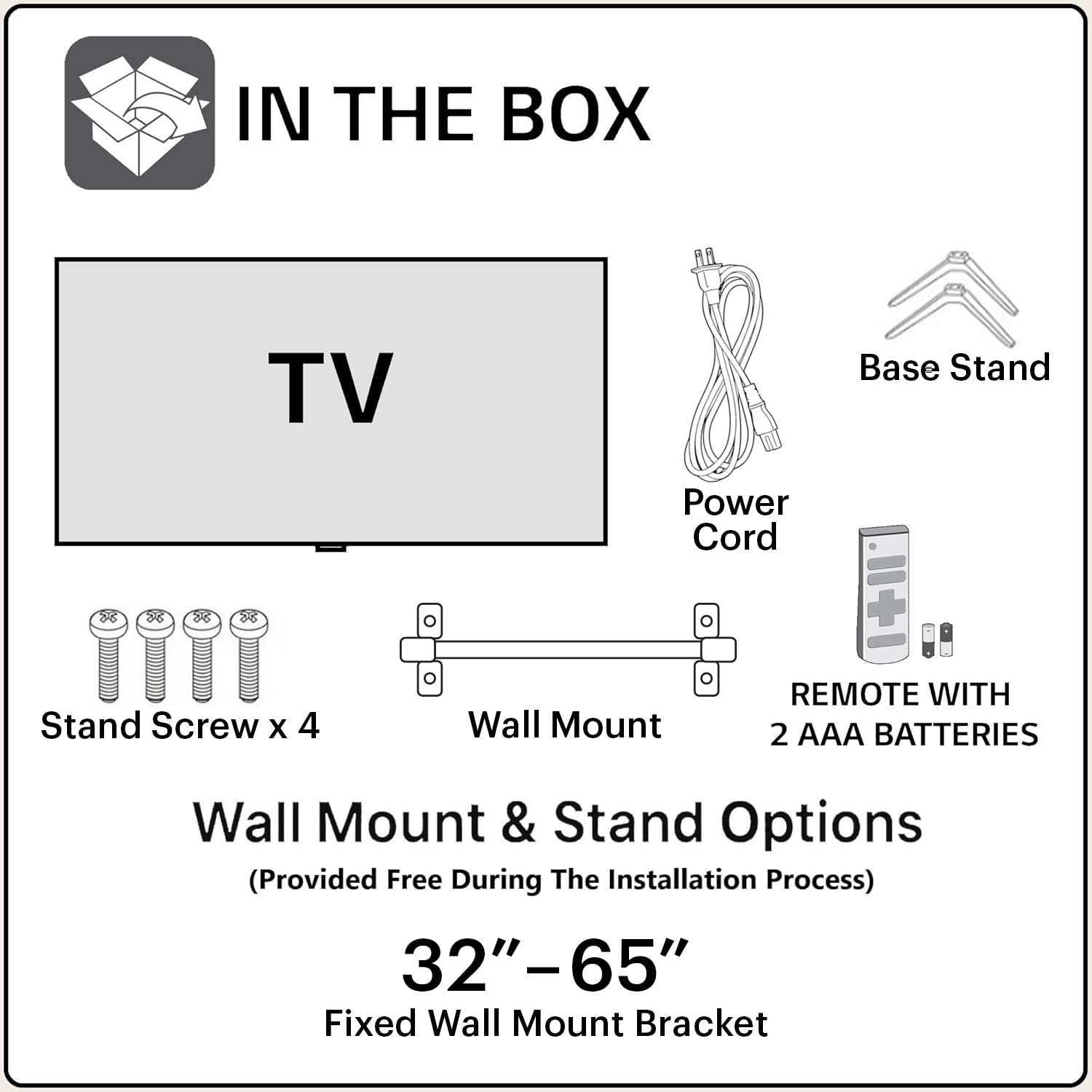
Image: Contents of the JVC 65-inch AI Vision Series QLED Google TV packaging.
3. സജ്ജീകരണ ഗൈഡ്
3.1 മൗണ്ടിംഗ് ഓപ്ഷനുകൾ
Your JVC TV offers two primary mounting options: Table Top Stand or Wall Mount. Choose the option that best suits your viewപരിസ്ഥിതി.
3.1.1. ടേബിൾ ടോപ്പ് സ്റ്റാൻഡ് ഇൻസ്റ്റലേഷൻ
- കേടുപാടുകൾ സംഭവിക്കാതിരിക്കാൻ ടിവി സ്ക്രീൻ-ഡൗൺ മൃദുവായതും പരന്നതുമായ ഒരു പ്രതലത്തിൽ ശ്രദ്ധാപൂർവ്വം വയ്ക്കുക.
- Attach the provided table top stands to the designated slots at the bottom of the TV.
- Secure the stands using the included stand screws.
- ടിവി ഒരു സ്ഥിരതയുള്ള, നിരപ്പായ പ്രതലത്തിൽ സ്ഥാപിക്കുക.
3.1.2. വാൾ മൗണ്ട് ഇൻസ്റ്റാളേഷൻ
The TV comes with a fixed wall mount bracket. Professional installation is recommended for wall mounting to ensure safety and proper setup.
- Identify a suitable wall location, ensuring it can support the TV's weight (approximately 15 kg).
- Follow the instructions provided with the wall mount bracket for secure installation.
- Attach the TV to the installed wall mount.

ചിത്രം: മുൻഭാഗം view of the JVC 65-inch AI Vision Series QLED Google TV.
3.2. പ്രാരംഭ കണക്ഷനുകൾ
Connect necessary devices to your TV using the available ports.
- ശക്തി: Connect the power cord to the TV and a suitable power outlet.
- എച്ച്ഡിഎംഐ: Use the 3 HDMI ports to connect gaming consoles, set-top boxes, or Blu-ray players. The TV supports ALLM and eARC.
- USB: Two USB ports are available for connecting hard drives and other USB devices.
- ഇഥർനെറ്റ്: സ്ഥിരമായ ഒരു വയർഡ് ഇന്റർനെറ്റ് കണക്ഷന് വേണ്ടി.
- ഒപ്റ്റിക്കൽ: അനുയോജ്യമായ ശബ്ദ സംവിധാനങ്ങളിലേക്കുള്ള ഡിജിറ്റൽ ഓഡിയോ ഔട്ട്പുട്ടിനായി.

ചിത്രം: പിൻഭാഗം view of the JVC 65-inch AI Vision Series QLED Google TV, highlighting connectivity ports.
4. നിങ്ങളുടെ ടിവി പ്രവർത്തിപ്പിക്കുന്നു
4.1. പവർ ഓൺ/ഓഫ്
Press the power button on the remote control or on the TV itself to turn the television on or off.
4.2. ഗൂഗിൾ ടിവി ഇന്റർഫേസ്
Your JVC TV runs on Google TV, providing a personalized and intuitive user experience. The home screen displays recommended content, installed apps, and quick access to various features.
- നാവിഗേഷൻ: Use the directional pad on your remote to navigate through menus and select options.
- അപ്ലിക്കേഷനുകൾ: Access supported streaming applications like Netflix, Prime Video, YouTube, Zee5, and more. The TV has 2 GB RAM and 16 GB ROM for app storage.
- സ്ക്രീൻ മിററിംഗ്: Cast content from compatible devices directly to your TV.
4.3. ഗൂഗിൾ അസിസ്റ്റൻ്റ്
The remote control includes a dedicated Google Assistant button for voice commands. Press the button and speak into the remote to search for content, control smart home devices, or get information.
4.4. കണക്റ്റിവിറ്റി സവിശേഷതകൾ
- ഡ്യുവൽ ബാൻഡ് വൈ-ഫൈ: ഇന്റർനെറ്റ് ആക്സസിനായി 2.4GHz അല്ലെങ്കിൽ 5GHz വൈഫൈ നെറ്റ്വർക്കുകളിലേക്ക് കണക്റ്റുചെയ്യുക.
- ബ്ലൂടൂത്ത് 5.0: വയർലെസ് ഹെഡ്ഫോണുകൾ, സൗണ്ട്ബാറുകൾ, അല്ലെങ്കിൽ മറ്റ് ബ്ലൂടൂത്ത് പ്രവർത്തനക്ഷമമാക്കിയ ആക്സസറികൾ എന്നിവ ബന്ധിപ്പിക്കുക.

Image: JVC TV remote control, featuring quick access buttons for popular streaming services and Google Assistant.
5. ഡിസ്പ്ലേ, ഓഡിയോ സവിശേഷതകൾ
5.1. ഡിസ്പ്ലേ ടെക്നോളജി
The JVC AI Vision Series QLED Google TV features a 4K Ultra HD (3840 x 2160) QLED display with a 60 Hz refresh rate. It supports HDR and HLG for enhanced contrast and vibrant colors, displaying 1.1 billion colors.

Image: Visual representation of the QLED display's color capabilities.
5.2. ഓഡിയോ സിസ്റ്റം
Experience immersive sound with 80 Watts of audio output, supported by Dolby Digital Plus and Dolby Atmos technologies. This provides a rich and dynamic audio experience for all your content.
6. പരിപാലനം
6.1. സ്ക്രീൻ വൃത്തിയാക്കൽ
സ്ക്രീൻ വൃത്തിയാക്കാൻ, മൃദുവായ, ലിന്റ് രഹിത തുണി ഉപയോഗിച്ച് സൌമ്യമായി തുടയ്ക്കുക. കഠിനമായ പാടുകൾക്ക്, ചെറുതായി dampവെള്ളം അല്ലെങ്കിൽ ഒരു പ്രത്യേക സ്ക്രീൻ ക്ലീനർ ഉപയോഗിച്ച് തുണി വൃത്തിയാക്കുക. കഠിനമായ രാസവസ്തുക്കളോ ഉരച്ചിലുകളോ ഉള്ള വസ്തുക്കൾ ഉപയോഗിക്കുന്നത് ഒഴിവാക്കുക.
6.2. ടിവി ബോഡി വൃത്തിയാക്കൽ
Wipe the exterior of the TV with a soft, dry cloth. Do not use liquid cleaners directly on the TV body.
7. പ്രശ്നപരിഹാരം
നിങ്ങളുടെ ടിവിയിൽ പ്രശ്നങ്ങൾ നേരിടുകയാണെങ്കിൽ, ഇനിപ്പറയുന്ന പൊതുവായ പരിഹാരങ്ങൾ പരിശോധിക്കുക:
- ശക്തിയില്ല: Ensure the power cord is securely connected to both the TV and the power outlet. Check if the outlet is functioning.
- ചിത്രം/ശബ്ദം ഇല്ല: ശരിയായ ഇൻപുട്ട് ഉറവിടം തിരഞ്ഞെടുത്തിട്ടുണ്ടെന്ന് ഉറപ്പാക്കുക. എല്ലാ കേബിൾ കണക്ഷനുകളും (HDMI, മുതലായവ) അയഞ്ഞതാണോ എന്ന് പരിശോധിക്കുക.
- റിമോട്ട് പ്രതികരിക്കുന്നില്ല: Replace the AAA batteries in the remote control. Ensure there are no obstructions between the remote and the TV's IR sensor.
- നെറ്റ്വർക്ക് കണക്ഷൻ പ്രശ്നങ്ങൾ: Restart your Wi-Fi router. On the TV, go to network settings and reconnect to your Wi-Fi network. For wired connections, check the Ethernet cable.
- ചിത്ര ഗുണനിലവാര പ്രശ്നങ്ങൾ: ടിവി മെനുവിൽ ചിത്ര ക്രമീകരണങ്ങൾ (തെളിച്ചം, ദൃശ്യതീവ്രത, നിറം) ക്രമീകരിക്കുക. ഉള്ളടക്ക ഉറവിടം ഉയർന്ന നിലവാരമുള്ളതാണെന്ന് ഉറപ്പാക്കുക.
8 സ്പെസിഫിക്കേഷനുകൾ
| ഫീച്ചർ | സ്പെസിഫിക്കേഷൻ |
|---|---|
| ബ്രാൻഡ് | ജെ.വി.സി |
| മോഡൽ | LT-65NQ7165C |
| സ്ക്രീൻ വലിപ്പം | 65 ഇഞ്ച് |
| ഡിസ്പ്ലേ ടെക്നോളജി | ക്യുഎൽഇഡി |
| റെസലൂഷൻ | 4K (3840x2160 Pixels) |
| പുതുക്കിയ നിരക്ക് | 60 Hz |
| ഓപ്പറേറ്റിംഗ് സിസ്റ്റം | Google TV |
| റാം മെമ്മറി | 2 ജിബി |
| സംഭരണ ശേഷി | 16 ജിബി |
| ഓഡിയോ ഔട്ട്പുട്ട് | 80 വാട്ട്സ് |
| ഓഡിയോ സവിശേഷതകൾ | Dolby Digital Plus, Dolby Atmos |
| കണക്റ്റിവിറ്റി | Dual Band Wi-Fi, 3 HDMI ports (ALLM, eARC), 2 USB ports, Bluetooth 5.0, Optical, Ethernet |
| പ്രത്യേക സവിശേഷതകൾ | HDR, HLG, Google Assistant, Screen Mirroring |
| ഉൽപ്പന്ന അളവുകൾ | 12.5D x 147W x 83H സെന്റീമീറ്ററുകൾ |
| ഇനത്തിൻ്റെ ഭാരം | 15 കി.ഗ്രാം |
9. വാറൻ്റി വിവരങ്ങൾ
Your JVC TV comes with a ഉൽപ്പന്നത്തിന് 1 വർഷത്തെ വാറന്റി ഒപ്പം 6 months on remote accessories. To avail of the brand warranty, please retain your purchase invoice. The user manual can also be accessed from the brand's official webസൈറ്റ്.
കുറിപ്പ്: The warranty does not cover light bleeding and dot issues (Mura issues) occurring on a certain Grey scale, as per the Mura Inspection standard, this is considered acceptable. As per ND (Neutral Density) Filter 2% guideline, this is not considered a panel defect.
10. ഉപഭോക്തൃ പിന്തുണ
For further assistance, technical support, or service requests, please refer to the contact information provided on your purchase invoice or visit the official JVC customer support website. Ensure you have your product model number (LT-65NQ7165C) and purchase details ready when contacting support.


