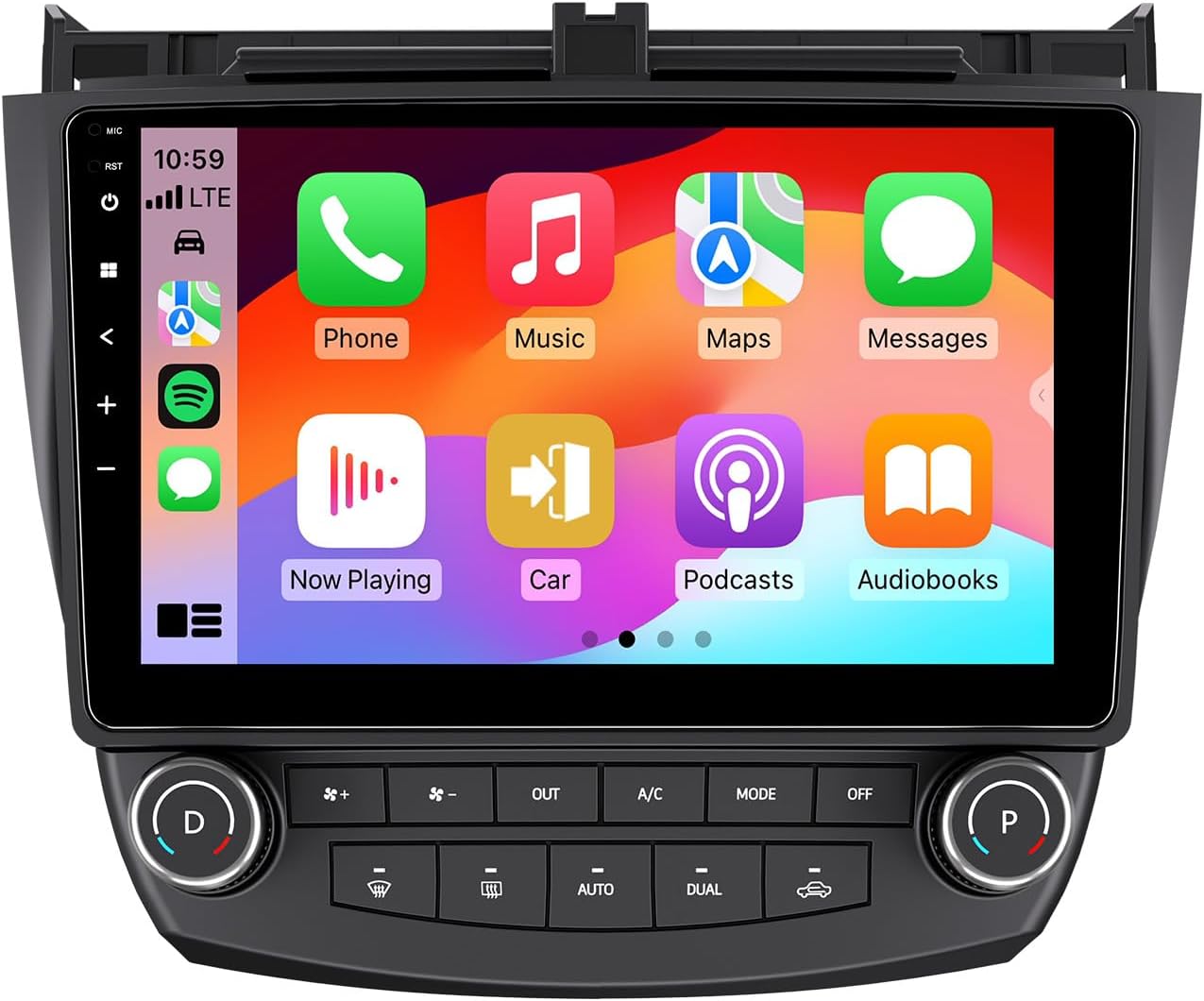
This manual provides detailed instructions for the installation, operation, and maintenance of your Eonon HAC1X6 Android 13 Car Stereo. This unit is custom-designed to seamlessly integrate with Honda Accord models manufactured between 2003 and 2007. It is important to verify your vehicle's model year and dashboard dimensions for proper fitment. Please note that this car stereo is suitable only for petrol versions of the car and is not compatible with diesel versions.
അൺപാക്ക് ചെയ്യുമ്പോൾ, ഇനിപ്പറയുന്ന എല്ലാ ഇനങ്ങളും ഉണ്ടെന്ന് ഉറപ്പാക്കുക:
പവർ കേബിൾ *1
Basic air conditioning adapter cable *1
GPS ആന്റിന *1
USB അഡാപ്റ്റർ കേബിൾ *2
Audio-video adapter cable *1
Audio adapter cable *1
Reverse video input cable *1
15A spare fuse *1
ബാഹ്യ മൈക്രോഫോൺ *1
ഉപയോക്തൃ മാനുവൽ *1
Figure 2.1: Contents of the Product Package
3 പ്രധാന സവിശേഷതകൾ
3.1 Android 13 System for Enhanced Performance
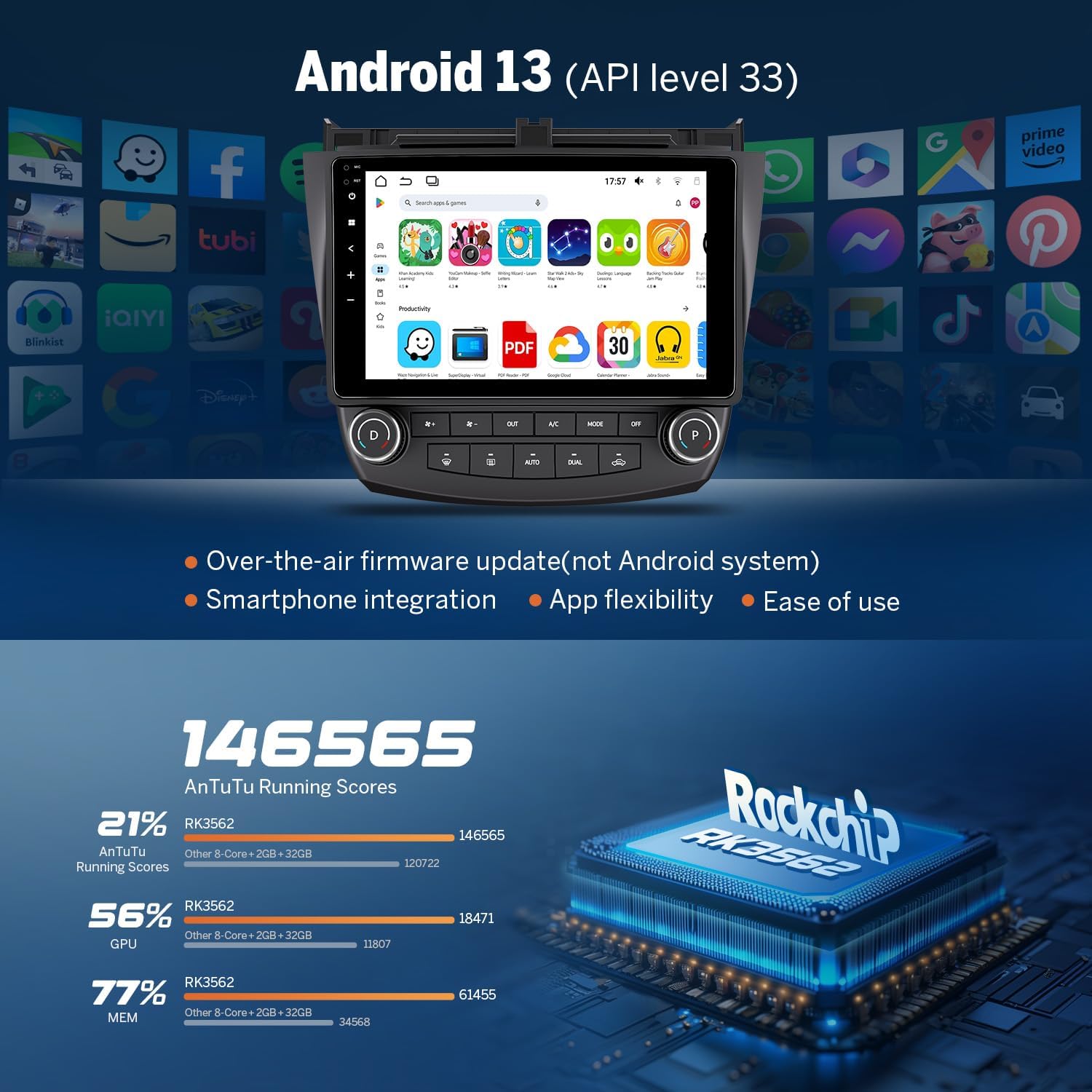
The Eonon HAC1X6 operates on the latest Android 13 system, powered by an RK3562 Quad-core ARM Cortex-A53 CPU clocked at 2.0GHz. This configuration, combined with 2GB RAM and 32GB ROM, ensures smooth multitasking and rapid application response times. Firmware updates are conveniently available online, eliminating the need for USB stick upgrades.
Figure 3.1: Android 13 System and Processor Details
3.2 വയർലെസ്/വയർഡ് കാർപ്ലേ & ആൻഡ്രോയിഡ് ഓട്ടോ
Enjoy seamless smartphone integration with both wireless and wired CarPlay and Android Auto functionalities. This feature allows for easy access to navigation, music, calls, and messages through voice commands or the intuitive touchscreen, promoting safer driving by minimizing distractions. Wireless connectivity provides a clutter-free setup, while wired options offer additional flexibility.
Figure 3.2: Wireless CarPlay & Android Auto Interface
3.3 Crystal-Clear Display & Audio Excellence
The unit features a 10.1-inch IPS HD capacitive touchscreen with a resolution of 1280×720 and a wide 178° viewing angle, ensuring clear and vibrant visuals even in bright conditions. For audio, a built-in 36-band EQ and a 4×45W surround sound amplifier provide immersive and customizable sound experiences. It supports various media formats including 1080P video, MP3, FLAC, and APE.
Figure 3.3: Display and Physical Controls
Figure 3.4: Audio Customization and Bluetooth Connectivity
3.4 Advanced Features & Expandability
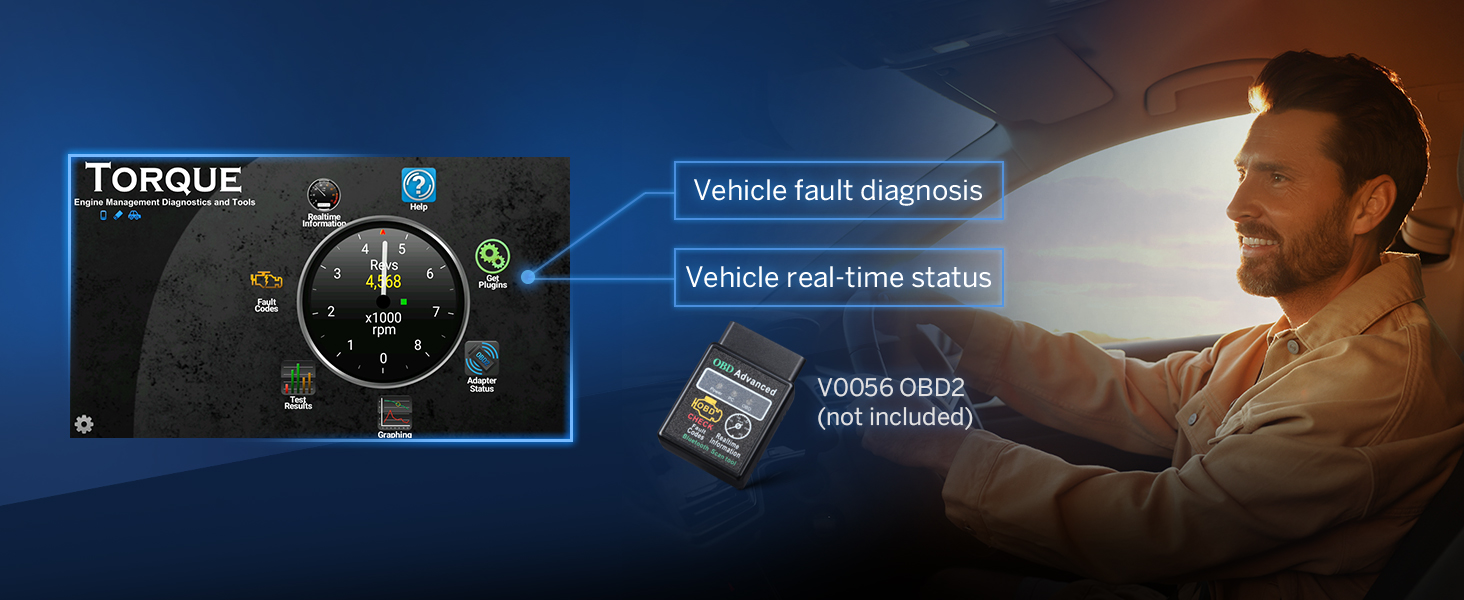
The HAC1X6 supports various advanced features and accessories. It includes inputs for a backup camera and is compatible with steering wheel controls. Dual-band Wi-Fi (2.4G/5G) and app installation are supported. Additional Eonon accessories such as a dashcam (A100) and OBD2 scanner (V0056) can be connected (sold separately). Bluetooth 5.4 ensures stable hands-free calls, music streaming, and quick phonebook searches. Three USB ports are available for external devices.
Figure 3.5: Backup Camera Support
Figure 3.6: Dash Cam Compatibility (A100, not included)
Figure 3.7: OBD2 Scanner Support (V0056, not included)
4. സജ്ജീകരണവും ഇൻസ്റ്റാളേഷനും
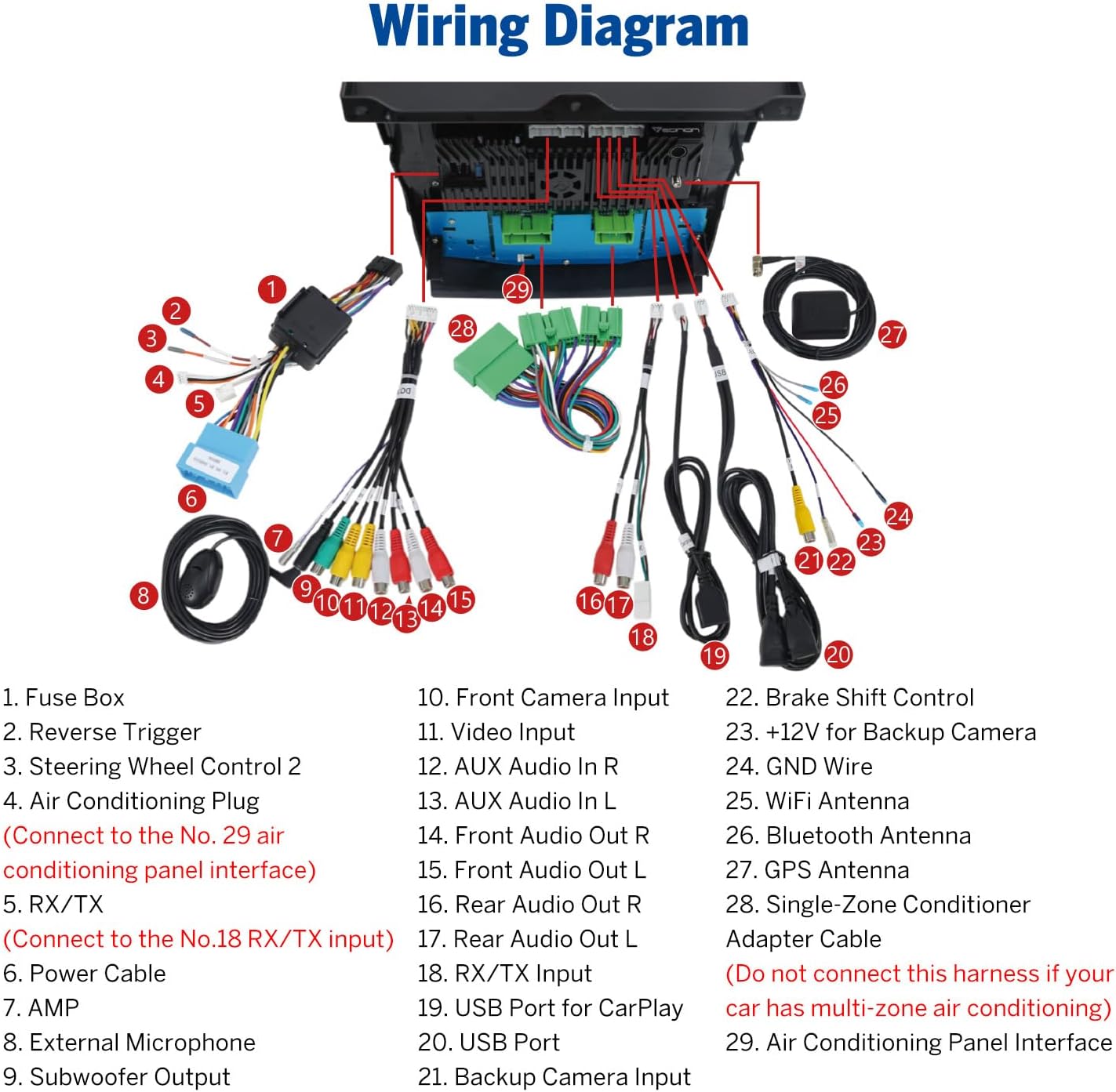
The Eonon HAC1X6 is designed for a plug-and-play installation, retaining your car's factory features. Professional installation is recommended to ensure proper wiring and functionality. Refer to the detailed wiring diagram provided below and in your included user manual for specific connections.
വീഡിയോ 4.1: ഇൻസ്റ്റലേഷൻ കഴിഞ്ഞുview for Eonon car stereo HAC1X6 in a Honda Accord. This video demonstrates the removal of the old stereo, connection of new wiring, and installation of the new Eonon unit, including a brief demonstration of the backup camera and Android Auto/CarPlay features. It highlights the seamless integration and retention of OEM features like AC controls.
4.1 വയറിംഗ് ഡയഗ്രം
Carefully follow the wiring diagram to connect the car stereo to your vehicle's electrical system. Pay close attention to the air conditioning adapter cable connection, especially if your car has a multi-zone air conditioning system.
ചിത്രം 4.2: സമഗ്രമായ വയറിംഗ് ഡയഗ്രം
4.2 OEM സവിശേഷതകൾ നിലനിർത്തൽ
The Eonon HAC1X6 is designed to maintain your vehicle's original features, including steering wheel controls and AC information/control. These functionalities are integrated into the new head unit for a consistent user experience.
Figure 4.3: Integration with Factory Features
5. പ്രവർത്തന നിർദ്ദേശങ്ങൾ
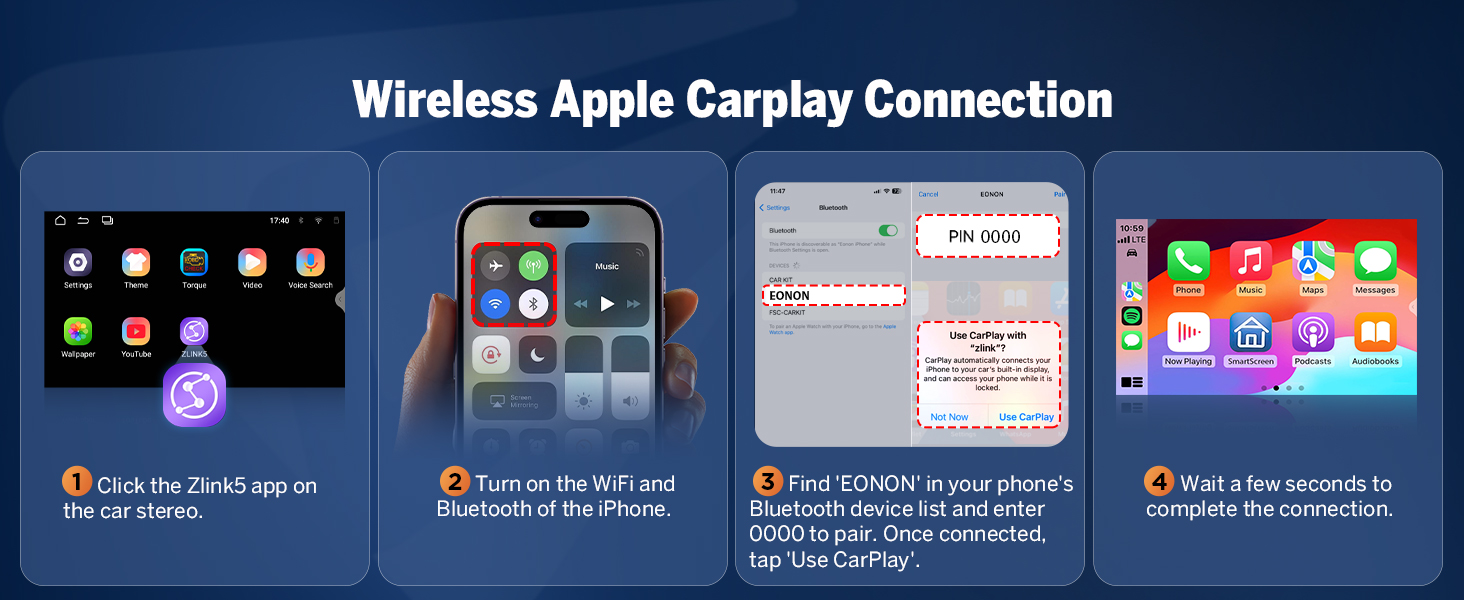
5.1 വയർലെസ് ആപ്പിൾ കാർപ്ലേ കണക്ഷൻ
കാർ സ്റ്റീരിയോയിലെ Zlink5 ആപ്പിൽ ക്ലിക്ക് ചെയ്യുക.
നിങ്ങളുടെ iPhone-ൽ Wi-Fi, Bluetooth എന്നിവ ഓണാക്കുക.
നിങ്ങളുടെ ഫോണിന്റെ ബ്ലൂടൂത്ത് ഉപകരണ ലിസ്റ്റിൽ 'EONON' കണ്ടെത്തി ജോടിയാക്കാൻ '0000' നൽകുക. കണക്റ്റ് ചെയ്തുകഴിഞ്ഞാൽ, 'Use CarPlay' ടാപ്പ് ചെയ്യുക.
കണക്ഷൻ പൂർത്തിയാക്കാൻ കുറച്ച് നിമിഷങ്ങൾ കാത്തിരിക്കുക.
Figure 5.1: Wireless Apple CarPlay Connection Steps
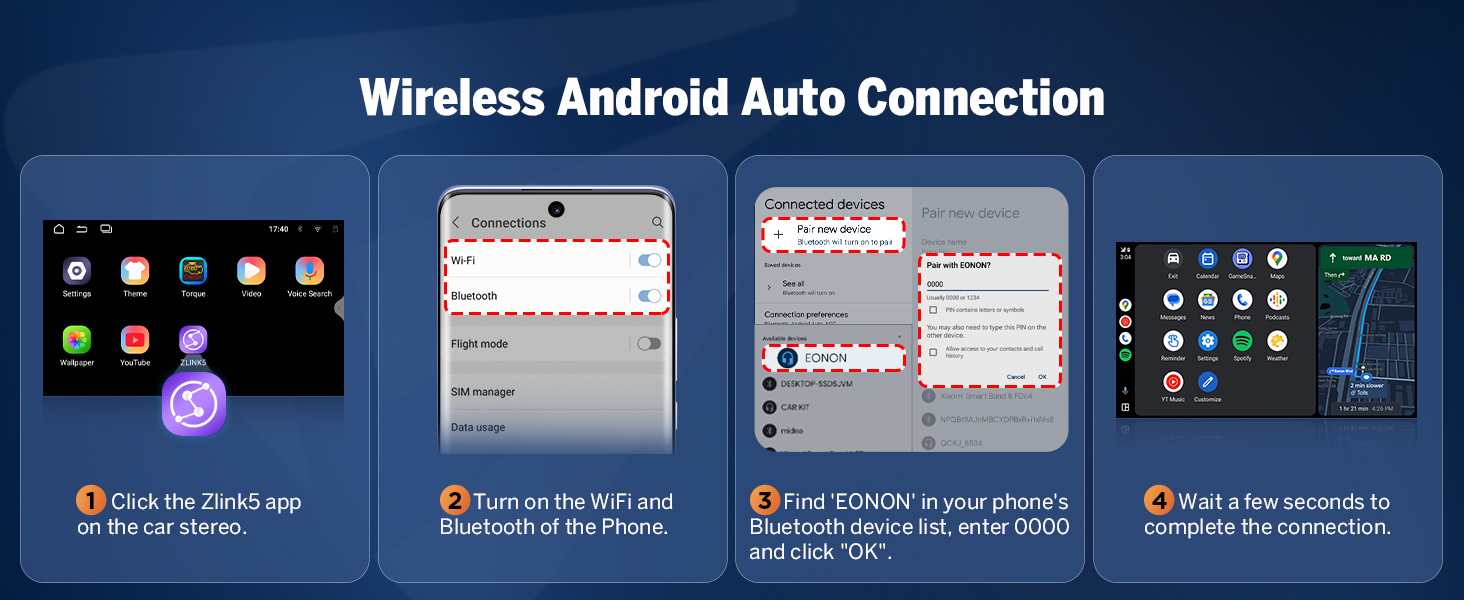
5.2 വയർലെസ് ആൻഡ്രോയിഡ് ഓട്ടോ കണക്ഷൻ
കാർ സ്റ്റീരിയോയിലെ Zlink5 ആപ്പിൽ ക്ലിക്ക് ചെയ്യുക.
നിങ്ങളുടെ ആൻഡ്രോയിഡ് ഫോണിൽ വൈഫൈയും ബ്ലൂടൂത്തും ഓണാക്കുക.
Find 'EONON' in your phone's Bluetooth device list, enter '0000' to pair and click 'OK'.
കണക്ഷൻ പൂർത്തിയാക്കാൻ കുറച്ച് നിമിഷങ്ങൾ കാത്തിരിക്കുക.
Figure 5.2: Wireless Android Auto Connection Steps
5.3 Screen Mirroring (iOS)
Click the Zlink5 app on the car stereo, set the car stereo to iPhone wireless screen mirroring mode.
Turn on the iPhone hotspot, and connect to the car stereo.
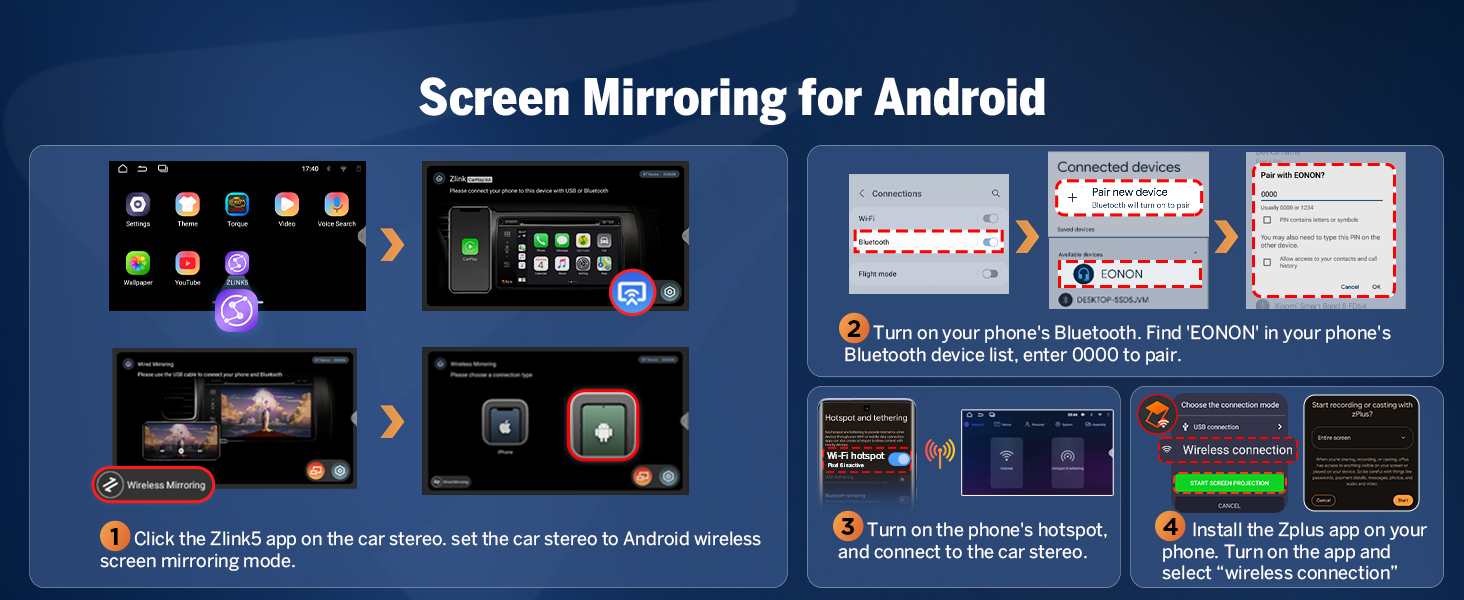
Click the Zlink5 app on the car stereo, set the car stereo to Android wireless screen mirroring mode.
നിങ്ങളുടെ ഫോണിന്റെ ബ്ലൂടൂത്ത് ഓണാക്കുക. നിങ്ങളുടെ ഫോണിന്റെ ബ്ലൂടൂത്ത് ഉപകരണ ലിസ്റ്റിൽ 'EONON' കണ്ടെത്തുക, ജോടിയാക്കാൻ '0000' നൽകുക.
Turn on the phone's hotspot, and connect to the car stereo.
നിങ്ങളുടെ ഫോണിൽ Zplus ആപ്പ് ഇൻസ്റ്റാൾ ചെയ്യുക. ആപ്പ് ഓണാക്കി "വയർലെസ് കണക്ഷൻ" തിരഞ്ഞെടുക്കുക.
Figure 5.4: Android Screen Mirroring Steps
5.5 Customizing the Interface
The Eonon HAC1X6 allows for personalization of the user interface. You can customize the boot logo, button colors, and wallpaper to match your preferences or vehicle's interior.
Figure 5.5: Interface Customization Options
Additionally, the unit offers three distinct UI themes to choose from, providing different visual layouts and aesthetics for your driving experience.
Figure 5.6: Available UI Themes
6. പരിപാലനം
6.1 സോഫ്റ്റ്വെയർ അപ്ഡേറ്റുകൾ (OTA)
The Eonon HAC1X6 supports Over-The-Air (OTA) software updates. These updates are crucial for fixing software issues, enhancing security, and improving overall device performance. You can update your device with just a few taps directly from the unit's settings. Please be aware that these updates are for the software and do not upgrade the core Android system version.
If you encounter any issues with your Eonon HAC1X6 car stereo, please refer to the following general troubleshooting tips:
ശക്തിയില്ല: Check all power cable connections and ensure the 15A fuse is intact.
ശബ്ദമില്ല: Verify speaker connections and audio output settings. Check the 36-band EQ settings.
കാർപ്ലേ/ആൻഡ്രോയിഡ് ഓട്ടോ കണക്റ്റ് ചെയ്യുന്നില്ല: Ensure Wi-Fi and Bluetooth are enabled on both the stereo and your smartphone. Re-pair the devices. Check the Zlink5 app settings.
ജിപിഎസ് സിഗ്നൽ പ്രശ്നങ്ങൾ: ജിപിഎസ് ആന്റിന ശരിയായി ഇൻസ്റ്റാൾ ചെയ്തിട്ടുണ്ടെന്നും വ്യക്തമായ ഒരു ലൈൻ ഉണ്ടെന്നും ഉറപ്പാക്കുക. view ആകാശത്തിൻ്റെ.
സ്ക്രീൻ പ്രതികരിക്കുന്നില്ല: Try restarting the unit. If issues persist, perform a factory reset (note: this will erase all user data).
7.1 Verifying Device Authenticity
To ensure you have a genuine Eonon product and to verify its specifications, you can use a "Fake Device Test" application. This can help confirm the Android version, processor, memory (RAM), and storage (ROM) of your unit.
Figure 7.1: Using a "Fake Device Test" App
8 സ്പെസിഫിക്കേഷനുകൾ
ഫീച്ചർ
വിശദാംശങ്ങൾ
ഉൽപ്പന്ന അളവുകൾ
1.18 x 10.91 x 8.07 ഇഞ്ച്
ഇനത്തിൻ്റെ ഭാരം
5.77 പൗണ്ട്
ഇനം മോഡൽ നമ്പർ
HAC1X6
ബ്രാൻഡ്
ഇയോണൺ
കണക്റ്റിവിറ്റി ടെക്നോളജി
ബ്ലൂടൂത്ത്, യുഎസ്ബി, വൈ-ഫൈ
കൺട്രോളർ തരം
ആൻഡ്രോയിഡ്
പ്രത്യേക സവിശേഷതകൾ
Android Auto, Apple CarPlay, Built-In Bluetooth, Built-In Wi-Fi
For warranty information, technical support, or any inquiries regarding your Eonon HAC1X6 car stereo, please refer to the contact details provided in the packaging or visit the official Eonon website. Regular software updates are provided to ensure optimal performance and security of your device.
അനുബന്ധ രേഖകൾ - HAC1X6
Mazda 3-നുള്ള Eonon Q63Pro ഇൻസ്റ്റലേഷൻ മാനുവൽ (2010-2013) മാസ്ഡ 3 വാഹനങ്ങളിലെ (2010-2013) ഇയോണൺ ക്യു63പ്രോ 9 ഇഞ്ച് ആൻഡ്രോയിഡ് 10 കാർ സ്റ്റീരിയോ ഹെഡ് യൂണിറ്റിനായുള്ള വിശദമായ ഇൻസ്റ്റാളേഷൻ ഗൈഡ്. ജിപിഎസ്, കാർപ്ലേ, ആൻഡ്രോയിഡ് ഓട്ടോ, ഡിഎസ്പി, ബ്ലൂടൂത്ത് എന്നിവയും അതിലേറെയും ഉൾക്കൊള്ളുന്നു.
Eonon VWA12S ഉപയോക്തൃ മാനുവൽ: സവിശേഷതകൾ, ഇൻസ്റ്റാളേഷൻ, ഓപ്പറേഷൻ ഗൈഡ് ഇയോണൺ VWA12S കാർ ഇൻഫോടെയ്ൻമെന്റ് സിസ്റ്റത്തിനായുള്ള സമഗ്രമായ ഉപയോക്തൃ മാനുവൽ. ഉൽപ്പന്നം മുഴുവൻ ഉൾക്കൊള്ളുന്നു.view, വയർലെസ് കാർപ്ലേ, ആൻഡ്രോയിഡ് ഓട്ടോ, ജിപിഎസ് നാവിഗേഷൻ, ബ്ലൂടൂത്ത്, ക്രമീകരണങ്ങൾ, നിങ്ങളുടെ ഇയോണൺ VWA12S കാർ സ്റ്റീരിയോയ്ക്കുള്ള ട്രബിൾഷൂട്ടിംഗ് തുടങ്ങിയ സവിശേഷതകൾ.
ബിഎംഡബ്ല്യു 3 സീരീസ് (E90/E91/E92/E93) 2005-2011 ഇയോൺ ഹെഡ് യൂണിറ്റ് ഇൻസ്റ്റലേഷൻ മാനുവൽ 2005 നും 2011 നും ഇടയിൽ നിർമ്മിച്ച BMW 3 സീരീസ് (E90, E91, E92, E93) മോഡലുകളിലെ ഇയോൺ കാർ സ്റ്റീരിയോ ഹെഡ് യൂണിറ്റുകൾക്കായുള്ള സമഗ്രമായ ഇൻസ്റ്റലേഷൻ മാനുവൽ. ഫാക്ടറി റേഡിയോ, എയർ കണ്ടീഷനിംഗ് നിയന്ത്രണങ്ങൾ നീക്കം ചെയ്യുന്നതിനും, പുതിയ യൂണിറ്റ് വയറിംഗ് ചെയ്യുന്നതിനും, ഡാഷ്ബോർഡിൽ ഘടിപ്പിക്കുന്നതിനുമുള്ള വിശദമായ, ഘട്ടം ഘട്ടമായുള്ള നിർദ്ദേശങ്ങൾ ഈ ഗൈഡ് നൽകുന്നു. കൺസോൾ അനുയോജ്യത പരിശോധിക്കൽ, പ്രത്യേക ഉപകരണങ്ങൾ ഉപയോഗിക്കൽ, ഹാർനെസുകൾ ബന്ധിപ്പിക്കൽ, ടെസ്റ്റിംഗ് സവിശേഷതകൾ തുടങ്ങിയ അവശ്യ ഘട്ടങ്ങൾ ഇത് ഉൾക്കൊള്ളുന്നു.
Eonon Q49PRO ഉപയോക്തൃ മാനുവൽ Eonon Q49PRO കാർ സ്റ്റീരിയോയ്ക്കുള്ള ഉപയോക്തൃ മാനുവൽ, ഇൻസ്റ്റാളേഷൻ, സവിശേഷതകൾ, ക്രമീകരണങ്ങൾ, ട്രബിൾഷൂട്ടിംഗ് എന്നിവ ഉൾക്കൊള്ളുന്നു.
Eonon Installation Manual for BMW 3 Series (2005-2011) - Q65SE Comprehensive installation guide for the Eonon Q65SE Apple CarPlay & Android Auto car stereo receiver in BMW 3 Series models (2005-2011, E90/E91/E92/E93). Includes step-by-step instructions, wiring, and panel removal.