ആമുഖം
The FIREBAT Mini PC A6 is a compact yet powerful desktop computer designed for a wide range of applications, including office work, business operations, home entertainment, and gaming. It features an advanced AMD Ryzen 7 6800H processor and AMD Radeon 680M graphics, offering a balance of high performance and efficient power consumption. This manual provides essential information for setting up, operating, maintaining, and troubleshooting your Mini PC.

ചിത്രം 1: മുന്നിലും പിന്നിലും view of the FIREBAT Mini PC A6.
പാക്കേജ് ഉള്ളടക്കം
ആരംഭിക്കുന്നതിന് മുമ്പ്, പാക്കേജിൽ എല്ലാ ഇനങ്ങളും ഉണ്ടെന്ന് ഉറപ്പാക്കുക:
- 1 x FIREBAT A6 AMD R7 6800H Mini PC
- 1 x 19V/6.3A 120W US Adapter
- 1 x VESA മൗണ്ട്
- 1 x HDMI കേബിൾ
- 1 x ഉപയോക്തൃ മാനുവൽ

Figure 2: Contents included in the FIREBAT Mini PC A6 package.
സജ്ജീകരണ ഗൈഡ്
പ്രാരംഭ സജ്ജീകരണം
- Connect the power adapter to the DC-in port on the Mini PC and plug it into a power outlet.
- Connect your monitor or TV to the Mini PC using the provided HDMI cable or a DisplayPort cable. The device supports triple 4K monitor output.
- Connect your keyboard and mouse to the available USB 3.0 ports. Wireless peripherals can also be used.
- മിനി പിസി ഓൺ ചെയ്യാൻ അതിന്റെ മുൻവശത്തുള്ള പവർ ബട്ടൺ അമർത്തുക.
- Follow the on-screen instructions to complete the initial setup of the Windows 11 Pro operating system.
വെസ മൗണ്ടിംഗ്
The FIREBAT Mini PC A6 includes a VESA mount for convenient installation behind a compatible monitor or TV, saving desk space and creating a clean setup.
- Attach the VESA mount bracket to the back of your monitor/TV using appropriate screws.
- Align the Mini PC with the mounted bracket and slide it into place until it clicks securely.
- Ensure all cables are properly connected and managed for optimal performance and aesthetics.
Video 1: Official unboxing and initial setup of the FIREBAT Mini PC A6, demonstrating the contents and basic connections.
നിങ്ങളുടെ മിനി പിസി പ്രവർത്തിപ്പിക്കുന്നു
പ്രധാന സവിശേഷതകളും പ്രകടനവും
The FIREBAT Mini PC A6 is engineered for robust performance across various tasks:
- പ്രോസസ്സർ: Equipped with an AMD Ryzen 7 6800H processor (8 cores/16 threads, up to 4.7GHz), based on ZEN 3+ architecture and TSMC 6nm FinFET technology. This provides excellent performance for multi-threaded tasks.
- ഗ്രാഫിക്സ്: Features an integrated AMD Radeon 680M GPU (2200MHz), offering powerful graphics processing capabilities for gaming and multimedia.
- മെമ്മറിയും സംഭരണവും: Comes with 16GB SO-DIMM DDR5 4800MHz RAM and a 512GB M.2 PCIe 3.0 2280 SSD. The system supports dual-channel memory expansion up to 64GB (32GB x 2) and dual M.2 PCIe 3.0/4.0 SSD interfaces for higher performance and capacity.
- കണക്റ്റിവിറ്റി: Offers extensive connectivity options including 1x Type-C (PD/DP/DATA, up to 10Gbps), 6x USB 3.0, 1x DisplayPort 1.4 (4K@120Hz), 1x HDMI 2.0 (4K@60Hz), 1x 3.5mm audio jack (HP&MIC), and 1x 2.5Gbps RJ45 LAN port. Wireless connectivity includes WiFi 6 and Bluetooth 5.2.
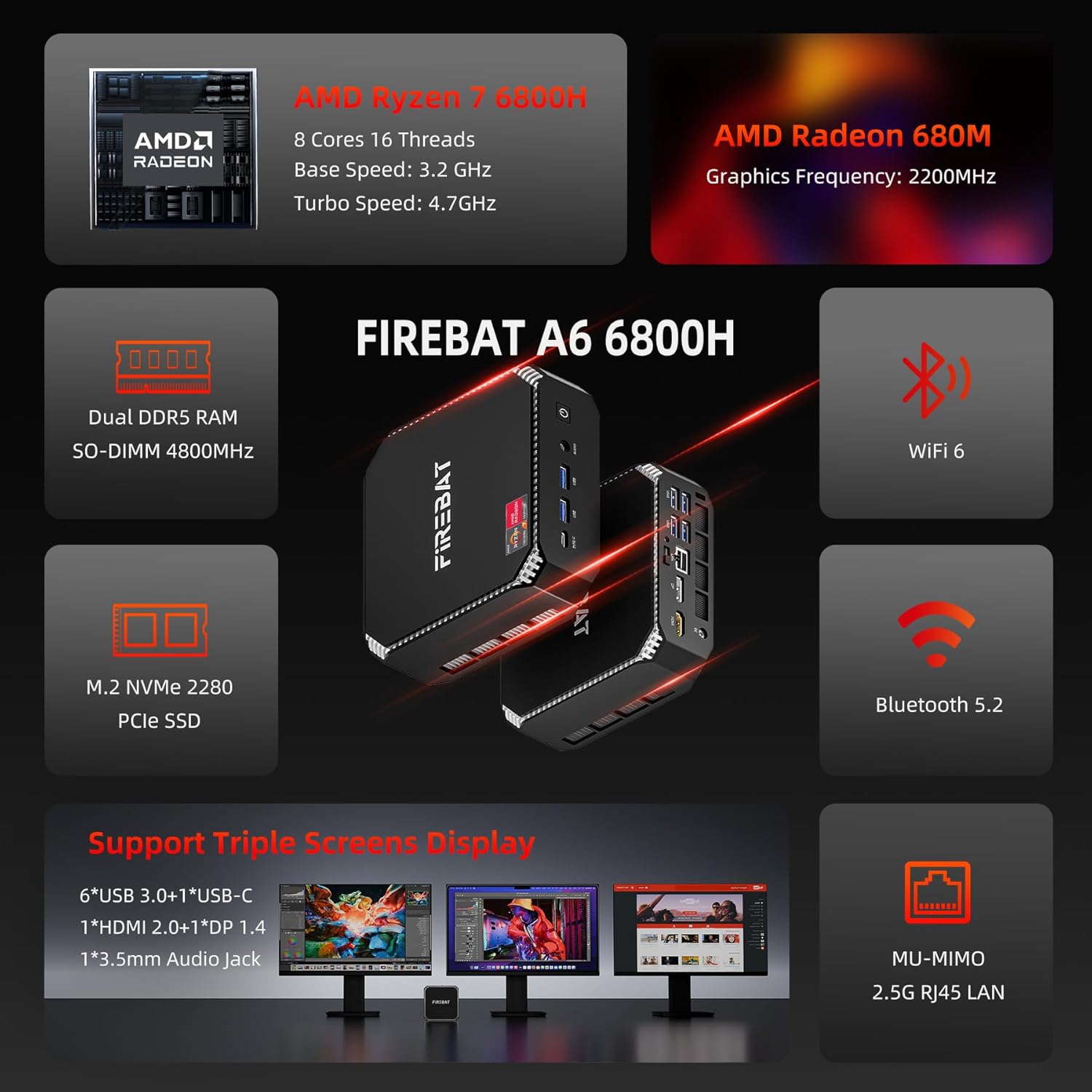
ചിത്രം 3: ഓവർview of the FIREBAT Mini PC A6's core features and specifications.
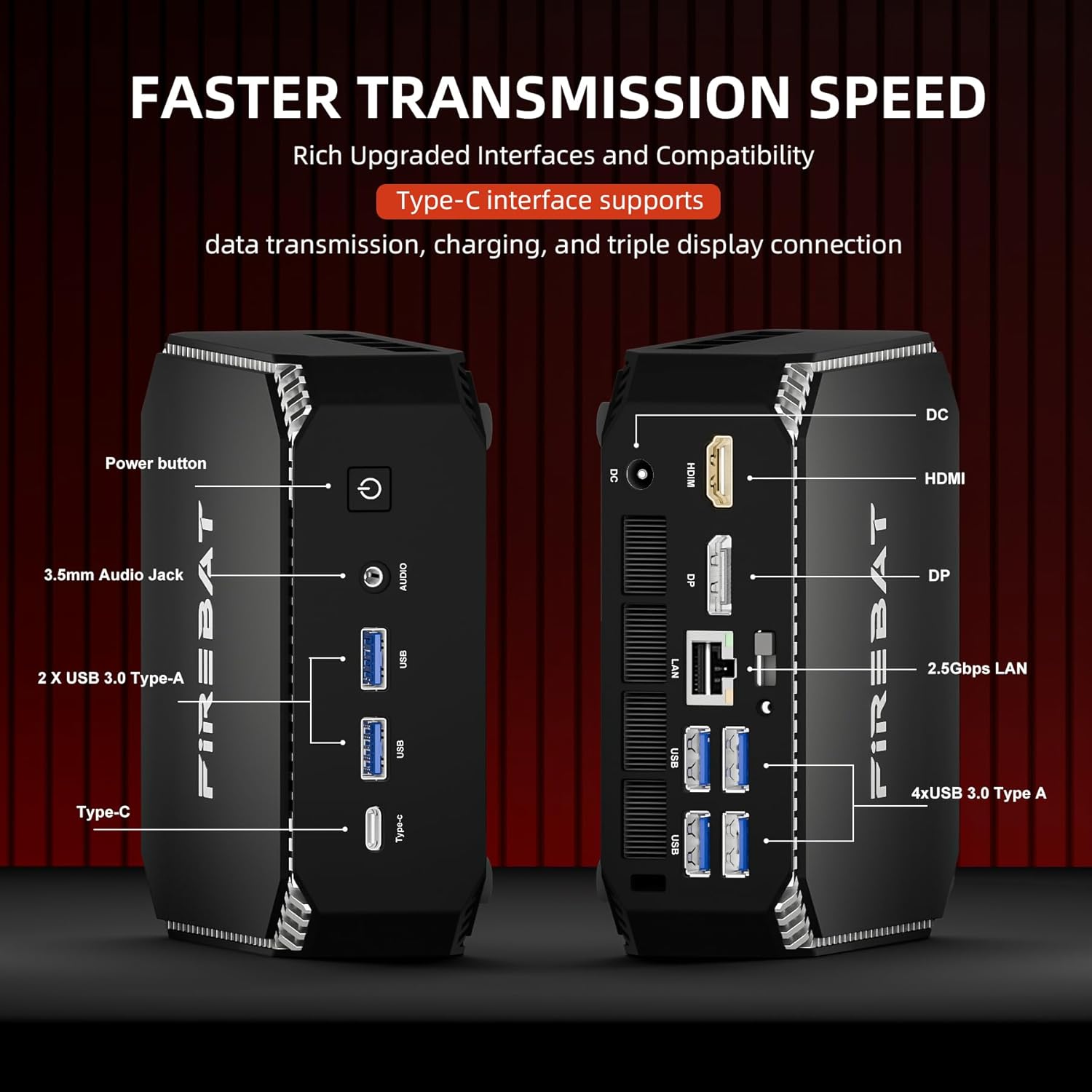
ചിത്രം 4: വിശദമായി view of the front and rear ports and interfaces on the Mini PC.

Figure 5: Illustration of the expandable RAM and dual M.2 SSD slots for storage upgrades.
ഉപയോഗ സാഹചര്യങ്ങൾ
The Mini PC A6 is versatile and suitable for:
- Business & Office: Efficiently handle demanding applications and multi-threaded tasks.
- വിദ്യാഭ്യാസം: Ideal for learning environments, supporting various educational software and online resources.
- ഹോം തിയേറ്റർ: Connect to your TV for 4K streaming and media consumption.
- ഗെയിമിംഗ്: Enjoy a smooth gaming experience with its powerful integrated graphics.
വീഡിയോ 2: ഒരു സംക്ഷിപ്ത വിവരണംview of the FIREBAT Ryzen 7 6800H Mini Computer A6 Model, highlighting its compact design and various applications.
മെയിൻ്റനൻസ്
To ensure the longevity and optimal performance of your FIREBAT Mini PC, consider the following maintenance tips:
- തണുപ്പിക്കൽ: The Mini PC features an ultra-efficient and fast cooling system with high-efficiency thermal grease, a cooling fan, and dual heat pipes, enabling 7x24 hours of silent operation. Ensure proper airflow around the device and keep ventilation openings clear of obstructions.
- വൃത്തിയാക്കൽ: Regularly clean the exterior of the Mini PC with a soft, dry cloth. Avoid using liquid cleaners directly on the device.
- അപ്ഗ്രേഡുകൾ: When upgrading RAM or SSDs, handle components carefully. Refer to the detailed instructions provided by FIREBAT or consult professional assistance if unsure.

Figure 6: Illustration of the internal cooling components, including the fan and heat pipes.
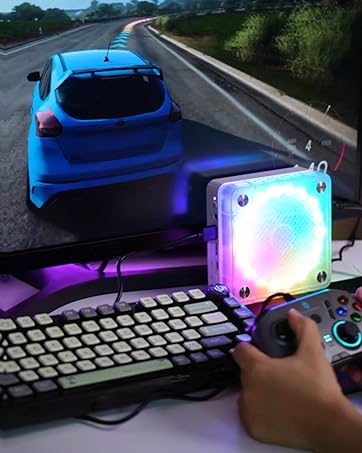
Figure 7: Chart illustrating the low noise levels of the FIREBAT Mini PC A6 during operation.
ട്രബിൾഷൂട്ടിംഗ്
If you encounter issues with your Mini PC, consider the following common solutions:
- ഡിസ്പ്ലേ ഇല്ല: Ensure all video cables (HDMI/DP) are securely connected to both the Mini PC and the monitor. Verify the monitor input source is correctly selected.
- പെരിഫറലുകൾ പ്രവർത്തിക്കുന്നില്ല: Check USB connections. If a specific USB port is unresponsive, try another port. Ensure drivers for peripherals are up to date.
- പ്രകടന പ്രശ്നങ്ങൾ: Close unnecessary applications. Ensure your operating system and drivers (especially AMD Radeon GPU drivers) are updated to the latest versions.
- Accessing Internal Components: If you need to open the Mini PC for upgrades (RAM/SSD), proceed with caution. Some users have reported the top cover can be difficult to remove initially. Apply gentle, even pressure to avoid damage.
- സിസ്റ്റം അസ്ഥിരത: Perform a system restart. If issues persist, consider reinstalling the operating system or contacting support.
സ്പെസിഫിക്കേഷനുകൾ
| ഫീച്ചർ | വിശദാംശങ്ങൾ |
|---|---|
| ബ്രാൻഡ് | ഫയർബാറ്റ് |
| മോഡൽ നമ്പർ | A6 |
| പ്രോസസ്സർ | AMD Ryzen 7 6800H (8 Cores/16 Threads, up to 4.7GHz) |
| ഗ്രാഫിക്സ് കോപ്രൊസസർ | എഎംഡി റേഡിയൻ 680എം ഗ്രാഫിക്സ് |
| റാം | 16GB SO-DIMM DDR5 4800MHz (Expandable to 64GB) |
| ഹാർഡ് ഡ്രൈവ് | 512GB PCIe 3.0 2280 SSD (Dual M.2 slots) |
| ഓപ്പറേറ്റിംഗ് സിസ്റ്റം | Default (Windows 11 Pro pre-installed) |
| USB പോർട്ടുകൾ | 6 x USB 3.0, 1 x USB-C (PD/DP/DATA) |
| വീഡിയോ ഔട്ട്പുട്ട് | 1 x HDMI 2.0 (4K@60Hz), 1 x DisplayPort 1.4 (4K@120Hz) |
| നെറ്റ്വർക്ക് | 2.5Gbps RJ45 LAN, WiFi 6 (802.11ax), Bluetooth 5.2 |
| ഓഡിയോ | 3.5mm Audio Jack (HP&MIC) |
| വൈദ്യുതി ഉപഭോഗം | Up to 54W (45W TDP) |
| ഇനത്തിൻ്റെ ഭാരം | 1 പൗണ്ട് |
| ഉൽപ്പന്ന അളവുകൾ | 5 x 5 x 1.5 ഇഞ്ച് |
പിന്തുണയും വാറൻ്റിയും
FIREBAT is committed to providing quality products and support. For any inquiries, technical assistance, or warranty information, please contact us:
- ഇമെയിൽ: support@firebatpc.com
- Webസൈറ്റ്: www.firebatpc.com
നിർദ്ദിഷ്ട വാറന്റി നിബന്ധനകൾക്കും വ്യവസ്ഥകൾക്കും നിങ്ങളുടെ വാങ്ങൽ ഡോക്യുമെന്റേഷൻ പരിശോധിക്കുക.


