1. ആമുഖം
This manual provides detailed instructions for the setup, operation, and maintenance of your HEYAXA Wireless WiFi Pool Thermometer. Please read this manual thoroughly before use to ensure proper functionality and longevity of the device.
2. ഉൽപ്പന്നം കഴിഞ്ഞുview
2.1 പാക്കേജ് ഉള്ളടക്കം
- 1 x Outdoor Thermometer (Floating Sensor)
- 1 x Digital LCD Display Unit
- 1 x ഉപയോക്തൃ മാനുവൽ
2.2 പ്രധാന സവിശേഷതകൾ
- 4.3" Large Color LCD: Easy-to-read display with four adjustable brightness levels (10%, 40%, 70%, 100%).
- ഉയർന്ന കൃത്യത: Indoor temperature range: -9.9℃ to 50℃ (14.2℉ to 122℉); Outdoor temperature range: -40℃ to 70℃ (-40℉ to 158℉).
- 24-hour APP Records: View real-time data, historical curves, and temperature/humidity on the mobile application.
- IPX7 വാട്ടർപ്രൂഫ്: The outdoor sensor is designed to be waterproof, suitable for various water environments.
- Multi-location Data: Supports connection with up to 3 outdoor sensors (one included in the package).
- രണ്ട് പവർ മോഡുകൾ: The display unit can be powered by 2x AA batteries (not included) or a DC 5V/1A charging adapter (not included).
- വയർലെസ് ട്രാൻസ്മിഷൻ ശ്രേണി: Up to 60 meters (197 feet) in open areas.
- Heat & Cold Resistant: The sensor operates effectively in temperatures ranging from -40°C to 70°C (-104°F to 158°F).
2.3 ഉൽപ്പന്ന ഘടകങ്ങൾ
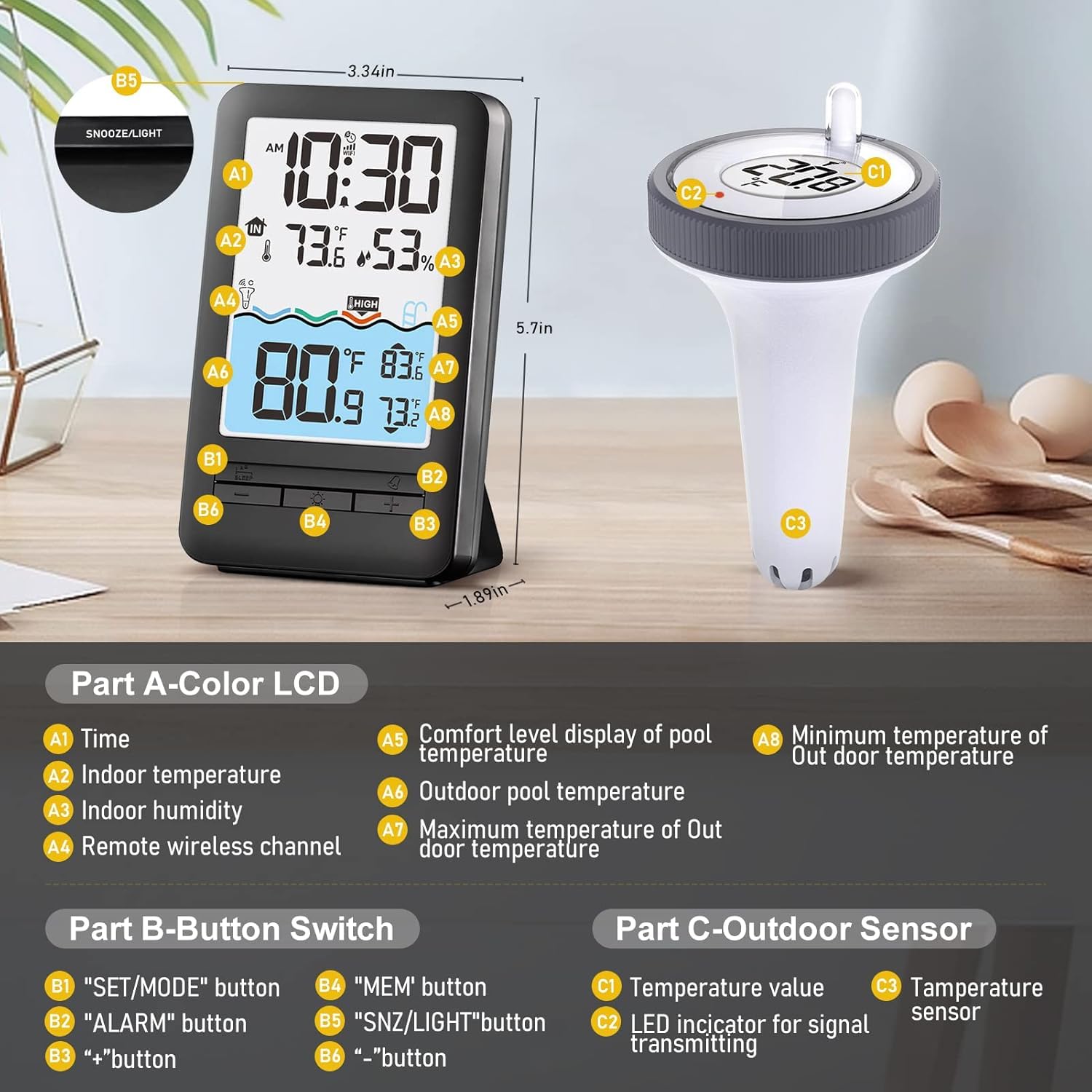
ചിത്രം: Labeled diagram of the display unit and outdoor sensor. The display unit features a color LCD screen and various buttons. The outdoor sensor is a floating device with a temperature sensor and an LED indicator.

ചിത്രം: The HEYAXA Wireless WiFi Pool Thermometer, featuring the main display unit and the floating outdoor sensor. A smartphone screen in the background illustrates the accompanying mobile application.
3. സജ്ജീകരണ നിർദ്ദേശങ്ങൾ
3.1 Battery Installation for Outdoor Sensor
- Turn the top lid of the outdoor thermometer counter-clockwise to open it.
- Remove the battery compartment lid and insert 2x AA batteries (not included), ensuring correct polarity.
- Replace the battery compartment lid, then turn the top lid clockwise to securely close and tighten it.

ചിത്രം: Visual guide demonstrating how to open the outdoor sensor, install AA batteries, and securely close the lid.
3.2 Powering the Display Unit
- ബാറ്ററി മോഡ്: Insert 2x AA batteries (not included) into the battery compartment on the back of the display unit.
- ചാർജിംഗ് മോഡ്: Connect a DC 5V/1A power adapter (not included) to the power input port on the back of the display unit.

ചിത്രം: Illustration of the two power options for the display unit: using 2x AA batteries or connecting a DC 5V/1A power adapter.
3.3 App Connection (HEYAXA APP)
- Download the "HEYAXA" app from the App Store or Google Play. You can also scan the QR code provided in the product packaging or visit https://a.smart321.com/kalevolsmart.
- Create an account or log in to the HEYAXA app.
- Power up the display unit. It will automatically enter "AP Mode" for initial setup.
- In the HEYAXA app, tap "Add Device".
- The app will begin discovering devices. Select your thermometer from the list.
- നിങ്ങളുടെ 2.4GHz വൈഫൈ നെറ്റ്വർക്ക് തിരഞ്ഞെടുത്ത് പാസ്വേഡ് നൽകുക. കുറിപ്പ്: The device supports 2.4GHz Wi-Fi only.
- Once connected, the device will be successfully added to your app.

ചിത്രം: A visual step-by-step guide showing how to download the HEYAXA app, power up the station, add the device, discover it, select a 2.4GHz Wi-Fi network, and successfully add the device.
4. പ്രവർത്തന നിർദ്ദേശങ്ങൾ
4.1 Display Unit Overview
The 4.3-inch LCD screen provides comprehensive information at a glance:
- സമയം: നിലവിലെ സമയ പ്രദർശനം.
- ഇൻഡോർ താപനില: Temperature reading from the display unit's internal sensor.
- ഇൻഡോർ ഈർപ്പം: Humidity reading from the display unit's internal sensor.
- Remote Wireless Channel: Indicates which outdoor sensor's data is currently displayed (CH1, CH2, or CH3).
- Comfort Level Display: Visual indicator for the comfort level based on pool temperature.
- Outdoor Pool Temperature: Temperature reading from the floating outdoor sensor.
- Maximum/Minimum Outdoor Temperature: Records of the highest and lowest outdoor temperatures.
4.2 Button Functions (Display Unit)
- SET/MODE button: Press to enter settings mode or switch between display modes.
- അലാറം ബട്ടൺ: Use to set or disable temperature alarms.
- "+" button: Increase values during settings or navigate forward through options.
- MEM button: View maximum and minimum temperature records for indoor and outdoor readings.
- SNZ/LIGHT ബട്ടൺ: Activate snooze function for alarms or adjust backlight brightness (10%, 40%, 70%, 100%).
- "-" button: Decrease values during settings or navigate backward through options.
4.3 ആപ്പ് ഉപയോഗം
The HEYAXA app enhances your monitoring capabilities:
- തത്സമയ ഡാറ്റ: View current indoor and outdoor temperature and humidity readings from anywhere.
- Historical Data & Curves: Access auto-generated temperature and humidity curves and historical data for up to 24 hours.
- ഇഷ്ടാനുസൃതമാക്കൽ: Adjust backlight settings and switch between Celsius and Fahrenheit units directly from the app.
- Multi-Sensor Monitoring: If additional sensors are connected, monitor up to 3 different locations simultaneously.

ചിത്രം: The HEYAXA app on a smartphone showing real-time temperature and humidity data, with the floating sensor visible in a pool, highlighting the IP67 waterproof feature.

ചിത്രം: The HEYAXA app displaying auto-logged temperature and humidity graphs over 24 hours, illustrating its data recording capability.

ചിത്രം: This image highlights the 60-meter (197-foot) transmission range and the capability to connect up to three outdoor sensors (CH1, CH2, CH3) for monitoring different locations like a swimming pool, bathtub, or home.
5. പരിപാലനം
- Clean the display unit and outdoor sensor with a soft, damp തുണി. ഉരച്ചിലുകളുള്ള ക്ലീനറുകളോ ലായകങ്ങളോ ഉപയോഗിക്കരുത്.
- Ensure the outdoor sensor's lid is securely tightened at all times to maintain its IPX7 waterproofing.
- Replace batteries in both units promptly when the low battery indicator appears on the display or in the app.
- When not in use for extended periods, store the device in a dry, cool environment.

ചിത്രം: The floating outdoor sensor partially submerged in water, emphasizing its IPX7 waterproof design and built-in desiccant to prevent moisture damage.

ചിത്രം: The outdoor sensor depicted in both sunny and snowy conditions, highlighting its heat and cold resistance, operating normally from -40°C to 70°C (-104°F to 158°F).
6. പ്രശ്നപരിഹാരം
- No Signal from Outdoor Sensor:
- Ensure batteries are correctly installed and charged in both the sensor and display unit.
- Verify the outdoor sensor is within the 60-meter transmission range of the display unit.
- Minimize obstacles (e.g., thick walls, large metal objects) between the sensor and display unit.
- Try re-pairing the sensor with the display unit by following the initial setup steps.
- ആപ്പ് കണക്റ്റിവിറ്റി പ്രശ്നങ്ങൾ:
- നിങ്ങളുടെ വൈഫൈ നെറ്റ്വർക്ക് 2.4GHz ആണെന്ന് ഉറപ്പാക്കുക. ഉപകരണം 5GHz വൈഫൈ പിന്തുണയ്ക്കുന്നില്ല.
- Double-check your Wi-Fi password for accuracy.
- Ensure the display unit is in "AP Mode" during initial setup.
- Restart your Wi-Fi router and the display unit.
- Ensure your smartphone is connected to the same 2.4GHz Wi-Fi network during the setup process.
- കൃത്യമല്ലാത്ത വായനകൾ:
- Ensure the outdoor sensor is fully submerged in water for accurate water temperature readings.
- Avoid placing the indoor display unit near direct heat sources, air conditioning vents, or direct sunlight.
- Display Unit Not Turning On:
- ബാറ്ററി ഇൻസ്റ്റാളേഷൻ പരിശോധിച്ച് ബാറ്ററികൾ തീർന്നിട്ടില്ലെന്ന് ഉറപ്പാക്കുക.
- If using the charging adapter, ensure it is properly connected and the power outlet is active.
7 സ്പെസിഫിക്കേഷനുകൾ
| ഫീച്ചർ | സ്പെസിഫിക്കേഷൻ |
|---|---|
| മോഡൽ നമ്പർ | 647379028435 |
| ഇൻഡോർ താപനില ശ്രേണി | -9.9℃ മുതൽ 50℃ വരെ (14.2℉ മുതൽ 122℉ വരെ) |
| Do ട്ട്ഡോർ താപനില ശ്രേണി | -40 ℃ മുതൽ 70 ℃ വരെ (-40 ℉ മുതൽ 158 ℉ വരെ) |
| ഡിസ്പ്ലേ തരം | ഡിജിറ്റൽ എൽസിഡി |
| ഡിസ്പ്ലേ വലിപ്പം | 4.3 ഇഞ്ച് |
| കണക്റ്റിവിറ്റി | വൈഫൈ (2.4GHz മാത്രം) |
| വയർലെസ് ട്രാൻസ്മിഷൻ ശ്രേണി | 60 മീറ്റർ വരെ (197 അടി) |
| Waterproof Rating (Sensor) | IPX7 |
| Power Source (Display Unit) | 2x AA Batteries (not included) or DC 5V/1A Adapter (not included) |
| പവർ സ്രോതസ്സ് (ഔട്ട്ഡോർ സെൻസർ) | 2x AA ബാറ്ററികൾ (ഉൾപ്പെടുത്തിയിട്ടില്ല) |
| മെറ്റീരിയൽ | പ്ലാസ്റ്റിക് |
| നിർമ്മാതാവ് | ഹെയാക്സ |
8. വാറൻ്റിയും പിന്തുണയും
For any questions, technical assistance, or support regarding your HEYAXA Wireless WiFi Pool Thermometer, please do not hesitate to contact our dedicated customer service team.
ഇമെയിൽ: support@heyaxa.com
Our customer service team is committed to providing prompt assistance and aims to respond to all inquiries and resolve issues within 24 hours.

ചിത്രം: A customer service representative with a headset, symbolizing the availability of professional service and technical guidance, with a commitment to respond within 24 hours.