1. ഉൽപ്പന്നം കഴിഞ്ഞുview
The KKnoon Wireless Ultrasonic Level Gauge is an advanced device designed for accurate monitoring of liquid levels and temperatures in water tanks. It consists of a receiver unit with an LCD display and a wireless transmitter unit. This system provides real-time data, including tank liquid level, indoor temperature, tank temperature, and time display, along with customizable alarms for high/low liquid levels and an empty tank warning.

Figure 1: KKnoon Wireless Ultrasonic Level Gauge (Receiver and Transmitter)
This image displays the two main components of the system: the rectangular receiver unit with a digital display and control buttons, and the cylindrical transmitter unit with an antenna and mounting bracket.
2 പ്രധാന സവിശേഷതകൾ
- അഡ്വാൻസ്ഡ് ഡിസ്പ്ലേ ടെക്നോളജി: LCD bar graph for accurate liquid level display.
- സമഗ്രമായ നിരീക്ഷണം: Tracks minimum/maximum liquid levels and supports high/low level and empty tank alarms.
- ഡ്യുവൽ ടെമ്പറേച്ചർ ഡിസ്പ്ലേ: Integrates measurement of both indoor temperature and tank temperature.
- വിശാലമായ അളക്കൽ ശ്രേണി: Indoor temperature: 0℃~50℃ (32℉~122℉); Tank temperature: -40℃~60℃ (-40℉~140℉); Water level: 1~5m (0.01m resolution).
- വയർലെസ് ട്രാൻസ്മിഷൻ: 433MHz wireless transmission with an open distance of 100 meters (effective distance 30 meters).
- ബഹുമുഖ ഇൻസ്റ്റാളേഷൻ: Receiver can stand on a desk or be wall-mounted. Transmitter features IP65 waterproof rating and a solar charging panel.

ചിത്രം 2: ഓവർview of Ultrasonic Level Meter Features
This image highlights the core functionalities: water level monitoring, low water level alarm, tank temperature, indoor temperature, and time alarm.

Figure 3: Detailed Features of Temperature and Water Level Monitoring
This image further details the temperature display (tank temperature, room temperature, humidity) and water level monitoring (low water level alert, dynamic bar display).

Figure 4: Transmitter Details and Installation Advice
This image illustrates the transmitter's features, including 433MHz wireless transmission, solar charging panel, surveyor's level, IP65 waterproof rating, and advises installing the solar panel on the sunny side for optimal charging.
3 സ്പെസിഫിക്കേഷനുകൾ
| ഘടകം/സവിശേഷത | സ്പെസിഫിക്കേഷൻ |
|---|---|
| മോഡൽ | TS-FT005 (Item Model Number: E26207) |
| മെറ്റീരിയൽ | എബിഎസ് |
| Receiver Indoor Temperature Range | 0℃~50℃ / 32℉~122℉ |
| Receiver Temperature Resolution | 0.1℃ |
| Receiver Temperature Accuracy | ±1℃ |
| Water Tank Temperature Measurement Range | -40 ℃ ~ 60 ℃ / -40 ℉ ~ 140 |
| അലാറം ദൈർഘ്യം | 120 സെക്കൻഡ് |
| Transmitter Temperature Resolution | 0.1℃ |
| Transmitter Temperature Accuracy | ±1℃ |
| Water Level Resolution | 0.01മീ |
| Water Level Accuracy | ±0.05മി |
| Water Level Measurement Range | 1~5മീ |
| റിസീവർ പവർ ഉറവിടം | USB to Type-C Wire / 3 * AAA batteries (Not included) |
| ട്രാൻസ്മിറ്റർ പവർ സ്രോതസ്സ് | 6 * AAA ബാറ്ററികൾ (ഉൾപ്പെടുത്തിയിട്ടില്ല) |
| Receiver Screen Size | 112mm / 4.4in |
| റിസീവർ അളവുകൾ | 135 * 84 * 26 മിമി / 5.31 * 3.31 * 1.02 ഇഞ്ച് |
| ട്രാൻസ്മിറ്റർ അളവുകൾ | 167 * 109 * 68 മിമി / 6.57 * 4.29 * 2.67 ഇഞ്ച് |
| റിസീവർ ഭാരം | 184g / 6.49oz |
| ട്രാൻസ്മിറ്റർ ഭാരം | 216g / 7.62oz |
| പാക്കേജ് ഭാരം | 610g / 21.51oz |
| പാക്കേജ് വലിപ്പം | 14.5 * 12 * 16 സെ.മീ / 5.71 * 4.72 * 6.29 ഇഞ്ച് |
| Transmitter Waterproof Rating | IP65 |
4. പാക്കേജ് ഉള്ളടക്കം
പാക്കേജിൽ എല്ലാ ഇനങ്ങളും ഉണ്ടെന്ന് ദയവായി പരിശോധിക്കുക:
- 1 x റിസീവർ യൂണിറ്റ്
- 1 x ട്രാൻസ്മിറ്റർ യൂണിറ്റ്
- 2 x Installation Screws
- 1 x USB to Type-C Wire
- 1 x യൂസർ മാനുവൽ (ഇംഗ്ലീഷ്)
5. സജ്ജീകരണ നിർദ്ദേശങ്ങൾ
5.1 ട്രാൻസ്മിറ്റർ ഇൻസ്റ്റാളേഷൻ
Install the transmitter unit on top of your water tank. Ensure the solar panel on the transmitter is positioned to receive direct sunlight for optimal battery charging. Use the provided installation screws to secure it firmly. The transmitter has a surveyor's level to aid in proper horizontal alignment.
5.2. Receiver Power and Initial Setup
The receiver can be powered via the included USB to Type-C wire or by 3 AAA batteries (not included).
- പവർ ഓൺ: Energize the receiver by inserting 3 AAA batteries or connecting the USB to Type-C power cord.
- Enter Tank Depth Setting Mode: The device will automatically enter the tank depth setting mode. The setting range is 0.5m to 5m (1.64ft to 16.4ft).

Figure 5: Receiver Power and Initial Tank Depth Setting
This image shows the receiver display during the initial power-on and tank depth setting, indicating the range for setting the tank depth.
- Set Air Gap Value: Press the "SET" button to set the air gap value. The default display is "0.50". The setting range is 0.5m to 5m (1.64ft to 16.4ft). This value represents the distance from the top of the tank (where the transmitter is mounted) to the maximum liquid level.

Figure 6: Setting the Air Gap Value
This image illustrates the receiver display when setting the air gap value, showing the default value and the adjustable range.
6. പ്രവർത്തന നിർദ്ദേശങ്ങൾ
6.1. വിവരങ്ങൾ പ്രദർശിപ്പിക്കുക
The receiver's LCD screen provides comprehensive information:
- Tank Level: Displayed as a numerical value in meters (M) and a bar graph indicating percentagഇ (10% മുതൽ 100% വരെ).
- ഇൻഡോർ താപനില: Current ambient temperature.
- ടാങ്ക് താപനില: Temperature of the liquid inside the tank.
- സമയം: നിലവിലെ സമയ പ്രദർശനം.
- അലാറങ്ങൾ: Indicators for High Alarm (HI AL), Low Alarm (LO AL), and Empty Tank.

ചിത്രം 7: വിശദമായി View of Receiver Display
This image shows the various readings on the receiver's screen, including tank level, indoor temperature, tank temperature, time, and alarm indicators. It also lists the temperature ranges for indoor and tank measurements.
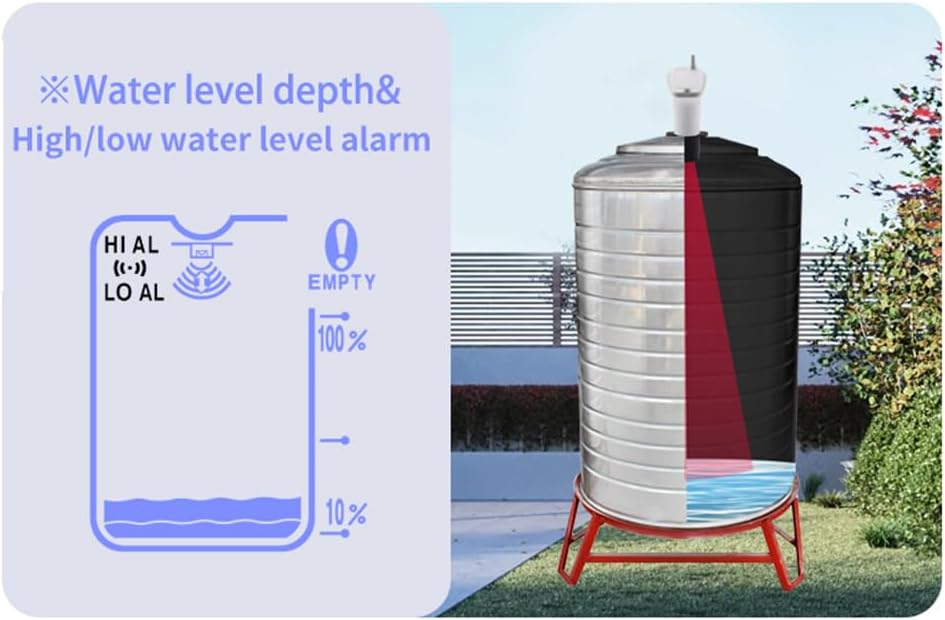
Figure 8: Numerical Display Exampലെസ്
This image provides examples of the numerical display for indoor temperature (in Celsius and Fahrenheit) and tank depth (in meters and feet).
6.2. അലാറങ്ങൾ സജ്ജമാക്കുന്നു
The device supports high/low water level alarms and an empty tank alarm. Refer to the user manual for specific steps on how to set these alarm thresholds using the 'AL' and '+/-' buttons.

Figure 9: Water Level Depth and Alarm Visual
This image visually represents the water level depth measurement and the high/low water level alarm indicators, along with an empty tank warning.
6.3. ബട്ടൺ പ്രവർത്തനങ്ങൾ
- സജ്ജമാക്കുക: ക്രമീകരണ മോഡുകൾ നൽകാനും തിരഞ്ഞെടുപ്പുകൾ സ്ഥിരീകരിക്കാനും ഉപയോഗിക്കുന്നു.
- AL: Used to access alarm settings.
- +: Used to increase values or navigate up in menus.
- -: Used to decrease values or navigate down in menus.
- ടാങ്ക്: Likely used to switch between tank display modes or confirm tank-related settings.
7. പരിപാലനം
- ബാറ്ററി മാറ്റിസ്ഥാപിക്കൽ: Replace AAA batteries in both the receiver (3x) and transmitter (6x) when the low battery indicator appears on the receiver display. Ensure correct polarity.
- വൃത്തിയാക്കൽ: Wipe the receiver and transmitter units with a soft, dry cloth. Do not use abrasive cleaners or immerse the receiver in water. The transmitter is IP65 rated, meaning it is protected against dust and low-pressure water jets, but not full immersion.
- Transmitter Solar Panel: Periodically clean the solar panel on the transmitter to ensure efficient charging.
- സംഭരണം: ഉപകരണം ദീർഘനേരം സൂക്ഷിക്കുകയാണെങ്കിൽ, ചോർച്ച തടയാൻ എല്ലാ ബാറ്ററികളും നീക്കം ചെയ്യുക.
8. പ്രശ്നപരിഹാരം
- No Display on Receiver:
- ബാറ്ററികൾ ശരിയായി ചേർത്തിട്ടുണ്ടോ എന്നും അവ തീർന്നിട്ടില്ലെന്നും പരിശോധിക്കുക.
- Ensure the USB power cable is securely connected if using external power.
- No Water Level Reading / Inaccurate Reading:
- Ensure the transmitter is correctly installed on the tank and is within the effective wireless range (30 meters).
- Verify that the tank depth and air gap settings are correctly configured on the receiver.
- Check for obstructions directly below the transmitter inside the tank that might interfere with ultrasonic waves.
- Ensure the transmitter batteries are not depleted.
- Temperature Readings Incorrect:
- Ensure the transmitter is properly sealed and its sensor is not obstructed.
- Allow time for temperature sensors to stabilize after initial setup or significant temperature changes.
- Alarms Not Functioning:
- Verify that alarm thresholds are set correctly in the receiver's settings.
- Check if the alarm function is enabled.
- Poor Wireless Connection:
- Reduce the distance between the receiver and transmitter.
- Minimize obstacles (thick walls, metal structures) between the units.
- Ensure no strong electromagnetic interference sources are nearby.
9. വാറൻ്റിയും പിന്തുണയും
For warranty information and technical support, please refer to the documentation provided with your purchase or contact KKnoon customer service directly. Details regarding specific warranty periods and support channels are typically available on the manufacturer's official webസൈറ്റ് അല്ലെങ്കിൽ നിങ്ങളുടെ റീട്ടെയിലർ വഴി.


