1. ആമുഖം
വാങ്ങിയതിന് നന്ദി.asing the ROCAM CR1024 Projection Alarm Clock Radio. This device combines a digital alarm clock with a projection feature, FM radio, and convenient USB charging ports. Please read this manual carefully to ensure proper use and optimal performance of your new alarm clock.

Image 1.1: The ROCAM CR1024 Projection Alarm Clock Radio displaying time, date, temperature, and humidity, with the time projected onto a surface. The device also features an FM radio and dual alarm settings.
2 സുരക്ഷാ വിവരങ്ങൾ
- ഉപകരണം വെള്ളത്തിലോ അമിതമായ ഈർപ്പത്തിലോ തുറന്നുകാട്ടരുത്.
- താപ സ്രോതസ്സുകൾക്ക് സമീപം അല്ലെങ്കിൽ നേരിട്ട് സൂര്യപ്രകാശത്തിൽ ഉപകരണം സ്ഥാപിക്കുന്നത് ഒഴിവാക്കുക.
- നൽകിയിരിക്കുന്ന പവർ അഡാപ്റ്റർ മാത്രം ഉപയോഗിക്കുക.
- കുട്ടികൾക്ക് ലഭ്യമാകാതെ സൂക്ഷിക്കുക.
- ഉപകരണം സ്വയം വേർപെടുത്താനോ നന്നാക്കാനോ ശ്രമിക്കരുത്. പ്രശ്നങ്ങൾ ഉണ്ടായാൽ ഉപഭോക്തൃ പിന്തുണയുമായി ബന്ധപ്പെടുക.
3. പാക്കേജ് ഉള്ളടക്കം
പാക്കേജിൽ ഇനിപ്പറയുന്ന ഇനങ്ങൾ ഉണ്ടോ എന്ന് പരിശോധിക്കുക:
- ROCAM CR1024 Projection Alarm Clock Radio
- പവർ അഡാപ്റ്റർ
- USB-C ചാർജിംഗ് കേബിൾ
- ഉപയോക്തൃ മാനുവൽ (ഈ പ്രമാണം)
4. ഉൽപ്പന്നം കഴിഞ്ഞുview
4.1. നിയന്ത്രണങ്ങളും ബട്ടണുകളും
- സ്നൂസ്/ശരി/*: Snooze alarm, confirm settings, adjust display brightness (short press).
- VOL-/AL1: Decrease volume, set Alarm 1.
- VOL+/AL2: Increase volume, set Alarm 2.
- 12/24എച്ച്: Switch between 12-hour and 24-hour time format.
- ° C/° F: Switch between Celsius and Fahrenheit temperature display.
- PRESET/STORE: Save FM radio stations, recall presets.
- RADIO/SCAN: Turn FM radio on/off, auto-scan for stations.
- DIM: Adjust projection brightness.
- തിരിക്കുക: Rotate projected time display.
4.2. ഘടകങ്ങൾ പ്രദർശിപ്പിക്കുക
- സമയ പ്രദർശനം: Large LED digits for current time.
- AM/PM സൂചകം: For 12-hour format.
- DST സൂചകം: Daylight Saving Time.
- തീയതി ഡിസ്പ്ലേ: Month and Day.
- ആഴ്ചയിലെ ദിവസം: Indication for current day.
- താപനില / ഈർപ്പം: Indoor temperature and humidity readings.
- Alarm 1/2 Indicators: Show active alarms.
- എഫ്എം ഫ്രീക്വൻസി: Displays current radio station frequency.
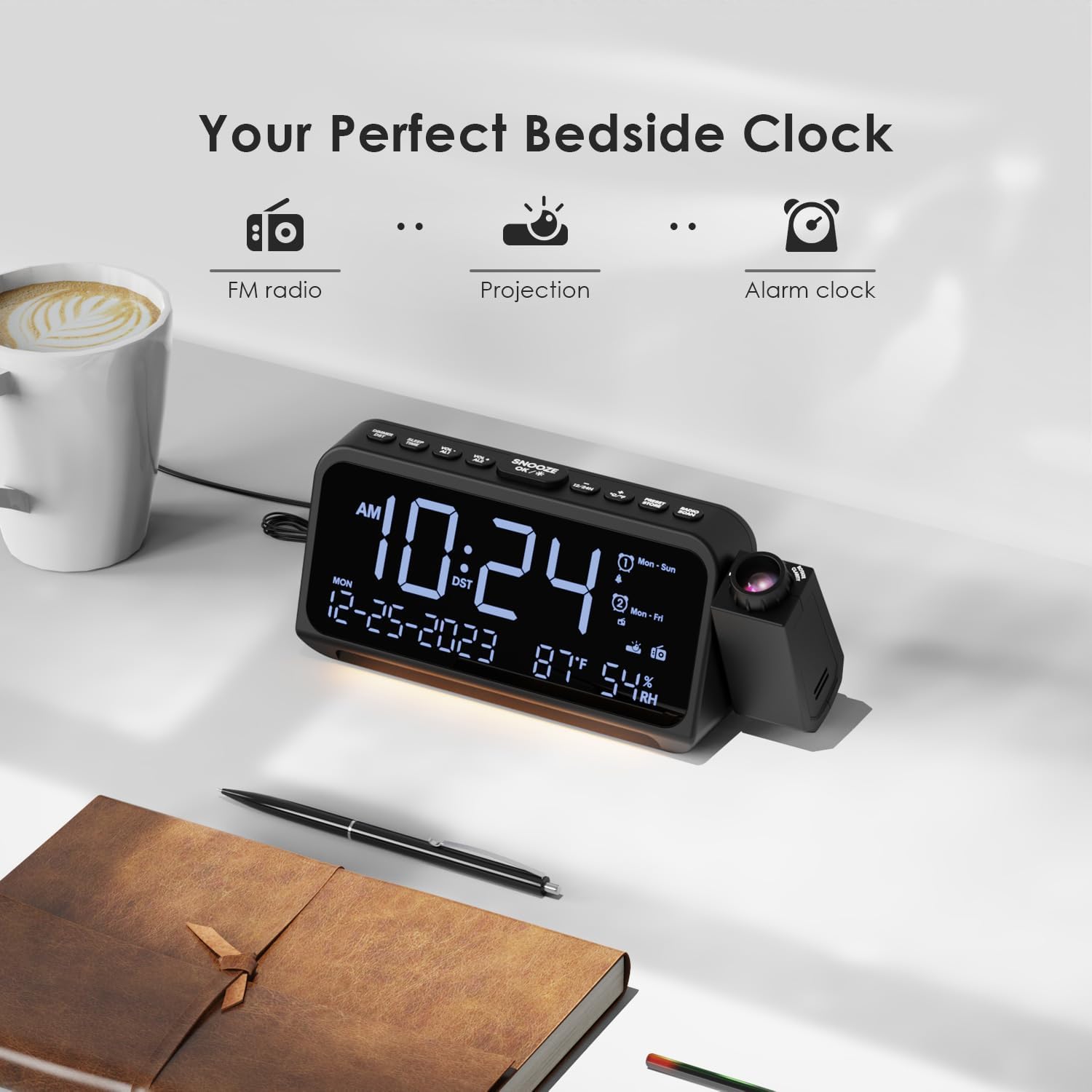
Image 4.1: The ROCAM CR1024 Projection Alarm Clock Radio positioned on a bedside table, highlighting its compact design and integrated projection feature. The display shows time, date, temperature, and humidity.
5. സജ്ജീകരണം
5.1. പവർ കണക്ഷൻ
Connect the provided power adapter to the DC IN port on the back of the alarm clock and plug it into a standard wall outlet. The display will light up.

Image 5.1: The alarm clock connected to a wall outlet via its power adapter, illustrating the primary power source connection.
5.2. ബാറ്ററി ബാക്കപ്പ് ഇൻസ്റ്റലേഷൻ
For memory backup during power outages, insert 2 AAA batteries (not included) into the battery compartment on the bottom of the unit. This will preserve time and alarm settings but will not power the display or other functions.

Image 5.2: The open battery compartment on the underside of the alarm clock, showing where two AAA batteries should be inserted for backup power.
5.3. പ്രാരംഭ സമയവും തീയതിയും ക്രമീകരണം
- അമർത്തിപ്പിടിക്കുക 12/24എച്ച് സമയ ക്രമീകരണ മോഡിൽ പ്രവേശിക്കാൻ ബട്ടൺ അമർത്തുക. മണിക്കൂർ അക്കങ്ങൾ മിന്നിമറയും.
- ഉപയോഗിക്കുക വോൾ- or VOL+ മണിക്കൂർ ക്രമീകരിക്കാൻ. അമർത്തുക സ്നൂസ്/ശരി/* to confirm and move to minute setting.
- ഉപയോഗിച്ച് മിനിറ്റുകൾ ക്രമീകരിക്കുക വോൾ- or VOL+. അമർത്തുക സ്നൂസ്/ശരി/* to confirm and move to year setting.
- Continue adjusting year, month, and day using വോൾ- or VOL+ and confirming with സ്നൂസ്/ശരി/*.
- After setting the date, you can set the 12/24-hour format by pressing 12/24എച്ച്.
- അമർത്തുക ° C/° F to switch between Celsius and Fahrenheit for temperature display.
6. പ്രവർത്തന നിർദ്ദേശങ്ങൾ
6.1 ഡിസ്പ്ലേ ബ്രൈറ്റ്നസ് അഡ്ജസ്റ്റ്മെന്റ്
ഷോർട്ട് അമർത്തുക സ്നൂസ്/ശരി/* button to cycle through 5 levels of LED display brightness (L-1 to L-5). This allows you to adjust the display to your preference for different lighting conditions.
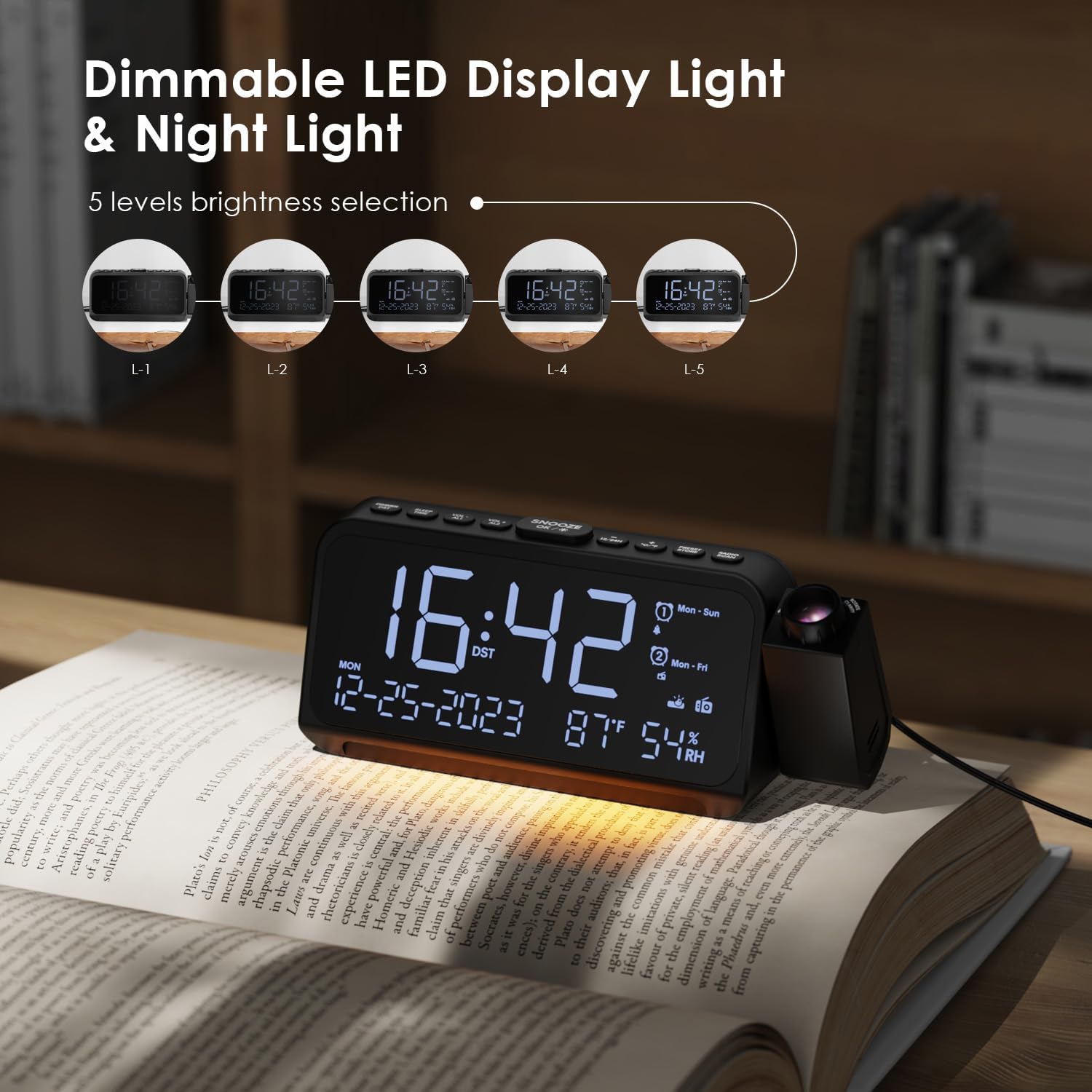
Image 6.1: The alarm clock demonstrating its 5-level dimmable LED display, with examples of different brightness settings (L-1 to L-5).
6.2. പ്രൊജക്ഷൻ സവിശേഷത
- To activate or deactivate the projection, press the DIM button on the side of the projector.
- അമർത്തുക DIM button repeatedly to cycle through 5 levels of projection brightness.
- Rotate the projector lens to adjust the focus of the projected image.
- ഉപയോഗിക്കുക തിരിക്കുക button on the side of the projector to flip the projected time 180 degrees for optimal viewing angle. The projector can be physically rotated up to 270 degrees.

Image 6.2: The time projected clearly onto a wall from the alarm clock, illustrating the projection feature in a bedroom setting.

Image 6.3: A close-up of the projector lens, showing the rotation capability of the projected time for flexible viewകോണുകൾ.
6.3. Alarm Settings (Alarm 1 & Alarm 2)
The device supports two independent alarms with customizable settings.
- അമർത്തിപ്പിടിക്കുക VOL-/AL1 to set Alarm 1. The hour digits will flash.
- ഉപയോഗിക്കുക വോൾ- or VOL+ മണിക്കൂർ ക്രമീകരിക്കാൻ. അമർത്തുക സ്നൂസ്/ശരി/* to confirm and move to minute setting.
- ഉപയോഗിച്ച് മിനിറ്റുകൾ ക്രമീകരിക്കുക വോൾ- or VOL+. അമർത്തുക സ്നൂസ്/ശരി/* സ്ഥിരീകരിക്കാൻ.
- Select alarm sound: Use വോൾ- or VOL+ to choose between buzzer or FM radio. Press സ്നൂസ്/ശരി/*.
- Select alarm mode: Use വോൾ- or VOL+ to choose between Mon-Sun, Mon-Fri, Sat-Sun, or One-Time. Press സ്നൂസ്/ശരി/* സ്ഥിരീകരിക്കാനും പുറത്തുകടക്കാനും.
- Repeat steps for Alarm 2 using VOL+/AL2.
- To activate/deactivate an alarm, short press VOL-/AL1 or VOL+/AL2. The alarm icon will appear/disappear on the display.
- When an alarm sounds, press സ്നൂസ്/ശരി/* for a 9-minute snooze. To turn off the alarm, press any other button.

Image 6.4: The alarm clock display illustrating the dual alarm settings, including options for alarm sound (buzzer or radio) and alarm frequency (Mon-Sun, Mon-Fri, Sat-Sun, One-Time).
6.4. എഫ്എം റേഡിയോ പ്രവർത്തനം
The alarm clock can store up to 30 FM radio stations (87.5 MHz - 108.0 MHz).
- അമർത്തുക RADIO/SCAN to turn the FM radio on or off.
- ഓട്ടോ-സ്കാൻ: When the radio is on, press and hold RADIO/SCAN to automatically scan and save available stations.
- സ്വമേധയാലുള്ള ട്യൂണിംഗ്: ഷോർട്ട് പ്രസ്സ് RADIO/SCAN to switch between saved stations. To manually tune, press വോൾ- or VOL+.
- പ്രീസെറ്റുകൾ സംരക്ഷിക്കുന്നു: നിങ്ങൾ ആഗ്രഹിക്കുന്ന സ്റ്റേഷനിലേക്ക് ട്യൂൺ ചെയ്യുക. അമർത്തി പിടിക്കുക PRESET/STORE. ഉപയോഗിക്കുക വോൾ- or VOL+ to select a preset number (P01-P30). Press PRESET/STORE സംരക്ഷിക്കാൻ വീണ്ടും.
- പ്രീസെറ്റുകൾ തിരിച്ചുവിളിക്കുന്നു: ഷോർട്ട് പ്രസ്സ് PRESET/STORE സംരക്ഷിച്ച സ്റ്റേഷനുകളിലൂടെ സഞ്ചരിക്കാൻ.
- വോളിയം ക്രമീകരണം: ഉപയോഗിക്കുക വോൾ- or VOL+ to adjust the radio volume (7 levels).

Image 6.5: The alarm clock displaying an FM radio frequency (108.0 MHz) and illustrating the sleep timer function with options from 15 to 90 minutes, or off.
6.5. സ്ലീപ്പ് ടൈമർ
When the FM radio is on, press the ഉറക്കം/സമയം button to activate the sleep timer. Repeatedly press the button to cycle through sleep timer options: 15, 30, 60, 90 minutes, or OFF. The radio will automatically turn off after the selected duration.

Image 6.6: A hand interacting with the alarm clock, demonstrating the selection of sleep timer durations (15, 30, 60, 90 minutes, or OFF) for the FM radio.
6.6. യുഎസ്ബി ചാർജിംഗ് പോർട്ടുകൾ
The alarm clock features two charging ports:
- ടൈപ്പ്-സി പോർട്ട്: Input 5V-2A, Output 5V-1A.
- USB-A പോർട്ട്: Output 5V-1A.
These ports can be used to charge compatible electronic devices such as smartphones or tablets while the alarm clock is powered.

Image 6.7: The back of the alarm clock, clearly showing the Type-C and standard USB charging ports, along with their respective input/output specifications.
7. പരിപാലനം
- മൃദുവായതും ഉണങ്ങിയതുമായ തുണി ഉപയോഗിച്ച് ഉപകരണം വൃത്തിയാക്കുക. അബ്രസീവ് ക്ലീനറുകളോ ലായകങ്ങളോ ഉപയോഗിക്കരുത്.
- Ensure the projector lens is clean for clear projection.
- If storing the device for an extended period, remove the AAA backup batteries.
8. പ്രശ്നപരിഹാരം
| പ്രശ്നം | സാധ്യമായ കാരണം | പരിഹാരം |
|---|---|---|
| ഡിസ്പ്ലേ ശൂന്യമാണ്. | No power, power adapter not connected. | Ensure the power adapter is securely plugged into the device and a working outlet. |
| അലാറം മുഴങ്ങുന്നില്ല. | Alarm not activated, volume too low, incorrect alarm mode. | Check if the alarm icon is displayed. Adjust alarm volume. Verify the alarm mode (Mon-Sun, Mon-Fri, etc.) is set correctly. |
| റേഡിയോ സ്റ്റാറ്റിക് അല്ലെങ്കിൽ മോശം സ്വീകരണം. | Weak signal, antenna not extended. | Extend the FM antenna fully. Try repositioning the device for better reception. Perform an auto-scan again. |
| പ്രൊജക്റ്റ് ചെയ്ത സമയം മങ്ങിയതാണ്. | പ്രൊജക്ഷൻ ഫോക്കസിൽ ക്രമീകരണം ആവശ്യമാണ്. | Rotate the projector lens to adjust the focus until the image is clear. |
| യുഎസ്ബി ചാർജിംഗ് പ്രവർത്തിക്കുന്നില്ല. | Device not powered, cable issue, incompatible device. | Ensure the alarm clock is powered. Try a different USB cable or device. |
9 സ്പെസിഫിക്കേഷനുകൾ
- ബ്രാൻഡ്: ROCAM
- മോഡൽ നമ്പർ: CR1024
- നിറം: വെള്ള
- ഉൽപ്പന്ന അളവുകൾ (L x W x H): 20 x 3.81 x 8.4 സെ.മീ (7.87 x 1.5 x 3.3 ഇഞ്ച്)
- ഭാരം: 370 ഗ്രാം (0.82 പൗണ്ട്)
- മെറ്റീരിയൽ: പ്ലാസ്റ്റിക്
- ഡിസ്പ്ലേ തരം: ഡിജിറ്റൽ LED
- ഊർജ്ജ സ്രോതസ്സ്: കോർഡഡ് ഇലക്ട്രിക്
- ബാറ്ററി ബാക്കപ്പ്: 2 x AAA ബാറ്ററികൾ (ഉൾപ്പെടുത്തിയിട്ടില്ല)
- എഫ്എം റേഡിയോ ഫ്രീക്വൻസി: 87.5 മെഗാഹെട്സ് - 108.0 മെഗാഹെട്സ്
- USB-C ഔട്ട്പുട്ട്: 5V-1A
- USB-A putട്ട്പുട്ട്: 5V-1A
10. വാറൻ്റിയും പിന്തുണയും
For warranty information and customer support, please refer to the documentation included with your purchase or visit the official ROCAM webസൈറ്റ്. വാറൻ്റി ക്ലെയിമുകൾക്കായി നിങ്ങളുടെ വാങ്ങൽ രസീത് സൂക്ഷിക്കുക.


