ആമുഖം
This manual provides detailed instructions for the Ceybo OEM Solar Voice Remote Control (Model BN59-01432A). This remote is designed as a replacement for various Samsung Smart TV series, including Neo QLED, The Frame, and Crystal UHD. It offers advanced functionality, including voice commands and eco-friendly solar charging, for a convenient and energy-efficient user experience.

ചിത്രം 1: മുന്നിലും പിന്നിലും view വിദൂര നിയന്ത്രണത്തിന്റെ.
സജ്ജമാക്കുക
റിമോട്ട് പവർ ചെയ്യുന്നു
The Ceybo BN59-01432A remote control is designed to be battery-powered, offering a dependable and always-ready solution without the need for frequent charging. It does not require traditional batteries as it utilizes solar charging technology.
ബ്ലൂടൂത്ത് ജോടിയാക്കൽ
To pair the remote control with your Samsung Smart TV, follow these steps:
- Ensure your Samsung Smart TV is turned on.
- On the remote control, simultaneously press and hold the മടങ്ങുക button (curved arrow) and the പ്ലേ/താൽക്കാലികമായി നിർത്തുക 3 സെക്കന്റോ അതിൽ കൂടുതലോ ബട്ടൺ.
- Follow any on-screen prompts that appear on your TV to complete the pairing process.
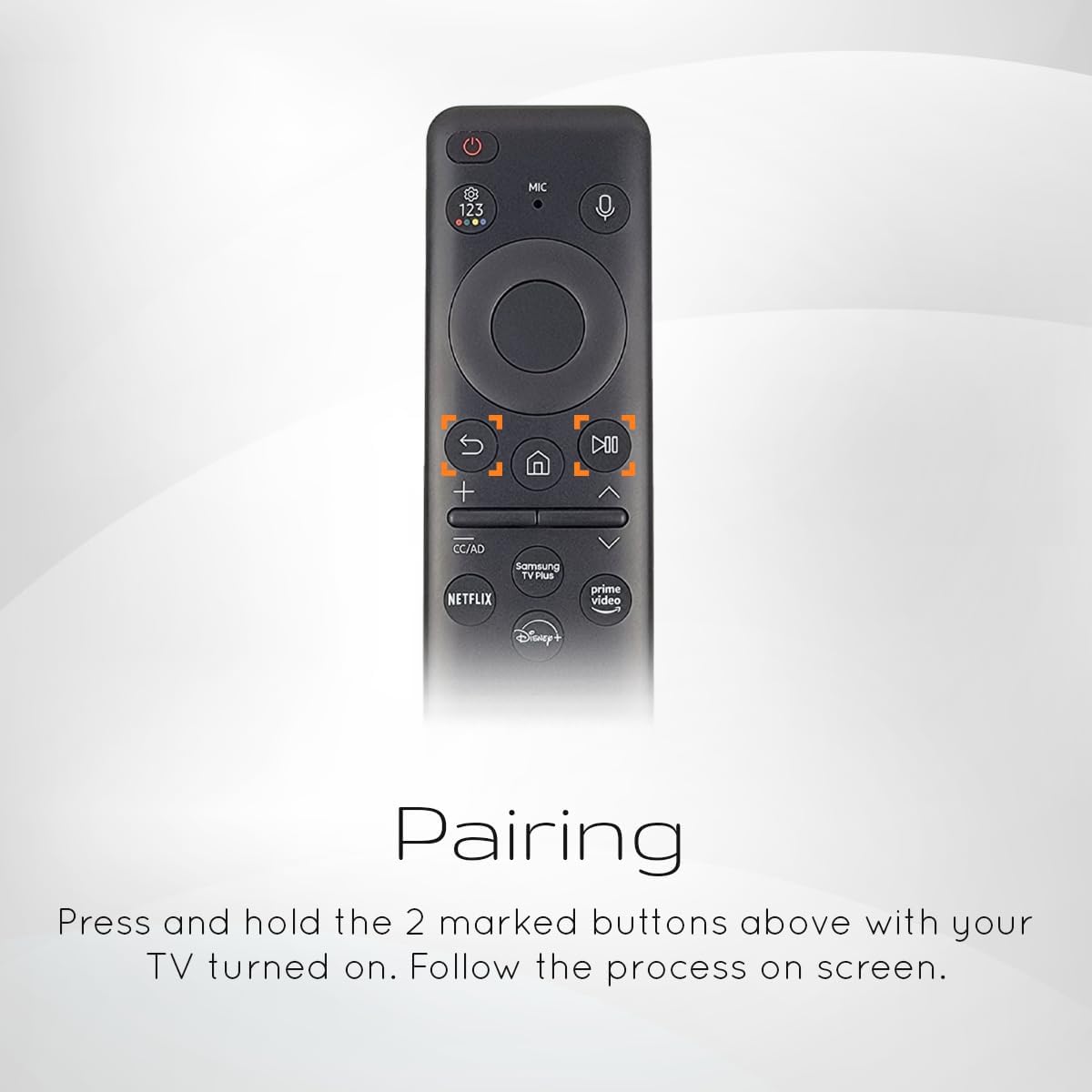
Figure 2: Press and hold these two buttons to initiate pairing.
റിമോട്ട് പ്രവർത്തിപ്പിക്കുന്നു
അടിസ്ഥാന നാവിഗേഷൻ
The remote features a minimalist design with essential buttons for easy navigation:
- Directional Pad (Circular Button): Use the up, down, left, and right arrows to navigate menus and select items. The center button acts as an 'Enter' or 'OK' button.
- ഹോം ബട്ടണ്: Returns you to the Smart Hub or home screen of your TV.
- റിട്ടേൺ ബട്ടൺ: മുമ്പത്തെ സ്ക്രീനിലേക്കോ മെനുവിലേക്കോ തിരികെ പോകുന്നു.
- വോളിയം കൂട്ടുക/താഴ്ത്തുക: ടിവി വോളിയം ക്രമീകരിക്കുന്നു.
- ചാനൽ മുകളിലേക്കും താഴേക്കും: ടിവി ചാനലുകൾ മാറ്റുന്നു.
ശബ്ദ നിയന്ത്രണം
The remote supports voice control for enhanced convenience. To use this feature:
- അമർത്തിപ്പിടിക്കുക മൈക്രോഫോൺ button located near the top of the remote.
- Speak clearly into the remote's microphone. You can search for shows, adjust settings, or issue other commands.
- Release the Microphone button when you are finished speaking.
കുറുക്കുവഴി ബട്ടണുകൾ
The remote includes four dedicated shortcut buttons for quick access to popular streaming platforms:
- നെറ്റ്ഫ്ലിക്സ്: Directly launches the Netflix application.
- പ്രധാന വീഡിയോ: Directly launches the Amazon Prime Video application.
- സാംസങ് ടിവി പ്ലസ്: Directly launches the Samsung TV Plus service.
- Disney+: Directly launches the Disney+ application.
അനുയോജ്യത
This Ceybo OEM Solar Voice Remote Control (BN59-01432A) is compatible with a wide range of Samsung Smart TV series, including but not limited to:
- Samsung Neo QLED Series
- Samsung The Frame Series
- Samsung Crystal UHD Series
For specific model compatibility, please refer to your TV's user manual or the product listing where you purchased the remote.

Figure 3: Remote compatible with Neo QLED 8K HDR Smart TVs.

Figure 4: Remote compatible with 2023 Neo QLED models.
മെയിൻ്റനൻസ്
സോളാർ ചാർജിംഗ്
This remote features eco-friendly solar charging technology. To ensure optimal performance and battery life:
- Periodically expose the remote's solar panel (located on the back) to indoor or outdoor light.
- Avoid prolonged exposure to direct sunlight in extreme heat, as this may damage the remote.
- The remote also supports USB-C charging for convenience if solar charging is insufficient.

Figure 5: The solar panel on the back of the remote for eco-friendly charging.
വൃത്തിയാക്കൽ
To clean your remote control, use a soft, dry cloth. Do not use liquid cleaners or abrasive materials, as they may damage the surface or internal components.
ട്രബിൾഷൂട്ടിംഗ്
- റിമോട്ട് പ്രതികരിക്കുന്നില്ല: Ensure the remote is sufficiently charged via solar power or USB-C. Re-attempt the Bluetooth pairing process as described in the Setup section.
- ശബ്ദ നിയന്ത്രണം പ്രവർത്തിക്കുന്നില്ല: Make sure you are holding down the Microphone button while speaking. Check your TV's settings to ensure voice control is enabled and configured correctly.
- ബട്ടണുകൾ പ്രതികരിക്കുന്നില്ല: Check for any physical obstructions or debris around the buttons. If the issue persists, try resetting the remote by removing power (if applicable) and re-pairing.
- ഇടപെടൽ: Ensure there are no strong electromagnetic devices near the TV or remote that could cause interference with the Bluetooth signal.
ഈ ട്രബിൾഷൂട്ടിംഗ് ഘട്ടങ്ങൾ പരീക്ഷിച്ചതിനു ശേഷവും പ്രശ്നങ്ങൾ നിലനിൽക്കുകയാണെങ്കിൽ, കൂടുതൽ സഹായത്തിനായി ഉപഭോക്തൃ പിന്തുണയുമായി ബന്ധപ്പെടുക.
സ്പെസിഫിക്കേഷനുകൾ
| ഫീച്ചർ | സ്പെസിഫിക്കേഷൻ |
|---|---|
| മോഡൽ നമ്പർ | BN59-01432A |
| ബ്രാൻഡ് | സിബോ |
| അനുയോജ്യമായ ഉപകരണങ്ങൾ | Samsung Neo QLED, The Frame, Crystal UHD Series Smart TVs |
| കണക്റ്റിവിറ്റി ടെക്നോളജി | ബ്ലൂടൂത്ത് |
| പ്രത്യേക സവിശേഷതകൾ | Rechargeable (Solar & USB-C), Voice Search, Shortcut Buttons |
| നിറം | കറുപ്പ് |
| ഇനത്തിൻ്റെ ഭാരം | 0.8 ഔൺസ് |
| പാക്കേജ് അളവുകൾ | 5.5 x 5 x 1.5 ഇഞ്ച് |
വാറൻ്റിയും പിന്തുണയും
Information regarding product warranty and specific support contact details is not available in the provided product data. Please refer to the product packaging or the seller's website for warranty information and customer support contacts.


